
Cyclades Access Router Cyclades-PR2000 Operating and maintenance instructions

Cyclades-PR2000
Quick Installation Manual
Access Router
Cyclades Corporation

Cyclades-PR2000 Quick Installation Manual
Version 1.2 – May 2002
Copyright (C) Cyclades Corporation, 2001-2002
We believe the information in this manual is accurate and reliable. However, we assume no responsibility,
financial or otherwise, for any consequences of the use of this Installation Manual.
This manual is published by Cyclades Corporation, which reserves the right to make improvements or changes
in the products described in this manual as well as to revise this publication at any time and without notice to
any person of such revision or change. The menu options described in this manual correspond to version
1.9.7 of the CyROS operating system. This manual is printed horizontally in order to match the electronic
(PDF) format of the Installation Manual, page per page.
All brand and product names mentioned in this publication are trademarks or registered trademarks of their
respective holders.
FCC Warning Statement:
The Cyclades-PR2000 has been tested and found to comply with the limits for Class A digital devices, pursuant
to Part 15 of the FCC rules. These limits are designed to provide reasonable protection against harmful
interference when the equipment is operated in a commercial environment. This equipment generates, uses
and can radiate radio frequency energy and, if not installed and used in accordance with the Installation
Manual, may cause harmful interference to radio communications. Operation of this equipment in a residential
area is likely to cause harmful interference in which case the user is required to correct the problem at his or
her own expense.
Canadian DOC Notice:
The Cyclades-PR2000 does not exceed the Class A limits for radio noise emissions from digital apparatus set
out in the Radio Interference Regulations of the Canadian Department of Communications.
Le Cyclades-PR2000 n’émet pas de bruits radioélectriques dépassant les limites applicables aux appareils
numériques de la classe A prescrites dans le règlement sur le brouillage radioélectrique edicté par le Ministère
des Communications du Canada.

Table of Contents 3
Cyclades-PR2000
Table of Contents
CHAPTER 1 HOW TO USE THIS MANUAL ........................................................................................................ 5
Installation Assumptions .................................................................................................................................... 6
Text Conventions................................................................................................................................................ 7
Icons................................................................................................................................................................... 7
Cyclades Technical Support and Contact Information....................................................................................... 8
CHAPTER 2 WHAT IS IN THE BOX .................................................................................................................. 10
CHAPTER 3 USING CYROS MENUS ............................................................................................................... 12
Connection Using the Console Cable and a Computer or Terminal................................................................ 12
Special Keys................................................................................................................................................. 14
The CyROS Management Utility...................................................................................................................... 15
CHAPTER 4 STEP-BY-STEP INSTRUCTIONS FOR COMMON APPLICATIONS........................................... 17
Example 1 Connection to an Internet Access Provider via Modem................................................................ 17
Example 2 A LAN-to-LAN Example Using Frame Relay ................................................................................ 25
Example 3 Link Backup................................................................................................................................... 33
APPENDIX A TROUBLESHOOTING................................................................................................................. 39
What to Do if the Login Screen Does Not Appear When Using a Console. .................................................... 39
What to Do if the Router Does Not Work or Stops Working. ........................................................................... 40
Testing the Ethernet Interface .......................................................................................................................... 41
Testing the WAN Interfaces.............................................................................................................................. 42

Table of Contents 4
Cyclades-PR2000
APPENDIX B HARDWARE SPECIFICATIONS ................................................................................................. 45
General Specifications ..................................................................................................................................... 45
External Interfaces ........................................................................................................................................... 46
The WAN Interfaces ..................................................................................................................................... 46
The LAN Interface ........................................................................................................................................ 46
The Asynchronous Interface ........................................................................................................................ 47
The Console Interface .................................................................................................................................. 47
Cables .............................................................................................................................................................. 48
The Straight-Through Cable......................................................................................................................... 48
DB-25 - M.34 Adaptor................................................................................................................................... 49
The ASY/Modem Cable................................................................................................................................ 50
The Cross Cable........................................................................................................................................... 50
DB-25 Loopback Connector......................................................................................................................... 52
INDEX .................................................................................................................................................................. 53

Cyclades-PR2000
5
Chapter 1 - How To Use This Manual
CHAPTER 1 HOW TO USE THIS MANUAL
Three Cyclades manuals are related to the PR2000.
1 The Quick Installation Manual -- provided with the router,
2 The Installation Manual -- available electronically on the Cyclades web site,
3 The CyROS Reference Guide -- also available electronically on the Cyclades web site.
CyROS stands for the Cyclades Routing Operating System. It is the operating system for all Cyclades Power
Routers (PR1000, PR2000, PR3000, and PR4000). The CyROS Reference Guide contains complete information
about the features and configuration of all products in the PR line.
CyROS is constantly evolving, and the menus in this manual might be slightly different from the menus in the
router. Thelatestversionof allthreemanuals(and the latestversionofCyROS) can bedownloadedfrom Cyclades’
web site. All manuals indicate on the second page the manual version and the corresponding version of CyROS.
This manual should be read in the order written, with exceptions given in the text.
Chapter 2 - What is in the Box
-
explains how the router should be connected.
Chapter 3 -Using Menus
-
describes CyROS menu navigation.
Chapter 4 -Step-by-Step Instructions for Common Applications - guide to configuration with detailed examples.
Appendix A - Troubleshooting - provides solutions and tests for typical problems.
If the network being configured is similar to one of the examples in chapter 4, only the Quick Installation Manual
maybenecessary. ThecompleteInstallationManualcontains everything inthismanualand the followingadditional
information:

Cyclades-PR2000
6
Chapter 1 - How To Use This Manual
Chapters 5 to 9- Basic router configuration information for applications that do not fit any of the examples in
chapter 4.
Chapter 10 - CyROS - shows how to set router specific parameters and create lists of hosts and users.
Chapter 11 - Network Address Translation - describes CyROS’ NAT implementation.
Chapter 12- Filters and Rules - demonstrates how to protect your router from undesired traffic.
Chapter 13 - IPX - presents the hidden menus available only in routers with IPX activated.
Chapter 14 - Virtual Private Network - describes CyROS’ VPN implementation.
Appendix B - Hardware Specifications.
Appendix C - Configuration Without a Console.
Installation Assumptions
This Installation Manual assumes that the reader understands networking basics and is familiar with the terms
and concepts used in Local Area and Wide Area Networking.

Cyclades-PR2000
7
Chapter 1 - How To Use This Manual
Text Conventions
Common text conventions are used. A summary is presented below:
Convention Description
CONFIG=>INTERFACE=>L A combination of menu items, with the last being either a menu item, a
parameter, or a command. In this example, L lists the interface configuration.
<INTERFACE>
A variable menu item that depends on hardware options or a choice of
hardware or software options.
IP Address
A parameter or menu item referenced in text, without path prepended.
Screen Text Screen Text
<ESC>, <Enter> Simbols representing special keyboard keys.
Icons
Icons are used to draw attention to important text.
Icon Meaning Why
What is Wrong? When an error is common, text with this icon will mention the symptoms and
how to resolve the problem.
Where Can I Find
More Information? CyROS contains many features, and sometimes related material must be
broken up into digestible pieces. Text with this icon will indicate the relevant
section.
Caution! Not following instructions can result in damage to the hardware. Text with
this icon will warn when damage is possible.
Reminder. Certain instructions must be followed in order. Text with this icon will explain
the proper steps.

Cyclades-PR2000
8Chapter 1 - How to Use This Manual
Cyclades Technical Support and Contact Information
All Cyclades products include limited free technical support, software upgrades and manual updates.
These updates and the latest product information are available at:
http://www.cyclades.com
ftp://ftp.cyclades.com/pub/cyclades
Before contacting us for technical support on a configuration problem, please collect the information
listed below.
•The Cyclades product name and model.
•Applicable hardware and software options and versions.
•Information about the environment (network, carrier, etc).
•The product configuration. Print out a copy of the listing obtained by selecting INFO=>SHOW
CONFIGURATION=>ALL.
•A detailed description of the problem.
•The exact error or log messages printed by the router or by any other system.
•The Installation Guide for your product.
•Contact information in case we need to contact you at a later time.
In the United States and Canada, contact technical support by phone or e-mail:
Phone: (510) 770-9727 (9:00AM to 5:00PM PST)
Fax: (510) 770-0355
E-mail: [email protected]
OutsideNorthAmerica, pleasecontactusthrough e-mailorcontactyour localCycladesdistributor or representative.

Cyclades-PR2000
9Chapter 1 - How to Use This Manual
The mailing address and general phone numbers for Cyclades Corporation are:
Cyclades Corporation
Phone: + 01 (510) 770-9727
Fax: + 01 (510) 770-0355
41829 Albrae Street
Fremont, CA 94538
USA
Cyclades-PR2000
Chapter 2 - What is in the Box 10
CHAPTER 2 WHAT IS IN THE BOX
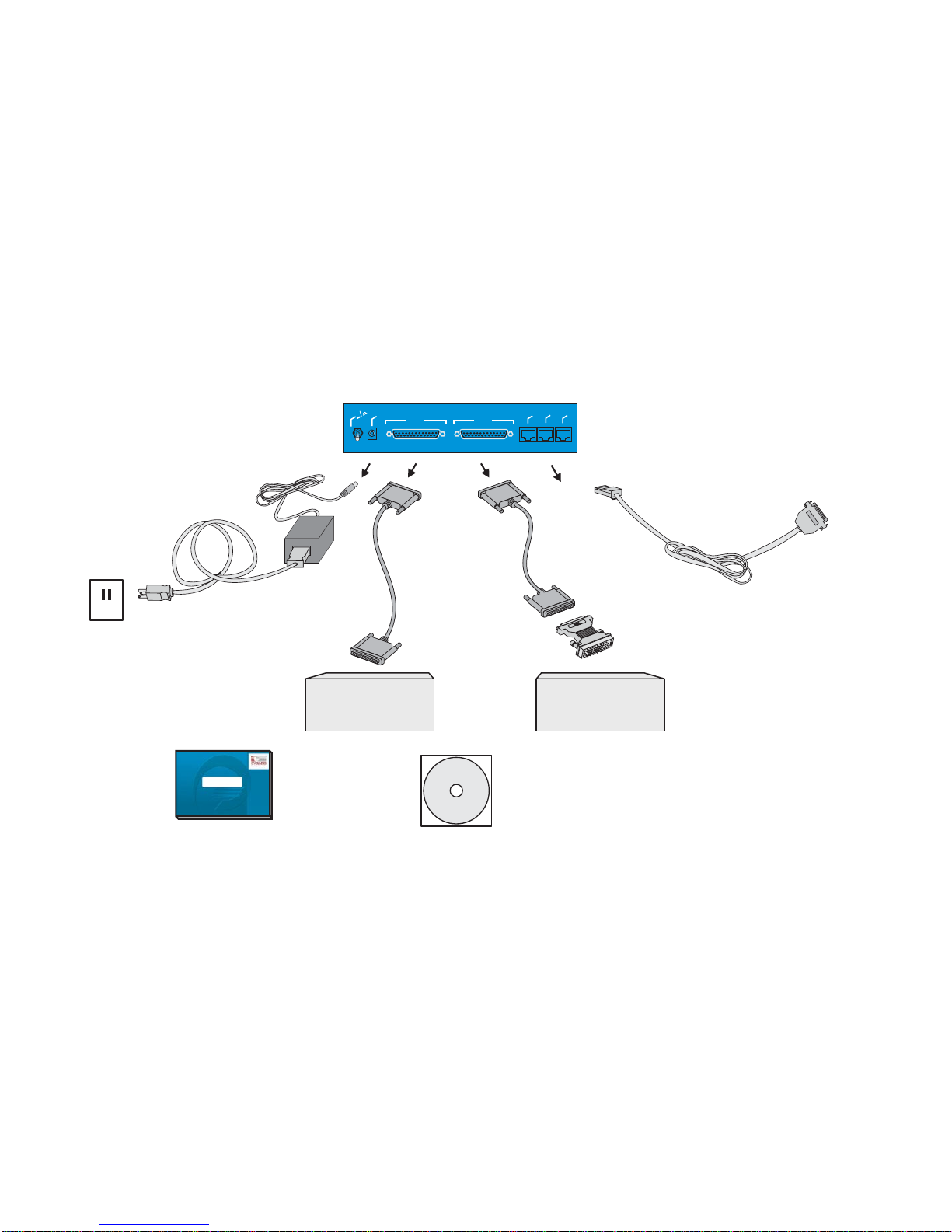
The Cyclades-PR2000 is accompanied by the following accessories:
Back Panel of PR2000
Console Cable
Labeled “Conf”
To COM Port
of Computer
Power Cable
To Wall Outlet
Cyclades - PR2000
WAN 1
WAN 1
WAN 2
WAN 2
Power Plug
Power Plug
OnOff
On Off
Ethernet
Ethernet
Asynch.
Asynch.
Console
Console
V.35
with M.34
Interface
DSU/CSU
DB-25
Male
DB-25
Male
Straight-
Through
Cable
(optional)
RS-232 Modem
with DB-25
Interface
Cyclades-PR2000
Quick Installation Manual
CD-Rom Containing
Documentation
V.35
Adaptor
(optional)
Straight-
Through
Cable
(optional)
FIGURE 2.1 CYCLADES-PR2000 AND CABLES
Other manuals for Access Router Cyclades-PR2000
2
Table of contents
Other Cyclades Network Router manuals

Cyclades
Cyclades Access Router Cyclades-PR2000 User manual

Cyclades
Cyclades PR3000 User manual

Cyclades
Cyclades Access Router Cyclades-PR1000 Operating and maintenance instructions

Cyclades
Cyclades AlterPath Manager 2500 User manual

Cyclades
Cyclades Access Router Cyclades-PR1000 User manual

Cyclades
Cyclades Access Router Cyclades-PR2000 User manual





