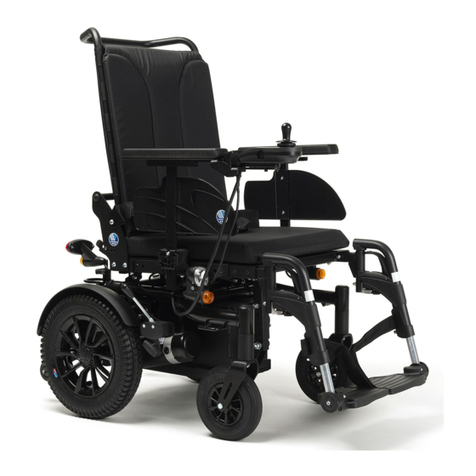
Culver Mobility 337 User manual

Operating Manual
Please must read the Operating Instruction before using Wheelchair

Contents
ⅠIntroduction ................................................................................................................... 1
IISpecifications ............................................................................................................. 2
ⅢUnfolding &Folding .................................................................................................. 3
Ⅳ Installing the Joystick Controller .............................................................................. 5
ⅤAdjusting the Armrest and Backrest .......................................................................... 6
ⅥManual Model Operation ........................................................................................... 7
VII Splitting Wheelchair ................................................................................................. 8
ⅦIJoystick Operation ..................................................................................................... 9
IXCharging Instructions ............................................................................................... 10
X Transport& Storage ..................................................................................................... 12
ⅩISafety Guide ............................................................................................................. 12
ⅪIAppendix .................................................................................................................. 19

PRECAUTIONS
Please read the instructions before using the chair in order to operate
and maintain it properly.
PLEASE PAY ATTENTION TO THE FOLLOWINGS
CONTENT WITH THESE WARNING SYMBOLS.
FAILURE TO TAKE PRECAUTIONS COULD RESULT IN
SERIOUS INJURIES.
IT CAN ALSO DAMAGE OR DECREASE THE LIFE
EXPECTANCY OF THE CHAIR.

1
Ⅰ Introduction
Thank you for choosing Culver Mobility for your portable wheelchair transportation needs.
Congratulations on your choice of Culver Mobility CHAIR, which will provide you with years
of dependable service with proper use and care.
It is important to read through this manual before operating your chair to become familiar with
its features as well as its limitations and safety information. You will find the operation and care
of your chair very simple and easy, but should you have any questions please contact us at
hotline 949-501-5183 or by email [email protected].
Get to know your CHAIR:
Joystick
Controlle
r
Motor
Battery
Armrest
Seatrest
Rear wheel
Front wheel
Footrest
Frame

2
II Specifications
Model 337
Unfold size (L*W*H) 35.4”x23.9”x38.6”
Fold size (L*W*H) 29.8”x23.9”x14.4”
Turning Radius 33.5”
Backrest Adjustable height
Motor 2 x 250W Brushless
DC Motor
Battery
1 x 24V10Ah Li-ion battery or
2 x 24V10Ah Li-ion battery or
3 x 24V10Ah Li-ion batter
y
Max Load 400 lbs
Tires 8" solid PU tires (Front)
12″ solid Rubber tires (Rear)
Suspension 6 spring suspensions
Max Speed 4.7 MPH
Frame material 6061 Aluminum alloy
Charge 24V/2A

3
Ⅲ Unfolding &Folding
Your CHAIR will arrive carefully packaged in a cardboard box. We suggest that two people are
available to remove the packaging and set up the CHAIR for the first time.
1. The WHEELCHAIR ships upright; carefully open the top of the box then turn the box on
the side for easier removal of the contents.
2. Unfolding Process
A) Unfolding-Step 1
Hold the backrest with one hand, and press and hold the seat cushion with the other hand to
push it away, as shown in Figure. 1.
Figure. 1
B) Unfolding-Step 2
After fully unfolding, the buckle plate under the backrest should be fastened, as shown in Figure. 2.
(Before using the wheelchair, make sure that the gusset plate is pressed in place, otherwise there
is danger of folding during use!)
Figure. 2

4
3. Folding Process
A) Folding-Step 1
Open the buckle plate, check the images below to see how it should appear open. As show in Figure.3
Figure. 3
B) Folding-Step 2
First pull the buckle plate under the backrest apart, as shown in Figure. 4, hold the backrest with one
hand and pull up the seat cushion with the other hand to close it, as shown in Figure. 5.
Figure. 4
Figure. 5

5
Ⅳ Installing the Joystick Controller
Step 1
Insert the controller joystick into the armrest tube and tighten the knob to fix it in position. as shown
in Figure. 6.
Figure. 6
Step 2
Connect the controller wire harness to the CPU wire harness that runs from the chair itself,
taking care to line up the pins properly so that they do not get bent, broken or damaged. as
shown in Figure. 7
NOTE: Make sure connector pins in
wire harness are lined up properly;
do NOT force the wire harness
connections together or you will
bend or break the pins.
Figure. 7
Step 3
Insert the power plug into the battery and tighten it, as shown in Figure. 8. If the battery needs
to be replaced, loosen and pull out the plug. As shown in Figure. 9, pull open the fixed switch
under the battery by hand and pull out the battery.
Figure. 8 Figure. 9

6
Step 4
If the battery capacity needs to be increased, batteries with the same capacity can be connected
in parallel. As shown in Figure. 10, there are two socket holes on the battery that can be
inserted into either of them in parallel to increase the capacity.
Figure 10
Ⅴ Adjusting the Armrest and Backrest
Turn the armrest locking knob upward, as shown in Figure. 11, and then lift the armrest upward, as
shown in Figure. 12. To fix the armrest, press the armrest downward and turn the knob downward, as
shown in Figure. 13.
Figure 11 Figure 12 Figure 13
Release the fixing knob behind the backrest, as shown in Figure. 14, and adjust the backrest up and
down to a suitable height, as shown in Figure. 15. Finally, tighten the knob to fix the backrest.
Figure 14 Figure 15

7
Ⅵ Manual Model Operation
Press down inside on the clutch handle to keep the electromagnetic brake at the separation
position. This will allow the wheels to move freely so caregiver can push the chair. as shown
in Figure.16
Figure 16
If the user operates the chair without assistance, the electromagnetic brake must be at the
engaged position. Otherwise, the user will not have control over the chair. as shown in
Figure.17
Press the both clutch
handle outside, the chair
is on electric model.
Figure 17
Table of contents
Other Culver Mobility Wheelchair manuals