
Contemporary Research ICE-HE-DXL User manual

972.931.2728 | 888.972.2728 | www.contemporaryresearch.com
ICE-HE-DXL User Manual 04/2018
Page 2
Overview
The ICE-HE-DXL Display Control Center is an intelligent soluon for “over-the-coax” RF display control to any combinaon of ICC1-
IRX Controllers, ICC1-232 Controllers, and ICC2-ATSC4S Tuner/Controllers. Control commands are sent over RF by inserng a micro
data channel in the gap between channels 4 and 5. In addion, its exibility allows it to communicate with individual displays,
groups, zones, or all displays using any one of three soware opons: the onboard DX Lite web page, Display Express Soware
from Contemporary Research, or third-party control systems.
DX Lite Web Page
The DX Lite web page can be congured to control up to 128 TVs, 24 channels, and 16 groups. No addional soware is required,
and the enre system can be controlled from any web-enabled device such as a smartphone or tablet.
Display Express Soware
By purchasing the addional Display Express Soware which resides on a PC, the Display Control Center can be expanded to sup-
port up to 4000 TVs and 256 channels. The soware oers increased exibility by providing the ability to dene presets, perform
advanced scheduling, congure mulple user levels, zones, etc.
Note: DX Lite does not convert to Display Express. The user must recongure the complete system with the new soware. If using
Display Express Soware, please refer to the “Display Express Soware Manual” for detailed instrucons.
Custom Control Systems
Custom control systems can connect to the Display Control Center through RS-232, front or rear panel USB, or Telnet, sending com-
mands via the published Contemporary Research ICC-Net protocol, controlling all TVs through a single control port.
Front-panel menus and the USB Service port simplify setup and rmware updates. In addion, a Display Express PC or other exter-
nal control system may be connected via the Ethernet, RS-232, or USB port on the back panel.
Note: The RS-232, front USB, and rear USB ports all perform the same funcon, but the front USB port is faster for rmware up-
dates.
Page 3 ICE-HE-DXL User Manual 04/2018
Specications
Physical
Size: 8.5” [216mm] wide x 1.73” [44mm] high (1RU) x 6” [152mm] deep
Weight: 1.38 lbs. [628g]
Enclosure: Aluminum with durable black powder coat paint
Mounng: Mounts in included RKU 19” rack mount kit
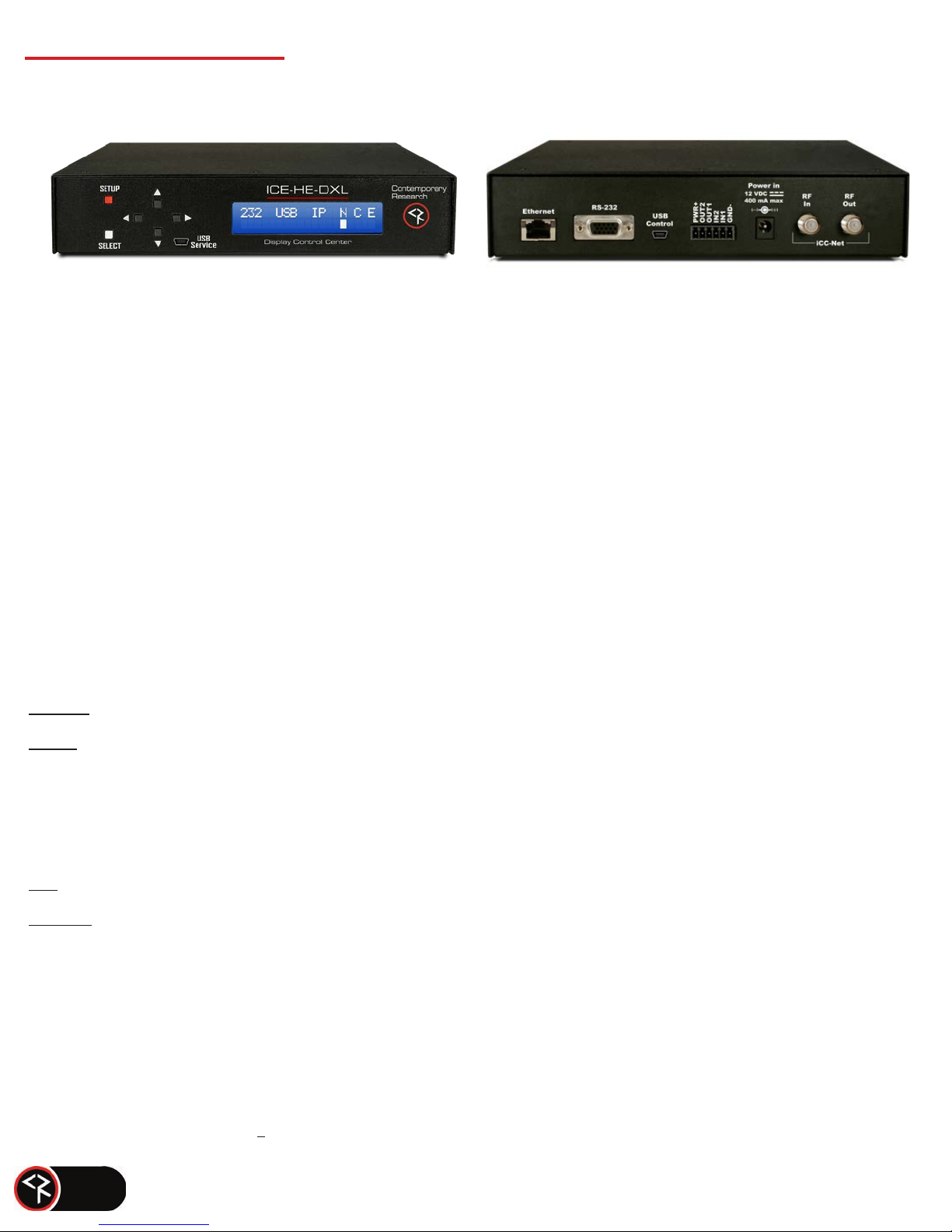
Front Panel
Display: Text Display, white text on blue LCD
Control Buons: SETUP, SELECT, and Up/Down/Le/Right arrows
Mini-B USB Port
Rear Panel
Control Connecons – Ports can operate simultaneously.
Ethernet: 10/100BASE-T RJ-45 jack
RS-232: DB9 female, RS-232 data link
2 – Rx
3 – Tx
5 – GND
USB: Mini-B USB Port
I/O 1 & 2: 6-pin capve screw terminal
1 – PWR+ Power, 12 VDC, 250 mA max (using the included 500 mA power supply)
2 – OUT2 Output 2
3 – OUT1 Output 1
4 – IN2 Input 2
5 – IN1 Input 1
6 – GND- Ground

Page 4 ICE-HE-DXL User Manual 04/2018
Both the front and rear panel USB ports and the RS-232 port all perform the funcons of control and rmware updates. However, the
front panel USB performs faster rmware updates.
iCC-Net Connecons
RF In: ’F’, female, 75 ohm impedance, RF and iCC-Net from CATV system
(Only for legacy 2-way applicaons)
Data Receive: Carried over the same RF coax connecon as TV channels
Return signal from system controllers
Sub-band, 5.6 MHz, narrow-band signal below standard sub-band channels
-15 to +35 dBmV signal level (0 to +15 dBmV nominal)
RF Out: ‘F’, female, 75 ohm impedance, RF to CATV distribuon to controllers
Data Transmit: Mid-band VHF, 74.7 MHz, narrow-band signal between channels 4 and 5
±80 KHz max carrier deviation
+14 to +45 dBmV, adjustable from front panel
Power Connecons
Power In: 2.1 mm coaxial jack (inside center conductor posive), 11 to 18 VDC, 12 VDC typical, 250 mA maximum
Includes
12 VDC Power Supply, 500 mA 110/220VAC, 60/50 Hz
Embedded DX Lite soware

Page 5 ICE-HE-DXL User Manual 04/2018
Installation
Remote Control Connecon
There are three types of control ports:
• RS-232: Aach a null modem cable to the port. The default seng is 19.2K baud and can be changed via the front panel
setup.
• USB: Connect a mini-B USB cable from a Display Express PC or other control system. It shows up as FT230X UART in Win-
dows/Devices.
• Ethernet: Connect to an IP network port to access the internal DX Lite webpage, or use the port for telnet control or con-
necon to a Display Express server.
RF Coax and iCC-Net Operaon
• Connect an RF coax feed from RF Out to the system’s RF combiner, mixing the iCC-Net Out signal with the other CATV chan-
nels. The iCC-Net Out channel operates at 74.7 MHz, between cable channels 4 and 5.
• When combining the RF output with QMOD modulators, the internal aenuator should be set to 29 dBmV to match the
modulator’s level. 29 dBmV is the factory default seng.
• Do not connect any feeds to RF In in normal operaon. It is used only for legacy 2-way applicaons.
AC Power
• Insert the DC power supply plug into the Power In jack.
• Plug the power adapter into an AC wall outlet. The front panel display should turn on.
I/O Port
• Inputs are 0-24 VDC or contact closure to ground. A closed contact closure creates a logical low; an open contact closure
creates a logical high.
• Outputs are open collector and may require a pull-up resistor; 28 VDC max, 200 mA max. Turning on the output turns on
the transistor and creates a current path to ground.
Simplied Output Circuit Typical Applicaon

Page 6
ICE-HE-DXL User Manual 4/2018
ICE-HE-DXL Setup
Basic Network Setup
• Connect the Display Control Center to the network.
• Press the red SETUP buon.
• Press the Down arrow unl “Network” is displayed then press the white SELECT buon.
• Use the Down arrow to view “IP Mode”.
• Use the Le or Right arrow to show “DHCP” then press the SELECT buon to save the seng.
• To create a stac IP address, choose “Stac” mode and manually set an IP address. The unit will use the gateway sengs it cap-
tured in “DHCP”.
• Press SETUP then SELECT to show the IP Address.
• A PC’s Ethernet port may be directly connected to the ICE-HE-DXL’s Ethernet port. A cross-over cable is not required.
• Enter the IP Address of the ICE-HE-DXL into the top entry bar on your browser.
• The DX Lite home page will appear on your screen.
• If the ICE-HE-DXL is connected to a network with Wi-Fi access, the unit may also be accessed from the browser on a tablet or
smart phone.

Page 7
ICE-HE-DXL User Manual 04/2018
Front Panel Display
During normal operaon, the ICE-HE-DXL displays the above text on the LCD display. The top line shows communicaon ports as
well as network and control status. “Rx” or “Tx” appears briey under the three external ports (232, USB, IP) to show I/O acvity,
and
a white cursor will blink under the three status opons (Network, Communicaon, Error).
• 232 – Acve RS-232 port
• USB – Acve USB data port
• IP – Acve Ethernet port
• N – ICC-Net status, blinking once per second, sending the “heartbeat” command to all TV controllers.
• C – Valid ICC-Net command. The processor evaluates the syntax, and conrms when it is valid.
• E – Error in ICC-Net control frequency. The unit auto-corrects the frequency, so you may see the error status
briey, such as
when the unit is powered up. If the status stays constant, contact CR Support for service.
ICE-HE DXL Setup Menus
Press the SETUP buon to enter the menus. Use the Up/Down arrows to move through menus and the Le/Right arrows to
change sengs. Press SELECT to store the changes at each step.
•
Select a menu group (“System”, “Network”, “Command”) then SELECT to view that group’s menus.
•
Press SETUP to move back to other menu groups.
•
Pressing the Le/Right arrows together will reboot the unit.

Page 8
ICE-HE-DXL User Manual 04/2018
System Factory Defaults are shown in Bold.
Baud Rate
2400 | 4800 | 9600 | 19200 | 38400 | 115K This seng is for rear
USB and DB9.
Pnl Lockout None | Setup Press setup and right arrow key to temporarily unlock.
Backlight Display brightness 1-10 (9)
LCD Contrst Contrast 1-9 (5)
RF Level dB
14-45 in 1 dB steps (29). Use 29 when combining with QMODs, 14
when connecng to QCA9-33 Low RF Input.
Fact Dfault Conrm: N | Conrm: Y Restores factory default sengs.
Firmware
Displayed as ICE-HE-DXL<X.YY> L/R arrows may be used to view boot-
loader and board rev.
Network
IP Address 192.168.1.251
IP Mode
Stac | DHCP Note: Changing IP address, gateway, & subnet are not
permied in DHCP Mode.
Gateway 0.0.0.0
Subnet Mask 255.255.255.0
IP Port 23 Telnet Port
MAC/SN 00:14:C8:10:xx:xx
Command
Power All:On | All:O
Volume All:Mute |All:Low | All:Medium
Send IR Type
Zn: ALL,01-15 Un: ALL,001-255 Ty: 1-99(21) Zone, Unit, Type
(IR Type)
Send 232 Typ
Zn: ALL,01-15 Un: ALL,001-255 Ty: 1-99(21) Zone, Unit, Type
(RS-232 Type)
Note: In the version of rmware available at this me, the “Send 232 Typ” command is supported only with the ICC2-ATSC 4S Tuner/
Controller. It is not yet funconal with the ICC1-232 Controller.
Send IR Type / Send 232 Typ Commands
In the Command secon of the menu above, Send IR Type and Send 232 Typ are used to match the controllers to the specic TV
models and locaon on the network. There are three parts to the command, selected by moving the Le/Right arrows to each
value, then using the Up/Down arrows to set a number. Press SELECT to store the changes.
The following is a descripon of those commands.
All ICC-Net controllers have a display ID that is made up of two values: Zone and Unit. The displays are organized into 16 Zones of
255 displays each. The display number is equal to the Zone number plus the Unit number. For example: Display 258 is Unit 2 (2)
of Zone 1 (256).

Zn: Press the Right arrow to select the Zone, use the Up/Down arrow to select the Zone number.
Zn = (0-15, or ALL). ALL TV Controllers will respond to a command sent to Zone ALL.
Un: Press the Right arrow again to select a Unit number
1-255 or ALL (all the controllers in that Zone)
Ty: For a full list of IR codes, refer to the ICC1-IRX manual. Popular codes include:
21=LG 44=Vizio
25=Samsung 45=Panasonic
43=Sony 46=Sharp
For a full list of 232 codes, contact Contemporary Research Support. Popular codes include:
54=LG 47 = Sharp
11=Samsung 13=Panasonic
Se-
lect
Press the white SELECT buon to send the command
Test Use the Power command menu to test operaon
Page 9 ICE-HE-DXL User Manual 04/2018

Page 10 ICE-HE-DXL User Manual 04/2018
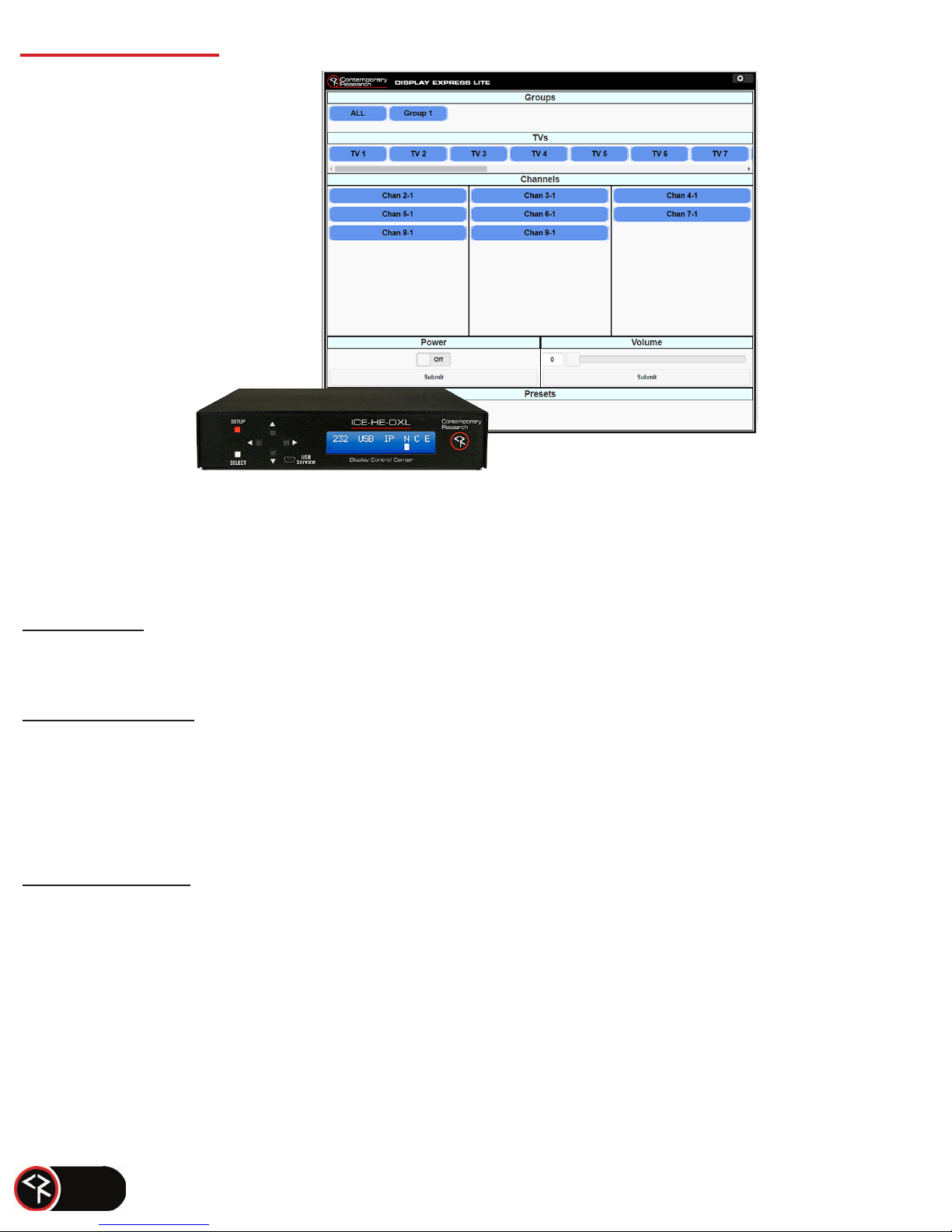
Display Express Lite
The Display Express Lite web page in the ICE-HE-DXL Display Control Center is a compact version of full Display Express
soware
that runs on a PC. The Lite version is focused on one task – tuning channels for a selected group of TVs, with the
added opons for
TV power and volume, and turning all the TVs on and o.
The page will scale to t your screen, whether on a smartphone, tablet, or PC.
Other manuals for ICE-HE-DXL
1
Table of contents
Popular Control Unit manuals by other brands
Festo
Festo Compact Performance CP-FB6-E Brief description

Elo TouchSystems
Elo TouchSystems DMS-SA19P-EXTME Quick installation guide

JS Automation
JS Automation MPC3034A user manual

JAUDT
JAUDT SW GII 6406 Series Translation of the original operating instructions

Spektrum
Spektrum Air Module System manual

BOC Edwards
BOC Edwards Q Series instruction manual

KHADAS
KHADAS BT Magic quick start

Etherma
Etherma eNEXHO-IL Assembly and operating instructions

PMFoundations
PMFoundations Attenuverter Assembly guide
GEA
GEA VARIVENT Operating instruction

Walther Systemtechnik
Walther Systemtechnik VMS-05 Assembly instructions

Altronix
Altronix LINQ8PD Installation and programming manual


