
Cochlear Baha Intenso User manual

English Français Deutsch Nederlands Italiano ZONE 1
User Manual
Intenso™
®
Baha
English 4
Français 22
Deutsch 40
Nederlands 58
Italiano 76
Contents
v
y
U
V
W
xu
w

English
4
English
5
We strive to provide the best possible products and services to our clients. Your
views and experiences of our products and services are important to us. If you
have any comments you would like to share, please contact us.
Address:
Customer Service - Cochlear Americas
13059 E. Peakview Avenue, Centennial, CO 80111, USA
Toll free (North America) 1800 523 5798
Tel: +1 303 790 9010 Fax: +1 303 792 9025
Email: customer@cochlear.com
Customer Service - Cochlear Europe
6 Dashwood Lang Road, Bourne Business Park, Addlestone, Surrey KT15 2HJ, UK
Tel: +44 1932 87 1500 Fax: +44 1932 87 1526
Email: info@cochlear.co.uk
Customer Service - Cochlear Asia Pacific
1 University Avenue, Macquarie University, NSW 2109, Australia
Toll free (Australia) 1800 620 929
Toll free (New Zealand) 0800 444 819
Tel: +61 2 9428 6555 Fax: +61 2 9428 6352 or Toll free 1800 005 215
Email: customer[email protected]
The Baha Intenso™ is a bone conduction sound processor and the most
powerful of our head worn devices. The Baha® bone conduction system
works by combining a sound processor with an abutment and a small
titanium implant placed in the skull behind the ear. The system is based on
a process of “osseointegration” through which living bone tissue integrates
with titanium. Thus, the titanium implant becomes one with the bone
allowing sound to be conducted via the skull bone directly to the cochlea and
improving your hearing.
Please read this manual carefully to learn how to use and maintain your
sound processor. Be sure to discuss any questions or concerns that you
may have regarding hearing or use of this system with your hearing care
professional.
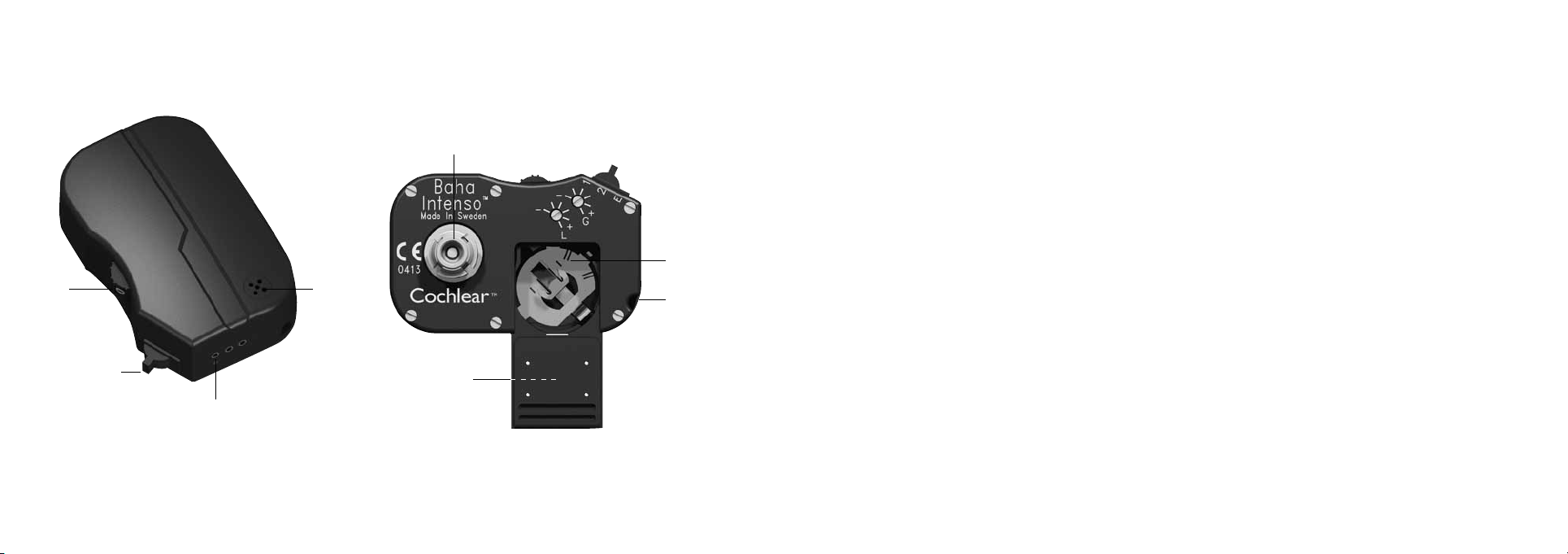
Baha Intenso™
u Volume control y Program selector
v Direct audio input U Plastic snap connector
w Battery compartment V Attachment point for the safety line
x Microphone W Serial number

English
6
English
7
On For the sound processor to be on, the volume control must be set to a
position higher than 0. You will feel a click as the sound processor moves from off
mode to on mode.
Volume control If you turn the volume control upwards the volume increases,
and if you turn it downwards it will decrease.
Program selector
As you change from one program to another sounds signal which program
you enter. One beep for program one, two for program two and three beeps for
program E.
Program 1 Program one is the “normal setting”, suitable for most everyday
sound environments.
Program 2 For comfort and convenience program two has a higher bass cut
setting that some people will find useful for reducing background noise in loud
environments.
Program E This program is used when connecting electrical accessories such as
the audio adapter or telecoil. If no accessory is connected, there will be no sound
from the device even if it is on.
Getting started
Connecting and disconnecting the sound processor
A plastic snap connector is mounted to the sound processor. It is designed to
snap onto the abutment and hold the sound processor securely in place.
Connecting Hold the sound processor so that the plastic snap connector
is accessible and move any hair away from the abutment. Push the sound
processor carefully in with a tilting motion and it will attach to the abutment.
Disconnecting Tilting the sound processor slightly in any direction will release
it from the abutment.
Warning! Do not push the sound processor straight in and do not
pull it straight out. This puts pressure on the abutment and may
cause discomfort.
On/Off
Off When the volume control is in the 0 position it is off. You will feel
a “click” as it goes into off mode.
E
2
1
0
3

English
8
English
9
Care and maintenance
Cleaning the abutment area
When the last dressing has been removed and the abutment is exposed hygiene
continues to be very important.
Daily care
On a daily basis the area around the abutment should be cleaned to avoid debris
build up. This build up around the base of the abutment is not a scab and must
be removed. Cleaning this area is most easily done when you bath or take a
shower as plenty of warm water and soap on the area will help to soften any
crust that may have developed around the base of the abutment.
A soft brush is provided together with your sound processor for this purpose.
During the first weeks, after the dressing is removed, cleaning with the soft brush
may feel a little rough. If so, use a strip of baby wipe until your skin becomes less
sensitive and you can use the brush comfortably. The soft brush can be used with
any mild soap or shampoo and plenty of warm water.
When you brush, aim the bristles at the side of the abutment rather than at the
skin. Your focus should be to remove crust and debris around the base of the
Gain and Tone control
The gain and tone controls are to be adjusted by audiologists only.
When fitting the Intenso, the audiologist will set the gain and tone controls
to suit your needs by increasing or decreasing the volume and/or low frequency
outputs.
Low battery warning
The Intenso has a low battery warning that will signal the need to change
battery. As the battery is losing power you will hear two longer “beeps”.
Telephones and mobiles
When using telephones, including mobiles, with your Baha Intenso™,
you hold the receiver in the normal manner, but close to the microphone
inlet of the sound processor instead of close to your ear. It is important
that neither you, nor the phone, touches the sound processor as this may
cause feedback (“whistling”).

English
10
English
11
However, should you experience any persistent irritation, soreness or
any other signs of inflammation around the abutment, always contact
your doctor.
Maintenance of your Baha Intenso™
The sound processor can be worn during waking hours apart from when you take
a shower, or swim. Keep in mind that the sound processor is an electrical device
that should be used with due care and attention. When engaging in physical
activities, use common sense. If the activity is of such a nature that the sound
processor risks getting damaged (for example contact sports)–remove it!
If you choose to keep your sound processor on during physical activity we
recommend securing it with the safety line (see below).
When not using your Baha Intenso™
When not in use ensure that the sound processor is switched off and stored
carefully where it will not gather dust and dirt. If you will not be using the sound
processor for any length of time, remove the battery. To maintain a good snap
connection to the abutment, we recommend that you use an abutment cover
when not wearing your sound processor.
abutment rather than brushing your skin. Your skin is delicate and should not be
treated too harshly.
Remember, it is important to keep your soft brush clean too!
After cleaning, gently dry the area around the abutment with a clean towel or
tissue. Do not allow your hair to wrap itself around the abutment. If you use a
hairdryer do not keep the hot air on the abutment for too long.
Weekly care
If you use an abutment cover it will help keep the inside of the abutment clean
however, the inside of the abutment should still be cleaned on a weekly basis.
The soft brush can also be used for cleaning inside the abutment. Again, this is
best done in conjunction with a bath or shower when soap and warm water can
soften dirt making it easy to remove.
Skin debris or any other dirt in the abutment can prevent a smooth fitting of the
abutment to your abutment cover and your Baha sound processor. This could
potentially lead to damage of your Baha sound processor.
You will have routine check-ups initially every 4-6 months and later every
6-12 months.

English
12
English
13
Batteries
Zinc-air batteries type 675 should be used. Please note that these batteries are
not rechargeable.
Battery replacement Open the battery compartment by sliding the cover
downwards. Turn the sound processor over and, if the battery is stuck, shake the
device gently. Place the new battery in with the + mark facing upwards. Press the
battery down with your thumb and close the cover. If you are unable to slide the
cover back easily, the battery may be incorrectly inserted. Please check that the
+ mark is facing upwards.
Warning! The Baha sound processor contains small parts that may
be a risk for small children. Batteries can be harmful if swallowed.
Be sure to keep your batteries out of reach of small children or
people of diminished mental capacity. In the event a battery is
accidentally swallowed, seek medical attention at the nearest
emergency centre immediately.
Battery life
Battery life begins decreasing as soon as the plastic strip is removed exposing it
to air, even if the battery is not in use.
Attachment of the safety line
If you keep the sound processor on when engaging in physical activities we
advise you to attach a safety line to your sound processor so that it is not lost if it
disconnects. The clip can then be fastened to clothing, for example, your shirt or
jacket collar.
Cleaning your Baha
Ensure that your snap coupling is always visibly clean. Use a brush for cleaning
purposes. (A regular toothbrush with hard bristles is suitable). Keep the plastic
housing clean by regularly wiping with a soft, dry cloth.
Attention: For children who have been fitted with a Baha sound processor
it is extremely important that the parent or caregiver of the child provides
all necessary assistance and support in cleaning and maintenance, as
detailed above.

English
14
English
15
Accessories
Several accessories are available to enhance your sound experience in different
contexts. To ensure the smooth operation of your Baha, only use Cochlear original
accessories or accessories approved by Cochlear.
Audio adapter
Allows direct input from computers, personal stereos, TVs, MP3s and
other external equipment.
MicroLink Baha FM-receiver
Enables the use of most Phonak FM transmitters. For more information
and orders contact your local Phonak distributor www.phonak.com
Telecoil unit
Improves sound quality and speech understanding when using telephones
in homes where there are personal loop systems installed and in other buildings
with loop facilities.
To maximise battery life, switch off the sound processor when not in use.
Battery life varies depending on volume setting, the sound environment and
the program setting. Battery life will decrease significantly when using the Baha
sound processor with a connected FM receiver if the FM receiver uses the sound
processor as its power source. Using powerful batteries is particularly important
when high current consumption is common. The batteries included with the
sound processor reflect our latest battery recommendation. Battery function can
be related to a number of problems including: no sound, intermittent sound and
crackling/buzzing. Thus, when encountering problems one of the first things one
can do is to try changing the battery.
Note: Always follow local regulations for battery disposal.
General advice
• A sound processor will not restore normal hearing and will not prevent or
improve a hearing impairment resulting from organic conditions.
• Infrequent use of a sound processor does not permit a user to attain full
benefit from it.
• The use of a sound processor is only part of a hearing rehabilitation and may
need to be supplemented by auditory training and instructions in lip-reading.
• For advice on “do’s and don’ts” for your Baha sound processor see the section
on Warnings and Precautions (p. 18).

English
16
English
17
Abutment cover
An abutment cover is included in the sound processor kit. The cover helps
conceal and protect the abutment when the sound processor is not in place.
This improves aesthetics and prevents dirt from collecting in the abutment,
which helps maintain a good snap connection between the abutment and sound
processor. Simply press the cover gently onto the abutment.
Share the Experience
The test rod provided can be used by others so that they can listen to your Baha
sound processor themselves. Snap the sound processor onto the test rod and
hold the rod against the skull bone behind the ear while keeping the ears plugged
(take care not to allow the sound processor to touch anything except the test rod
as this may cause feedback),
Direct audio input and microphone settings
The sound processor has a three-pin DAI (Direct Audio Input) port designed for
connecting external equipment. As can be seen from the table below Program E
allows sound from whatever device you have connected to the DAI only.
In all the other programs, the microphone is still active and you will be able
to hear sounds from your surrounding environment.
Attention: The marking on the plug must match up with the corresponding
marking on the sound processor.
Safety instructions when connecting external equipment
Only connection cables and accessories that are supplied or approved by
Cochlear should be used. Non-standard connection cables can cause damage to
the sound processor and injury to you. If in doubt, consult your audiologist.
Cochlear is not liable for any damages arising as a result from this or any other
form of incorrect use of the product or its parts.
Warning! It is extremely dangerous and potentially fatal to connect
any equipment that is plugged into a 110 and/or 220 V power supply
without using the audio adapter.
Program Microphone
setting
DAI
1 on on
2 on on
E off on

English
18
English
19
Troubleshooter
If you have encountered any problems with your Baha sound processor:
• Check that plastic housing is not touching anything (such as a hat, eyeglasses or similar items).
• Check the volume control.
• Check the program setting
• Try changing the battery.
If the problem persists, contact your audiologist to get it fixed. Do not try fixing the sound processor yourself.
Warnings and precautions
• The sound processor is a digital, electrical, medical device designed for specific use. As such, due care and
attention must be exercised by the user at all times.
• The sound processor is not waterproof! Never wear it in the bath or shower!
• Do not expose the sound processor to extreme temperatures etc. For example do not wear it in the sauna.
The sound processor is designed to operate within the temperature ranges +5°C (+41°F) to +40°C (+104°F).
In particular, battery performance deteriorates in temperatures under +5°C. The device should not be
subject, at any time, to temperatures below -20°C (-4°F) or above +50°C (+122°F).
• This product is not suitable for use in the presence of flammable materials.
• If you are to undergo an MRI (Magnetic Resonance Imaging) procedure, the sound processor should be
removed beforehand. The implant and abutment remain in place.
• Dispose of electronic items in accordance with your local regulations.
• Do not dispose of in fire.
Other manuals for Baha Intenso
5
Table of contents
Languages:
Other Cochlear Medical Equipment manuals









