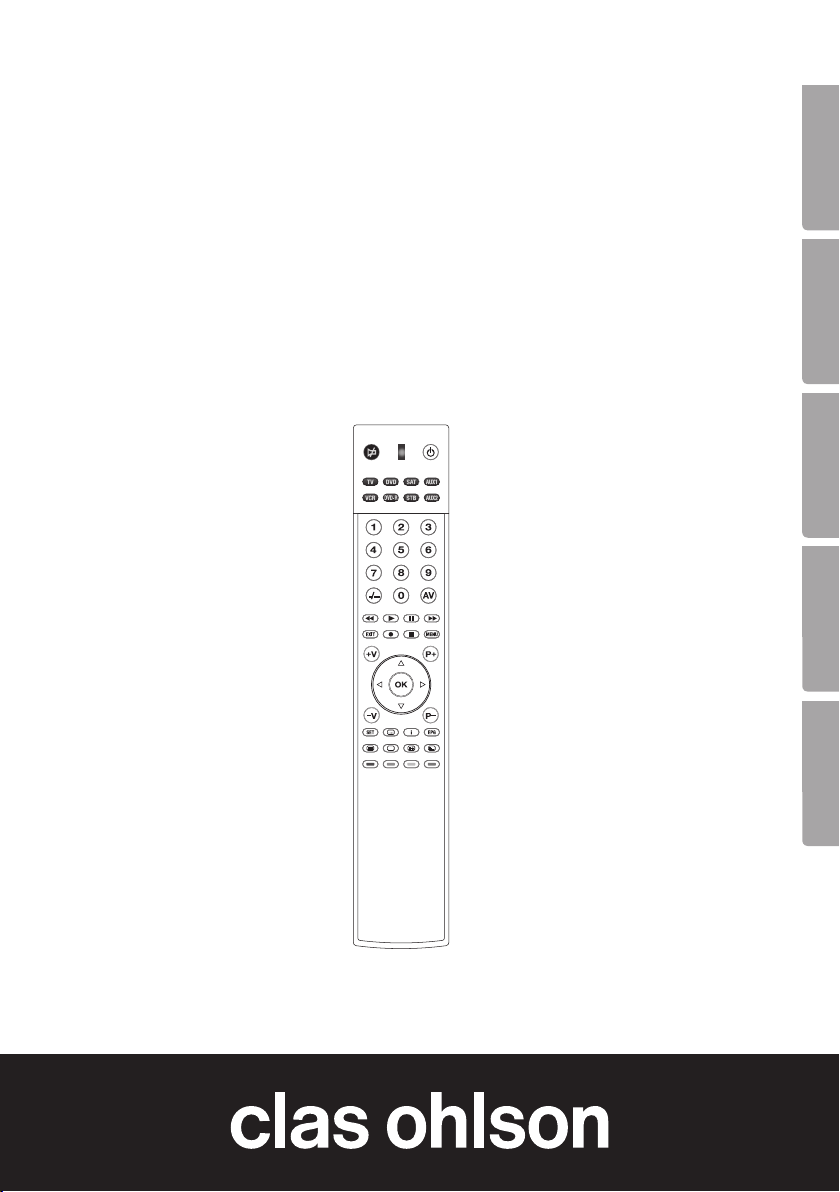
Clas Ohlson SR1000 User manual

EnglishSvenskaNorskSuomiDeutsch
Ver. 20130425
Art.no Model
38-4362 SR1000
Pre-Programmed
Remote Control
Förprogrammerad fjärrkontroll
Forhåndsprogrammert fjernkontroll
Ohjelmoitu kaukosäädin
Vorprogrammierte Fernbedienung

2
English
Pre-Programmed Remote Control
Art.no 38-4362 Model SR1000
Please read theentire instruction manual before use and save it for future reference.
Wereserve theright for any errors in text or images and for making any necessary
technical changes to this document. Ifyou should have any questions concerning
technical problems please contact our Customer Services.
1. Description of theproduct
This remote control has been pre-programmed at thefactory. Itreplaces up to eight
separate remote controls to operate devices such as TV sets, video recorders,
satellite receivers, cable TV receivers and DVD players. Allyou need to do is key in
theright control code and theremote control is ready for use. Thereis alist of
control codes at theback of this user guide.
• Pre-programmed for themost common makes of equipment.
• Replaces remote controls that have been dropped or damaged.
• Can replace up to eight remote controls, eg for TV sets, video recorders,
satellite and digital receivers, DVD players and cable TV receivers.
• Teletext function.
• Powered by two AAA/LR03 batteries (sold separately).
2. Worth bearing in mind
• This remote control works with most brands on themarket but it is not certain that
it will work with your particular model of device, even though thebrand appears in
thecode list. You can’t tell from thecode list whether theremote control will work
with aparticular device. Youhave to find out by experiment.
• The remote control may work with more than one code. Youwill have to experi-
ment to find thecode for which thegreatest number of button functions work.
3. Getting started
3.1 Installing thebatteries
The remote control is powered by two AAA/LR03 batteries.
1. Remove thebattery cover on theback.
2. Install thebatteries, observing themarkings in thebattery compartment.
Make sure thebatteries are theright way round, with plus (+) and minus (-)
as shown by themarkings.
3. Refit thebattery cover.

3
English
12
34
5
6
7
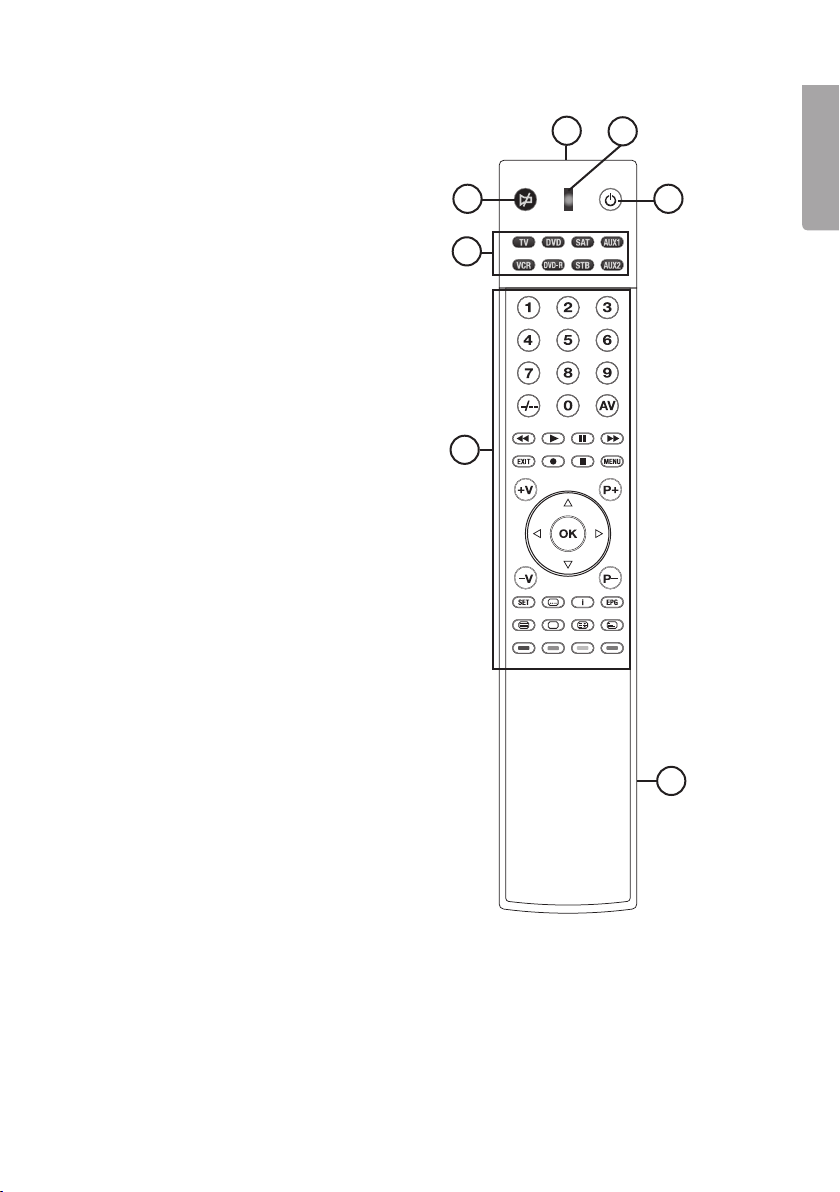
4. Buttons and functions
1. Infrared transmitter
2. LED indicator
3. [ON/OFF] button
4. [Mute] button
5. Device selector
6. Function buttons
7. Battery compartment

4
English
5. Use
5.1 Programming theremote control
There are three ways of setting up theremote control.
• By entering thecontrol code.
• By searching through thelibrary.
• By auto-searching.
5.2 Entering thecontrol code
You can choose which type of device you want to have on thedifferent function buttons.
Forinstance, you can choose SAT, STB or one of theother buttons if you want to add
acode for device of type DVB-T (terrestrial receiver).
5.2.1 Key in thecode as follows:
1. Find thecode list supplied and search under theheading for thedevice type that
matches your equipment.
• TV, TV/VCR COMBO - Codes for TV sets and TV sets with built-in video.
• VCR – Codes for video devices
• SAT/CTV/DVB-T, DIGITAL TV STB/BROADBAND/AXILIARY STB/
HDD VIDEO RECORDER – Codes for satellite receivers, cable TV receivers,
terrestrial TV receivers, digital receivers connected to anetwork, etc. Codesfor
digital receivers for cable TV and theterrestrial network.
• DVD – DVD players
• DVD-R – DVD recorders
• TV/DVD COMBO – TV sets with built-in DVD player.
• DVD/VCR COMBO – DVD and videotape recorders
• MEDIA CENTER – PC
• HOME CINEMA SYSTEMS (DVD&AUDIO)
• CD PLAYER
• AUDIO AMPLIFIER/RECEIVER/TUNER
• AUDIO TAPE PLAYER
• MINI HIFI SYSTEM
• LD – Laser Disc
2. Then search under that heading for thecode for themake of your device, eg
Philips. Eachcode has four digits. Ifthere is more than one code for your make of
device, start with thefirst one.
3. Switch on theTV (for example) manually with theoriginal remote control.
Choosechannel 1.
4. Press and hold down followed by therelevant device, eg . TheLED lights up.
5. Release both buttons.
6. Key in your four-digit control code with the – keys. The LED goes out
immediately.
Check that theremote control works with thedevice you have just programmed.

5
English
Ifthedevice responds correctly to your keypresses, you have entered theright control
code. Ifnot, you will have to repeat theabove procedure using theother control codes
available for your make of device until thedevice responds correctly to your keypresses
and until most of thebuttons work correctly.
Use thesame procedure to enter thecontrol codes for any other devices.
Itis important to remember to press thedevice type button in step 4 above.
5.3 Searching through thelibrary
If you cannot find acode in thelist, you can search thelibrary.
1. Manually switch on theTV set (for example).
2. Press and hold down followed by therelevant device, eg . TheLED lights up.
3. Release both buttons.
4. Press again. TheLED flashes. Theremote control is now ready to search.
5. Aim theremote control at your TV and press repeatedly until
theTV switches off. Everytime you press theremote control goes to thenext
code and sends asignal in an attempt to switch off thedevice.
6. When thedevice has switched off, press therelevant device button, eg ,
to lock thecode. TheLED goes out.
Switch thedevice, eg theTV, on again and try out thebuttons. Ifyour TV set
responds correctly, theremote control has found thecorrect code. Ifnot, repeat
theabove procedure.
If you happen to press after your device has been switched off, switch thedevice
on immediately, press on theremote control (for every press on you go back
one step in thelist of codes) and then repeat steps 5-6. The remote control times out
of search mode automatically after 30 seconds. If you want to exit setting mode,
press thecorresponding device button.
Important!
If theon/off function of your device is not infrared-controlled, you will have to follows
steps 2 to 4. Press and any other function button until thedevice responds to
thecorresponding function, then press theassociated device button to save.
5.4 Autosearch
1. Switch on theTV set (for example) manually.
2. Choose adevice on theremote control, eg .
3. Press and hold down followed by for three seconds until
theLED indicator lights up.
4. Release both buttons.
5. Aim theremote control at theTV. Theremote control transmits automatically.
6. When thedevice switches off, press therelevant device button, eg , to lock
thecode. TheLED goes out.

6
English
5.5 Normal use
Aim theremote control at thedevice and press thebutton for function you want.
TheLED flashes during sending to confirm thekeypress.
5.6 Advanced use
The remote control has several built-in functions:
• Volume control on all devices
• Code check
• Total reset
The volume and mute buttons can be set to use theTV code even when
theremote control is set to theother modes. Thismeans that you can control
theTV sound even when theremote control is set to video mode.
5.6.1 To de-activate volume control on all devices
1. If you do not want theTV volume to be controlled when theremote control is in
VCR mode, first choose themode you want, eg VCR.
2. Then press and hold down followed by therelevant device, eg .
TheLED lights up.
3. Release both buttons.
4. Using thenumber keys – , enter 9-0-2. TheLED goes out.
5.6.2 To re-activate volume control on all devices
1. If you want to be able to control theTV volume when theremote control is in VCR
mode, first choose themode you want, eg VCR.
2. Then press and hold down followed by therelevant device, eg .
TheLED lights up.
3. Release both buttons.
4. Using thenumber keys – , enter 9-0-1. TheLED goes out.

5.6.3 Code check
You can check your four-digit code.
1. Press adevice mode, eg .
2. Press and hold down . TheLED flashes 0 to 9 times to show thefirst digit of
thecode. Example: Two flashes represent thedigit 2.
3. Repeat step 2 for thesecond, third and fourth digits of thecode.
5.6.4 Total reset
1. Resetting theremote control to its factory default settings.
2. Press and hold down and . TheLED lights up.
3. Using thenumber keys, enter 9-9-0. TheLED flashes three times.

7
English
6. Troubleshooting chart
6.1 My remote control doesn’t work at all!
• Check your device, eg. TV. Ifits power switch is set to off, nothing will work.
• Check that thebatteries are theright way round, with plus and minus facing
theright way.
• Check that you have pressed thebutton for thecorrect device type.
• Replace thebatteries if they are low.
• It is not compatible with your model of device. Theremote control is not compatible
with every model on themarket, so even if your make (eg Philips) appears in thecode
list, there is no guarantee that theremote control will work with your particular device.
6.2 What do I do if more than one code is listed for my device?
• Try thecontrol codes one at atime until you find theone that results in correct
operation of thegreatest number of buttons on thecontroller.
6.3 My device responds to some commands but not others.
• You have chosen acode that only works for alimited number of commands.
Tryother codes until you find theone that gives correct operation of thegreatest
number of buttons on thecontroller.
7. Waste management
Follow local ordinances when disposing of this product.
Ifyou are unsure about how to dispose of this product contact your municipality.
8. Specifications
System Pre-programmed infrared remote control
Supply voltage 2 × AAA/LR03 batteries (sold separately)
Dimensions 230 × 40 × 15 mm

8
Svenska
Förprogrammerad fjärrkontroll
Art.nr 38-4362 Modell SR1000
Läs igenom hela bruksanvisningen före användning och spara den sedan för framtida bruk.
Vireserverar oss för ev. text- och bildfel samt ändringar av tekniska data. Vidtekniska
problem eller andra frågor, kontakta vår kundtjänst (se adressuppgifter på baksidan).
1. Produktbeskrivning
Denna fjärrkontroll är förprogrammerad från fabrik och ersätter upp till 8 separata fjärr-
kontroller för styrning av t.ex. TV, video och DVD samt mottagare för satellit-, kabel-
och digital-TV. Knappa in rätt apparatkod för att göra fjärrkontrollen klar för användning.
Enlista över apparatkoder finns längst bak iden här bruksanvisningen.
• Förprogrammerad för de flesta förekommande fabrikat.
• Ersätter skadade eller borttappade fjärrkontroller.
• Ersätter upp till 8 fjärrkontroller för t.ex. TV, video och DVD samt mottagare för
satellit-, kabel- och digital-TV.
• Funktion för Text-TV.
• Drivs med 2 × AAA/LR03-batterier (säljs separat).
2. Atttänka på
• Fjärrkontrollen passar de flesta märken på marknaden men det är inte säkert att
den passar just din modell av apparat, trots att märket finns med ikodlistan.
Det går inte att se ikodlistan om fjärrkontrollen passar enspecifik apparat, du
måste prova dig fram.
• Fjärrkontrollen kan fungera på fler koder än en. Prova dig fram till den kod som de
flesta knappfunktionerna fungerar på.
3. Attkomma igång
3.1 Sätta ibatterier
Fjärrkontrollen drivs med 2 × AAA/LR03-batterier.
1. Ta bort batteriluckan på baksidan.
2. Sätt ibatterierna enligt märkningen ibatterifacket.
Kom ihåg att vända batterierna rätt med plus (+) och minus (-) enligt märkningen.
3. Sätt tillbaka batteriluckan.

9
Svenska
12
34
5
6
7
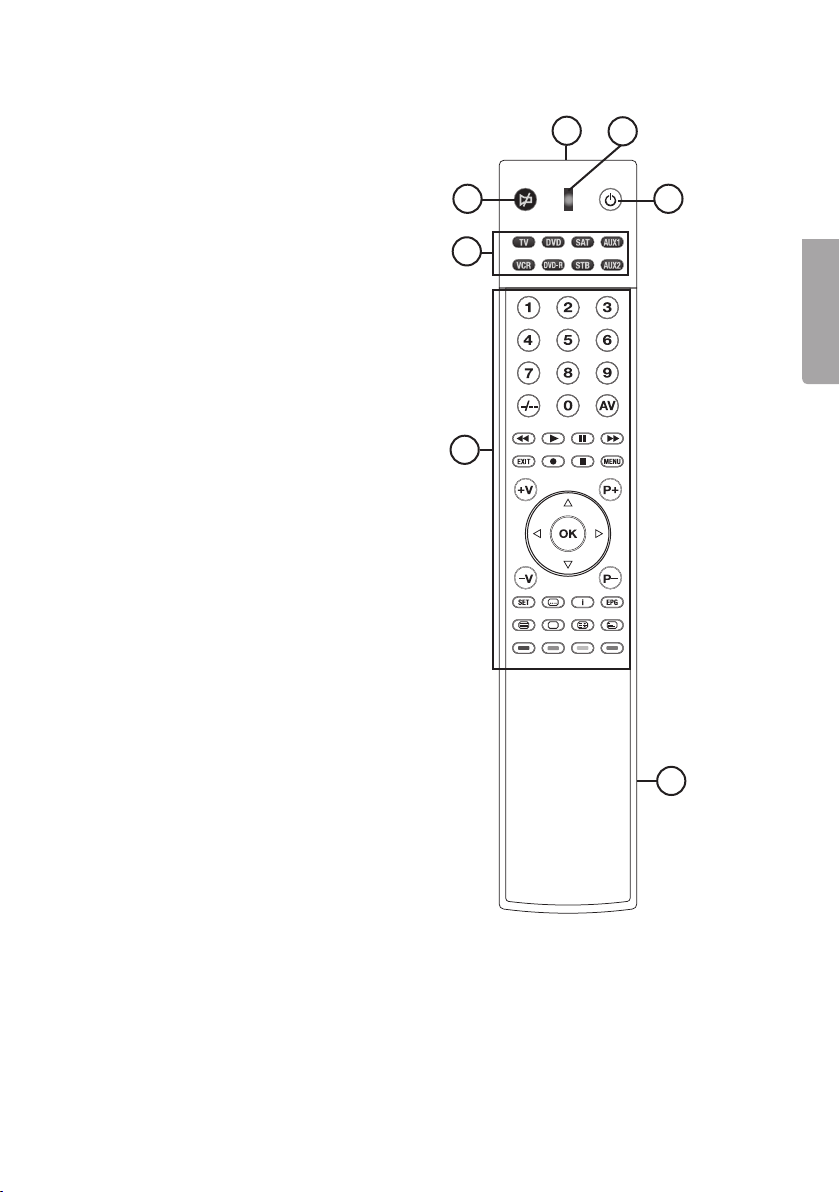
4. Knapparoch funktioner
1. Infraröd sändare
2. LED-indikator
3. [ON/OFF]
4. [Mute]
5. Enhetsväljare
6. Funktionsknappar
7. Batterifack

10
Svenska
5. Användning
5.1 Programmering av fjärrkontrollen
Det finns 3 olika sätt att ställa in fjärrkontrollen:
• Genom att knappa in apparatkoden.
• Genom att söka igenom biblioteket.
• Genom att autosöka.
5.2 Inknappning av apparatkod
Du kan själv välja vilken apparattyp du vill ha på de olika funktionsknapparna. Dukan
exempelvis välja SAT, STB eller någon av de övriga knapparna om du vill lägga in
enkod för apparattypen DVB-T (markbunden mottagare).
5.2.1 Knappa in koden på följande sätt:
1. Slå upp den medföljande kodlistan (Code list) och leta under rubriken för den appa-
rattyp som din utrustning motsvarar.
• TV, TV/VCR COMBO – Koder för TV-apparater och TV-apparater
med inbyggd video.
• VCR – Koder för videoapparater
• SAT/CTV/DVB-T, DIGITAL TV STB/BROADBAND/AXILIARY STB/
HDD VIDEO RECORDER – Koder för satellit- och kabel-TV-mottagare, mark-
bunden mottagare och nätverksansluten digitalmottagare etc. Koderför
digitalmottagare för kabel-TV och det markbundna nätet.
• DVD – DVD-spelare
• DVD-R – Inspelningsbar DVD-spelare
• TV/DVD COMBO – TV-apparat med inbyggd DVD-spelare
• DVD/VCR COMBO – DVD- och videobandspelare
• MEDIA CENTER – PC – Mediacenter – PC
• HOME CINEMA SYSTEMS (DVD&AUDIO) – Hemmabiosystem
• CD PLAYER – CD-spelare
• AUDIO AMPLIFIER/RECEIVER/TUNER – Förstärkare, radiomottagare
• AUDIO TAPE PLAYER – Kassettbandspelare
• MINI HIFI SYSTEM – Ministereosystem
• LD – Laser Disc
2. Under denna rubrik letar du sedan efter den kod som motsvarar märket på din
apparat, t.ex. Philips. Varjekod har fyra siffror. Omdet finns fler apparatkoder än
enför ditt märke så börjar du med den första.
3. Slå på t.ex. TV:n manuellt eller med originalfjärrkontrollen. Väljkanal 1.
4. Tryck och håll ned följt av önskad enhet, t.ex. . Lysdiodentänds.
5. Släpp båda knapparna.
6. Knappa in din fyrsiffriga apparatkod med knapparna – .
Lysdioden slocknar direkt.
Testa funktionen på fjärrkontrollen mot den apparat som du just har programmerat.
Table of contents
Languages:
Other Clas Ohlson Remote Control manuals

Clas Ohlson
Clas Ohlson BW0881 User manual

Clas Ohlson
Clas Ohlson PP-iDual-IR iD RC User manual

Clas Ohlson
Clas Ohlson BW6200 User manual

Clas Ohlson
Clas Ohlson BW8380EU User manual

Clas Ohlson
Clas Ohlson EMW100TM User manual

Clas Ohlson
Clas Ohlson ML-C User manual

Clas Ohlson
Clas Ohlson LD-SCB01 User manual

Clas Ohlson
Clas Ohlson 50027 User manual