Clas Ohlson DPU3270V+SSD70S-UK User manual

EnglishSvenskaNorskSuomi
DVD Player
Dvd-spelare
Dvd-spiller
Dvd-soitin
Art.no. Model
18-8181 DPU3270V+SSD70S-UK
38-3990 DPU3270V+SSD70S Ver. 201009

2

3
English
DVD Player with Twin 7″ TFT screens
Article number 18-8181 Model DPU3270V+SSD70S-UK
38-3990 DPU3270V+SSD70S
Please read the entire instruction manual before using the product and save it for
future reference. We reserve the right for any errors in text or images and any neces-
sary changes made to technical data. If you have any questions regarding technical
problems please contact Customer Services.

4
English
CLASS 1
LASER PRODUCT
1. Safety
• The product should only be repaired by qualified service technicians.
• The product should not be taken apart or modified.
• The product is designed for indoor use only.
• Never expose the device to high temperatures, blows, dampness or moisture.
• Do not place the product where there is a risk of it falling into water or other liquid.
Do not place any objects which contain liquid on the product, e.g. flower vases or
soft drinks.
• Do not place the device in damp, dusty environments or where there are
heavy vibrations.
• Shut off the standby function and pull out the plug at night, or if you plan to be away
for an extended period.
• Prolonged exposure to high volume from the headphones can cause hearing damage.
• Place the device on a flat surface during use.
• Only use the supplied car charger.
CLASS 1 LASER PRODUCT
Warning! Do not open the casing! Invisible laser
beams can cause eye damage. Do not look directly
into the laser beam or look directly at it using an
optical instrument.
2. Contents of pack
1 x DVD player with TFT screen
1 x Twin screen
1 x Remote control
2 x Headphones
1 x AC/DC adaptor
1 x Car adaptor for plugging into a cigarette lighter socket
2 x Car headrest mounting straps
1 x Carrying case
1 x AV lead
1 x Power lead for connecting the screens
English

5
English
1
2
3
4
5
6
7
8
9
10
11 12
13
14
15
16
17
18
19
20
21
21
3. Buttons and functions
DVD player
1. TFT screen
2. [] – Start or pause playback
3. [■] – Stop playback
4. [9 /] - Previous track/fast rewind
5. [: /] - Next track/fast forward
6. [VOL-] – Volume down
7. [VOL+] – Volume up
8. [SETUP] - Enter setup menu
9. [SUBTITLE] – Subtitle control
10. [◄▼►▲] - Direction buttons
11. [OK] – Confirm selection
12. IR sensor for remote control
13. [DISPLAY ON/OFF] – Screen power button
14. DC IN 9-12 V – Input for external power supply
15. [POWER ON/OFF] – Power switch, completely turns off the device
16. Power indicator light
17. VIDEO /AUDIO OUT – Video and audio outlet
18. SD/MMC CARD – Slot for SD/MMC memory card
19. USB port
20. PHONES – 3.5 mm stereo headphone connection
21. Speakers – Left and right

6
English
22
30 31 32 33
23 23
24 25 26
27 28 29
Twin screen
22. TFT screen
23. Speakers
24. BRIGHTNESS – Adjusts the
brightness of the display
25. COLOR – Adjusts the colour
of the display
26. Volume controls – Increase/
decrease the volume
27. POWER ON/OFF – Power switch,
completely turns off the device
28. DC IN 9-12 V – Input for external
power supply
29. DC OUT 9-12 V – Output for the main
unit connect
30. VIDEO – Video input
31. AUDIO – Left audio input
32. AUDIO – Right audio input
33. PHONES – 3.5 mm stereo
headphone connection

7
English
34
35
36
37
38
39
50
51
52
53
40
41
42
43
44
45
46
47
48
49
Remote control
Note! Hold in the button for at least
3seconds to access some of the
buttons’ alternative functions (b).
34. [BRI/COL] – Adjust brightness/
colour
34b. [SCREEN ON/OFF] – Turns the
display screen on/off
35. [TITLE] – Press to enter DVD’s
title menu (during DVD playback)
36. [9] – Previous chapter
36b. [] – Fast rewind
37. [:] – Next chapter
37b. [] – Fast forward
38. [▲►▼◄] – Direction buttons
39. [0-9] – Numerical buttons
40. [PROGRAM] – Select
programme
40b. [ANGLE] – Changes the picture
angle (if supported by the DVD)
41. [VOL–] – Volume down
42. [MUTE] – Turns off volume
43. [SETUP] – View detailed settings
and make changes
44. [MENU] – During DVD playback:
Press to go to the DVD’s
main menu
45. [DISPLAY] – Display disc
information
46. [■ STOP] – Stop playback
46b. [USB/SD/MMC CARD] – Select playback from: USB, SD or MMC memory and disc.
47. [OK] – Confirm selection
47b. [PLAY/PAUSE] – Start or pause playback
48. [SUBTITLE] – Select subtitle language
49. [AUDIO] – Select audio track During audio playback: Press to switch between left,
right, mixed or stereo. During DVD playback: Press to select language
(if the disc has this option).
50. [SEARCH] – During playback: Press during playback to find/select what is
to be played.
51. [REPEAT] – During playback: Press to select the start and end of a section
that you wish to playback repeatedly. Press to repeat a programmed section,
the entire film or the entire DVD.
52. [ZOOM] – Enlarge/reduce image
52b. [SLOW] – Play the film in slow-motion
53. [VOL+] – Volume up

8
English
Twin screen
POWER
ON
POWER ON
DISPLAY ON
Power lead
AV lead
DVD player
27
15
13
Car adaptor
4. Connections
Connecting the twin screen
Both the AV lead and the power lead must be used to connect the twin screen
to the DVD player.
Connect the car adaptor to a car cigarette lighter socket.
Warning! Make sure that the cigarette lighter lead is centre-
positive before plugging it in.
N.B. Only use the supplied car adaptor.
N.B. Always unplug the car/mains adaptor when the DVD
player is not being used.
9
English
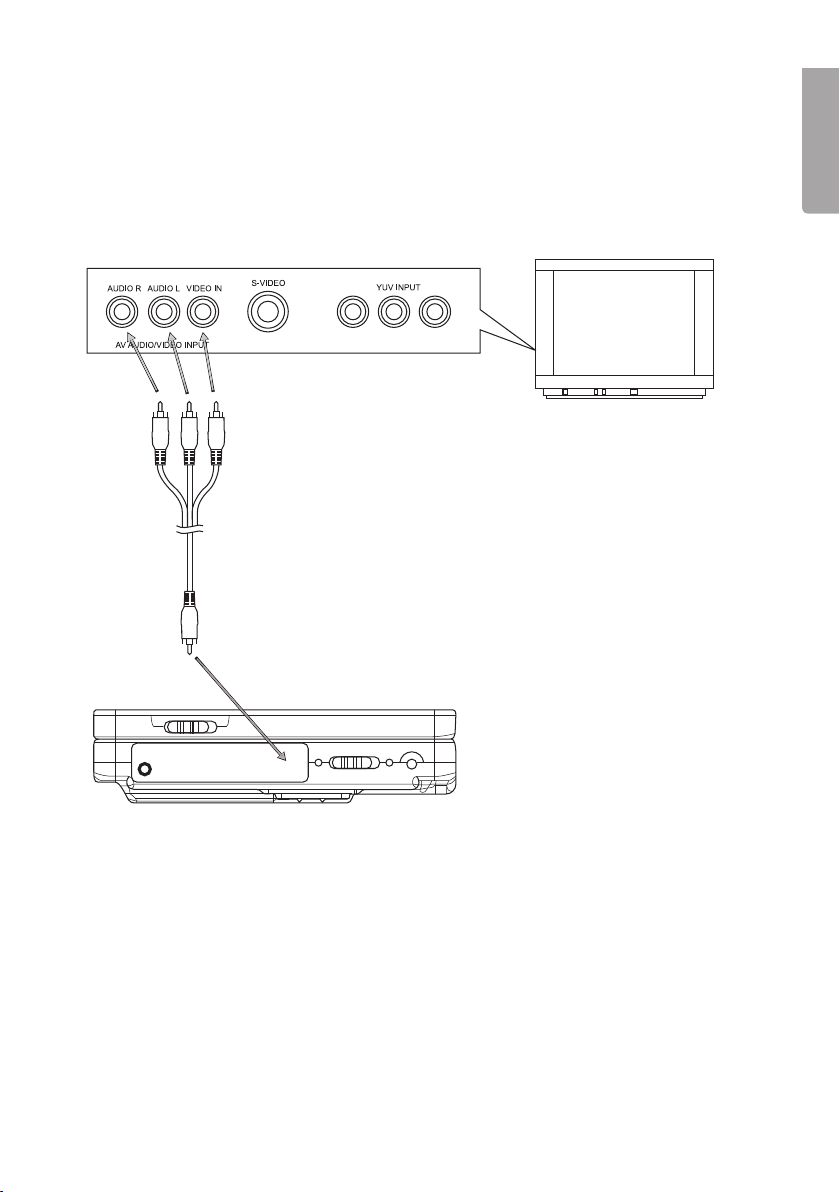
AV lead
Red connector to “AUDIO R”
White connector to “AUDIO L”
Yellow connector to “VIDEO IN”
Connecting to the TV set
1. Make sure that the DVD player and TV/Home Theatre Amp. are turned off
before making any connections.
2. Connect the AV lead to VIDEO/AUDIO OUT (17) on the DVD player.
3. Connect the 3 RCA connectors between the player and your TV according
to the diagram.

10
English
5. Use
A. Starting the DVD player
Set the power switch (15) to the ON position to start the device.
B. Using the remote control
Aim the remote control at the sensor (12) on the front of the DVD player and press
the relevant button for the desired function.
C. Playing a CD or DVD
Open the DVD player by lifting ▲ OPEN and carefully place a DVD onto the spindle
(with the label facing up). Close the DVD player. The DVD will automatically start to
be read.
D. Adjusting the volume
Press [VOL+] (53) or [VOL-] (41) to raise or lower the volume. Press [MUTE] (42) to
turn off the sound completely.
E. Skip to next/previous chapter/track
Use [9] (36) or [:] (37) to skip to the next or previous track/chapter.
F. Fast forward/rewind
• Press and hold [] (36b) or [] (37b) to quickly search backwards or forwards
within a chapter. The fast forward/rewind speed is shown on the display.
• Keep the button pressed in for a little longer to change the fast forward/rewind
speed. You can choose between 2, 4, 8, 16 or 32 times the playback speed.
• Press [PLAY/PAUSE] (47b) to resume normal playback.
G. Stopping playback
During video playback:
• Press [■ STOP] (46) once to stop playback. Press [PLAY/PAUS] (47b) to resume
playback from where you stopped.
• Press [■ STOP] (46) again to completely stop playback and return to the beginning
of the disc.
During audio playback:
• Press [■ STOP] (46) once to stop playback.
H. Slow-Motion playback (DVD)
Press and hold in [ZOOM/SLOW] (52b) on the remote control during playback.
The disc will play at 1/2 speed. Press the button several times to change to 1/4, 1/8,
or 1/16 speed. Press [PLAY/PAUSE] (47b) to resume normal playback.
Other manuals for DPU3270V+SSD70S-UK
1
This manual suits for next models
3
Table of contents
Languages:
Other Clas Ohlson DVD Player manuals

Clas Ohlson
Clas Ohlson M251-UK User manual

Clas Ohlson
Clas Ohlson DV5631-UK User manual

Clas Ohlson
Clas Ohlson M841-UK User manual

Clas Ohlson
Clas Ohlson M829 User manual

Clas Ohlson
Clas Ohlson PDVD-12809B-UK User manual

Clas Ohlson
Clas Ohlson M848-UK User manual

Clas Ohlson
Clas Ohlson BDU186E User manual

Clas Ohlson
Clas Ohlson DV2136-UK User manual