Clare Controls CM-MT4420-HD User manual

2014-02-382 • Rev 02
HDMI 4x4 Matrix Switcher
User Guide
Model CM-MT4420-HD


2014-02-382 • Rev 02
Copyright
© 21MAR14 Clare Controls, Inc. All rights reserved.
This document may not be copied in whole or in part or
otherwise reproduced without prior written consent from
Clare Controls, Inc., except where specifically permitted
under US and international copyright law.
Trademarks and
patents
HDMI 4x4 Matrix Switcher, Model CM-MT4420-HD name is
a trademark of Clare Controls, Inc.
Other trade names used in this document may be
trademarks or registered trademarks of the manufacturers or
vendors of the respective products.
Manufacturer
Clare Controls, Inc.
7519 Pennsylvania Ave., Suite 104, Sarasota, FL 34243,
USA
Version
This document applies to HDMI 4x4 Matrix Switcher User
Guide, Model CM-MT4420-HD version 2.
Contact information
For contact information, see www.clarecontrols.com.


HDMI 4x4 Matrix Switcher User Guide i
Content
Limitation of liability...ii
Introduction...1
Features...1
Package contents...1
Product appearance...2
Front panel...2
Rear panel...3
System connection...3
Usage precautions...3
Connecting the RS232 communication port...4
Connecting with the computer...5
System diagram...6
Connection procedure...6
EDID management...7
EDID automatic handshake...7
Systemapplications...8
System operations...8
IR controls...9
Using the IR remote...9
Communication protocol and command codes...10
Specifications...13
Panel drawing...14
Troubleshooting and maintenance...15
Safety operation guide...16
After-sales service...17

ii HDMI 4x4 Matrix Switcher User Guide
Limitation of liability
To the maximum extent permitted by applicable law, in no event will Clare
Controls, Inc. be liable for any lost profits or business opportunities, loss of use,
business interruption, loss of data, or any other indirect, special, incidental, or
consequential damages under any theory of liability, whether based in contract,
tort, negligence, product liability, or otherwise. Because some jurisdictions do not
allow the exclusion or limitation of liability for consequential or incidental damages
the preceding limitation may not apply to you. In any event the total liability of
Clare Controls, Inc. shall not exceed the purchase price of the product. The
foregoing limitation will apply to the maximum extent permitted by applicable law,
regardless of whether Clare Controls, Inc. has been advised of the possibility of
such damages and regardless of whether any remedy fails of its essential
purpose.
Installation in accordance with this manual, applicable codes, and the instructions
of the authority having jurisdiction is mandatory.
While every precaution has been taken during the preparation of this manual to
ensure the accuracy of its contents, Clare Controls, Inc. assumes no responsibility
for errors or omissions.

HDMI 4x4 Matrix Switcher User Guide 1
Introduction
The HDMI 4x4 is a matrix switcher with four, female HDMI inputs and four, female
HDMI outputs. It enables cross-point switching from any input to any output, or all
outputs, and supports 3D, 4K x 2K, and 1080P. It can be used in both residential and
commercial applications to allow sharing of HD source content to multiple displays.
Features
HDMI 1.4a, supports 3D.
HDTV compatible with high definition transmission resolution up to 1920 x 1200 at
60 Hz, and supports 1080P.
HDCP compliant and DVI compatible, supporting DVI1.0.
RS232 controllable EDID management.
Supports firmware upgrade via USB port on front panel.
HDMI switcher is controllable via RS232, IR (remote included), or the front panel.
RS232 serial control port for serial commands and third-party control.
RS232 controllable front panel security lock to avoid unauthorized or accidental
use when the matrix is installed in an unsecure environment.
Built-in gain compensation technique and synchronous signal correction
technology. Switching speed is less than 200 ns (maximum).
LCD screen shows real-time connection status, switching status, whether input/
output signal is with HDCP, and output resolution.
Package contents
1 x serial cable
1 x IR remote
1 x remote IR receiver
1 x mounting bracket set
4 x plastic feet
1 x power supply
4 x power supply adapters
1 x user manual
Notes: Please verify that the product and all the accessories are included. If not,
contact your dealer.

2 HDMI 4x4 Matrix Switcher User Guide
Product appearance
Front panel
Figure 1: Front panel of the HDMI 4x4 switcher
(1) Firmware
Micro USB port for updating firmware.
(2) Power indicator
Power 'on' indicator light.
(3) IR receiver
IR receive window.
(4) LCD indicator
Shows real-time system status.
(5) INPUTS
Normal mode: Input buttons range from 1 to 4.
Inquire mode: Press and hold “SELECT” for 3 seconds to enter
this mode to check connection status, switching status, HDCP
and output resolution. Press ◄► to change menus and ▲▼ to
change selection.
(6) OUTPUTS
Output buttons range from 1 to 4.
(7) FUNCTION
SELECT: Used to transfer video and audio signal (HDMI) from
an input to an output.
Example: To transfer both the video and audio signals from input
channel 3 to output channel 4, press Input 3 + SELECT +
Output 4.
GLOBAL: Used to transfer video and audio signal (HDMI) of an
input channel to all output channels.
Example: To transfer HDMI signal from input channel 2 to all
output channels, press Input 2 + GLOBAL.
EDID: Used to manually control EDID management.
Example: To learn the EDID data of the display on output
channel 2 to input channel 3, press Input 3 + EDID + Output 2.

HDMI 4x4 Matrix Switcher User Guide 3
Rear panel
Figure 2: Rear panel of the HDMI 4x4 switcher
(1) GROUND
Connection point for equipment grounding.
(2) INPUTS
Four HDMI input ports. Connect them to the HDMI ports on the
signal sources.
(3) OUTPUTS
Four HDMI output ports. Connect them to the HDMI ports on the
output source devices.
(4) IR EYE
A .25 in. mono jack for rear connection of IR control.
(5) RS232
The serial port for unit control, 9-pin female connector. Connects
with a control device, such as a PC.
Note: Be sure to fill in the corresponding communication protocol
parameters correctly.
(6) Power input
Connect with the power adaptor. Indicator light is on when the
switcher is powered. Be sure to use the adapter that came with the
unit.
System connection
Usage precautions
The system should be installed in a clean environment with the property
temperature and humidity controlled.
All devices should be connected before powering on.
The Cat5e/Cat6 terminations for HDBaseT devices should be a straight-thru
TIA/EIA T568B standard.

4 HDMI 4x4 Matrix Switcher User Guide
Connecting the RS232 communication port
You can use the front-mounted buttons to control the switcher. However, you can also
perform control functions via a control system (Clare Controls, Crestron, Control4, etc.)
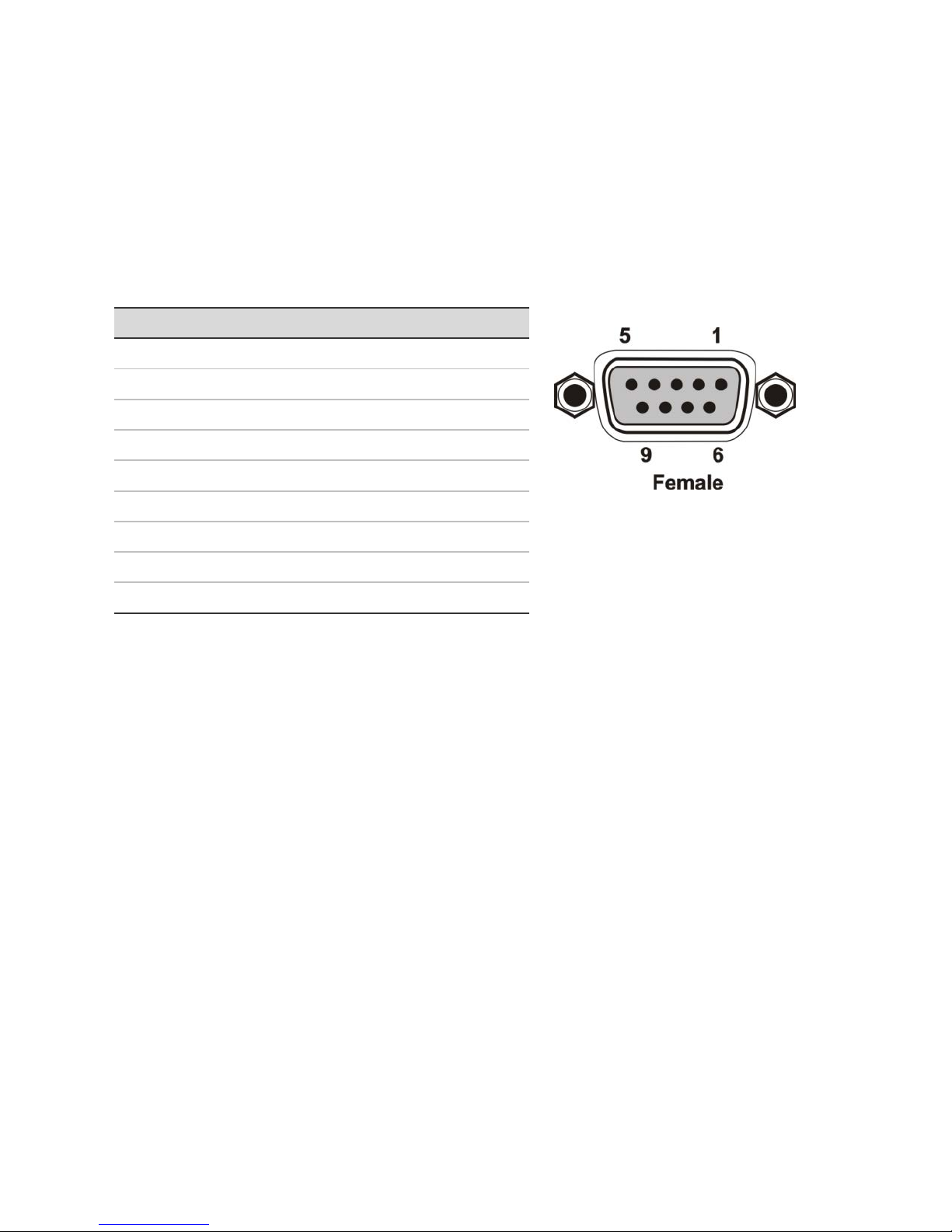
using its RS232 communication port. The RS232 communication port is a female,
9-pin D connector (DB9). As shown in the table below, only pins 2, 3, and 5 are used.
The standard functions of Tx, Rx, and Gnd apply.
Table 1: RS232 connection definitions
No.
Pin
Function
1
N/u
Unused
2
Tx
Transmit
3
Rx
Receive
4
N/u
Unused
5
Gnd
Ground
6
N/u
Unused
7
N/u
Unused
8
N/u
Unused
9
N/u
Unused
Table of contents
Other Clare Controls Matrix Switcher manuals