Citizen C660 User manual

330
300
240
210
150
120
60
30
60
50 20
40 20
30
18 6
12
24
1
2
3
4
5
6
7
8
9
(A)
(B)
(C)

1
Please charge the watch fully before use
by exposing it to light.
When the watch does not operate according to the
instruction manual, it is insufficiently charged.
Charge the watch for at least 3 hours approximately
20 cm (8 in) away from a fluorescent or incandescent
lamp (30 W) as a light source. When charging, do
not place the watch too close to the light source to
prevent the watch from becoming too hot.
* When charging the watch under direct sunfight,
charge for at least 50 minutes.
English

Contents
1. Features ................................................................................................... 4
2. Before Using the Watch .......................................................................... 5
3. Names of Components and Major Functions ....................................... 6
4. Switching Modes (Display Functions) ................................................. 10
5. Checking 0-Position of Each Hand ...................................................... 11
6. Accessing Times and Dates of Major Cities around the World ........ 15
7. Switching between Analog Time and Digital Time ............................. 17
8. Hand Evacuation Function ................................................................... 19
9. Setting the Time .................................................................................... 20
10. Setting the Date ..................................................................................... 24
11. Using the Race timer ............................................................................ 27
12. Using the Chronograph ........................................................................ 31
13. Using the Timer ..................................................................................... 34
14. Using the Alarm ..................................................................................... 36
15. Using Zone Setting ............................................................................... 39
16. About All-Reset ..................................................................................... 40
17. Functions Unique to Solar Power Watches ........................................ 42
· Insufficient Charge Warning Function
· Time Setting Warning Function
· Overcharging Prevention Function
· Power Save 1
· Power Save 2
18. General Reference for Charging Times .............................................. 51
19. Notes Regarding Handling of this Watch ............................................ 53
20. Precautions ............................................................................................ 54
21. Specifications ........................................................................................ 60
2 3

1. Features
This watch is a combination solar-powered watch that contains a solar cell in its
face that drives the watch hands, race timer, chronograph, alarm, and numerous
other functions by converting light energy into electrical energy.
It is also equipped with convenient functions including a power save mode that
reduces power consumption when light is not shining on the solar cell, UTC
(Coordinated Universal Time) and a world timer indicating the time and dates of
30 major cities around the world.
4 5
2. Before Using the Watch
This watch is a solar-powered watch. Before using, allow light to shine
onto the watch so that it is sufficiently charged.
In this watch a secondary battery is used to store electrical energy. This
secondary battery is a clean energy battery that does not contain mercury or
other toxic substances. Once fully charged, the watch will continue to run for a
maximum of 4 years without additional charging (when in the power save 2
mode).
[Proper use of this watch]
To use this watch comfortably, make sure to recharge it before it stops running
completely. There is no risk of overcharging the watch no matter how often it is
recharged. (Overcharging Prevention Function).
It is recommended that the watch be recharged everyday.

7
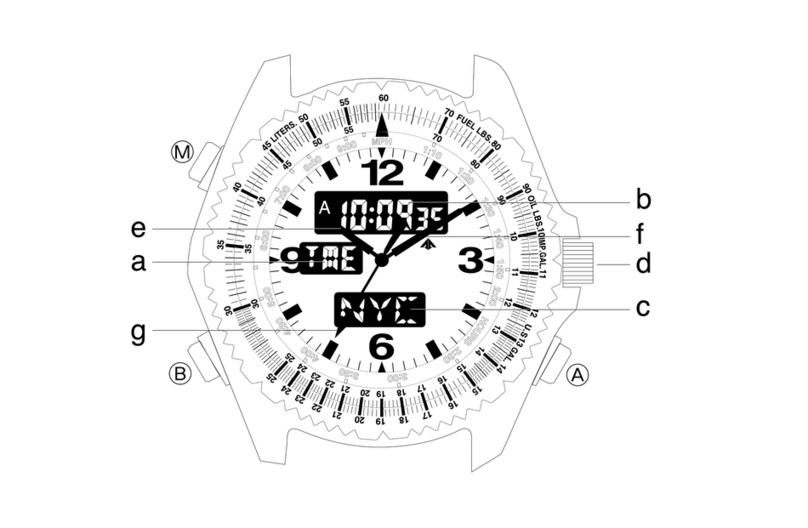
3. Names of Components and Major Functions
6
Name/Mode Time Calendar Race timer Chronograph
1. Mode hand TME CAL RACE CHR
2. Hour hand Always indicates “hours”
3. Minute hand Always indicates “minutes”
4. Second hand Always indicates “seconds”
5. 24-hour hand Always indicates “24-hour time” in conjunction with hours and minutes
6. Function hand Always stopped at 0-position
(standard position)
8. Digital display 2 City name, SMT (when set to
daylight savings time)
7. Digital display 1
Hours,
minutes,
seconds
Month, date,
day
Indicates the remaining
race time (minutes,
seconds)
Indicates the auto-
chronograph measured time
display (minutes, seconds)
Timer Alarm-1 Alarm-2 Zone setting
TMR AL-1 AL-2 SET
Always indicates “hours”
Always indicates “minutes”
Always indicates “seconds”
Always indicates “24-hour time” in conjunction with hours and minutes
Always stopped at 0-position (standard position)
Indicates the timer’s
remaining time
(minutes, seconds)
Hours, minutes, alarm (ON/OF) City name (SET/OFF)
Timer set time (minutes)
Indicates the
chronograph
measured time
(minutes, seconds,
1/100 seconds)
Indicates the remaining
race time (minutes)
Indicates the auto-
chronograph measured
time display (minutes)
Indicates the
chronograph
measured time
(minutes)
Indicates the remaining
race time (seconds)
Indicates the auto-
chronograph measured
time display (seconds)
Indicates the
chronograph
measured time
(seconds)
Race timer set time
(minutes)
Chronograph measured
time (hours) City name

98
Name/
Mode Time Calendar Race timer Chronograph
Normal
position
1st
click
Normal
position
1st
click
Normal
position
1st
click
Mode switching
Time correction Calendar
correction
Adjust to 0
position
Changing between cities
Switching location to be corrected
Changing between cities
Switching SMT (ON/OF)
Switching between
‘seconds’ correction and
‘24-hour time’
Hand evacuation
1st
click
Timer Alarm-1 Alarm-2 Zone setting
Mode switching
Timer set time correction
Start/stop
------
Return flight / reset
------
Hand evacuation
Hand evacuation
Alarm time correction
Changing between cities
Switching location to be corrected
Changing between cities
Switching alarm (ON/OF)
Changing city name
Changing city name
------
Changing city name
Changing city name
(SET/OFF)
9. Crown
A.
Button (A)
C.
Button (C)
------
Hand evacuation
Normal
position
------------
Race Timer
set time
correction
Start/stopStart/stop
Switching
location to be
corrected
------
Split/reset
Return flight /
reset
B.
Button (B)
Crown
position

5. Checking 0-Position of Each Hand
Before using this watch perform the following procedure to check that the 0-
position (standard position of each hand) is set correctly to ensure that the
functions of the watch operate properly.
< 0-Position Check>
1. While in the normal position, turn the crown to set the mode hand to the
chronograph [CHR] mode.
2. Pull the crown out to the first click (0-position
correction position)
· The second hand, minute hand, hour hand, 24-
hour hand and function hand rapidly advance to
the 0-position (12 o’clock position).
Note:
· When each hand is not at the 0-position,
perform the “0-position correction” procedure. If
this 0-position is out of alignment, each hand will
not indicate the correct position.
11
4. Switching Modes (Display Functions)
In addition to the time and date modes, this
watch is also equipped with a race timer, a
chronograph and a timer mode and alarm-1
and 2 modes. Switch modes by turning the
crown. Check the current mode using the
mode hand.
10
60
50 20
40 20
30
18 6
12
24
TME
Time
CAL
Calendar
RACE
Race timer
CHR
Chronograph
SET
Zone setting
AL-2
Alarm-2
AL-1
Alarm-1
TMR
Timer
Mode hand
< Switching the mode>
60
50 20
40 20
30
18 6
12
24

13
< 0-Position Correction (Setting to the Watch Standard Position) >
... Setting when the 0-position is out of algnment
When setting the 0-position of each hand, always make sure to turn the crown to
the right (clockwise) to set each hand to its 0-position in the clockwise direction.
1. Turn the crown while in the normal position to set the mode hand to the
chronograph [CHR] mode.
2. Pull the crown out to the first click (0-position correction position).
·The second hand, minute hand, hour hand and 24-hour hand rapidly advance
to the position stored in the memory.
·“F-H”lights in digital display 2 indicating that the watch is in the function hand
correction state.
3. Turning the crown to the right (clockwise) allows corrections to be made in the
positive direction. Turning the crown continuously allows corrections to be
made continuously. Turn the crown to the left or right to stop.
4. Pressing button (A) switches the correction location between “HR”(24-hour
hand, hour hand, minute hand), “SEC”(second hand) and “F-H”(function
hand) each time the button is pressed.
5. Turn the crown to the right (clockwise) to align each hand at the 0-position.
Although correction can be made in the negative direction by turning the
crown backwards (counter-clockwise) always make sure to set the 0-position
12
by turning the crown in the right direction (clockwise) to ensure that the
standard position is set correctly.
·The 24-hour hand is corrected in conjunction with the hour hand and the
minute hand.
6. After performing correction, return the crown to the normal position.
·After correcting the 0-position of each hand, reset the time, calendar, and
other modes before using the watch.
Note:
·None of the buttons on the watch operate during movement of each hand.
Operate the buttons only after the hands have stopped moving.

1514
60
50 20
40 20
30
18 6
12
24
Function hand
Minute hand/hour hand/
24-hour hand
Second hand
<Normal Chronograph
Display>
Crown
pulled out to
the first click
Crown
returned to
normal
position
<0-Position (Standard Position)
Correction State>
(A)
(A)
(A)
6. Accessing Times and Dates of Major Cities
around the World
The time or date of major cities pre-registered in this watch can be easily
accessed by pressing the buttons.
<Access Procedure>
1. Turn the crown to set the mode hand to the [TME] time or [CAL] calendar
mode.
2. When button (A) is pressed, the times or dates of major cities in the scrolling
UP direction are displayed each time the button is pressed.
3. When button (B) is pressed, the times or dates of major cities in the scrolling
DOWN direction are displayed each time the button is pressed.
·Pressing button (A) or (B) continuously causes scrolling to advance rapidly.

1716
7. Switching between Analog Time and Digital Time
This watch is able to switch between analog time display and digital time
display.
<Switching Procedure>
1. Turn the crown to set the mode hand to the time [TME] mode.
2. Press buttons (A) and (B) simultaneously.
3. After a confirmation tone sounds, the watch switches the time of the city
displayed by analog display and the time of the city displayed by digital
display.
·If buttons (A) and (B) are simultaneously pressed when in the calendar [CAL]
mode, the watch switches the date of the city displayed by analog display and
the date of the city displayed by digital display (the times are switched at this
time as well).
* Cities (regions) in which daylight savings time is used, are indicated with the Kmark, while those in
which it is not, are indicated with an M.
* The time difference and use of daylight savings time of each city are subject to change by each
individual country.
<Cities and UTC Time Differences Pre-registered in this Watch>
Display
on watch City name
Time
difference
Daylight
savings
time
UTC
Universal time constant
±0 ---
Display
on watch City name
Time
difference
Daylight
savings
time
TYO Tokyo +9 M
LON London ±0 KSYD Sydney +10 K
PAR Paris +1 KNOU Noumea +11 M
ROM Rome +1 KAKL Auckland +12 K
CAI Cairo +2 KHNL Honolulu
-
10 M
IST Istanbul +2 KANC Anchorage
-
9K
MOW Moscow +3 KLAX Los Angeles
-
8K
KWI Kuwait +3 MDEN Denver
-
7K
DXB Dubai +4 MCHI Chicago
-
6K
KHI Karachi +5 MMEX Mexico City
-
6M
DAC
DEL New Delhi +5.5 MNYC New York
-
5K
BKK
Dacca +6 MYUL Montreal
-
5K
SIN
Bangkok +7 MCCS Caracas
-
4M
HKG
Singapore +8 MRIO Rio de Janeiro
-
3K
PEK Beijing +8 M
Hong Kong +8 MBUE Buenos Aires
-
3M
Scrolling UP
Scrolling DOWN
Other manuals for C660
1
Table of contents
Other Citizen Watch manuals

Citizen
Citizen H57 User manual

Citizen
Citizen B023 User manual

Citizen
Citizen F100 User manual

Citizen
Citizen E820 User manual

Citizen
Citizen Watch User manual

Citizen
Citizen miyota User manual

Citizen
Citizen E61 Series User manual

Citizen
Citizen Eco-Drive Riiiver W510 User manual

Citizen
Citizen E101 User manual

Citizen
Citizen EW2586-58E User manual

Citizen
Citizen 0S11 User manual

Citizen
Citizen H11A User manual

Citizen
Citizen AIR DUNK ME5 series User manual

Citizen
Citizen C710 User manual

Citizen
Citizen F50 User manual
Citizen
Citizen 8980 Manual

Citizen
Citizen u680 User manual

Citizen
Citizen YP17747 User manual

Citizen
Citizen P991 Manual

Citizen
Citizen H10 Series User manual