
Chatsworth Products VD Series User manual

User Manual for Lead Acid Online UPS 04/22v.1 Page 1
Chatsworth Products (CPI)
User Manual for
Lead Acid Online UPS
VD-Series
1000VA, 2000VA and 3000VA Models
Reference Sales Model: VDxxxxx
Version 1
April 2022
While every effort has been made to ensure the accuracy of all information, CPI does not accept liability for any
errors or omissions and reserves the right to change information and descriptions of listed services and products.
©2022 Chatsworth Products, Inc. All rights reserved. Chatsworth Products, Clik-Nut, CPI, CPI Passive Cooling,
eConnect, Evolution, GlobalFrame, MegaFrame, Motive, QuadraRack, RMR, Saf-T-Grip, Secure Array,
SeismicFrame, SlimFrame, TeraFrame and Velocity are federally registered trademarks of Chatsworth Products.
CUBE-iT, EuroFrame, Simply Efcient and ZetaFrame are trademarks of Chatsworth Products.
All other trademarks belong to their respective companies. 04/22 MKT-60020-767
800-834-4969
chatsworth.com

User Manual for Lead Acid Online UPS 04/22v.1 Page 2
VD-Series (1000VA-3000VA)Chatsworth Products (CPI)
Table of Contents
1 Safety Information............................................................................................4
1.1 Transportation and Storage..................................................................4
1.2 Preparation...........................................................................................4
1.3 Installation............................................................................................4
1.4 Operation.............................................................................................5
1.5 Maintenance, service and faults..........................................................5
2 Installation and setup ....................................................................................6
2.1 Rear Panel View..................................................................................7
2.2 Operating Principle..............................................................................8
2.3 Install the UPS.....................................................................................9
2.4 Set Up the UPS....................................................................................9
2.5 Battery Replacement..........................................................................13
2.6 Battery Kit Assembly...........................................................................14
3 Operations......................................................................................................16
3.1 Button Operations...............................................................................16
3.2 LCD Panel..........................................................................................16
3.3 Audible Alarm.....................................................................................18
3.4 LCD Display Index.............................................................................18
3.5 UPS Settings......................................................................................19
3.6 Operating Mode Descriptions.............................................................24
3.7 Faults Reference Code.......................................................................25
3.8 Warning Indicator................................................................................25
4 Troubleshooting.................................................................................................26
4 Storage and Maintenance.................................................................................27
5 Specications....................................................................................................28
6 Obtaining Service..............................................................................................32
7 Limited Warranty................................................................................................33

User Manual for Lead Acid Online UPS 04/22v.1 Page 3
VD-Series (1000VA-3000VA)Chatsworth Products (CPI)
Introduction
User Manual for Lead Acid Online UPS
This document is the User Manual for CPI 1000VA - 3000VA Lead Acid Online Uninterruptible
Power Supplies (UPS) (Sales Models VD1000A1U, VD1000A, VD1500A, VD2000A, VD3000A,
VD1000B1U, VD1500B, VD2000B, VD3000B).
©2022 Chatsworth Products, Inc. All rights reserved.
UL Listed for use in U.S. and Canada.
Legal Information
The information contained in this guide is subject to change without notice. Chatsworth
Products, Inc. (CPI) shall not be liable for technical or editorial errors or omissions contained
herein; nor is it liable for any injury, loss, or incidental or consequential damages resulting from
the furnishing, performance or use of this material and equipment.

User Manual for Lead Acid Online UPS 04/22v.1 Page 4
VD-Series (1000VA-3000VA)Chatsworth Products (CPI)
1. Important Safety Warning
SAVE THESE INSTRUCTIONS - This manual contains important instructions that should be followed
during installation and maintenance of the UPS and batteries. Please comply with all warnings and
operating instructions in this manual strictly. Do not operate this unit before reading through all safety
information and operating instructions carefully.
1.1 Transportation and Storage
• Please transport the UPS system only in the original package to protect against shock
and impact.
1.2 Preparation
• Condensation may occur if the UPS system is moved directly from cold to warm environments.
The UPS system must be absolutely dry before being installed. Please allow at least two hours
for the UPS system to acclimate to the environment.
• Do not install the UPS system near water or in moist environments.
• Do not install the UPS system where it would be exposed to direct sunlight or nearby heater.
• Do not block ventilation holes in the UPS housing.
1.3 Installation
• Do not connect appliances or devices which would overload the UPS system (e.g. laser printers)
to the UPS output sockets.
• Place cables in such a way that no one can step on or trip over them.
• Do not connect domestic appliances such as hair dryers to UPS output sockets.
• The UPS can be operated by any individuals with no previous experience.
• Connect the UPS system only to an earthed shockproof outlet which must be easily accessible
and close to the UPS system.
• Please use cables approved by regulatory agencies (e.g. the mains cable of your computer)
to connect the UPS system to the building wiring outlet (shockproof outlet).
• Please use cables approved by regulatory agencies to connect the loads to the UPS system.
• When installing the equipment, it should ensure that the sum of the leakage current of the
UPS and the connected devices does not exceed 3.5mA.
• Temperature Rating - Units are considered acceptable for use in a maximum ambient
of 40°C (104°F).
• For Pluggable Equipment - The socket-outlet shall be installed near the equipment and shall
be easily accessible.
• CAUTION: The unit is heavy. Lifting the unit requires a minimum of two people.
• Batteries with minimum case ame rating V-2 are intended for use in a computer room as dened
in the Standard for the Protection of Information Technology Equipment, ANSI/NFAP 75.
Batteries with case ame rating HB are not intended for use in a computer room.
(US installations only.)
1.4 . Operation
• Do not disconnect the mains cable on the UPS system or the building wiring outlet (shockproof
socket outlet) during operations since this would cancel the protective earthing of the UPS
system and of all connected loads.
• The UPS system features its own, internal current source (batteries). The UPS output sockets
or output terminals block may be electrically live even if the UPS system is not connected to the
building wiring outlet.
• In order to fully disconnect the UPS system, rst press the OFF/Enter button to turn off the unit.

User Manual for Lead Acid Online UPS 04/22v.1 Page 5
VD-Series (1000VA-3000VA)Chatsworth Products (CPI)
• Prevent uids or other foreign objects from inside of the UPS system.
• The EPO and USB circuits are an IEC 60950-1 safety extra low voltage (SELV) circuit. This
circuit must be separated from any hazardous voltage circuits by reinforced insulation.
1.5 Maintenance, service and faults
• The UPS system operates with hazardous voltages. Repairs may be carried out only by qualied
maintenance personnel.
• Caution - risk of electric shock. Even after the unit is disconnected from the mains (building
wiring outlet), components inside the UPS system are still connected to the battery and
electrically live and dangerous.
• Before carrying out any kind of service and/or maintenance, disconnect the batteries and verify
that no current is present and no hazardous voltage exists in the terminals of high capabili
capacitor such as BUS-capacitors.
• To avoid electrical shock, turn off the unit and unplug it form the AC power source before
servicing the battery
• Only persons adequately familiar with batteries and with the required precautionary measures
may replace batteries and supervise operations. Unauthorized persons must be kept well awa
from the batteries.
• Caution - risk of electric shock. The battery circuit is not isolated from the input voltage.
Hazardous voltages may occur between the battery terminals and the ground. Before touching,
please verify that no voltage is present!
• Caution - Do not dispose of batteries in a re. The batteries may explode.
• Caution - Do not open or mutilate batteries. Released electrolyte is harmful to the skin and eyes.
It may be toxic.
• A battery can may cause a risk of electrical shock and high short-circuit current
The following precautions should be observed when working on batteries:
a) Remove watches, rings, or other metal objects.
b) Use tools with insulated handles.
c) Wear rubber gloves and boots.
d) Do not lay tools or metal parts on top of batteries.
e) Disconnect charging source prior to connecting or disconnecting battery terminals.
f) Determine if battery is inadvertently grounded. If inadvertently grounded,remove
source from ground. Contact with any part of a grounded battery can result in electrical
shock. The likelihood of such shock can be reduced if such grounds are removed during
installation and maintenance
• When changing batteries, install the same number and same type of batteries or battery packs.
• Please replace the fuse only with the same type and amperage in order to avoid re hazards.
• Do not dismantle the UPS system.
User Manual for Lead Acid Online UPS 04/22v.1 Page 6
VD-Series (1000VA-3000VA)Chatsworth Products (CPI)
1.5 Maintenance, service and faults
• WARNING: This is a category C2 UPS product. In a residential environment, this product
may cause radio interference, in which case the user many be required to take additional
measures. (only for CE models)
• NOTE: This equipment has been tested and found to comply with the limits for a Class A digital
device, pursuant to part 15 of the FCC Rules. These limits are designed to provide reasonable
protection against harmful interference when the equipment is operated in a commercial
environment. This equipment generates, uses, and can radiate radio frequency energy and,
if not installed and used in accordance with the instruction manual, may cause harmful
interference to radio communications. Operation of this equipment in a residential area is likely
to cause harmful interference in which case the user will be required to correct the interference
at his own expense.
• WARNING: Changes or modications not expressly approved by the party responsible for
compliance could void the user’s authority to operate the equipment.
2. Installation and setup
NOTE: Before installation, please inspect the unit. Be sure that nothing inside the package is damaged.
Please keep the original package in a safe place for future use
2-1. Rear panel view
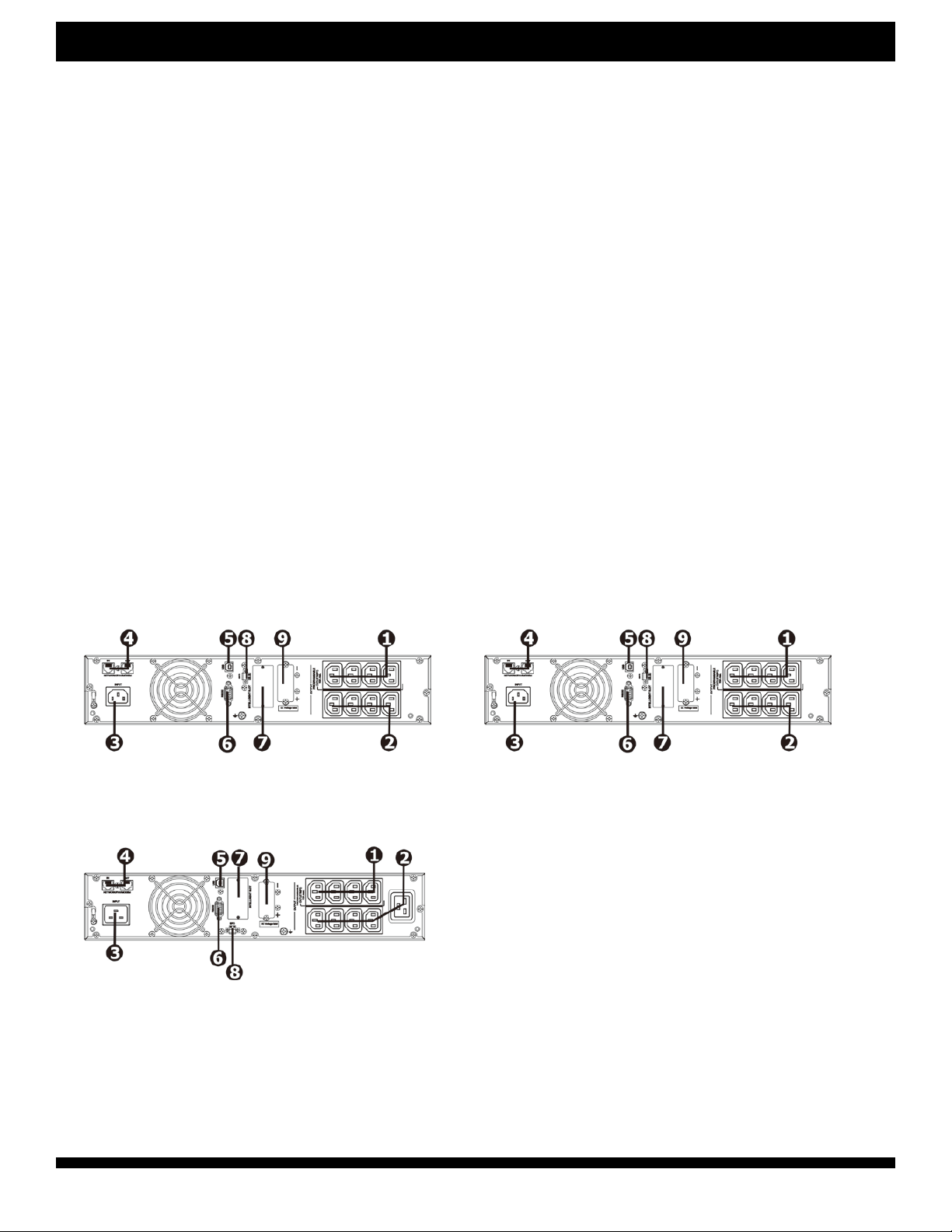
VDxxxxB Models:
VD1500B VD2000B
VD3000B 1.Programmable outlets: connect to
non-critical loads.
2.Output receptacles: connect to mission-critical
loads.
3. AC input
4. Network/Fax/Modem surge protection
5. USB communication port
6. RS-232 communication port
7. SNMP intelligent slot
8. Emergency power off function connector (EPO)
9. External battery connection
10. Output circuit breaker
User Manual for Lead Acid Online UPS 04/22v.1 Page 7
VD-Series (1000VA-3000VA)Chatsworth Products (CPI)
NOTE: Before installation, please inspect the unit. Be sure that nothing inside the package is damaged.
Please keep the original package in a safe place for future use
2-1. Rear panel view
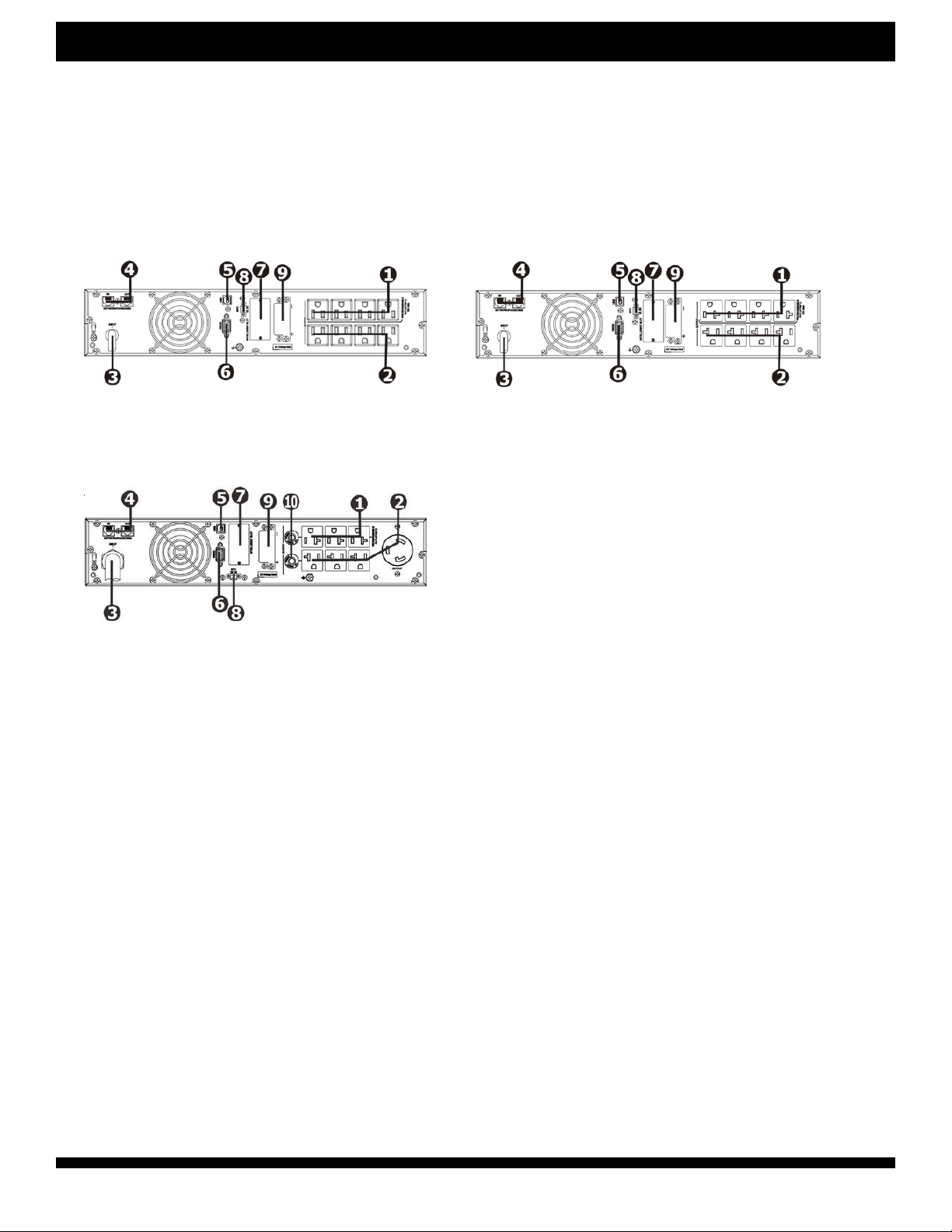
VDxxxxA Models:
VD1000A/VD1500A VD2000A
VD3000A
VD3000A
1.Programmable outlets: connect to
non-critical loads.
2.Output receptacles: connect to mission-critical
loads.
3. AC input
4. Network/Fax/Modem surge protection
5. USB communication port
6. RS-232 communication port
7. SNMP intelligent slot
8. Emergency power off function connector (EPO)
9. External battery connection
10. Output circuit breaker

User Manual for Lead Acid Online UPS 04/22v.1 Page 8
VD-Series (1000VA-3000VA)Chatsworth Products (CPI)
2-2. Operating principle
The operating principle of the UPS is shown as below
The UPS is composed of mains input, EMI/RFI lters, rectier/PFC, inverter, battery charger, DC-to-DC
converter, battery, dynamic bypass and UPS output.
2-3. Install the UPS
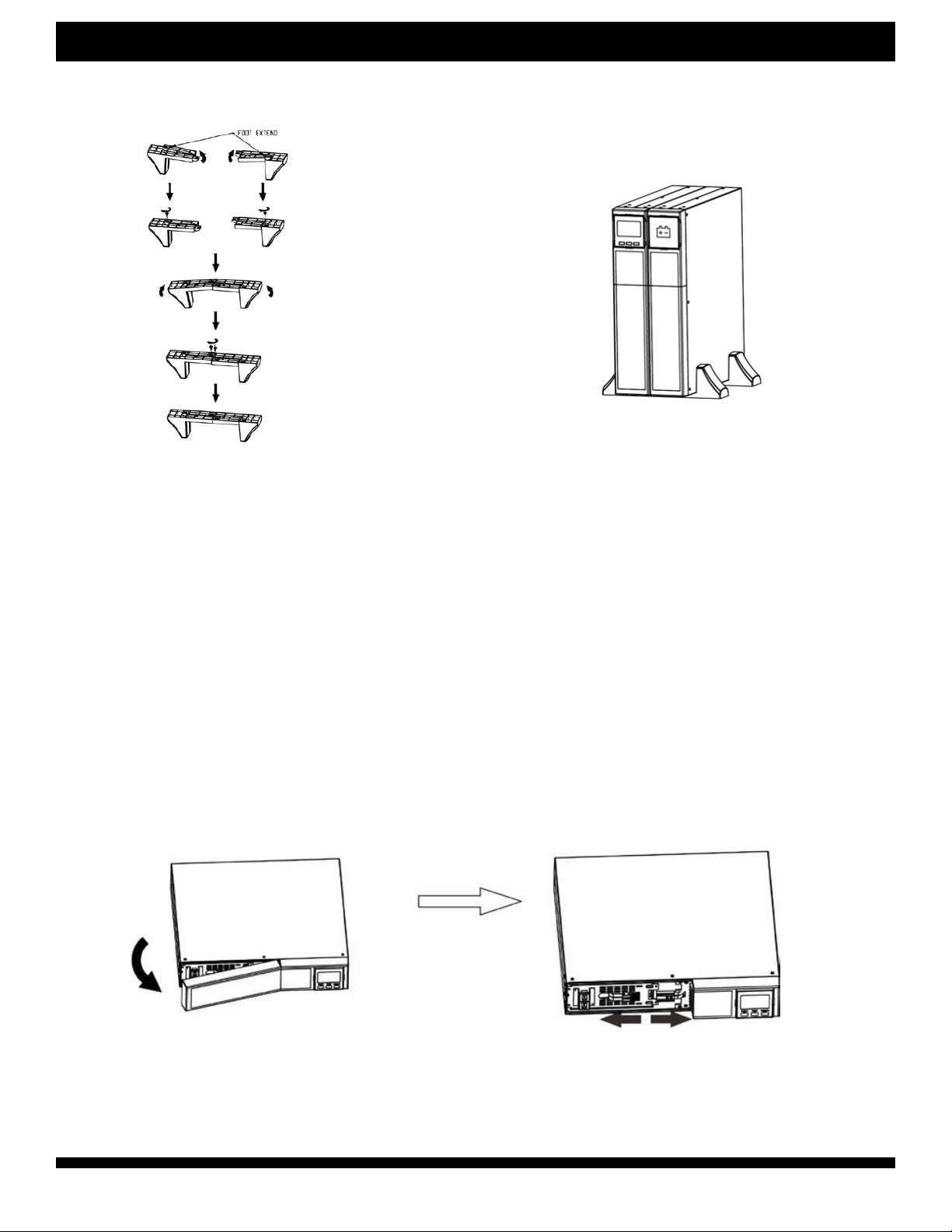
This UPS can be either displayed on the desk or mounted in the 19” rack chassis. Please choose proper
installation to position this UPS.
Rack-Mount Installation
Step 1 Step 2
UPS Tower Installation
Step 1 Step 2 Step 3
User Manual for Lead Acid Online UPS 04/22v.1 Page 9
VD-Series (1000VA-3000VA)Chatsworth Products (CPI)
Tower Installation with Battery Pack
Step 1 Step 2
2-4. Setup the UPS
Before installing the UPS, please read below to select proper location to install UPS.
1. UPS should be placed on the flat and clean surface. Place it in an area away from vibration, dust,
humidity, high temperature, flammable liquids, gas, corrosive and conductive contaminants.
Install the UPS indoors in a clean environment, where it is away from window and door. Maintain
minimum clearance of 4” (100mm) in the bottom of the UPS to avoid dust and high temperature.
2.Place UPS:
It’s equipped with fan for cooling. Therefore, place the UPS in a well-ventilated area. It’s required
to maintain minimum clearance of 4” (100mm) in the front of the UPS and 12” (300mm) in the back
and two sides of the UPS for heat dissipation and easy-maintenance.
Step 1: External battery connection
For safety consideration, the UPS is shipped out from factory without connecting battery wires. Before
connecting to external batteries, it’s required to have the internal battery wire disconnected. Follow the
below steps to make external battery connection.
1. Turn off UPS and remove power plug from the mains.
2. Remove front panel and disconnect internal battery wire.
User Manual for Lead Acid Online UPS 04/22v.1 Page 10
VD-Series (1000VA-3000VA)Chatsworth Products (CPI)
2-4. Setup the UPS
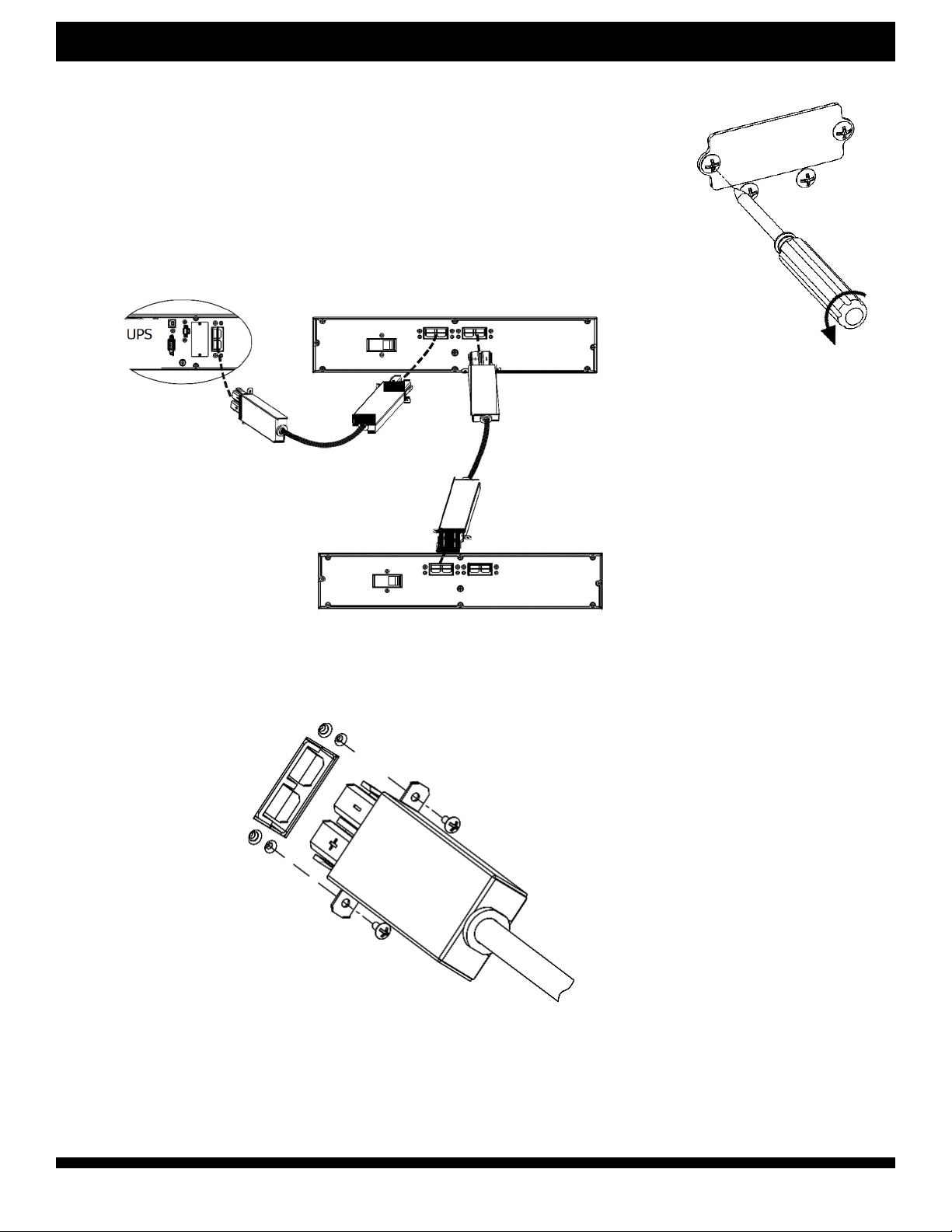
3. Remove the cover of the external battery connector by using a screwdriver.
4. Plug the battery cable into the external battery connector of the UPS and
the battery pack(s).
Note: If you have multiple battery packs available, connect them serially.
An example is shown in the diagram below (connecting the second battery
connector of the rst battery pack to the rst battery connector of the second
battery pack).
Battery pack #1
Battery pack #2
5. Stabilize the connector to the UPS and the battery pack(s) by fixing screws as shown
below diagram
Other manuals for VD Series
1
This manual suits for next models
3
Table of contents
Other Chatsworth Products UPS manuals










