Canon F-730SX User manual

F-730SX
SCIENTIFIC CALCULATOR
User Guide
ENGLISH
www.canon.com/calcmanual
E-IE-492
First Tme Operation
1. Remove the battery insulation tab to load the battery.
(Figure )
2. To initialize the calculator, use the tip of a ballpoint pen
(or similar sharp object) to press the [RESET] button on
the back of the calculator. (Figure )

2
SAFETY PRECAUTIONS .....................................................P.3
USING THE PROTECTIVE SLIDE CASE .............................P.3
DISPLAY (2-LINE DISPLAY) ................................................P.4
TO GET STARTED
Power On and Off .............................................................P.5
Input Capacity ..................................................................P.5
Display Format Setting (Notation – Fix, Sci, Eng) ............P.5
Inputting and Editing Calculations ....................................P.6
Order of Operations ..........................................................P.7
Input Ranges.....................................................................P.8
Error Messages and Error Locator..................................P.11
BASIC CALCULATIONS
Arithmetic Calculations....................................................P.12
Memory Calculations.......................................................P.13
Fraction Operations.........................................................P.15
Percentage Calculations .................................................P.15
Degrees-Minutes-Seconds Calculations .........................P.15
Angle Unit Conversion ....................................................P.16
FUNCTIONAL SCIENTIFIC CALCULATIONS
Square, Root, Power, Power Root, Reciprocal and Pi ...P.17
Trigonometry Calculations .............................................P.17
Logarithm, Natural Logarithm, and Antilogarithm ...........P.18
Coordinate Conversion ..................................................P.18
Base-n Calculations and Logical Calculations ...............P.19
Permutations, Combinations Factorials and
Random Number Generation ..........................................P.21
STATISTICAL CALCULATIONS ........................................P.22
BATTERY REPLACEMENT ...............................................P.25
BATTERY CAUTION ...........................................................P.26
SPECIFICATIONS ...............................................................P.26
CONTENTS

3
SAFETY PRECAUTIONS
Slide the unit out of the protective case to open or close the
cover as shown in the figure.
USING THE PROTECTIVE SLIDE CASE
OPEN
CLOSE
This calculator contains precision components such as
LSI chips and should not be used in places subject to rapid
variations in temperature, excessive humidity, dirt or dust, or
exposure to direct sunlight.
Do not apply excessive pressure on the liquid crystal display
panel as it is made of glass.
Use a soft, dry cloth to clean the calculator. Do not clean with
a damp cloth or volatile liquid such as paint thinner.
Do not under any circumstances dismantle the device. If the
calculator is not functioning properly, please contact Canon
Service & Support or mail the device with the Warranty to a
Canon service location.
Do not improperly dispose of the calculator such as in an
incinerator as it may cause personal injury or harm.
Please dispose of the product in accordance with
National regulations
It is recommended to replace the battery once every two
years.
SAFETY PRECAUTIONS .....................................................P.3
USING THE PROTECTIVE SLIDE CASE .............................P.3
DISPLAY (2-LINE DISPLAY) ................................................P.4
TO GET STARTED
Power On and Off .............................................................P.5
Input Capacity ..................................................................P.5
Display Format Setting (Notation – Fix, Sci, Eng) ............P.5
Inputting and Editing Calculations ....................................P.6
Order of Operations ..........................................................P.7
Input Ranges.....................................................................P.8
Error Messages and Error Locator..................................P.11
BASIC CALCULATIONS
Arithmetic Calculations....................................................P.12
Memory Calculations.......................................................P.13
Fraction Operations.........................................................P.15
Percentage Calculations .................................................P.15
Degrees-Minutes-Seconds Calculations .........................P.15
Angle Unit Conversion ....................................................P.16
FUNCTIONAL SCIENTIFIC CALCULATIONS
Square, Root, Power, Power Root, Reciprocal and Pi ...P.17
Trigonometry Calculations .............................................P.17
Logarithm, Natural Logarithm, and Antilogarithm ...........P.18
Coordinate Conversion ..................................................P.18
Base-n Calculations and Logical Calculations ...............P.19
Permutations, Combinations Factorials and
Random Number Generation ..........................................P.21
STATISTICAL CALCULATIONS ........................................P.22
BATTERY REPLACEMENT ...............................................P.25
BATTERY CAUTION ...........................................................P.26
SPECIFICATIONS ...............................................................P.26
Mantissa
minus sign

4
<Status Indicators>
2nd : 2nd Function
DEG : Degree Mode
GRAD : Gradient Mode
RAD : Radian Mode
K : Constant
HYP : Hyperbolic
FIX : Fixed Mode
SCI : Scientific Exponential Mode
ENG : Engineering Exponential Mode
STAT : Statistic Mode
DISPLAY (2-LINE DISPLAY)
Next or
Previous
page
Status indicators
Mantissa
minus sign
Formula (11 characters)
Exponent
minus sign
Exponent
Extension mark (Shows the
presence of hidden formula)
Mantissa

5
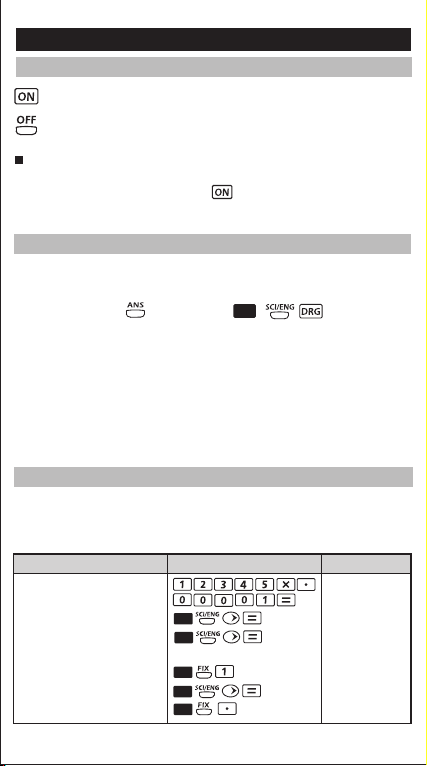
(Power ON): Turns on the calculator.
(Power OFF): Turns off the calculator.
Auto Power Off Function:
If the calculator is not used for about 7 minutes, it will
automatically power off. Press key to turn the calculator on
again.
TO GET STARTED
Power ON and OFF
F-730SX can accommodate up to 87 steps in Normal mode and 47
steps in STAT mode in a single calculation. One step is used when
you press one of the numeric keys, arithmetic keys, scientific
calculation keys or key. Pressing , and the
direction keys will not take up any steps.
When you reach 79 steps in Normal mode or 39 steps in STAT mode
of any calculation, the cursor changes from [ █] to [ ▓ ] notifying you
that the memory is running low. In case you need to input a single
calculation with more than 87 steps in Normal mode and 47 steps in
STAT mode, you can separate the calculation into two or more
segments.
Input Capacity
Default Setting : Floating-Decimal
0.12345
Scientific Notation (SCI) 1.2345
Engineering Notation (ENG) 123.45
(Exponent is a multiple of 3)
Fixed Decimal places: 1
123.5
Restore to Standard Notation 0.1
(Floating-decimal) 0.12345
F-730SX can display up to 10 digits. Values exceeding the 10-digit
limit will automatically be displayed in exponent notation format.
Example : Changing the display format of 0.12345
Display Setting
Display (Lower)
Operation
Display Format Setting (Notation – Fix, Sci, Eng)
2nd –01
x10
2nd
2nd
2nd
2nd
–03
x10
–03
x10
Exponent
minus sign
Exponent
2nd

Inputting and Editing Calculations
Replacing an Entry (1234567 1234560)
6
New input begins on the left of the upper (entry) line. When the
entries are over 11 digits, the line will move to the right
consecutively. Press to scroll the cursor within the upper
(entry) line and edit your calculation as needed.
Example (Editing an Entry):
234567 889900
Press or press continuously
for "7" blinks 123456█+889
Replace with "0" 1234560█889
Display Setting Display (Upper)
Operation
Deletion (1234560 134560 )
Press or press continuously
for "2" blinks 1█34560+889
"2" is deleted 1█4560+8899
Display Setting Display (Upper)
Operation
Default Setting : Floating-Decimal
0.12345
Scientific Notation (SCI) 1.2345
Engineering Notation (ENG) 123.45
(Exponent is a multiple of 3)
Fixed Decimal places: 1
123.5
Restore to Standard Notation 0.1
(Floating-decimal) 0.12345
567+889900█
Press or press continuously
for "8" blinks 134560+█899
"8" and "_" blinks alternately 134560+8899
Insert "2", "8" continues 134560+2899
to blink
Insertion (889900 2889900)
Display Setting Display (Upper)
Operation
2nd
Replay
• After the calculation is executed, the calculation expression and
its result is automatically stored in memory.
• Press (or ) to replay the performed calculation expressions
and results.
• The calculation memory is cleared when:
i) (RESET: Y) keys are pressed (which initializes
the calculator).
ii) Calculation mode is changed.

7
Replay
• After the calculation is executed, the calculation expression and
its result is automatically stored in memory.
• Press (or ) to replay the performed calculation expressions
and results.
• The calculation memory is cleared when:
i) (RESET: Y) keys are pressed (which initializes
the calculator).
ii) Calculation mode is changed.
Order of Operations
The calculator will automatically determine the operation priority.
This means that algebraic expressions can be entered just as they
are written and the calculation priority is as follows:
1st Priority Recall memory (A-E), RAND
2nd Calculation with parentheses ( ).
3rd Function with parentheses that requests the
input argument to the right. log(, ln(, 10^(, e^(,
( , sin(, cos(, tan(, sin-1(, cos-1(, tan-1(, sinh(,
cosh(, tanh(, sinh-1(, cosh-1(, tanh-1(, R>Pr(,
R>Pθ(, P>Rx(, P>Ry( and RANDI(
4th Fractions
5th Functions that come after the input value
preceded by values.
x2, x-1 , x! and angle units ( r g)
6th Power (^) and Power root ( x )
7th Negation (+/–)
Logical NEG, NOT
8th Permutations (nPr) and Combinations (nCr)
9th Multiplication, implied multiplication and division
10th Addition and subtraction
11th Logical AND
12th Logical OR, XOR, XNOR
13th Conversions ( A b/c↔d/e , F↔D, ►DMS)
14th Calculation ending instruction [=], Base-n
transformation, Storage

8
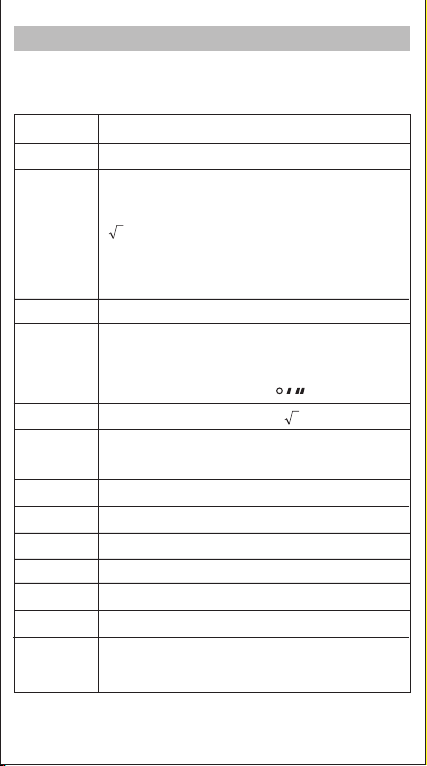
Input Ranges
Functions
Input Range
sin DEC 0 ≤| |≤4.499999999 E 10
RAD 0 ≤ || ≤ 785398163.3
GRA 0 ≤ || ≤ 4.999999999 E 10
cos DEC 0 ≤| | ≤4.500000008 E 10
RAD 0 ≤ || ≤ 785398165
GRA 0 ≤ || ≤ 5.000000009 E 10
tan
DEG same as sinx, except when = (2n-1)x90
RAD same as sinx, except when = (2n-1)x�/2
DEG same as sinx, except when = (2n-1)x100
sin-1
cos-1
tan-1 | | < 1 x 10100
sinh
cosh
tanh | | < 1 x 10100
sinh-1 | | < 5 x 1099
cosh-1 1 ≤ < 5 x 1099
tanh-1 | | < 1
log / In 1 x 10–99 ≤ < 1 x 10100
–1 x 10100 < < 100
–1 x 10100 < ≤ 230.2585092
0 ≤ < 1 x 10100
2| | < 1x1050
1/ | | < 1 x 10100; ≠ 0
! 0 ≤ ≤ 69 ( is an integer)
| | ≤1
| | ≤230.2585092 For sinh and tanh, errors are
cumulative and accuracy is
affected at a certain point when
=0

9
Functions
Input Range
0 ≤ r ≤ n
nPr/nCr n< 1 x 10¹⁰
(nand rare integers)
R → P x2+ y2< 1 x 10100
P → R 0 ≤ r < 1 x 10100
(DEG) |θ| < 9 x 10⁹
(RAD) |θ| < 5 x 10⁷ �rad
(GRA) |θ| < 1 x 10¹⁰ grad
o : | | < 1 x 10100
' : ≥ 0
" : ≥ 0
y> 0 : –1x10100 < y log < 100
= 0 : y > 0
< 0 : y= n; (n is an integer)
However : –1 x 10100 < y log | | < 100
1/y > 0 ; y ≠ 0
–1x10100 < 1/y log < 100
= 0: y > 0
< 0: y = 2n + 1; 1/n (n ≠ 0; n is an integer)
However: –1 x 10100 < 1/y log | | < 100
ab/c
Total of integer, numerator, and denominator must
be 10 digits or less (including division marks)
STAT 1-VAR : | | < 1 x 1050
0 ≤ FRQ < 100
2-VAR : | | < 1 x 1050
|y| < 1 x 1050
EEx –99 ≤ ≤99 ( is an integer)
2n+1
1

2
10
• In Base-n mode, valid values in each number system:
• Calculation range:
Number system Valid values
Binary 0, 1
Octal 0, 1, 2, 3, 4, 5, 6, 7
Decimal 0, 1, 2, 3, 4, 5, 6, 7, 8, 9
Hexadecimal 0, 1, 2, 3, 4, 5, 6, 7, 8, 9, A, B, C, D, E, F
Number system Calculation range
Binary Positive 0111111111 ≥ x ≥ 0
Negative 1111111111 ≥ x ≥1000000000
Octal Positive 3777777777 ≥ x ≥ 0
Negative 7777777777 ≥ x ≥4000000000
Decimal Positive 9999999999 ≥ x ≥ 0
Negative –1 ≥ x ≥–9999999999
Hexadecimal Positive 2540BE3FF ≥ x ≥ 0
Negative FFFFFFFFFF ≥ x ≥FDABF41C01
Table of contents
Other Canon Calculator manuals

Canon
Canon 12-Digit Fluorescent User manual

Canon
Canon F-789SGA User manual

Canon
Canon F-719SG User manual

Canon
Canon P23-DTSC User manual

Canon
Canon WS-1210T User manual

Canon
Canon KC-30 User manual

Canon
Canon WS-220TC User manual

Canon
Canon TX-220TS User manual

Canon
Canon LS-270G User manual

Canon
Canon MP11DX - Printing Calculator User manual

Canon
Canon MP25DV User manual

Canon
Canon TX-1210E User manual

Canon
Canon P23-DHV G User manual

Canon
Canon MP41DHII User manual

Canon
Canon P160-DH User manual

Canon
Canon MP18DII User manual

Canon
Canon F-605G User manual

Canon
Canon TS-120TS User manual

Canon
Canon CP1260D User manual

Canon
Canon WS-1400H User manual