
camry Premium CR 1168 User manual

CR 1168
(GB)
(FR) mode d'emploi - 9 (ES) manual de uso - 12
(PT) manual de serviço - 15 (LT) naudojimo instrukcija - 19
(LV) lietošanas instrukcija - 21 (EST) kasutusjuhend - 24
(HU) felhasználói kézikönyv - 32 (BS) upute za rad - 29
(RO) Instrucţiunea de deservire - 26 (CZ) návod k obsluze - 40
(RU) инструкция обслуживания - 49 (GR) οδηγίες χρήσεως - 38
(MK) упатство за корисникот - 35 (NL) handleiding - 43
(SL) navodila za uporabo - 46 (FI) manwal ng pagtuturo - 55
(PL) instrukcja obsługi - 78 (IT) istruzioni operative - 64
(HR) upute za uporabu - 52 (SV) instruktionsbok - 53
(DK) brugsanvisning - 70 (UA) інструкція з експлуатації - 73
(SR) Корисничко упутство - 67 (SK) Používateľská príručka - 61
user manual - 3 (DE) bedienungsanweisung - 6
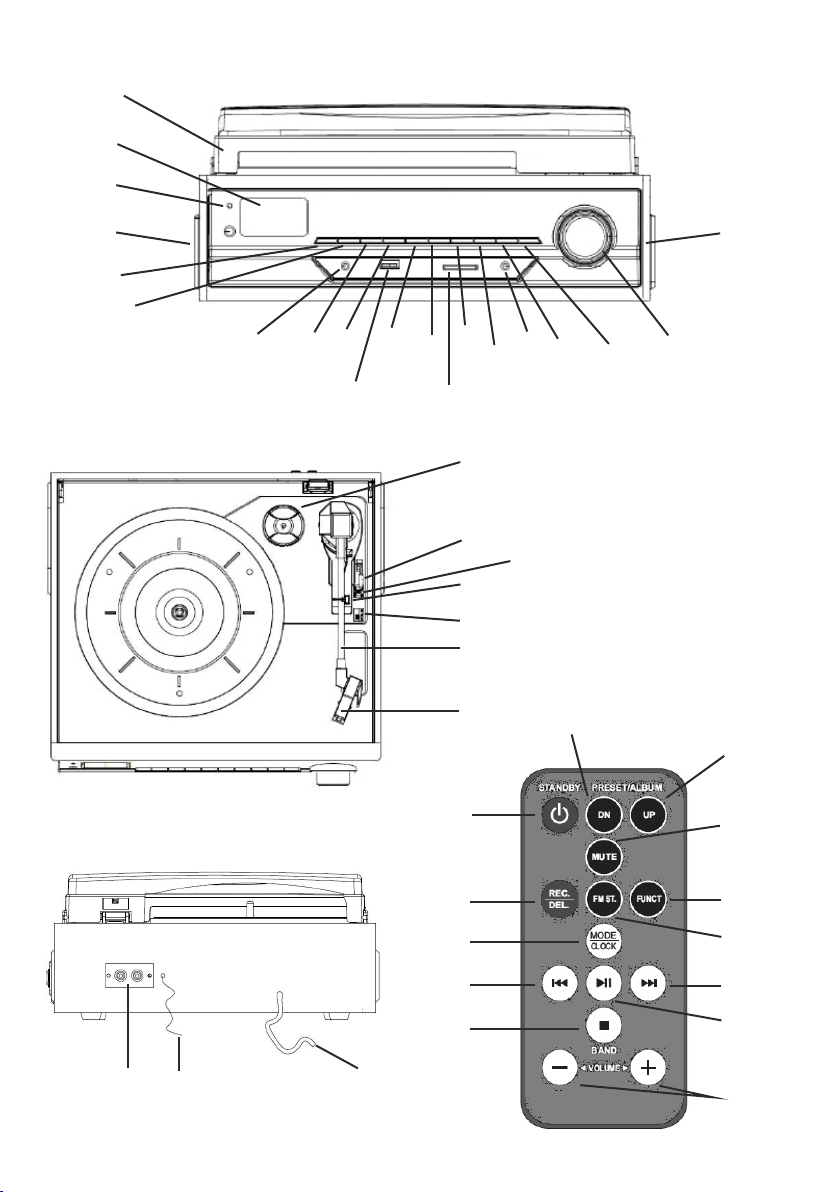
1
2
3
4
56
789 10 11 121314 15 16 17
4
18
19
20
22
23
24 25 26
21
27
28 29
31
35
33
34
36
39
38
40
37
41
42 30
32
2

ENGLISH
SAFETY CONDITIONS IMPORTANT INSTRUCTIONS ON SAFETY OF USE PLEASE
READ CAREFULLY AND KEEP FOR FUTURE REFERENCE
The warranty conditions are different, if the device is used for commercial purpose.
1.Before using the product please read carefully and always comply with the following
instructions. The manufacturer is not responsible for any damages due to any misuse.
2.The product is only to be used indoors. Do not use the product for any purpose that is not
compatible with its application.
3.The applicable voltage is 230V, ~50Hz. For safety reasons it is not appropriate to
connect multiple devices to one power outlet.
4.Please be cautious when using around children. Do not let the children to play with the
product. Do not let children or people who do not know the device to use it without
supervision.
5.WARNING: This device may be used by children over 8 years of age and persons with
reduced physical, sensory or mental capabilities, or persons without experience or
knowledge of the device, only under the supervision of a person responsible for their
safety, or if they were instructed on the safe use of the device and are aware of the
dangers associated with its operation. Children should not play with the device. Cleaning
and maintenance of the device should not be carried out by children, unless they are over
8 years of age and these activities are carried out under supervision.
6.After you are finished using the product always remember to gently remove the plug from
the power outlet holding the outlet with your hand. Never pull the power cable!!!
7.Never put the power cable, the plug or the whole device into the water. Never expose the
product to the atmospheric conditions such as direct sun light or rain, etc.. Never use the
product in humid conditions.
8.Periodically check the power cable condition. If the power cable is damaged the product
should be turned to a professional service location to be replaced in order to avoid
hazardous situations.
9.Never use the product with a damaged power cable or if it was dropped or damaged in
any other way or if it does not work properly. Do not try to repair the defected product
yourself because it can lead to electric shock. Always turn the damaged device to a
professional service location in order to repair it. All the repairs can be done only by
authorized service professionals. The repair that was done incorrectly can cause
hazardous situations for the user.
10.Never put the product on or close to the hot or warm surfaces or the kitchen appliances
like the electric oven or gas burner.
11.Never use the product close to combustibles.
12.Do not let cord hang over edge of counter or touch hot surfaces.
13.Never leave the product connected to the power source without supervision. Even when
use is interrupted for a short time, turn it off from the network, unplug the power.
14.In order to provide additional protection, it is recommended to install residue current
device (RCD) in the power circuit, with residual current rating not more than 30 mA.
Contact professional electrician in this matter.
15. Avoid getting the radio wet.
16. The radio may only be wiped with a dry cloth. Do not use water or cleaning fluids.
3

17.
18. The radio should be kept in a dry room.
DESCRIPTION OF THE DEVICE
1. Turntable cover 23. Turntable needle guard
2. LCD display 24. LINE OUT jack
3. Power diode 25. FM antenna cable
4. In-built speaker 26. Power cord
5. FUNCTION button 27. STANDBY button
6. SLEEP/TIMER button 28. PRESET/ALBUM DN button
7. Headphone port 29. PRESET/ALBUM UP button
8. REC/DEL button 30. SD card port
9. MODE/CLOCK button 31. MUTE button
10. PLAY/PAUSE/TUNER SCAN button 32. AUTO-STOP switch
11. STOP/BAND button 33. REC/DEL button
12. SKIP DOWN button 34. FM ST. button
13. SKIP UP button 35. FUNCTION button
14. AUX port 36. MODE/CLOCK button
15. ALBUM/PRESET DOWN button 37. PLAY/PAUSE button
16. ALBUM/PRESET UP button 38. STOP/BAND button
17. ON/OFF switch/volume control 39. SKIP DOWN button
18. 45RPM disc adaptor 40. SKIP UP button
19. Turntable lever 41. VOLUME UP/DOWN buttons
20. Turntable arm lock 42. USB port
21. Plate spin speed adjustment
22. Turntable arm
To save energy, if there is no audio signal from Turntable /AUX IN / USB / SD for a
period of over 10 minutes, then the unit will automatically switch to Standby Mode.
SETTING THE CLOCK
Before first use, unpack everything and remove all protective materials. Unwind the FM antenna cable and power cable. Do not cover the ventilation holes,
make sure that there is a gap of a few centimeters around the radio, which is required for proper ventilation.
1. In standby mode, press and hold the MODE/CLOCK button (9, 36). '12H/24H' will start flashing on the display (2). Using the SKIP DOWN button (12, 39)
and SKIP UP button (13, 40) select either the 12-hour or 24-hour mode and confirm by pressing the MODE/CLOCK button again (9, 36). The device will
enter the hour editing mode.
2. Using the SKIP DOWN button (12, 39) and SKIP UP button (13, 40) set the current hour and confirm by pressing the MODE/CLOCK button (9, 36). The
device will enter the minute editing/ mode.
3. Using the SKIP DOWN button (12, 39) and SKIP UP button (13, 40) set the current minute and confirm by pressing the MODE/CLOCK button (9, 36).
TIMER FUNCTION (AUTOMATIC SHUT-OFF)
1. When the device is switched on, press the SLEEP/TIMER button (6) the appropriate number of times to select the time after which the device is to switch
off (90, 80, 70...10 minutes).
2. The word 'SLEEP' on the display informs you that the automatic shut-off function is activated.
3. After the selected time has elapsed the device will turn off and enter standby mode.
FUNCTION BUTTON (5)
Used to change the operating mode of the device
– PHON (turntable operation mode)
– AUX (external device operation mode)
– FM radio mode
– MP3 (USB memory playback mode and SD card playback mode)
-- Bluetooth mode
LISTENING TO THE RADIO
1. Turn the device on using the ON/OFF button (17, 27) and set the radio mode using the FUNCTION button (5).
2. Using the BAND button (11) set the wavelength to FM.
3. Using the SKIP DOWN button (12, 39) and SKIP UP button (13, 40) tune to the desired radio frequency. Pressing and holding these buttons for
approximately 1-2 seconds will automatically search for the closest frequency. After it is found the search will stop.
4. When the frequency of the selected station is found, press the MODE/CLOCK button (9, 36) to save the station.
5. Repeat steps 3-4 to program selected stations (maximum of 30 programs - FM, maximum of 20 programs - AM ).
6. You can switch between saved programs by using the PRESET DOWN button (15) and PRESET UP button (16).
7. You can set the volume by turning the volume control knob (17) or using the buttons (40) on the remote control.
8. The FM antenna (24) is located on the back panel. If the reception is poor, try to move the antenna and find a spot in which the signal is strongest.
The AM antenna is located inside the radio receiver. If the reception is poor, try moving the receiver to a different place or turning it in another direction to
catch the strongest signal.
9. The TUNER SCAN button (10) is used to automatically find and save available radio stations.
PLAYBACK OF MP3 FILES FROM USB/SD MEMORY
CAUTION: The device may not be compatible with all of the files due to coding differences. The device may not work with some USB/SD memories. The
device supports 8GB USB memories and SD cards.
1. Turn the player on using the ON/OFF button (17, 27). Place the USB or SD memory in the port (USB port - 42, SD port - 30)
2. Select the mode using the FUNCTION button (5, 35).
3. The device will read the memory and show the number of recorded tracks on the display. The device will then begin playback of the first track.
4. You can pause and resume playback of the given track using the PLAY/PAUSE button (10, 37).
5. You can playback the previous or next tracks using the SKIP DOWN button (12, 39) and SKIP UP button (13, 40). Pressing and holding these buttons
during playback of a track will make it rewind or fast-forward.
6. You can playback the previous or next track album using the ALBUM DOWN button (15, 28) and ALBUM UP button (16, 29).
7. During playback of a track press the MODE/CLOCK button (9, 36) once to activate repeat of one track. Pressing the MODE/CLOCK button (9,
4

36) again will repeat the entire content of the USB memory/SD card.
8. Before removing the USB memory/SD card from the port first turn off the player, or switch it to radio mode, turntable disc playback mode ('PHON')
or external device mode ('AUX').
You are able to play music files saved on a mobile telephone equipped with Bluetooth, for playback on the power socket radio.
1. Turn on the device, press „ FUNCTION” button to select Bluetooth mode. .
2. Activate the Bluetooth connection of the media playback device. The media playback device will now search for devices to which it can
connect.
3. The media playback device should now be receiving the device code CR 1168
4. Use the media playback device to connect to the radio. To do this, select CR 1168 on the media playback device.
USING A DEVICE CONNECTED THROUGH THE AUX IN UNIVERSAL ENTRY PORT:
1. Connect the external device to the player by the AUX IN port (14).
2. Switch the player to the AUX IN mode by pressing the FUNCTION button (5).
PLAYBACK OF VINYL DISCS
Prior to first use of the turntable, remove the turntable needle guard (23) and untie the knot protecting the turntable arm found next to the turntable
arm lock (20).
1. Release the arm lock (20) and set the device to the PHON mode by using the FUNCTION button (5, 35).
2. Place the disc on the turntable plate. If necessary, use the adapter (18).
3. Select the plate's rotational speed (the rotational speed depending on the type of disc) by using the switch (21).
4. By using the level (19) lift the turntable arm - this will activate the turning of the plate with the turntable disc. Gently slide the arm onto the track you
want to listen to. Lower the needle arm using the lever (19).
5. You can set the volume by turning the volume control knob (17) or using the buttons (40) on the remote control.
6. To stop playback of the disc, lift the turntable arm using the lever (19).
7. After completion of playback of the disc lift the turntable arm using the turntable lever (19). Move the arm over the lock (20) and lower it using the
lever (19).
8. To turn the AUTO-STOP function on or off use the AUTO-STOP switch (32).
RECORDING ONTO A USB DISC/SD CARD
1. Recording from the radio - place the USB disc/SD card in the appropriate port (42 or 30). Press the FUNCTION button (5, 35) to select the radio
mode. Using the BAND button (11) set the wavelength to AM or FM. Using the SKIP DOWN button (12, 39) and SKIP UP button (13, 40) tune to the
desired radio frequency. Press the REC/DEL button (8, 33). Within a few seconds the device will read the available USB/SD memory media. Using
the SKIP DOWN button (12, 39) and SKIP UP button (13, 40) select whether you want to record to the USB memory or the SD card. Confirm by
pressing the REC/DEL button (8, 33) again. After a few seconds the device will record to the selected portable memory (if only the USB memory or
the SD card is connected, the first press of the REC/DEL button will activate the recording function after a few seconds). The REC icon will flash
during recording. To stop recording press the STOP/BAND button (11, 38).
CAUTION: Activation of the process of recording from the radio will occur with a several-second delay. There may be interference/noise during radio
recording.
2. Recording from a vinyl disc - place the USB disc/SD card in the appropriate port (42 or 30). Press the FUNCTION button (5, 35) to select the
'PHON' mode. Place the vinyl disc on the plate and begin playback of the track you want to record by placing the turntable arm in the appropriate
spot. The remaining steps are identical to that of recording from the radio.
3. Recording from an external device (AUX mode) - place the USB disc/SD card in the appropriate port (42 or 30). Press the FUNCTION button (5,
35) to select the 'AUX' mode. Connect the external device to the AUX IN port (14) and select the track you wish to record from the external device.
The remaining steps are identical to that of recording from the radio.
DELETING TRACKS FROM A USB DISC/SD CARD
Deleting one recording - place the USB disc/SD card in the appropriate port (42 or 30). Select the track you want to delete using the SKIP DOWN
button (12, 39) and SKIP UP button (13, 40) and begin playing back. Press and hold the REC/DEL button (8, 33) for approximately 3 seconds.
CLEANING AND MAINTENANCE
1. Disconnect the device from the mains power.
2. The device may only be wiped with a dry cloth.
3. The device should be kept in a dry room.
CAUTION: Do not use water for cleaning - this may damage the device.
TECHNICAL DATA
Power source: 230V ~50Hz
RMS output power: 2x 1.5W
To protect your environment: please separate carton boxes and plastic bags and dispose them in corresponding waste bins.
Used appliance should be delivered to the dedicated collecting points due to hazarsous components, which may effect the
environment. Electrical appliance must be returned in order to reduce its reuse and utilization. If the device contains batteries
they should be delivered to dedicated points separatelly. 5

DEUTSCH
ALLGEMEINE SICHERHEITSVORSCHRIFTEN LESEN SIE AUFMERKSAM WICHTIGE
ANWEISUNGEN BEZÜGLICH DER SICHERHEIT DER BENUTZUNG BEWAHREN SIE
DIESE FÜR DIE ZUKUNFT AUF
Bei Verwendung des Gerätes zu gewerblichen Zwecken werden die Garantiebedingungen
geändert.
1.Vor dem ersten Gebrauch, die Bedienungsanleitung lesen und die dort angegebenen
Hinweise beachten. Der Produzent trägt keine Verantwortung für Schäden, die aufgrund von
bestimmungswidriger Nutzung oder unsachgemäßer Bedienung entstanden sind.
2.Das Gerät ist nur für den Hausgebrauch verwendet. Verwenden Sie es nicht für andere
Zwecke als den bestimmungsgemäßen Gebrauch.
3.Das Gerät ausschließlich an die Steckdose 230 V - 50 Hz anschließen. Es darf nicht zu
anderen, bestimmungswidrigen Zwecken benutzt werden. Wegen Vorsichtsmaßnahmen,
sollten keine weiteren Geräte an den gleichen Stromkreis angeschlossen werden.
4.Falls sich Kinder in der Nähe befinden, sollte bei der Nutzung des Gerätes spezielle
Vorsicht bewahrt werden. Dieses Gerät ist nicht zum Spielen für Kinder, sowie für
Erwachsene, die sich mit der Bedienungsanleitung nicht vertraut gemacht haben, geeignet.
5.WARNHINWEIS: Dieses Gerät kann von Kindern im Alter von über 8 Jahren sowie von
Personen von einer beschränkten körperlichen, sensorischen, psychischen Fähigkeit oder
von Personen, die keine Erfahrung oder kein Kenntnisse von dem Gerät haben, nur dann
genutzt werden, wenn die Nutzung unter Aufsicht einer Person, welche die Verantwortung für
deren Sicherheit trägt, stattfindet oder diesen Personen Ratschläge bezüglich der sicheren
Benutzung des Geräts erteilt wurden und sie sich den mit seiner Benutzung verbundenen
Gefahren bewusst sind. Kinder dürfen nicht mit dem Gerät spielen. Die Reinigung und die
Unterhaltung des Geräts dürfen nicht von Kindern durchgeführt werden, es sei denn, dass
diese Kinder im Alter von über 8 Jahren sind und diese Tätigkeiten unter Aufsicht
durchgeführt werden.
6.Nach der Benutzung, den Stecker aus der Steckdose ziehen und dabei die Steckdose mit
der Hand festhalten. NIEMALS am Kabel ziehen.
7.Das Kabel, die Buchse, sowie das ganze Gerät nicht in Wasser oder andere Flüssigkeiten
tauchen. Das Gerät vor Regen, Sonne usw. und vor Feuchtigkeit (z.B. im Badezimmer oder
Campingwagen) schützen.
8.Regelmäßig das Kabel prüfen. Falls das Kabel beschädigt ist, sollte es in einem
spezialisierten Service ausgetauscht werden, um ev. Gefährdung zu vermeiden.
9.Falls das Kabel oder ein anderer Teil des Gerätes beschädigt oder das Gerät fallen
gelassen wurde oder nicht ordnungsgemäß arbeitet, sollte es nicht benutzt werden. Das
Gerät darf nicht durch unbefugte Personen repariert werden, da die Gefahr eines
Stromstoßes besteht. Ein beschädigtes Gerät in einem spezialisierten Service zur Kontrolle
oder Reparatur abgeben. Jegliche Reparaturen dürfen nur durch einen spezialisierten
Service vorgenommen werden. Eine nicht korrekt ausgeführte Reparatur kann das Leben
des Benutzers gefährden.
10.Das Gerät auf eine kühle, gerade Fläche, entfernt von wärmeausstrahlenden Geräten,
wie: Elektroherd, Gasherd, usw. stellen.
11.Das Gerät nicht in der Nähe von leicht entzündlichen Materialien benutzen.
12.Das Kabel darf nicht außerhalb der Tischkante hängen oder heiße Flächen berühren.
DEUTSCH
6

13.Lassen Sie das Gerät oder den Adapter nicht unbeaufsichtigt, wenn es an das Stromnetz
angeschlossen ist.
14.Es wird empfohlen, für zusätzlichen Schutz den Fehlerstromschutzschalter (RCD),
dessen Bemessungsdifferenzstrom 30 mA nicht übersteigt, zu installieren. In diesem Bereich
wenden Sie sich an einen Fachelektriker.
15. Das Radio darf nicht dem Einfluss von Nässe ausgesetzt werden.
16. Das Radio darf nur mit einem trockenen Tuch abgewischt werden. Benutzen Sie weder
Wasser noch Reinigungsmittel.
17. Für die Sicherung der Energiesparsamkeit des Gerätes, wenn es keinen Signal vom
Grammophon/AUX IN-Eingang innerhalb von 10 Minuten registriert, übergeht es automatisch
in den Standby-Modus.
18. Das Radio ist in einem trockenen Raum aufzubewahren.
BESCHREIBUNG DES GERÄTES
1. Abdeckung des Grammofons 23. Schutz des Tonabnehmernadel
2. LCD-Anzeige 24. LINE OUT- Steckdose
3. Anzeige der Netzstromversorgung 25. FM – Antennenkabel
4. Eingebauter Lautsprecher 26. Netzkabel
5. FUNCTION-Taste 27. STANDBY- Taste
6. SLEEP/TIMER - Taste 28. PRESET/ALBUM DN – Taste
7. Kopfhörereingang 29. PRESET/ALBUM UP – Taste
8. REC/DEL – Taste 30. Lesegerät für SD-Karten
9. MODE/CLOCK- Taste 31. MUTE – Taste
10. PLAY/PAUSE/TUNER SCAN-Taste 32. AUTO-STOP - Umschalter
11. STOP/BAND – Taste 33. REC/DEL – Taste
12. SKIP DOWN – Taste 34. FM ST – Taste
13. SKIP UP – Taste 35. FUNCTION-Taste
14. AUX-Eingang 36. MODE/CLOCK- Taste
15. ALBUM/PRESET DOWN – Taste 37. PLAY/PAUSE-Taste
16. ALBUM/PRESET UP - Taste 38. STOP/BAND – Taste
17. ON/OFF – Ausschalter / Lautstärkeregulierung 39. SKIP DOWN – Taste
18. Adapter für Platten 45 RPM 40. SKIP UP – Taste
19. Tonabnehmerhebel 41. VOLUME UP/DOWN - Tasten
20. Sperre des Tonabnehmerhebels 42. USB-Anschluss
21. Regulierung der Drehgeschwindgeit des Plattentellers
22. Tonabnehmer
EINSTELLUNG DER UHR
Vor erstem Gebrauch sind alle Teile auszupacken und alle Sicherungsmaterialien zu entfernen. Das FM-Antennenkabel und das Netzkabel sind
auszulegen. Die Lüftungsöffnungen dürfen nicht abgedeckt werden. Vergewissern Sie sich, dass um das Radio herum einige Zentimeter Freiraum
gelassen wurde, was für eine ordnungsgemäße Lüftung notwendig ist.
1. Drücken Sie die MODE/CLOCK – Taste (9, 36) in dem Standby – Modus und halten Sie sie fest. Auf dem Display (2) beginnt die Aufschrift
“12H/24H” zu blinken. Mittels der SKIP DOWN (12, 39) und SKIP UP (13, 40) – Tasten wählen Sie den 12-stündigen oder den 24-stündigen Modus
aus und bestätigen Sie diesen mit einem erneuten Drücken der MODE/CLOCK – Taste (9, 36). Das Gerät geht dann in den Modus der Edition der
Stunde über.
2. Mittels der SKIP DOWN (12, 39) und SKIP UP (13, 40) – Tasten stellen Sie die aktuelle Stunde ein und bestätigen Sie diese durch das Drücken
der MODE/CLOCK (9, 36)- Taste. Das Gerät geht dann in den Modus des Editierens der Minute über.
3. Mittels der SKIP DOWN (12, 39) und SKIP UP (13, 40) – Tasten stellen Sie die aktuelle Minute ein und bestätigen Sie diese durch das Drücken
der MODE/CLOCK (9, 36) - Taste.
TIMER - FUNKTION (AUTOMATISCHE AUSSCHALTUNG)
1. Wenn das Gerät eingeschaltet ist, drücken Sie mehrmals die SLEEP/TIMER (6) – Taste, um die Zeit, nach der das Gerät ausgeschaltet werden
soll (90, 80, 70...10 Minuten), einzustellen.
2. Die Aufschrift “SLEEP” auf dem Display informiert darüber, dass die Funktion der automatischen Ausschaltung aktiv ist.
3. Nach dem Ablauf der gewählten Zeit wird das Gerät ausgeschaltet und geht in den Standby – Modus über.
FUNCTION (5)- Taste
Diese dient zur Änderung des Arbeitsmodus des Geräts.
– PHON (Modus des Grammofons)
– AUX (Modus der Bedienung des externen Geräts)
– Modus des FM - Radioempfangs
– MP3 (Modus des Lesens des USB- Speichers/Modus des Lesens der SD- Karte)
RADIO-FUNKTION
1. Schalten Sie das Gerät mit der ON/OFF (17, 27) – Taste ein und stellen Sie den Modus des Radioempfangs mit der FUNCTION (5)- Taste ein.
2. Mittels der BAND (11) – Taste wählen Sie die Funkwellenlänge (AM oder FM).
3. Mittels den SKIP DOWN (12, 39) und SKIP UP (13, 40) – Tasten stellen Sie die gewünschte Radiofrequenz ein. Das Drücken und Festhalten
7

dieser Tasten über zirka 1-2 Sekunden verursacht das automatische Suchen der nächsten Frequenz. Nach ihrer Auffindung wird das Suchen
angehalten.
4. Wenn die Frequenz der gewählten Station gefunden wird, drücken Sie die MODE/CLOCK (9, 36) – Taste, um die Station zu speichern.
5. Wiederholen Sie Schritte 3-4, um die ausgewählten Stationen (max. 30 Sender – FM, max. 20 Sender – FM ) einzustellen.
6. Wenn Sie die PRESET DOWN (15) und PRESET UP (16) – Tasten anwenden, können Sie unter den eingestellten Sendern wählen.
7. Wenn Sie den Drehknopf der Lautstärkeregulierung (17) umdrehen oder die Tasten (40) an der Fernbedienung verwenden, können Sie die
Lautstärke des Tons einstellen.
8. Die FM-Antenne (24) befindet sich an der Hinterseite des Geräts. Sollte das Empfangssignal zu schwach sein, versuchen Sie, die Antenne an
einer anderen Stelle zu lokalisieren und den Platz, an dem das Signal am stärksten ist, zu finden.
Die AM-Antenne befindet sich im Inneren des Radioempfängers. Sollte das Empfangssignal zu schwach sein, versuchen Sie, den Radioempfänger
woanders einzustellen oder in eine andere Richtung zu drehen, um das stärkste Signal zu empfangen.
9. Die TUNER SCAN (10) – Taste dient zum automatischen Aufsuchen und zur Einschaltung der erreichbaren Rundfunkstationen.
WIEDERGABE DER MP3 – DATEIEN AUS DEM USB/SD- SPEICHER
ACHTUNG: Das Gerät kann mit Rücksicht auf die Unterschiede in der Codierung nicht mit allen Dateien kompatibel sein. Das Gerät kann mit
manchen USB/SD- Speichern nicht zusammenarbeiten. Das Gerät unterstützt USB – Speicher und SD – Karten von einem Volumen von bis zu
8GB.
1. Schalten Sie den Player mit dem ON/OFF (17, 27) - Schalter ein. Legen Sie den USB - oder SD – Speicher in den Eingang (USB – Eingang - 42,
SD – Eingang - 30) ein.
2. Wählen Sie den Arbeitsgang mit der FUNCTION (5, 35) - Taste.
3. Das Gerät liest den Speicher aus und zeigt die Anzahl der gespeicherten Musikstücke auf dem Display an. Das Gerät beginnt dann, das erste
Musikstück wiederzugeben.
4. Mittels der PLAY/PAUSE (10, 37) – Taste kann man die Wiedergabe des jeweiligen Musikstücks anhalten und sie wiederholen.
5. Mittels der SKIP DOWN (12, 39) und SKIP UP (13, 40) – Tasten kann man die Wiedergabe der vorherigen und nächsten Musikstücke wählen.
Drücken und Festhalten dieser Tasten während der Wiedergabe des Musikstücks verursacht sein Vor- oder Zurückspulen.
6. Mittels der ALBUM DOWN (15, 28) und ALBUM UP (16, 29) – Tasten kann man in die Wiedergabe des vorherigen oder nächsten Verzeichnisses
mit den Musikstücken übergehen.
7. Während der Wiedergabe des Musikstücks drücken Sie einmalig die MODE/CLOCK (9, 36) – Taste, um die Wiederholung eines Musikstücks
einzuschalten. Das nächste Drücken der MODE/CLOCK (9, 36) – Taste verursacht die Wiederholung des Gesamtinhalts des USB- Speichers/der SD
- Karte.
8. Das Herausnehmen des USB- Speichers /der SD – Karten aus den Eingängen ist nach einer vorherigen Ausschaltung des Radios oder seiner
Umschaltung in den Radioempfang, die Wiedergabe der Grammofonplatten (”PHON”) oder das externe Gerät (”AUX”) durchzuführen.
Sie können Musikdateien abspielen, die auf einem mit Bluetooth ausgestatteten Mobiltelefon gespeichert sind, und können über das
Steckdosenradio abgespielt werden.
1. Schalten Sie das Gerät ein und drücken Sie die Taste „FUNCTION”, um den Bluetooth-Modus auszuwählen. .
2. Aktivieren Sie die Bluetooth-Verbindung des Medienwiedergabegeräts. Das Medienwiedergabegerät sucht jetzt nach Geräten, für die es möglich
ist
verbinden.
3. Das Medienwiedergabegerät sollte jetzt den Gerätecode CR 1168 empfangen
4. Verwenden Sie das Medienwiedergabegerät, um eine Verbindung zum Radio herzustellen. Wählen Sie dazu auf dem Medienwiedergabegerät CR
1168.
BENUTZUNG DES GERÄTES, DAS DURCH DEN UNIVERSELLEN EINGANG AUX IN ANGESCHLOSSEN IST:
1. Schließen Sie ein externes Gerät an den Player durch den AUX IN (14) – Eingang an.
2. Das Wiedergabegerät ist durch Drücken der Taste FUNCTION (5) in den Modus AUX IN umzuschalten.
WIEDERGABE VON VINYL-SCHALLPLATTEN
Vor der ersten Benutzung des Grammofons nehmen Sie den Schutz der Nadel des Tonabnehmers (23) ab und entfernen Sie den Knoten, der den
Tonabnehmer an der Sperrung des Tonabnehmers (20) befestigt.
1. Lockern Sie die Sperre des Tonabnehmers (20) und stellen Sie das Gerät in dem Modus PHON mittels der FUNCTION (5, 35)- Taste ein.
2. Legen Sie die Platte auf den Plattenteller. Wenn es notwendig ist, wenden Sie den Adapter (18) an.
3. Mit dem Schalter (21) wählen Sie die Drehgeschwindigkeit des Plattentellers. Die Geschwindigkeit der Wiedergabe ist abhängig von der Art der
Schallplatte.
4. Mittels des Hebels (19) heben Sie den Tonabnehmer, dies startet das Drehen des Tellers mit der Grammofonplatte. Bewegen Sie vorsichtig den
Tonabnehmer über den Titel, den Sie hören wollen. Senken Sie den Tonabnehmer mittels des Tonabnehmerhebels (19) ab.
5. Wenn Sie an dem Drehknopf der Lautstärkeregulierung (17) drehen oder die Tasten (40) an der Fernbedienung verwenden, können Sie die
Lautstärke einstellen.
6. Um die Wiedergabe der Platte zu unterbrechen, heben Sie den Tonabnehmer mit dem Hebel (19) an.
7. Nach der Beendigung der Wiedergabe der Platte, heben sie den Tonabnehmer mit dem Hebel (19) an. Verschieben Sie den Tonabnehmer über
die Sperrung (20) und senken Sie diesen mit dem Hebel (19).
8. Um die AUTO-STOP – Funktion einzuschalten oder auszuschalten, benutzen Sie den AUTO-STOP ( 32)- Umschalter.
AUFNAHME AUF DEN USB-SPEICHER / DIE SD-KARTE
1. Aufnahme der Radiosendung - legen Sie die USB- Platte / SD – Karte in den entsprechenden Eingang (42 oder 30). Drücken Sie die FUNCTION
(5, 35) – Taste, um den Modus des Radioempfangs zu wählen. Mittels der BAND (11) – Taste wählen Sie die Funkwellenlänge (AM oder FM). Mittels
den SKIP DOWN (12, 39) und SKIP UP (13, 40) – Tasten stellen Sie die gewünschte Radiofrequenz ein. Drücken Sie die REC/DEL (8, 33) - Taste.
Das Gerät liest angeschlossene USB/SD - Speicherträger innerhalb einiger Sekunden aus. Mittels der SKIP DOWN (12, 39) und SKIP UP (13, 40) –
Tasten wählen Sie, ob Sie auf den USB – Speicher oder auf die SD- Karte aufnehmen wollen. Bestätigen Sie mit einem erneuten Drücken der
REC/DEL (8, 33) - Taste. Das Gerät beginnt nach einigen Sekunden, auf dem gewählten mobilen Speicher aufzunehmen (wenn nur der USB –
Speicher oder nur die SD – Karte angeschlossen wird, startet das erste Drücken der REC/DEL – Taste die Aufnahme nach einigen Sekunden).
Während der Aufnahme wird das REC – Icon blinken. Um die Aufnahme anzuhalten, drücken Sie die STOP/BAND (11, 38) - Taste.
ACHTUNG: Die Aufnahme vom Radioempfänger erfolgt mit der Verzögerung von einigen Sekunden. Während der Aufnahme der Radiosendung
können Interferenzen/Geräusche auftreten. 8

2. Aufnahme von der Schallplatte – Setzen Sie den USB - Speicher / den SD – Speicher in den entsprechenden Eingang (42 oder 30) ein. Drücken
Sie die FUNCTION (5, 35) – Taste, um den Modus “PHON” zu wählen. Legen Sie die Schallplatte auf den Teller unter und beginnen Sie, das
Musikstück, das Sie aufnehmen wollen, wiederzugeben, indem Sie den Tonabnehmer an der entsprechenden Stelle aufsetzen. Die weiteren Schritte
sind mit dem Fall der Aufnahme der Radiosendung identisch.
3. Aufnahme von einem externen Gerät (Modus AUX) – Setzen Sie den USB - Speicher / den SD – Speicher in den entsprechenden Eingang (42
oder 30) ein. Drücken Sie die FUNCTION (5, 35) – Taste, um den Modus “AUX” zu wählen. Schließen Sie die externen Geräte an den AUX IN (14)
– Eingang an und wählen Sie das Musikstück, das Sie aufnehmen wollen, auf dem externen Gerät. Die weiteren Schritte sind mit dem Fall der
Aufnahme der Radiosendung identisch.
LÖSCHEN DER MUSIKSTÜCKE VON DER USB- PLATTE/ SD-KARTE
Löschung des einzelnen Musikstücks – legen Sie die USB- Platte/SD –Karte in den entsprechenden Eingang (42 oder 30). Wählen Sie das
Musikstück, das Sie löschen wollen, mittels der SKIP DOWN (12, 39) und SKIP UP (13, 40) – Tasten und beginnen Sie, es wiederzugeben. Drücken
Sie die REC/DEL (8, 33) - Taste und halten Sie diese zirka 3 Sekunden lang fest.
REINIGUNG UND WARTUNG
1. Schalten Sie das Gerät vom Netz ab.
2. Das Gerät kann nur mit einem trockenen Tuch abgewischt werden.
3. Das Gerät ist in einem trockenen Raum zu lagern.
ACHTUNG: Benutzen Sie kein Wasser zur Reinigung, da hierdurch das Gerät beschädigt werden kann.
TECHNISCHE DATEN
Speisespannung: 230 V ~50 Hz
RMS - Ausgangsleistung: 2x 1,5 W
CONSIGNES DE SECURITE.
INSTRUCTIONS IMPORTANTES CONCERNANT LA SECURITE D'UTILISATION.
LISEZ-LES ATTENTIVEMENT ET CONSERVEZ-LES POUR L'AVENIR"
En cas d'utilisation dans des fins commerciaux, les conditions de garantie changent."
1.Lisez ce mode d'emploi avant la première utilisation et suivez les conseils d'utilisation. Le
fabriquant n'est pas responsable des dégâts occasionnés par toute utilisation pour laquelle
l'appareil n'est pas destiné ou en cas d'usage non conforme aux règles d'utilisation.
2.L'appareil est destiné à un usage domestique. Ne pas l'utiliser à d'autres fins que celles
pour lesquelles il a été prévu.
3.L'appareil se branche uniquement à une prise 230 V ~ 50 Hz. Afin d'augmenter la sécurité
de l'utilisation, il ne faut pas brancher plusieurs appareils électriques sur le même circuit
électrique.
4.Lors de l'utilisation de l'appareil, il faut être particulièrement prudent s'il y a des enfants à
proximité. Ne pas laisser les enfants jouer avec l'appareil. N'autoriser l'utilisation de l'appareil
ni aux enfants ni aux personnes ne connaissant pas ce produit.
5.AVERTISSEMENT: Cet appareil peut être utilisé par les enfants de plus de 8 ans et par
des personnes dont les capacités physiques, sensorielles ou mentales sont réduites ou
encore des personnes n'ayant pas d'expérience ou de connaissance de cet appareil,
seulement si cela s'effectue sous la surveillance d'une personne responsable de la sécurité,
ou que ceux-ci ont reçu des instructions concernant une utilisation sûre de l'appareil et qu'ils
sont conscients des risques inérant à son utilisation. Les enfants de doivent pas jouer avec
l'appareil. Le nettoyage et l'entretien de l'appareil ne doivent pas être effectués par les
enfants sauf s'ils ont plus de 8 ans et que ces manipulations sont surveillées.
6.Après chaque utilisation, débrancher la fiche d'alimentation de la prise de courant, en
maintenant la prise avec la main. Ne pas tirer sur le cordon d'alimentation.
7.Ne pas tremper le cordon, la fiche ou l'appareil entier dans l'eau ou dans tout autre liquide.
Ne pas exposer l'appareil à des conditions atmosphériques (pluie, soleil etc.). Ne pas
Den Pappkarton im Altpapier entsorgen. Polyäthylenbeutel (PE) in dem Behälter für Kunststoff entsorgen. Das abgenutzte Gerät zum Recycling
zu einer offiziellen Sammelstelle bringen, da es gefährliche Substanzen enthält, die die Umwelt gefährden können. Das Gerät sollte in einer Form
abgegeben werden, die eine weitere Nutzung unmöglich macht. Wenn es Batterien enthält, sollten diese rausgenommen und separat an einer
Sammelstelle abgegeben werden. Das Gerät darf nicht in den Hausmüll rausgeworfen werden!!
FRANÇAIS
9

l'utiliser non plus dans des conditions d'humidité élevée (salle de bain, mobile-homes
humides).
8.Vérifier périodiquement l'état du cordon d'alimentation. Si le cordon d'alimentation est
endommagé, il devra être changé par un service de réparation spécialisé afin d'éviter le
danger.
9.Ne pas utiliser l'appareil si le cordon d'alimentation est endommagé, si l'appareil est tombé
ou qu'il a été endommagé de quelqu'autre manière ou au cas où il ne fonctionne pas
correctement. Ne pas réparer l'appareil soi-même car cela présente un risque
d'électrocution. Un appareil endommagé doit être remis chez un professionnel pour
vérification ou réparation. Toute réparation doit être effectuée par un service de réparation
agréé. Une réparation mal effectuée peut constituer un danger non négligeable pour
l'utilisateur.
10. L'appareil doit être posé sur une surface fraîche, stable et lisse, loin des appareils
électroménagers dégageant de la chaleur (cuisinière électrique, brûleur à gaz etc.).
11.Ne pas utiliser l'appareil à proximité de matériaux inflammables.
12.Le cordon d'alimentation ne peut pas dépasser les bords de la table ou toucher des
surfaces très chaudes.
13.Il est interdit de laisser l'appareil ou l'alimenteur branché à la prise de courant sans
surveillance.
14.Afin d'assurer une protection supplémentaire, il est conseillé d'installer dans le réseau
électrique un appareil à courant différentiel nominal ne dépassant pas 30 mA. Pour cela il
faut contacter un électricien spécialisé.
15. Ne pas exposer l'appareil à l'eau.
16. On ne peut nettoyer l'appareil qu'à l'aide d'un torchon sec. Ne pas utiliser d'eau ni de
produits nettoyants.
17. Afin d'assurer l'économie d'énergie, si l'appareil n'enregistre pas un signal à partir d'un
gramophone / AUX IN pendant 10 minutes, elle passe automatiquement en mode Standby.
18. Entreposer l'appareil dans un local protégé de l'humidité.
DESCRIPTION DE L’APPAREIL
1. Capot du gramophone 23. Protection de l’aiguille
2. Ecran LCD 24. Prise LINE OUT
3. Témoin d’alimentation 25. Fil de l’antenne FM
4. Haut-parleur intégré 26. Cordon d’alimentation
5. Touche FUNCTION 27. Touche STANDBY
6. Touche SLEEP/TIMER 28. Touche PRESET/ALBUM DN
7. Entrée écouteurs 29. Touche PRESET/ALBUM UP
8. Touche REC/DEL 30. Lecteur cartes SD
9. Touche MODE/CLOCK 31. Touche MUTE
10. Touche PLAY/PAUSE/TUNER SCAN 32. Commutateur AUTO-STOP
11. Touche STOP/BAND 33. Touche REC/DEL
12. Touche SKIP DOWN 34. Touche FM ST.
13. Touche SKIP UP 35. Touche FUNCTION
14. Entrée AUX 36. Touche MODE/CLOCK
15. Touche ALBUM/PRESET DOWN 37. Touche PLAY/PAUSE
16. Touche ALBUM/PRESET UP 38. Touche STOP/BAND
17. Touche ON/OFF / réglage de volume 39. Touche SKIP DOWN
18. Adaptateur disques 45RPM 40. Touche SKIP UP
19. Levier du gramophone 41. Touches VOLUME UP/DOWN
20. Support de blocage du bras de lecture 42. Port USB
21. Réglage de vitesse de rotation du plateau
22. Bras de lecture
REGLAGE DE L'HORLOGE
Avant première utilisation, déballer tous les éléments de l'appareil et retirer toutes les protections. Dérouler le fil de l'antenne FM et le cordon
d'alimentation. Ne pas couvrir les ouïes de ventilation, s'assurer qu'il y a un espace libre de quelques centimètres autour de l'appareil nécessaire
pour assurer une ventilation correcte. 10
Table of contents
Languages:
Other camry Turntable manuals


