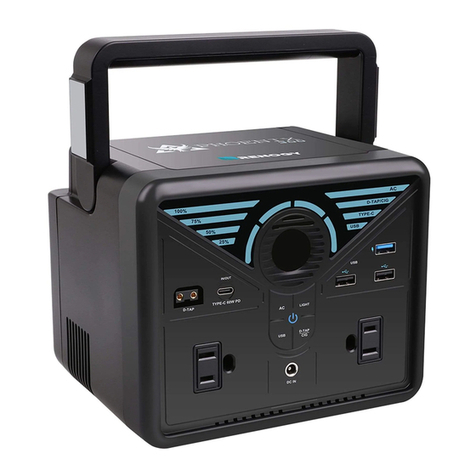
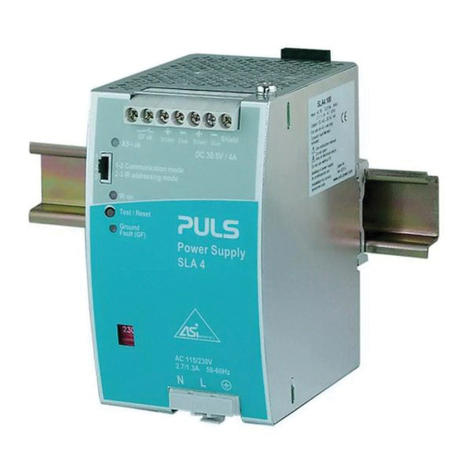
C INVERTER BP300-UL User manual

Model: BP300-UL
PORTABLE POWER STATION
User Manual
AC DC USB

-1-
ABOUT THE PRODUCT
SAFETY INSTRUCTIONS (IMPORTANT)
Remove all outer packing and uncoil cables before using the machine.
This product is not suitable for children.
If other people use the machine, make sure they are fully aware of how to use it
safely and have read and understood the instructions.
Do not use near flammable gases or flammable liquids.
Do not expose machine to temperatures exceeding 40℃(104℉).
Do not operate the unit with a damaged power cord or plug.(Please replace the
power cord or plug immediately)
Do not charge the unit with a damaged extension cord.
Do not operate the unit if it is severely hit, dropped or otherwise damaged in
any way; give it to a qualified service person.
Do not disassemble the machine. If it needs repair, please contact customer
service for help.
To reduce the risk of electric shock, unplug the unit from the outlet and turn off
controls before performing any maintenance or cleaning.
The machine will get hot during use, and must be properly ventilated. Please
make sure there is at least 7.5 cm(3 in.) of air space around.
Thank you for using the multi-functional portable Power Station developed and
produced by C INVERTER. This product has the function of a AC output and
multi-interface DC output, which can meet the power supply requirements of
mobile phones, projectors, juicers, small fridges, subwoofers, laptops, video
cameras, CD players, various chargers, game consoles, fans, mini-drones, lights,
and other equipments. It also has a built-in LED light. Suitable for home emergen-
cy standby power, outdoor travel, emergency rescue, field work and other
applications.
-2-
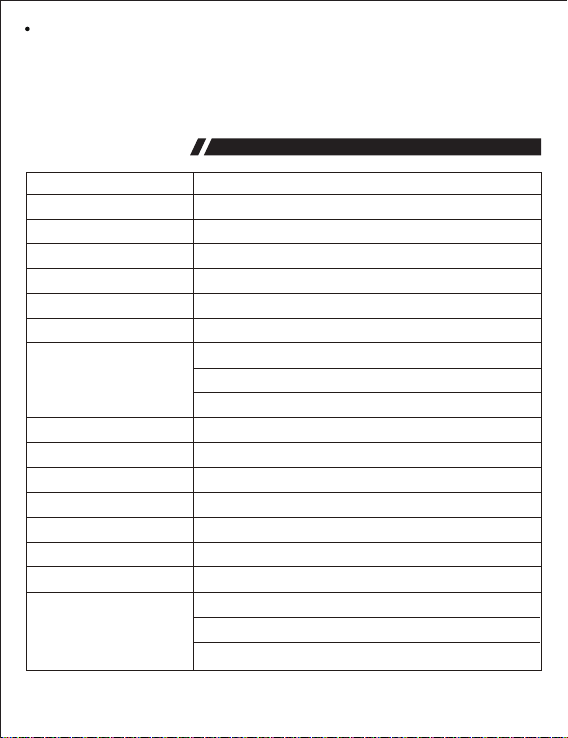
SPECIFICATION
Model
Capacity
Size(LWH)
Weight
Internal battery type
DC Input
Input/Output
BP300-UL
296Wh
230 x 140 x 203mm
3.4kg/7.5lb
lithium polymer battery
18V/3A (Note: PV/solar panels/car charger input 11V~30V)
5V/3A, 9V/3A, 12V/3A, 15V/3A, 20V/2.25A
6.5Hrs with 18V/3A adapter; 6.5Hrs with PV/solar panels 60W
9.5Hrs with car charger; 7.5Hrs with PD 45W adapter
3.5Hrs with DC input and Type-C PD adapter simultaneously
5V/3A, 9V/2A, 12V/1.5A
5V/3.1A total (single port 2.4A Max)
110V/60Hz/300W (pure sine wave)
LCD display
0~50℃(32~122ºF)
-20~60℃(-4~140ºF)
Short-circuit protection, over-current protection,
Over-voltage protection, under-voltage protection,
Over-load protection, temperature protection.
Protection functions
Charging time
DC Output
USB QC 3.0 Output 1
USB dual Output 2/3
AC dual Output
Battery indicator
Charging temperature
Discharge temperature
12V-16.8V/12A (single port 10A Max)
Do not place the machine on flammable objects such as carpets, upholstery,
paper, cardboard, etc. When the machine is in operation, please stay away from
items easily affected by high temperature, such as blankets, pillows, sleeping
bags, etc.
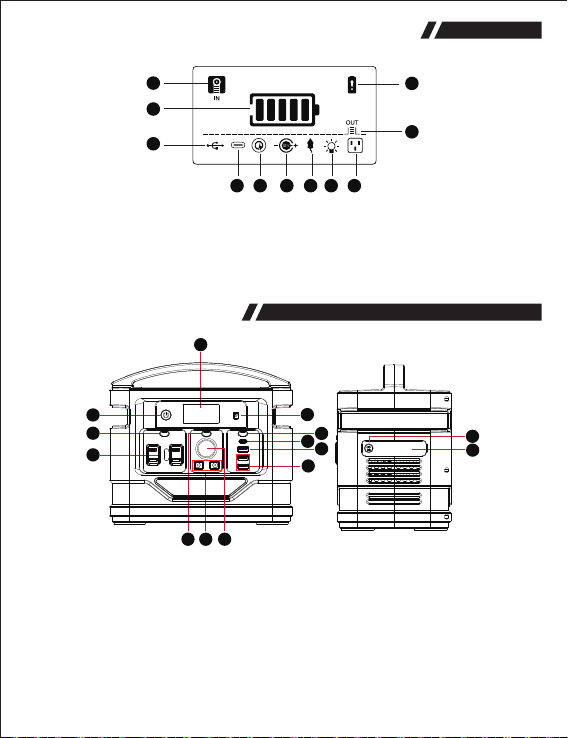
3. DC input 3.5mm
4. AC switch
7. Cigarette lighter output
8. DC output 5.5mm
11. QC 3.0 output 1
12. USB dual output 2/3
Be careful!! This AC power socket and voltage on product are different according to
different countries or regions, please refer to the actual product.
-3-
PRODUCT OVERVIEW
1
4
5
12
11
13
14
9
3
2
10
6 8 7
DISPLAY SCREEN SYMBOL DESCRIPTION
1
2
3
10
11
4 65 7 8 9
1. Charging indicator
2. Electric quantity indicator
3. USB output
4. Type-C output
5. QC3.0 output
6. 12V DC output
7. Cigarette lighter output
8. LED light
9. AC output
10. Output indicator
11. Warning
1. Master switch
2. LCD display
5. AC output
6. DC switch
9. USB switch
10. Type-C PD ~In(Out)
13. LED switch
14. LED light

For any functions to work, please make sure the ‘Master Switch’ is turn on.
1) How to supply power from DC 5.5mm output and cigarette output?
Connect your product to this DC 5.5mm port or cigarette port. Press ‘DC’ switch to
turn on, LCD screen will show ‘ ’ and ‘ ’ . Press ‘DC’ switch again and it will
shut down.
-4-
GUIDE TO OPERATE
2) How to use USB ports?
A: when you need to connect Type-C PD connection, locate the proper port on
panel, the LCD screen will show ‘ ’ . When cable is disconnected, the power
will shut down automatically.
B: when you connect a ‘USB QC 3.0’ connection, locate the proper port on panel.
Press ‘USB’switch, the LCD ‘ ’ + ‘ ’ are on. Press ‘USB’ switch again to
shut down.
C: when you connect regular USB connections, locate the proper port on the right
of panel. Press ‘USB’ switch, the LCD ‘ ’ + ‘ ’ are on. Press ‘USB’ switch
again, it will turn off.
A. Type-C PD In(Out)
C. USB (5V/3.1A Max)
5.5mm DC 12V~16.8V products
Cigarette 12V~16.8V products
B. USB QC 3.0

-
condition.
3) How to use AC ports?
Press the ‘AC’ switch to turn on, and connect AC devices, the icon ‘ ’ will light
up on LCD screen. Press ‘AC’ switch again to turn off.
Pay attention to AC power for the appliances. Make sure the total power consump
tion for all appliances is less than 300W.
Warning: The interface specifications and voltage standards in different countries
are different. Before use, please carefully check whether the product specifications
are consistent with the usage specifications of electrical appliances, otherwise it
may lead to dangerous conditions.
If AC device has short circuit or more power required than the rated output on
power station, will trigger the device to protect itself on short circuit or over load
When the product is not in used, please press corresponding key or long press
the ‘POWER’ key for 2s to conserve power.
AC load shall not exceed 300W rated power, otherwise it will self-protect.
-5-
1. Press ‘ ’
2. Press ‘ ’
3. Press ‘ ’
4. Long press
-6-
5) How to charge this product?
A. When using the 18V/3A adapter, plug 3.5mm port to the product, then
insert AC adapter to wall outlet.
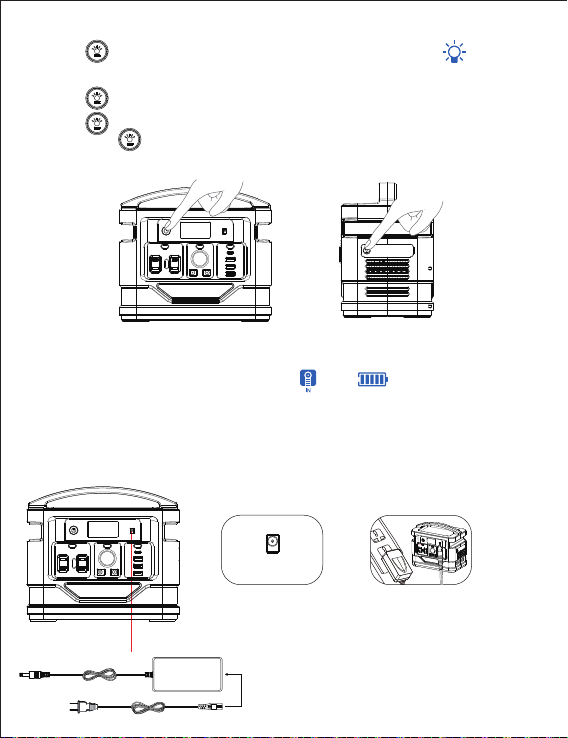
4) How to use flashlight?
button again to SOS mode;
button once more time to rapid flash;
‘ ’ button for 2 seconds to turn off the LED light.
‘ ’
When the product is normally charging, the ‘ ’ and ‘ ’ will flash on LCD screen.
After fully charged offen 10 seconds, it will turn off automatically.
The other end is connected to the
AC power source for charging
through the power adapter.
Step1: Step2:
DC Input
Connect the output line of
the charger to the DC input
port of the front panel of
the unit.
button for 2 seconds to turn on the LED light, the icon
will light up on LCD screen;


C. How to charge this product with solar panels?
1. Place the solar panel in a direct sunlight. Do not expose the power station to
direct sunlight or wet condition.
2. Connect your 3.5mm output of solar panel with the DC input port of the product.
-7-
The other end is connected to the
AC power source for charging
through the power adapter.
Step1: Step2:
B. How to charge with Type-C PD?
Insert the ‘Type-C’ connection to the proper port, plug the AC adapter to wall outlet.
In(Out)
Plug the charging cable
into the In(Out) port.
D. How to charge with DC input and Type-C PD-In?
-8-
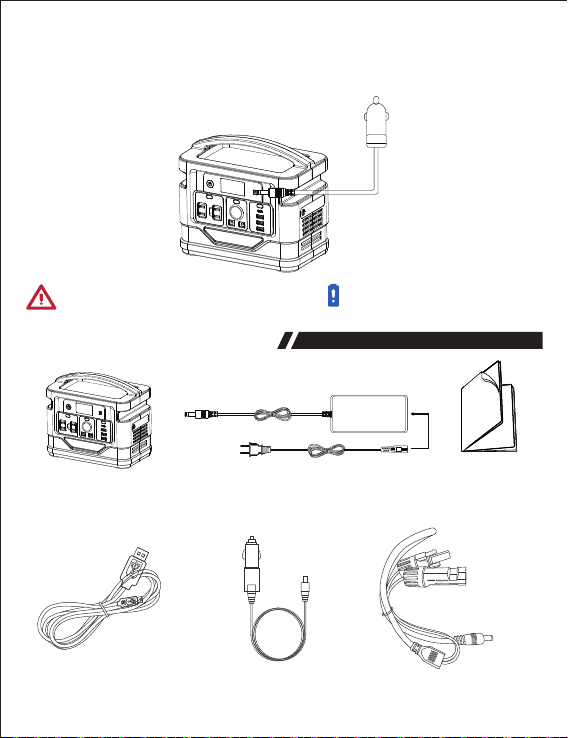
E. How to use a car charger to charge this product?
Plug the car charger cable into the 3.5mm DC input. Plug one end into the 12V
cigarette lighter socket of the vehicle.
PRODUCT ACCESSORIES
When there is a failure, corresponding icon and ‘ ’ will flash on LCD screen.
Support charging with DC and Type-C input simultaneously.
AC Adapter User Manual
USB Cable Car charging cable Solar charging cable
BP300-UL Portable
power station
Table of contents