
BZB Gear BG-AVTPG-MINI User manual
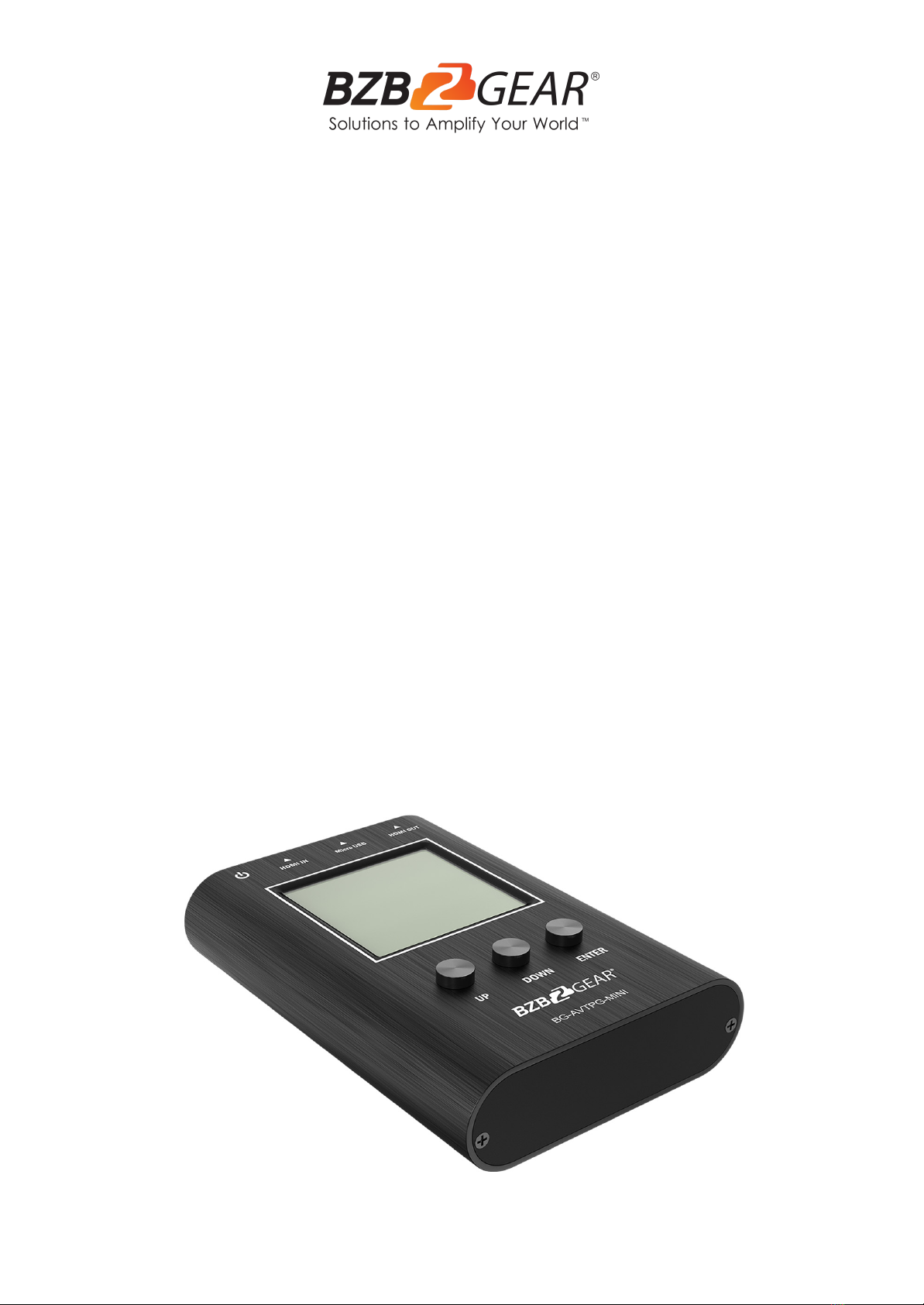
BG-AVTPG-MINI
1080P/4K UHD HDMI 2.0 18Gbps Portable Signal Test
Generator/Analyzer
User Manual

BZBGEAR BG-AVTPG-MINI PRODUCT MANUAL
Address: 830 National Drive #140, Sacramento, CA 95834, USA ·Tel: +1(888)499-9906 ·Email: support@bzbgear.com 2

BZBGEAR BG-AVTPG-MINI PRODUCT MANUAL
TABLE OF CONTENTS
Statement 4
Safety Precaution 4
Introduction 5
Features 5
Packing List 5
Technical Specifications 6
Operation Controls and Functions 7
Menu Operation 8
Operation 9
Application Example 12
Tech Support 13
Warranty 14
Mission Statement 15
Copyright 16
Address: 830 National Drive #140, Sacramento, CA 95834, USA ·Tel: +1(888)499-9906 ·Email: support@bzbgear.com 3

BZBGEAR BG-AVTPG-MINI PRODUCT MANUAL
Statement
Please read these instructions carefully before connecting, operating, or configuring this
product. Please save this manual for future reference.
Safety Precaution
●To prevent damaging this product, avoid heavy pressure, strong vibration, or immersion
during transportation, storage, and installation.
●The housing of this product is made of organic materials. Do not expose to any liquid,
gas, or solids which may corrode the shell.
●Do not expose the product to rain or moisture.
●To prevent the risk of electric shock, do not open the case. Installation and maintenance
should only be carried out by qualified technicians.
●Do not use the product beyond the specified temperature, humidity, or power supply
specifications.
●This product does not contain parts that can be maintained or repaired by users.
Damage caused by dismantling the product without authorization from BZBGEAR is not
covered under the warranty policy.
●Installation and use of this product must strictly comply with local electrical safety
standards.
Address: 830 National Drive #140, Sacramento, CA 95834, USA ·Tel: +1(888)499-9906 ·Email: support@bzbgear.com 4

BZBGEAR BG-AVTPG-MINI PRODUCT MANUAL
Introduction
The BG-AVTPG-MINI HDMI 2.0a is a hand-held, pocket size, and rechargeable device
which can generate HDMI signals, detect important HDMI features, and examine cable
quality. With the BG-AVTPG-MINI installers can easily setup and analyze HDMI equipment
in seconds.
In “Source” mode the BG-AVTPG-MINI provides reliable video patterns up to HDMI 2.0a
4K@60Hz 4:4:4 or 4K HDR, including HDMI 1.4 resolutions such as 1080P and 720P. With
adjustable color depth, installers can instantly test the connected display’s capabilities.
In “Sink” mode the BG-AVTPG-MINI can be used as a reliable HDMI signal detector to have
important information such as resolution, frame rate, HDCP version. These important pieces
of information can help installers deal with tedious HDMI compatibility issues with ease.
In the “Cable” mode this handy gadget can verify the wire condition of an HDMI cable and
also provide a cable quality indicator to help installers understand the cable status before
doing any installation.
Features
●Video resolution up to 4K2K@60 4:4:4 8bit, HDR 10 bits, 12 bits, 16 bits
●Built-in 3 video patterns
●Both HDMI input and output support up to HDMI 2.0
●HDMI feature analysis up to 4K2K@60 4:4:4 8bit HDMI 2.0 input
●HDCP 1.4 & 2.2 compliant
●Tests cable quality
●Provides statistical analysis for cable quality or connection stability
●Hand-held pocket size
●Rechargeable battery for portability for up to 3 hours
Packing List
●1x BG-AVTPG-MINI
●1x Micro-USB cable
●1x User Manual
●1х Quick Start Guide
Address: 830 National Drive #140, Sacramento, CA 95834, USA ·Tel: +1(888)499-9906 ·Email: support@bzbgear.com 5
BZBGEAR BG-AVTPG-MINI PRODUCT MANUAL
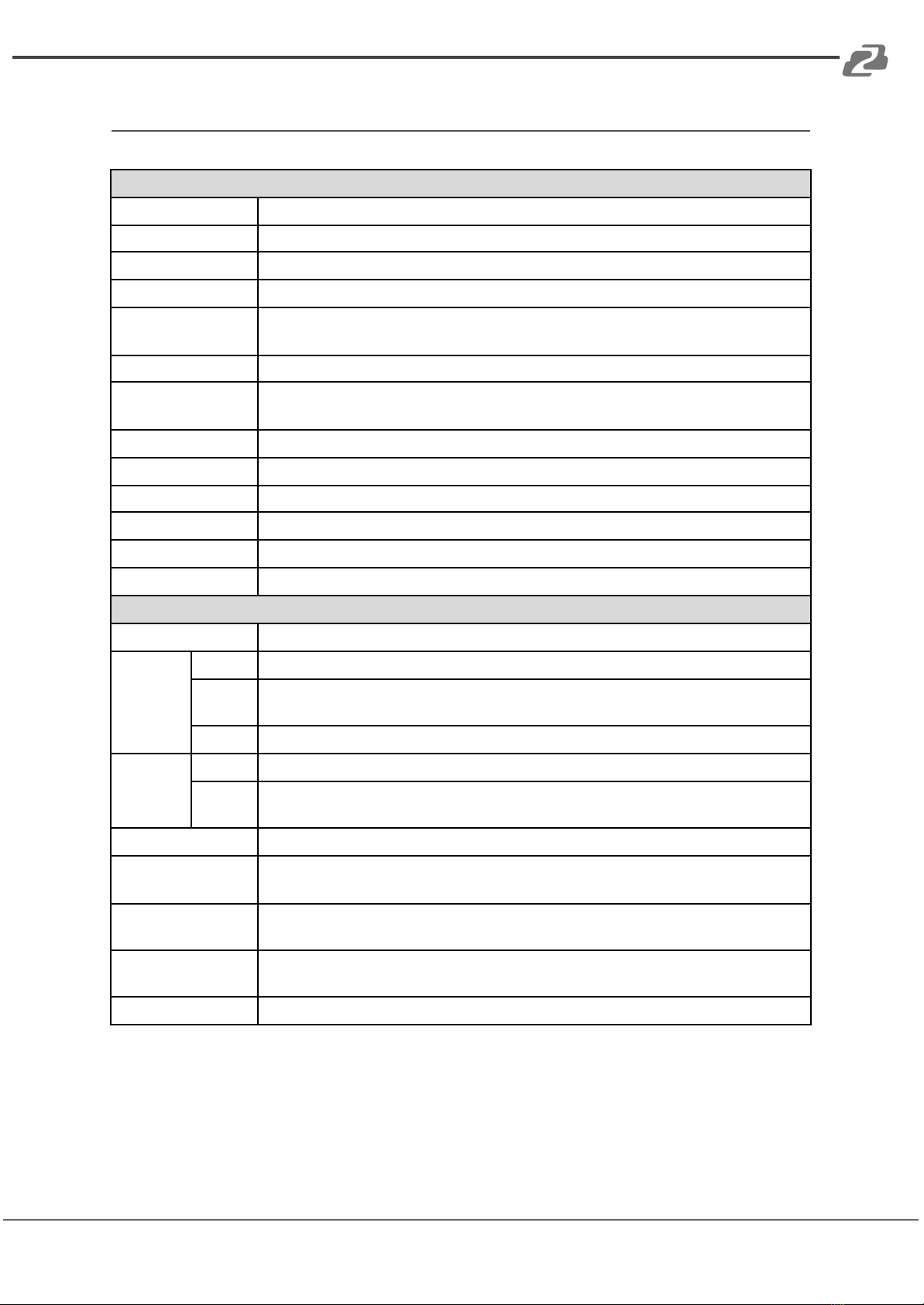
Technical Specifications
Technical
Role of usage
HDMI 2.0a Installation Gear
Video bandwidth
Single link 600MHz [18Gbps]
HDMI compliance
HDMI 2.0 and below
HDCP compliance
HDCP 2.2 and below
Video Support
up to 4K60 4:4:4 8bit,
4K2K60 4:2:0 16bit (HDR)
ESD protection
Human body model — ±15kV [air-gap discharge] & ±8kV [contact discharge]
Video Format
Support
HDMI
Input
1x HDMI
Output
1x HDMI
Control
Push Button
HDMI connector
Type A [19-pin female]
USB Support
Firmware update / Recharge
USB connector
Micro-USB (Type B)
Mechanical
Enclosure
Metal case
Dimension
s (LxWxH)
Model
130 x 89 x 14mm [5.1” x 3.5" x 0.6"]
Packag
e
198 x 137 x 74mm [7.8" x 5.4" x 2.9"]
Carton
420 x 400 x 300mm [1'4"x 1'3" x 11.8"]
Weight
Model
220g [7.8oz]
Packag
e
320g [11.3oz]
Power supply
Micro-USB / Battery
Power
Consumption
5W [MAX]
Operation
temperature
0~40°C [32~104°F]
Storage
temperature
-20~60°C [-4~140°F]
Relative humidity
20-90% RH [no condensation]
Address: 830 National Drive #140, Sacramento, CA 95834, USA ·Tel: +1(888)499-9906 ·Email: support@bzbgear.com 6
BZBGEAR BG-AVTPG-MINI PRODUCT MANUAL
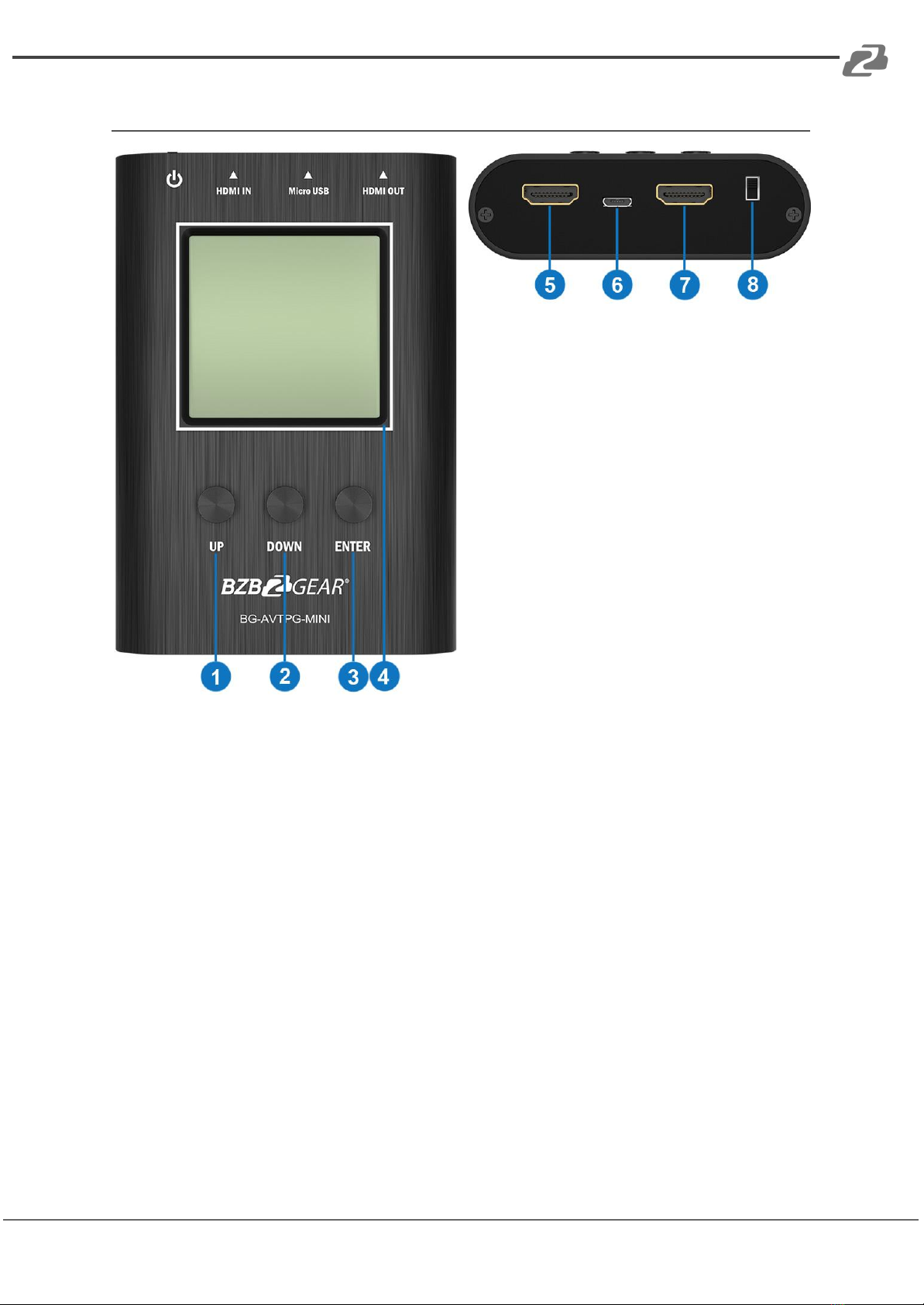
Operation Controls and Functions
1. Button (UP)
2. Button (ENTER)
3. Button (DOWN)
4. LCD Display: the measured data is
shown here
5. OUTPUT: HDMI output
6. Micro-USB: Firmware update /
Recharge
7. INPUT: HDMI input
8. Power Switch: Power ON/OFF Switch
BG-AVTPG-MINI will automatically enter battery saving mode after 1 minute of idle. During
battery saving mode, if the user would like to wake the BG-AVTPG-MINI, press any button.
When plugging in an active HDMI input the BG-AVTPG-MINI will NOT enter battery saving
mode.
Address: 830 National Drive #140, Sacramento, CA 95834, USA ·Tel: +1(888)499-9906 ·Email: support@bzbgear.com 7
BZBGEAR BG-AVTPG-MINI PRODUCT MANUAL
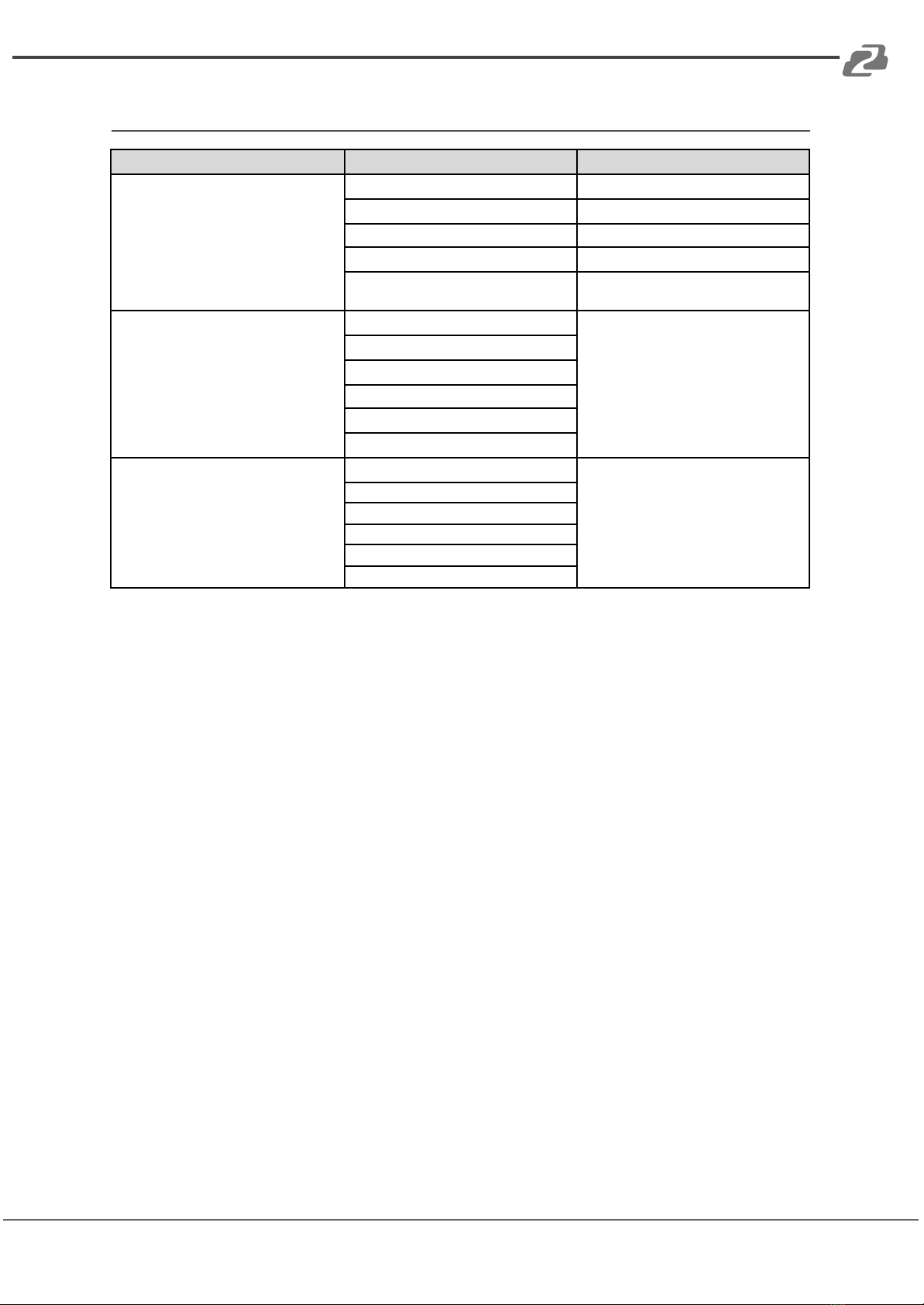
Menu Operation
Menu
Display Items
Remarks
SOURCE MODE
Resolution
Color space
Color depth
HDCP
Pattern
provide three test patterns for user to
use (Ramp, Toggle, Color Bar)
SINK MODE
Resolution
read the HDMI information from input
source
Color space
Color depth
HDCP
AUDIO
EDID
CABLE MODE
CED
link quality estimator ‘please refer to
cable mode section
CEC
HE AC
+5V
HPD
DDC
*Menu items subject to change without notification.
Address: 830 National Drive #140, Sacramento, CA 95834, USA ·Tel: +1(888)499-9906 ·Email: support@bzbgear.com 8
BZBGEAR BG-AVTPG-MINI PRODUCT MANUAL
Operation
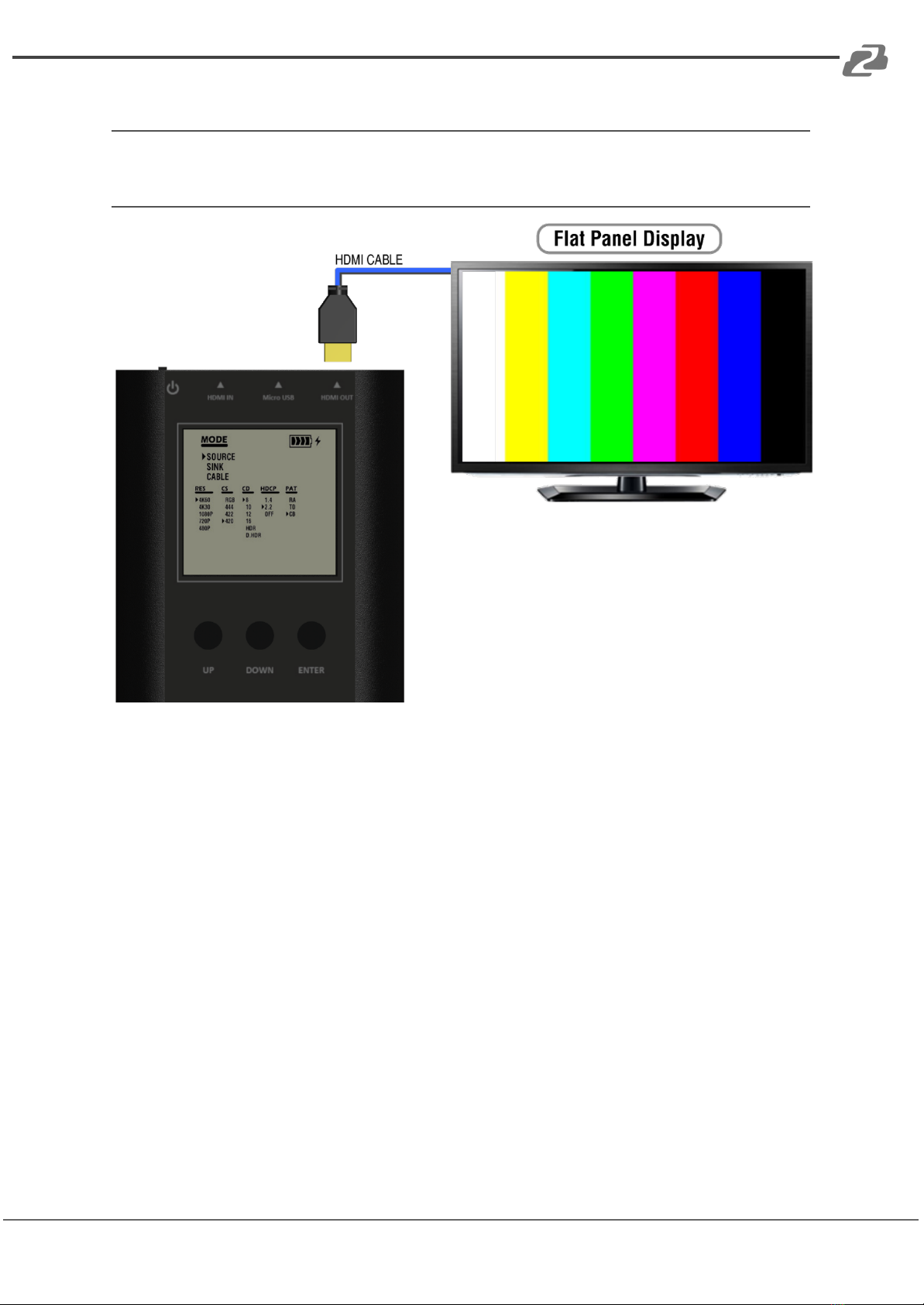
Source Mode
How to run Source Mode:
●Make sure to connect the BG-AVTPG-MINI HDMI output port and the display.
●Use buttons to select MODE category and enter SOURCE mode.
●Use buttons to set up the output signal format and video testing pattern.
Address: 830 National Drive #140, Sacramento, CA 95834, USA ·Tel: +1(888)499-9906 ·Email: support@bzbgear.com 9
BZBGEAR BG-AVTPG-MINI PRODUCT MANUAL
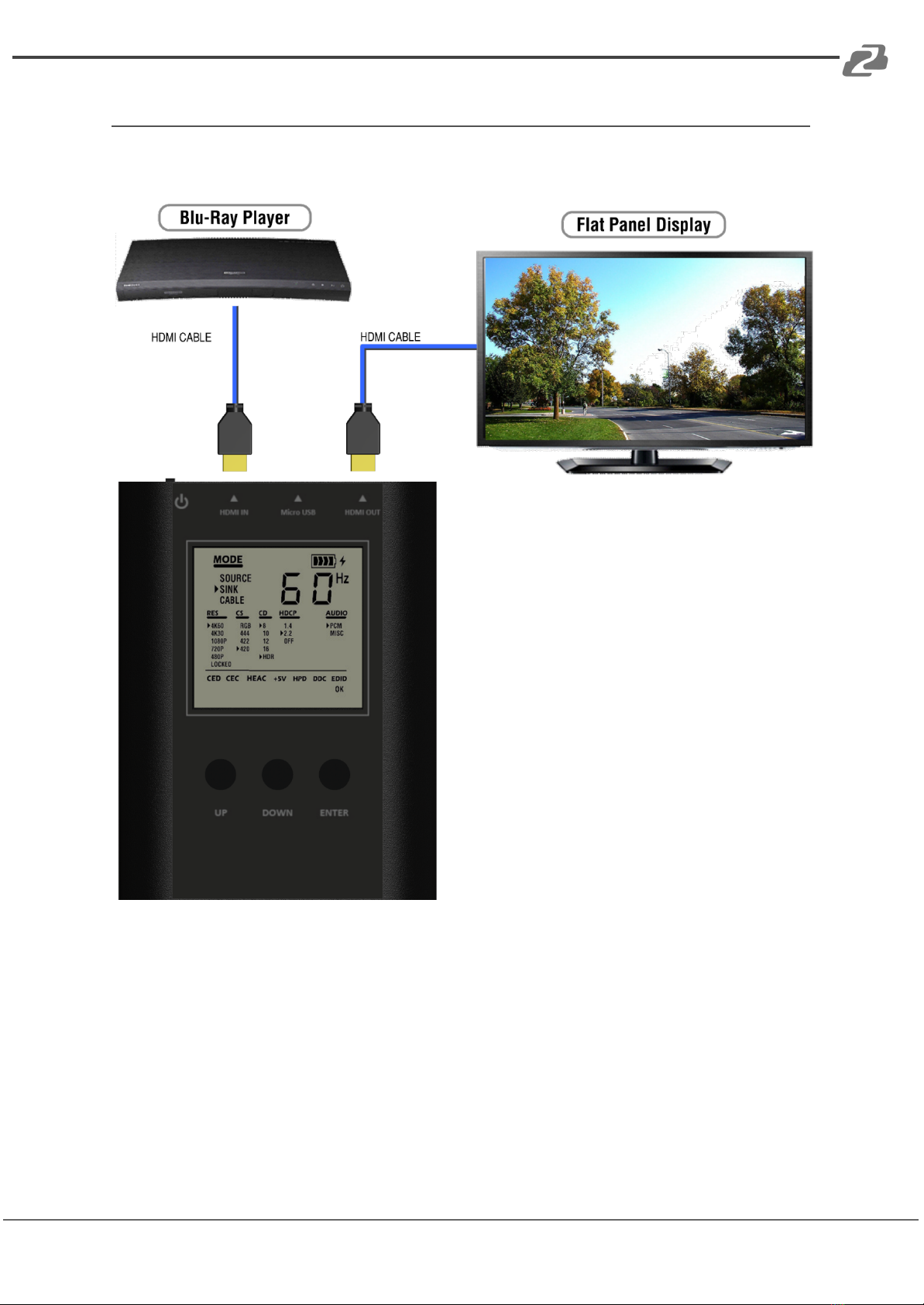
Sink Mode
When BG-AVTPG-MINI is in sink mode, it can read the HDMI source’s information and the
input HDMI can be passed through to an HDMI capable display if needed (as shown below).
How to run Sink Mode:
●Connect the BG-AVTPG-MINI between HDMI source and HDMI display.
●Use buttons to select MODE category and select SINK mode.
●The source information will be present on the LCD. The process of acquiring HDMI
information will take about 3~5 seconds.
Address: 830 National Drive #140, Sacramento, CA 95834, USA ·Tel: +1(888)499-9906 ·Email: support@bzbgear.com 10
Table of contents
Other BZB Gear Test Equipment manuals


