
Burgercis Music SUDOKU User manual

Notice:
踩镲- Hi-hat pedal
脚鼓- Bass Drum
SUDOKU
HOME PRACTICE
ELECTRONIC DRUM SET
Burgercis Music Offer Shop Sdn Bhd

A. Product Introduction..........................1
B. Product Features...............................1
C. Appearance Structure Diagram.........2
D. Fast Installation Guide.......................3
E. Module Function Description.............6
F. Drum Kit Timbre list...........................8
G. Demonstration Number list...............8
H. Common Operation Instructions.......9
I. Maintenance and Usage...................9
J. Precautions.......................................9
K. Abnormal Product Problems...........10
Index

Sincerely thank you for purchasing our electronic drum!
The electronic drum of our company is very portable.
This product has a very precise structural design. In order to
avoid damage, please pay attention when operating.
For normal use and maintenance, please read the following
usage methods & product operation methods in detail, especially
for young children, please read a detailed explanation of the
product usage methods
B. Product Features:
1. Small size and easy to carry, so it is convenient for students
to play and ensemble.
2. It can cover the needs of juniors and professionals, and is
more suitable for music performance & general music practice.
3. A variety of electronic drum sounds, simulating the real impact
effect.
4. When using headphones, you can enjoy playing without
disturbing others. When you are not using headphones,
you need to connect speakers.
1
A. Product introduction:
1. No built-in speakers, you need to connect headphones or
speakers to use.
2. True timbre, simulating real blow effect.
3. USB interface, powered by USB cable.
4. Can play Popular, Rock, Latin, Electronic and other styles.
5. Use the pedal to control Hihat, to simulate real Hihat effect.
6. Kick drums are simulated by pedals, hands and feet are used
more like real drums to practice, train hand & foot coordination.
7. Headphone output, can practice without disturbing others.
8. Basic functions of built-in metronome, best rhythm of training.
9. Easy to carry

C. Appearance Structure Diagram:
Crash Cymbal
Tom1 Tom2
Snare Drum
Module
Hihat Cymbal
Electronic
Bass Drum
Electronic
Hihat Pedal
Floor Tom
Ride Cymbal
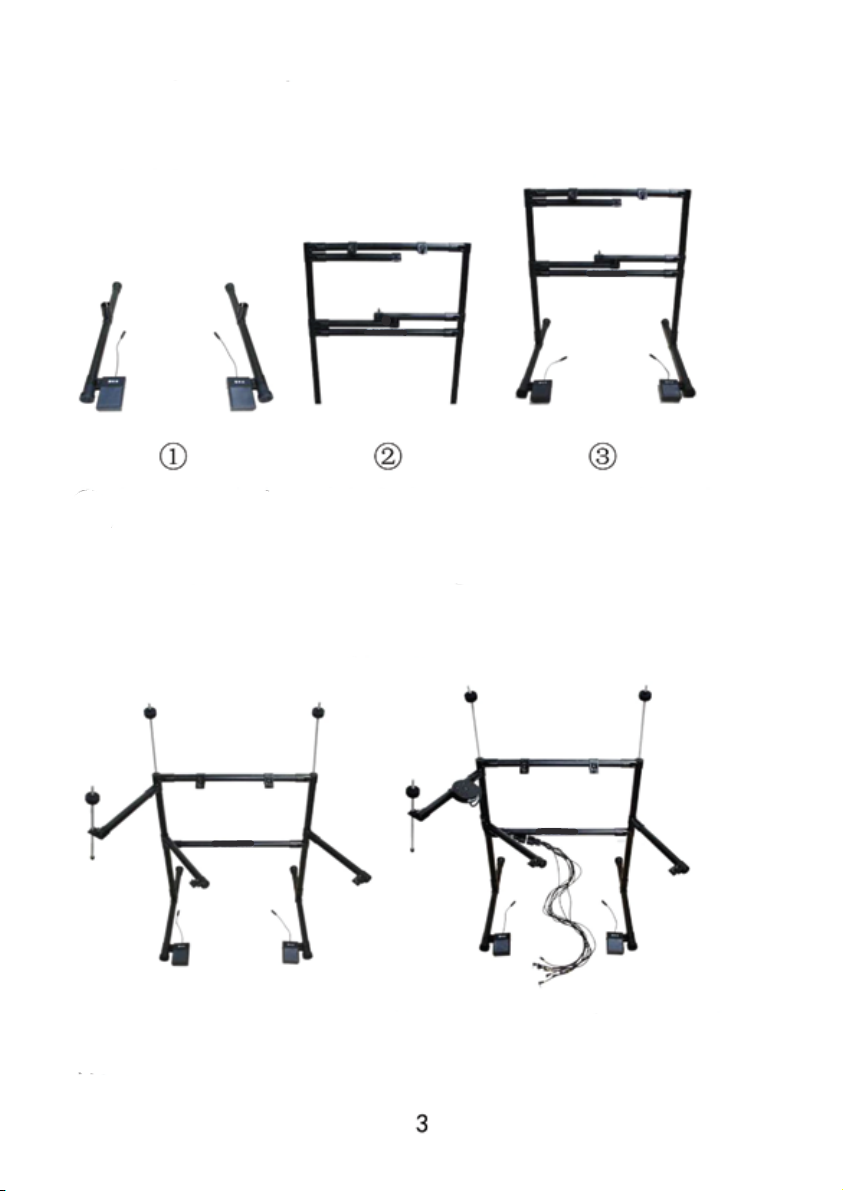
D. Quick Installation Guide:
1. Install Brackets
①Buckle the pedal on the tripod cup and tighten the screw with a
hexagon wrench, the electronic hi-hat is on the left, and the electronic
kick drum is on the right; insert the main frame ②vertically into the
tripod ①bayonet, the hexagon wrench locks the screw; ③Finish
installation.
2. Install Cymbal Hosting, Module, Connection Cable
Unfold the bracket (as shown in the figure) and adjust the angle
locking screw, install the cymbal support bar and fix the nut with a
double-ended wrench: install the module, serial port cable.

3. Quick Installation Guide:
Buckle of module is on the
left hand side bar
Tighten the screws with a hex wrench
on the back
4. Install Drum and Cymbals
Install the drum, adjust the direction of the drum so that the audio
interface on the drum faces away from us, and use a double-ended
wrench to lock the anti-lock nut at the bottom of the drum in the
opposite direction; install the cymbals in sequence and adjust the
direction of the cymbals, the audio interface of the film faces us, put
on a round cotton sleeve, a steel washer, and screw on the claw nut
(no need to tighten too much, so as to avoid triggering the resonance
effect of the cymbal and the stand).

5. Plug in the cable
According to the number on the connecting line, insert the connecting
line plug into the correspondingly numbered drum plate, cymbals,
electronic hi-hat, bass drum. Among them: Electronic hi-hat line 10 is
a single audio cable, plug in the hole of the electric drum module
PEDAL; the simple version of the electric drum has only one cymbals,
no ②cymbals, ②line does not need to be plugged; connect
headphones or audio plug drum the PHONES audio output hole of
the module, and the MP3 audio input hole of the mobile phone playing
song.
5

E. Module Function Description:

Module Function Description Table
No. Name Function
1
2
3
4
5
6
7
8
9
10
11
12
OFF/ON
DEMO
PLAY/STOP
CLICK
KIT
SPECIAL
VOL+
VOL-
USB/DC 5V
MP3
PHONES
PEDAL
Power Switch
Press the button to select and play
demo songs in sequence
Play, Stop demo
Metronome function, press the button
to select different beats in turn
Press the button to select the drum kit
tone in turn
Snare drum hi-hat positions interchanged,
it is recommended not to use
Adjust to increase the volume
Adjust volume reduction
USB power connector
MP3 audio input
Headphone and speaker output
Hi-hat interface, playing closed hi-hat
sound when stepping on hi-hat pedal,
playing open hi-hat sound when not
pressing the hi-hat pedal.
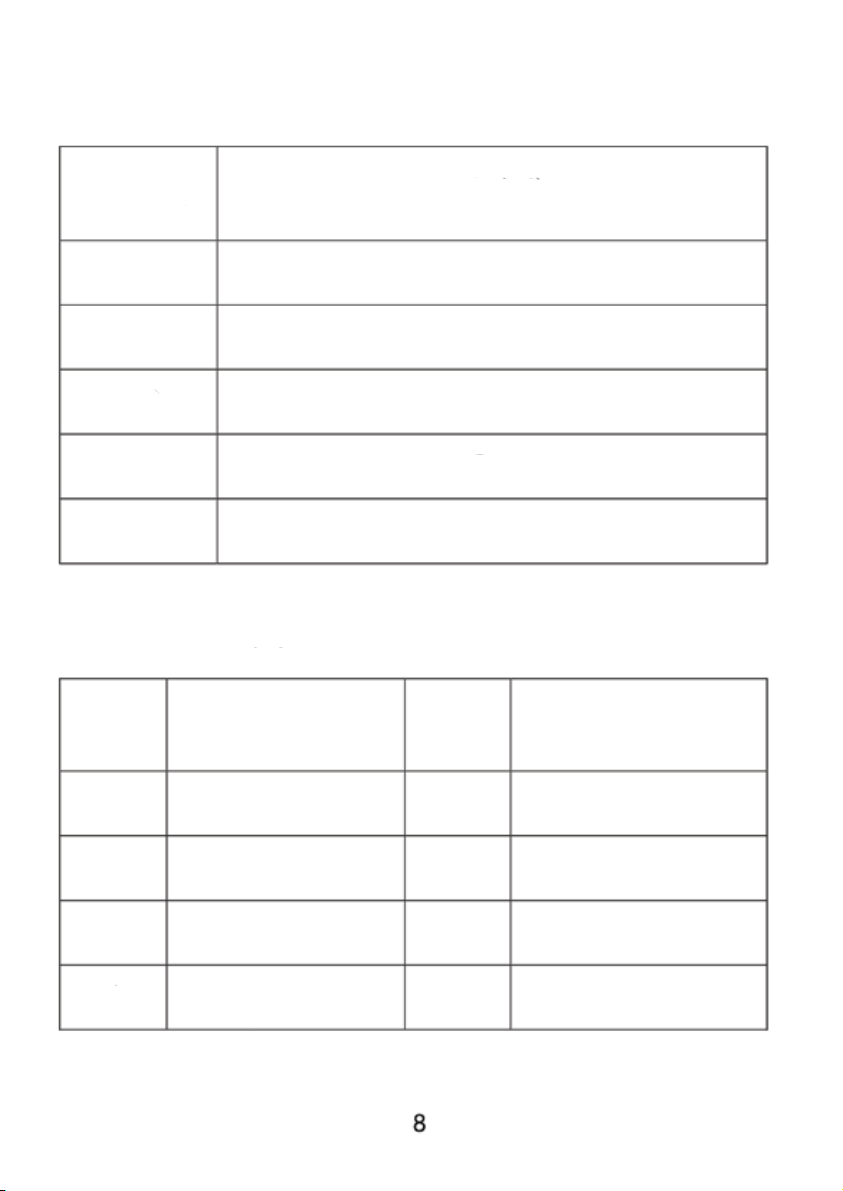
F. Drum Kit Timbre list:
G. Demonstration Number list:
Timbre No. English Name
No. English Name No. English Name
001
T01
T02
T03
T04
POP
ROCK
LATIN
ELECTRO
PERCUSSION
1
2
3
4
HEAVY ROCK
FUNK
LATIN
DANCE
5
6
7
8
SAMBA
CHA-CHA
SWING HI-HAT
UPBEAT ROCK
Table of contents


