Brook Pocket Auto Catch Lightning User manual
SUPPORT
ENGLISH
DEUTSCH
FRANÇAIS
ITALIANO
ESPAÑOL
中文
.............................................
.............................................
.............................................
.............................................
.............................................
....................................................
1
9
17
25
33
41
ver.08.21
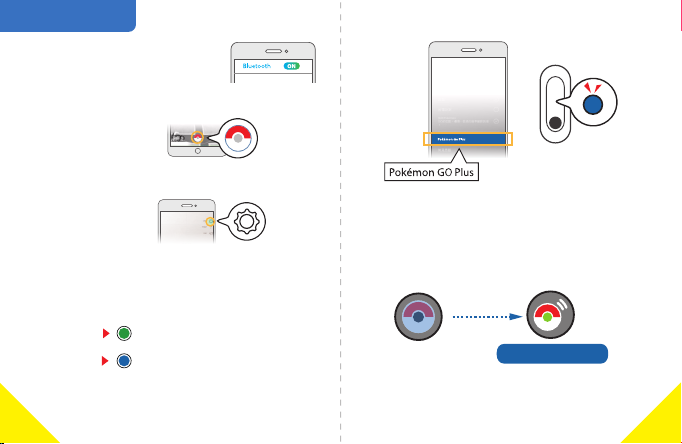
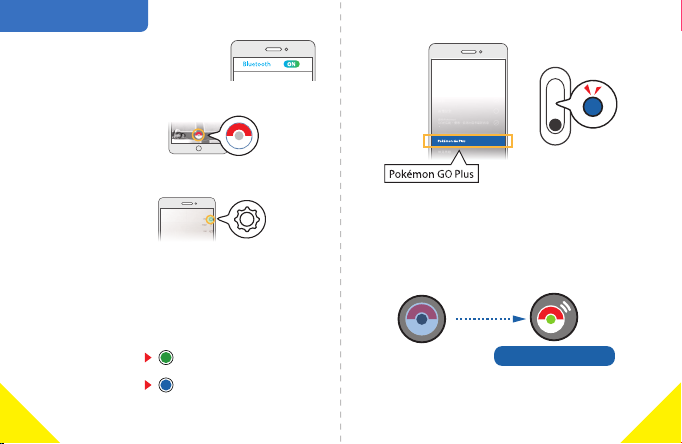
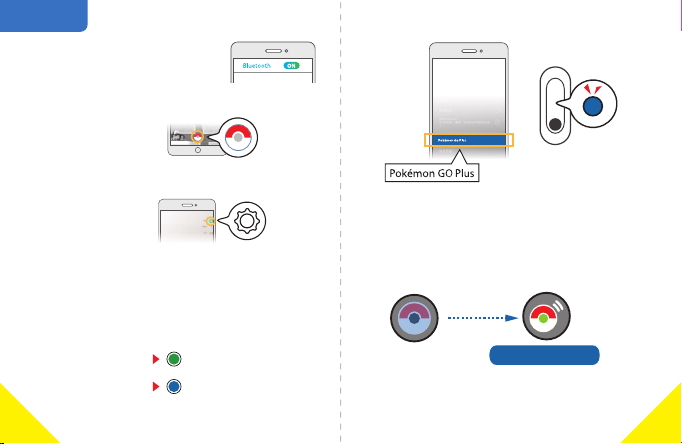
Pairing Connecon
Blue Light flashes
Green Light flashes
Unpaired ID
Paired ID
4. Select Pokémon GO Plus in seng page. Pocket Auto
Catch Lightning will start to pair automacally.
3. Tap Sengs.
1. Turn on your mobile Bluetooth.
2. Tap the Main Menu.
5. Waing for pairing. When the Pokémon GO Plus
icon turns on, it means pairing is successful.
Successful conneconNot connected
Connected to Pokémon GO
2
1
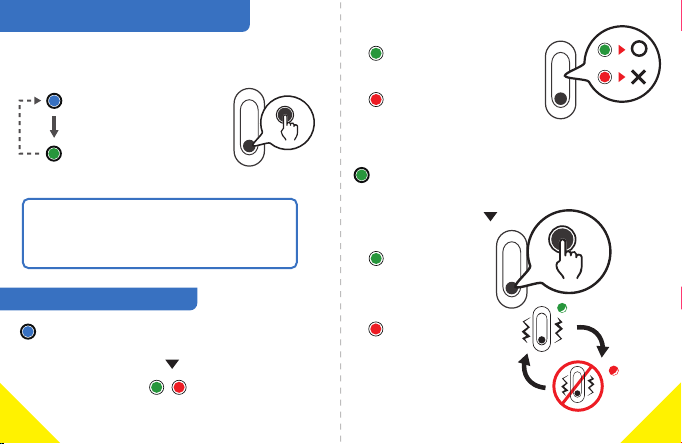
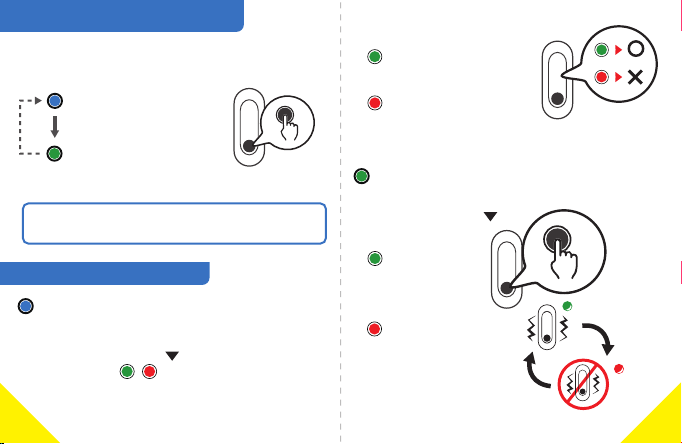
Short press the buon to switch between
the two funcon modes.
Mode 1: Blue Light
Mode 2: Green Light
Clear Bluetooth Pairing ID
Vibraon on / off
How to switch between Funcon Modes
Reset to factory sengs:
1. Hold buon
2. Insert the charger cable and connect to
a USB charger port.
Funcon Modes Descripon
Mode 1: Blue Light: Clear Bluetooth Pairing ID
Long press the buon for 3 seconds
Execute clearing ID Green and Red flashing
(Please wait 11-20 seconds when clearing ID)
Clear Failed
(Please re-operate)
Clear successful:
Green Light flashes 3 mes
Clear failed:
Red Light flashes 3 mes
Long press the buon for 3 seconds
Vibraon on:
Green Light
flashes 3 mes
Vibraon off:
Red Light
flashes 3 mes
Mode 2: Green Light: Vibraon on / off
3s
4
3
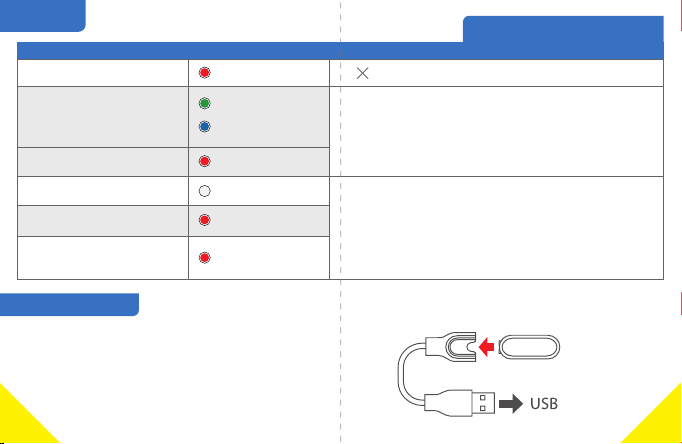
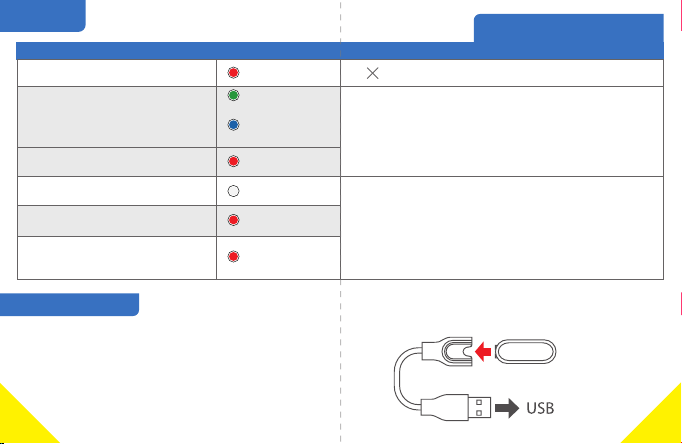
Situaon LED Vibraon
Others Power / Connecon / Other status
flashing
flashing
flashing
flashing 3 mes
Permanently on
intermient
White
Waing for connecon
Low Power
No internet connecon
Items are full
Out of Pokéball
Pokémon up to maximum/
Far away from Pokéstop
● 0 ~3 minutes: Vibrate 2 mes for every 10 seconds.
● 3 ~ 10 minutes: Vibrate 2 mes for every 30 seconds.
● Stop warning aer 10 minutes.
● If the situaon is "Intermient ", vibrate 3 mes
instead of 2.
● Vibrate 2 mes for every 2 seconds.
● Stop aer 3 cycles.
※When you are playing Pokémon GO,
there will be no vibraon.
(unpaired)
(paired)
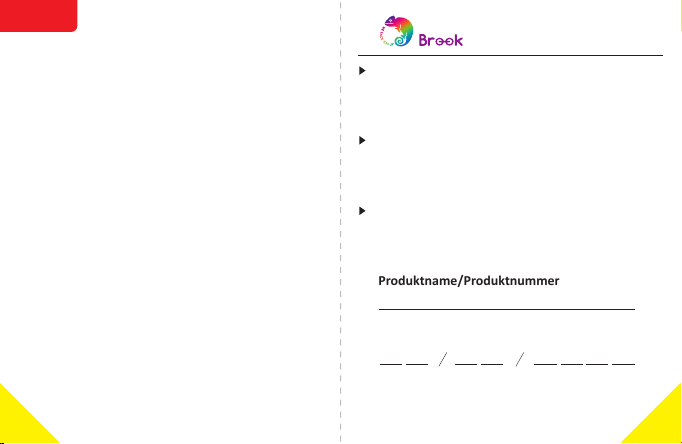
Charge your Device
● When charging Pocket Auto Catch Lightning, 3
colors (red, green, blue) will flash repeatedly.
● When the power is full, Pocket Auto Catch Lightning
will display a white light.
※Push hard ll LED flashes red/green/blue
6
5
Warning
When it not used over a long period of me, the rechargeable
baery may enter the protecon mode and cannot be charged
smoothly. You can acvate the rechargeable baery by pressing
and holding the buon, then plugging and unplugging the USB
charger several mes unl the white LED flashes, and then
releasing the buon.
Pocket Auto Catch Lightning may fail to pair to device because of
the update of Pokémon Go app, or the upgrade of Android and iOS.
Pocket Auto Catch Lightning will me out automacally every hour,
so players have to reconnect it.
Pocket Auto Catch Lightning will me out every 3-5 minutes if the
mobile is idle.
Beer keep it among -20°C ~ 45°C.
Suggested charging temperature: 10°C ~ 35°C.
Device requires Bluetooth low-energy compable smartphone with
Pokémon GO app installed. Compable with iPhone 6S or higher
devices with iOS Ver. 12 or higher version installed. Compable
with Android devices with 4 GB RAM or more. Bluetooth Smart
(Bluetooth Ver. 4.0 or higher) capability and Android Ver. 7.0 or
higher version installed.
This Product is not sponsored, endorsed, or approved by Nintendo,
The Pokémon Company or Nianc.
Product Warranty
Within one year from purchase date, Brook oers the
product warranty with normal operating
circumstances and non-human damage. It includes
free maintenance and return.
The following conditions are not included in the
warranty service: natural disasters, customer induced
damage, improper operation, and repaired by
non-Brook authorized sta.
Please be sure to keep both Warranty card and
Retailer invoice. These two documents are necessary
to guarantee a return.
If the purchase or invoice dates are incorrect or
unrecognized, the warranty service is unavailable.
Product Name / Product Number
*Warranty Period : 1 year
Date of Purchase
Date Month Year
87
4. Pokémon GO Plus in den Einstellungen auswählen.
Pocket Auto Catch Lightning wird automasch
verbunden.
3. Einstellungen öffnen.
1. Bluetooth des Mobilgeräts
einschalten.
2. Hauptmenü öffnen.
5. Wartet auf Verbindung. Wenn das Pokémon GO
Plus-Symbol erscheint, war die Verbindung
erfolgreich.
Verbindung herstellen
Blaues Licht blinkt
Grünes Licht blinkt
ID nicht verbunden
ID verbunden
Erfolgreich verbundenNicht verbunden
Mit Pokémon GO verbunden
10
9
Kurz auf den Knopf drücken, um zwischen den
zwei Modi zu wechseln.
Modus 1: Blaues Licht
Modus 2: Grünes Licht
Bluetooth-Verbindungs-
ID enernen
Vibraon an/aus
Zwischen den Funkonsmodi wechseln
Auf Werkseinstellungen zurücksetzen:
1. Knopf gedrückt halten
2. Mit Ladekabel an einen USB-Ladeanschluss anschließen.
Beschreibung der Funkonsmodi
Modus 1: Blaues Licht:
Bluetooth-Verbindungs-ID enernen
Knopf für 3 Sekunden gedrückt halten
ID wird enernt Grünes und rotes Licht blinken
(11–20 Sekunden auf das Enernen der ID warten)
Enernen fehlgeschlagen
(Bie erneut versuchen)
Enernen erfolgreich:
Grünes Licht blinkt 3-mal
Enernen fehlgeschlagen:
Rotes Licht blinkt 3-mal
Knopf für 3 Sekunden gedrückt halten
Vibraon an:
Grünes Licht
blinkt 3-mal
Modus 2: Grünes Licht: Vibraon an/aus
3s
Vibraon aus:
Rotes Licht
blinkt 3-mal
12
11
※Während du Pokémon GO spielst,
findet keine Vibraon sta.
Situaon LED Vibraon
Sonsges Energie/Verbindung/Anderer Status
Blinkt
Blinkt
Blinkt
Blinkt 3-mal
Leuchtet
durchgehend
Unregelmäßig
Weiß
Wartet auf Verbindung
Wenig Energie
Keine Internetverbindung
Rucksack ist voll
Keine Pokébälle übrig
Maximale Anzahl von Pokémon /
PokéStop ist zu weit weg
● 0 ~ 3 Minuten: Vibriert 2-mal alle 10 Sekunden.
● 3 ~ 10 Minuten: Vibriert 2-mal alle 30 Sekunden.
● Keine Warnungen nach 10 Minuten.
● Vibriert 3-mal sta 2-mal, wenn unregelmäßig.
● Vibriert 2-mal alle 2 Sekunden.
● Hört nach 3 Durchgängen auf.
(nicht verbunden)
(verbunden)
Das Gerät aufladen
● Während dein Pocket Auto Catch Lightning lädt,
blinken 3 Farben (Rot, Grün, Blau) wiederholt.
● Sobald das Pocket Auto Catch Lightning vollständig
aufgeladen ist, leuchtet ein weißes Licht.
※Gerät ganz fest in die Ladeschale drücken,
bis die LED rot/grün/blau blinkt
14
13
Warnung
Wenn das Gerät lange nicht genutzt wird, kann der wiederauflad-
bare Akku in den geschützten Modus wechseln, was zu Problemen
beim Aufladen führt. Du kannst den wiederaufladbaren Akku
akvieren, indem du den Knopf gedrückt hältst, das USB-Ladekabel
wiederholt anschließt und enernst, bis die weiße LED blinkt, und
dann den Knopf wieder loslässt.
Verbindung des Pocket Auto Catch Lightning zum Gerät kann durch
Update der Pokémon GO-App, von Android oder von iOS abbrechen.
Verbindung zum Pocket Auto Catch Lightning wird jede Stunde
automasch unterbrochen und muss wiederhergestellt werden.
Bei inakvem Mobilgerät bricht die Verbindung zum Pocket Auto
Catch Lightning nach 3–5 Minuten ab.
Möglichst zwischen -20 °C und 45°C halten.
Empfohlene Ladetemperatur: ca. 10–35 °C.
Gerät erfordert ein mit Bluetooth Smart kompables Smartphone
und die installierte Pokémon GO-App. Kompabel mit iPhone 6S
oder neuer und iOS 12 oder höher. Kompabel mit Android-Geräten
mit mind. 4 GB RAM. Gerät muss Bluetooth Low Energy-fähig
(Bluetooth 4.0 oder höher) sein und Android 7.0 oder höher
installiert haben.
Dieses Produkt wird nicht von Nintendo, The Pokémon Company
oder Nianc gesponsert, unterstützt oder genehmigt.
Innerhalb eines Jahres nach Zeitpunkt des Kaufes bietet
Brook eine Produktgarantie für Schäden, die bei normalem
Gebrauch und ohne Zutun des Nutzers auftreten. Diese
umfasst kostenlose Reparatur und Rücksendung.
Die folgenden Umstände werden von der Produktgarantie
nicht abgedeckt: Naturkatastrophen, Schäden durch den
Nutzer, unsachgemäßer Gebrauch und Reparaturen, die
nicht von Brook autorisiert wurden.
Bitte bewahre sowohl die Garantiekarte als auch die
Einzelhandelsrechnung auf. Diese beiden Dokumente
werden benötigt, um von der Garantie Gebrauch machen
zu können.
Produktgarane
Produktname/Produktnummer
*Garanezeit: 1 Jahr
Kaufdatum
Tag Monat Jahr
Wenn das Kauf- oder Rechnungsdatum falsch oder unkenntlich ist,
kann die Garane nicht in Anspruch genommen werden.
16
15
4. Séleconnez Pokémon GO Plus dans l'écran de
paramètres. Pocket Auto Catch Lightning iniera
alors automaquement l'appairage.
3. Touchez Paramètres.
1. Acvez le Bluetooth sur
votre téléphone.
2. Touchez le menu
principal.
5. En aente d'appairage. Lorsque l'icône de
Pokémon GO Plus s'éclaire, cela signifie que
l'appairage a réussi.
Appairage
La lumière bleue clignote
La lumière verte clignote
Idenfiant non appairé
Idenfiant appairé
Connexion effectuéeNon connecté
Connecté à Pokémon GO
18
17
Table of contents
Languages:
Other Brook Video Gaming Accessories manuals

Brook
Brook Sniper User manual

Brook
Brook POCKET ENERGY User manual

Brook
Brook Ras1ution User manual

Brook
Brook Pocket Trainer User manual

Brook
Brook Pocket Auto Catch Reviver User manual

Brook
Brook ZERO-PI User manual

Brook
Brook Pocket Auto Catch Reviver Plus User manual

Brook
Brook Marine User manual

Brook
Brook UFB-UP5 User manual