
BRERA PRODIVER Operating and maintenance manual

1
OUTSIDE COVER
WWW.BRERAOROLOGI.COM

3-22
MANUALE ISTRUZIONI | INSTRUcTIONAL MANUAL |
MANUAL DE INSTRUccIONES
Istruzioni | Instructions | Instrucciones:
24-43
45-65
23
Garanzia | Warranty | Garantía:
44
66

24
ENGLISH

25
PRODIVER
1. Chrono Second Hand
2. Minute Hand
3. Hour Hand
4. Chrono Minute Hand
5. Second hand
6. Date Window
7. Adjustable internal bezel
A. Crown
B. Date
C. Time
D. Screw crown adjustment
internal bezel for dive time setting
E. Dive time adjustment
SETTING THE TIME:
• Gently unscrew the crown to position C (the watch stops).
• Turn the crown until you reach the correct time.
• Push the crown back into position A.
SETTING THE DATE (quick mode):
• Pull out the crown to position B (the watch continues to run).
• Turn the crown until the correct date [ 1 ] appears.
• Push the crown back into position A.
Caution: never correct date between 9 pm and 0.30 am.
USING THE CHRONOGRAPH:
• The chronograph is able to measure and display time in 1/1 second up to maximum of 59 min. 59 sec.
ADJUSTING INTERNAL BEZEL FOR DIVE TIME SETTING:
• Gently unscrew the crown (D) to position (E).
• Adjust dive time setting bezel and align the minute hand with the "0" of the adjustable internal bezel.
• Push the crown back into position (D).
MEASURING TIME WITH THE CHRONOGRAPH:
• The chronograph can be started and stopped each time pusher (A) is pressed.
• Pressing pusher (B) resets the chronograph and all the hands return to their zero positions.
RESETTING THE CHRONO TO ‘12’ POSITION:
• Gently unscrew crown to position (C).
• Press top pushers (A) realign chrono hand manually to "12" position.
• Push the crown back into position A and rescrew.
• To test, press top pusher (A) for 5 seconds and push again to stop. Press bottom pusher (B).
Chrono should reset to "12."
A
1
2
3
4
5
6
7
B
DE
c
Pulsante A
Pulsante B

26
SETTING THE TIME:
• Gently unscrew the crown to position C (the watch stops).
• Turn the crown until you reach the correct time.
• Push the crown back into position A.
SETTING THE DATE:
• Pull out the crown to position B (the watch continues to run).
• Turn the crown until the correct date [ 1 ] appears.
• Push the crown back into position A.
Caution: never correct date between 9 pm and 0.30 Am.
2nd TIME ZONE:
• Pull out the crown to position B (the watch continues to run).
• Press push-button A and setting the 2nd time zone.
• Push the crown back into position A.
ALARM TIME SETTING:
• Gently unscrew the crown to position B.
• Turn the crown until you reach the correct time alarm.
• Push the crown back into position A.
• Press push-button B: 2 “bip”= alarm on / 1 “bip” = alarm off
• Press push-button B during alarm to stop alarm.
The alarm cycle works as follow:
• When alarm hour occurs, the movement generates double beeps during 15 seconds.
• A second cycle of 15 seconds is generated two minutes after the beginning of the rst one if alarm
has not been switched o by the user.
• After the second cycle (if user don’t stop it), the alarm is automatically switched o and will not restart until
the user does not manually switch it on.
ETERNO GMT
BRERA
BRERA
BRERA
A
1
2
3
4
5
6
B c
Pusher A
Pusher B
1. 2nd Time Zone Hand
2. Alarm hand 12h
3. Hour Hand
4. Minute Hand
5. Second Hand
6. Date Window
A. Crown
B. Date
C. Time

27
SETTING THE TIME:
• Gently pull the crown out to the 2nd click—position (C).
• Turn the crown until the desired time appears.
• Gently rescrew the crown back — position (A).
SETTING THE DATE:
• Gently pull the crown out to the 1st click—position (B).
• Turn the crown in a counter-clockwise direction until the desired date appears.
• Rescrew the crown back —position (A).
If the time is set between the hours of 9 p.m. and 1 a.m., the date may not change on the following day.
USING THE CHRONOGRAPH:
• The chronograph is able to measure and display time in 1/1 second up to maximum of 59 min. 59 sec.
MEASURING TIME WITH THE CHRONOGRAPH:
• The chronograph can be started and stopped each time pusher (A) is pressed.
Pressing pusher (B) resets the chronograph and all the hands return to their zero positions.
RESETTING THE CHRONO TO ‘12’ POSITION:
• Gently unscrew crown to position (C).
• Press top pushers (A) realign chrono hand manually to "12" position.
• Push the crown back into position A and rescrew.
• To test, press top pusher (A) for 5 seconds and push again to stop. Press bottom pusher (B).
Chrono should reset to "12."
ETERNO cHRONO
BRERA
BRERA
BRERA
A
1
2
3
4
5
6
7
B c
Pusher A
Pusher B
1. Chrono Second Hand
2. Minute Hand
3. Hour Hand
4. Chrono Minute Hand
5. Chrono Hour Hand
6. Date Window
7. Second Hand
A. Crown
B. Date
C. Time

28
SETTING THE TIME:
• Gently unscrew the crown to position C (the watch stops).
• Turn the crown until you reach the correct time.
• Push the crown back into position A and rescrew.
SETTING THE DATE*:
• Gently unscrew the crown to position B (the watch continues to run).
• Turn the crown counter-clockwise until the correct date appears.
• Push the crown back into position A and rescrew.
*If the time is set between the hours of 9 p.m. and 1 a.m., the date may not change on the following day.
USING THE CHRONOGRAPH:
• The chronograph is able to measure and display time in 1/1 second up to maximum of 59 min. 59 sec.
MEASURING TIME WITH THE CHRONOGRAPH:
• The chronograph can be started and stopped each time pusher (A) is pressed. Pressing pusher (B) resets the
chronograph and all the hands return to their zero positions.
RESETTING THE CHRONO TO “12” POSITION:
• Gently unscrew crown. Pull out crown to position (C). Press pushers (A & B) simultaneously for at least 2 seconds (the
center stop second rotates by 360 degrees and activates the corrective mode). To adjust the center stop second press
pusher (A) until desired position is reached. Press pusher B to continue to minute and hour counter hand if necessary.
To adjust press pusher (A) until desired position is reached. Push crown back to position (A) and re-screw.
BC
Pusher A
Pusher B
A
1
2
3
5
4
6
7
SUPERSPORTIVO SqUARE
1. Date Window
2. Second Counter
3. Hour Hand
4. Minute Hand
5. Minute Counter
6. 1/10 Second Counter
7. Second Hand
A. Crown
B. Date*
C. Time

29
SETTING THE TIME:
• Gently unscrew the crown to position C (the watch stops).
• Turn the crown until you reach the correct time.
• Push the crown back into position A and rescrew.
SETTING THE DATE*:
• Gently unscrew the crown to position B (the watch continues to run).
• Turn the crown counter-clockwise until the correct date appears.
• Push the crown back into position A and rescrew.
*If the time is set between the hours of 9 p.m. and 1 a.m., the date may not change on the following day.
USING THE CHRONOGRAPH:
• The chronograph is able to measure and display time in 1/1 second up to maximum of 59 min. 59 sec.
MEASURING TIME WITH THE CHRONOGRAPH:
• The chronograph can be started and stopped each time pusher (A) is pressed. Pressing pusher (B) resets the
chronograph and all the hands return to their zero positions.
RESETTING THE CHRONO TO “12” POSITION:
• Gently unscrew crown. Pull out crown to position (C). Press pushers (A & B) simultaneously for at least 2 seconds (the
center stop second rotates by 360 degrees and activates the corrective mode). To adjust the center stop second press
pusher (A) until desired position is reached. Press pusher B to continue to minute and hour counter hand if necessary.
To adjust press pusher (A) until desired position is reached. Push crown back to position (A) and re-screw.
B C Pusher A
Pusher B
A
1
2
3
5
4
6
DINAMIcO
1. Center Stop-Second
2. Minute Hand
3. Hour Hand
4. Minute Counter
5. Second Counter
6. Date Window
A. Crown
B. Date*
C. Time

30
SETTING THE TIME*:
• Push crown release button (8) to unlock crown guard.
• Gently pull the crown out to position C and turn crown until the desired time appears.
• Gently push crown in and push crown guard back into original—position 8.
*If the time is set between the hours of 9 p.m. and 1 a.m., the date may not change on the following day.
SETTING THE DATE:
• Gently pull out the crown to position B (the watch continues to run).
• Turn the crown counter-clockwise until the correct date appears.
• Push the crown back in and rescrew.
USING THE CHRONOGRAPH:
• The chronograph is able to measure and display time in 1/1 second up to maximum of 59 min. 59 sec.
MEASURING TIME WITH THE CHRONOGRAPH:
• The chronograph can be started and stopped each time by unscrewing pushers. Pressing Pusher A starts and stops
the chronograph and Pusher B resets the chronograph and all the hands return to their zero positions.
RESETTING THE CHRONO TO ‘24’ POSITION:
• Gently unscrew crown. Pull out crown to position (C). Press pushers (A & B) simultaneously for at least 2 seconds
(the center stop second rotates by 360 degrees and activates the corrective mode). To adjust the center stop second
press pusher (A) until desired position is reached. Press pusher B to continue to minute and hour counter hand if
necessary. To adjust press pusher (A) until desired position is reached. Push crown back to position (A) and re-screw.
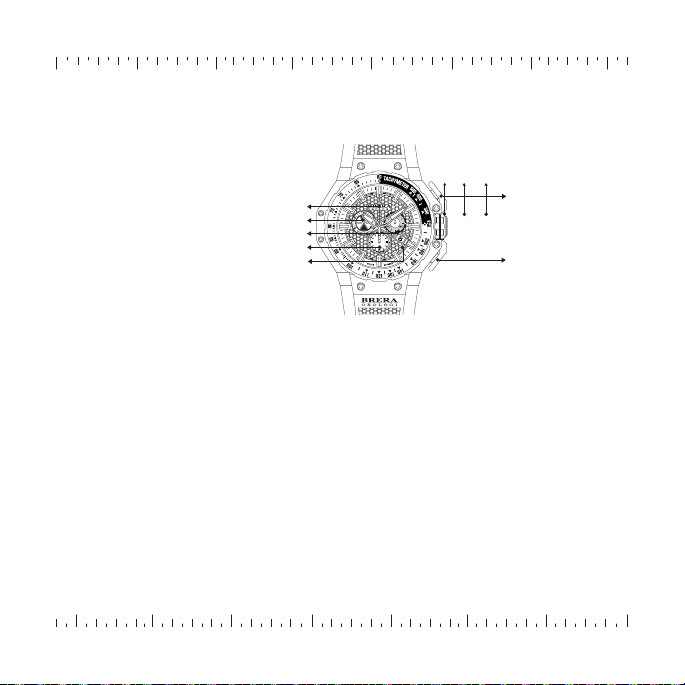
8
9
Pusher B
Pusher A 4
7
1
5
6
2
3
ABC
MILITARE
1. Minute Hand
2. Hour Hand
3. Second Hand
4. Date Window
5. Minute Counter
6. Hour Counter
7. Center Stop Second
8. Release Button
9. Crown Guard
A. Crown
B. Date
C. Time
31
B C
A
Pusher A
Pusher B
4
5
2
1
3
GRAN TURISMO
SETTING THE TIME:
• Gently unscrew the crown to position C (the watch stops).
• Turn the crown clockwise until you reach the correct time.
• Push the crown back into position A and rescrew.
SETTING THE DATE*:
• Gently unscrew the crown to position B (the watch continues to run).
• Turn the crown counter-clockwise until the correct date appears.
• Push the crown back into position A and rescrew.
*If the time is set between the hours of 9 p.m. and 1 a.m., the date may not change on the following day.
USING THE CHRONOGRAPH:
• The chronograph is able to measure and display time in 1/1 second up to maximum of 59 min. 59 sec.
MEASURING TIME WITH THE CHRONOGRAPH:
• The chronograph can be started and stopped each time pusher (A) is pressed. Pressing pusher (B) resets the
chronograph and all the hands return to their zero positions.
RESETTING THE CHRONO TO "12" POSITION:
• Gently unscrew crown. Pull out crown to position (C). Press pushers (A & B) simultaneously for at least 2 seconds
(the center stop second rotates by 360 degrees and activates the corrective mode). To adjust the center stop second
press pusher (A) until desired position is reached. Press pusher B to continue to minute and hour counter hand if
necessary. To adjust press pusher (A) until desired position is reached. Push crown back to position (A) and re-screw.
1. Center Stop-Second
2. Chrono Minute Counter
3. Second Hand
4. 12-Hour Counter
5. Date Window
A. Crown
B. Date*
C. Time
Table of contents
Other BRERA Watch manuals







