Bobot NAVI908 User manual

MAKE THE WORLD CLEAN
BOBOT NAVI908
Robotic Vacuum
Cleaner
Instruction
Manual
please read the instructions carefully before using the product

CONTENTS BOBOT ROBOTICS INC.
1. Install Application And Log In
2. APP Functions Introduction
3. Instructions For Use
4. Packing List
5. Machine Introduction
6. Product Operation
7. Product Maintenance
8. Product Parameters
9. Trouble-shooting
10. FAQ
11. Safety Information
12. AS Service And Warranty
13. User Information
·····························································································1
································································································2
··········································································································6
················································································································4
·······················································································································5
············································································································8
············································································································12
··············································································································15
·············································································································17
·········································································································································19
···············································································································20
··································································································21
··················································································································22

1.Scan the QR code, install the robotic vacuum application
2.Register and log in.
3.Turn on the robotic vacuum,wait and till voice prompt "
Hello, Master, the machine is ready", press two buttons of the
machine for 3 seconds at the same time, until you hear " WiFi
has reset". Open "Tuya smart" APP and click "+" to add the
device. Click “Small home appliance”,select “Robot vacuum
(Wi-Fi)” .
4.Select WiFi and enter password, click "Next".
5.Tick "Confirm the indicator is blinking rapidly", click "Next".
6. Adding device, robot vacuum voice prompts " The appliance
is starting to bind the user information", and then "Network is
connected...", click "Done"
1
BOBOT ROBOTICS INC.Install application and log in

3.Click "Pose" to stop current task. Select the position on the
map you want to clean, click "Go Here" to start point cleaning,
click "Back" to stop it.
4.Select "Zone", click "Sweep area",drag the area on the map you
want to clean, click "Go Here" to start zone cleaning,click "Back"
to stop it.
Click " Forbidden Edit" and then " Add area" to create the area you
don't want to clean, save it.
1.Click "Smart" to start auto-cleaning (default setting), click
again to pause it. Click "Chargego" for recharging.
2. Click "Setting", select "Suction" to adjust suction level:
Strong, Normal,Gentle or Auto. Select "Water quantity" to
adjust water discharge level: High, Middle or Low.
2
BOBOT ROBOTICS INC.APP Functions Introduction
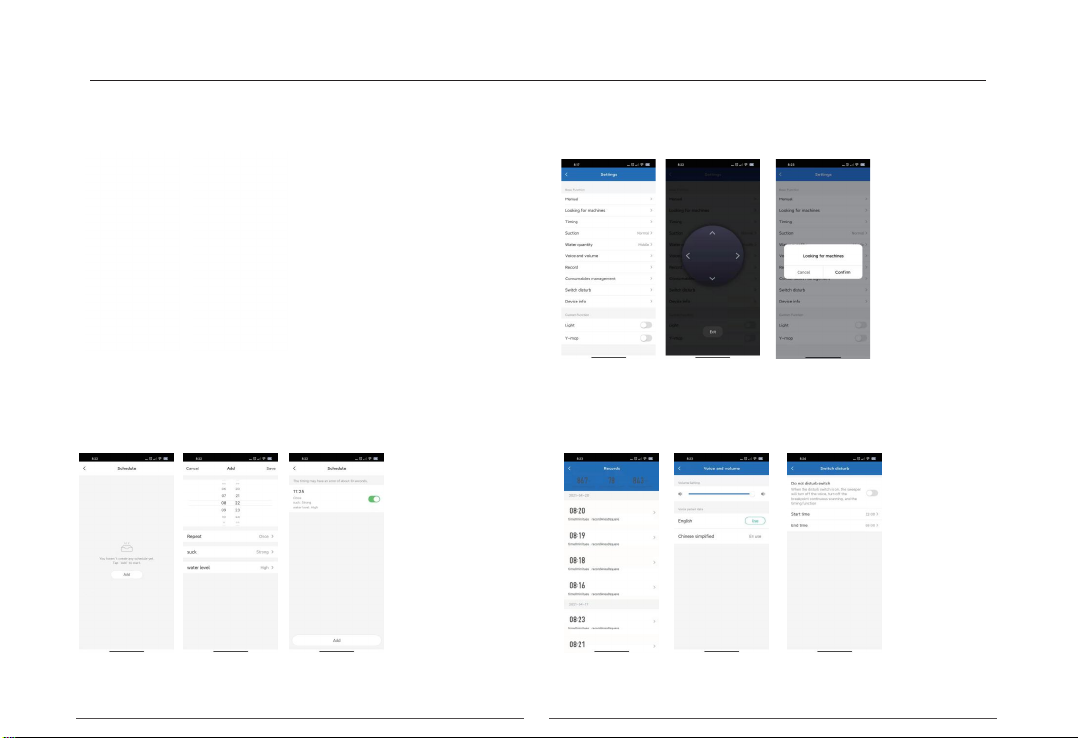
6. Click "Setting" in the lower right corner.
1) Timing: Click "Add" to set scheduled cleaning time and date
and Save the setting.
2) Click "Manual" to manually control robot vacuum movement.
3) Click "Looking for machines" to fine where the robot vacuum
is.
4) Click "Record" to check cleaning records.
5) Click "Voice and volume" to adjust voice volume and switch
voice language.
6) Click "Switch Disturb" to open non-disturb function.
5. Under mopping mode, click "Smart" to start auto-mopping,
back for recharging after mopping is finished.
3
BOBOT ROBOTICS INC.
APP Functions Introduction

01.The product is only for the cleaning of the floor in the home environment and do not use it outdoors (such as open balcony),
non-ground (such as sofa, coffee table, etc.), commercial or industrial environment.
02.Do not use the product in a suspended environment (such as duplex floors, home tops, etc. ) to avoid property damage and personal
injury caused by falling of the device.
03.Do not use the product in an environment above 40 0 C or below -10 0 C.
04.Do not use the product in a ground environment with liquid or sticky materials.
05.Please clean up the debris or scattered objects and cables on the ground before use to avoid the machine being blocked or entan-
gled during operation.
06.Please ensure that the items that are fragile, easy to fall, expensive or potentially dangerous are stored properly before use to avoid
personal injury or property damage caused by the robot vacuum cleaner during operation.
07.The people with physical, mental or cognitive impairments, including children are not allowed to use or operate the product.
08.P leas e properly keep the product, charging stand and product accessories to prevent children from touching to avoid personal and
property damage.
09.Do not allow children to use the robot vacuum cleaner as a toy. Keep the children and pets as far away as possible during its work-
ing and cleaning.
10.Do not place the hair, clothing, fingers, etc. of the human close to the suction port and operating parts of the product.
11.The products must not allowed to absorb any burning items such as cigarettes, matches, ash and other items that may cause fire.
12.The products must not allowed to absorb any items such as stones, was te paper, nails, broken glas s, etc. that may block the prod-
uct.
13.Do not move the machine by the lidar cover as the handle to avoid damage of the lidar.
14.Please clean and maintain the machine and the charging stand during shutdown or power off.
15.Please clean the charging stand and the product with a dry soft towel and do not wipe any part of the product with any damp cloth,
detergent or liquid.
16.During the initial use of the product, please always observe the work of the robot vacuum cleaner to help deal with some pos-sible
4
BOBOT ROBOTICS INC.Instructions for use
borne by the user.
problems, such as the wound cables, the uneven area and the area that may make the robot vacuum cleaner suspend-ing or stuck.
And these areas can be set in the APP once they are found to prevent the robot vacuum cleaner from entering these areas the next
time during work.
17.Please use the product strictly in accordance with the product instruction, and any loss or damage caused by improper use shall be
18.This product is equipped with UV light sterilization components. If equipped, the UV light components only work when the machine
is cleaned. When the machine fails or stops, the UV light components also stop working accordingly.
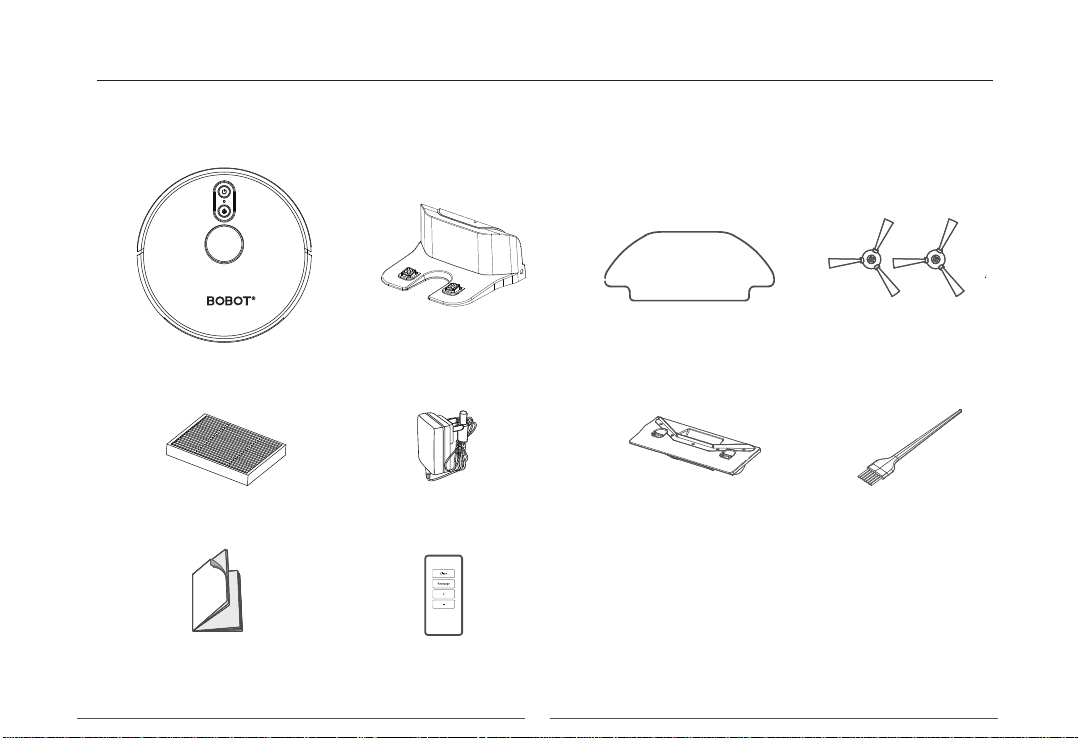
Machine Charging stand Extra Mop Side brush
Power adapter Single suction
port component
High efficiency filter Cleaning brush
Instruction Remote control
5
BOBOT ROBOTICS INC.Packing List

Blue LED: Charging
Red LED:Fault
LED Indication
Power key:
Short press: Sweep/pause
Long press: On/off the machine
WiFi indication light:
Slow flash: Waiting for connection
Normally on: WiFi is connected
Quick flash: WiFi connection failed
Recharge key:
Short press: recharge / pause
Long press: Timing cleaning
6
BOBOT ROBOTICS INC.Machine Introduction

Anti-dropping sensor
UV light
Universal wheel
Charging pole piece
Side brush
Battery Cover
Rolling brush
Rolling brush cover
Driving wheel
Mop component
Mop buckle
Integrated Dust
Bin & Water Tank
Laser radar
Radar collision
senso
Exhaust pot
Infrared sensor
Collision sensor
Alignment sensor
Collision buffer
7
BOBOT ROBOTICS INC.Product Operation

Indoor cleaning1
Please clean up small objects, fragile articles, cables, curtain ropes, etc. scattered on the ground before use to prevent entangle-
ment or damage of the property.
The users with a duplex structure such as stairs etc. in their homes shall specially note that it is strictly forbidden to use the prod-
uct in the fenceless suspending environment, which is higher than that of the family activities.
8
BOBOT ROBOTICS INC.Product Operation
Table of contents
Other Bobot Vacuum Cleaner manuals