Board-A Boardmaster User manual

www.arts-negatifs.com - v.1.2 1
A
A´ B´ C´
B C A
A´ B´ C´
B C
1152 3 4 5 6
7
8 9 10 11 12 13 14
1P 2P
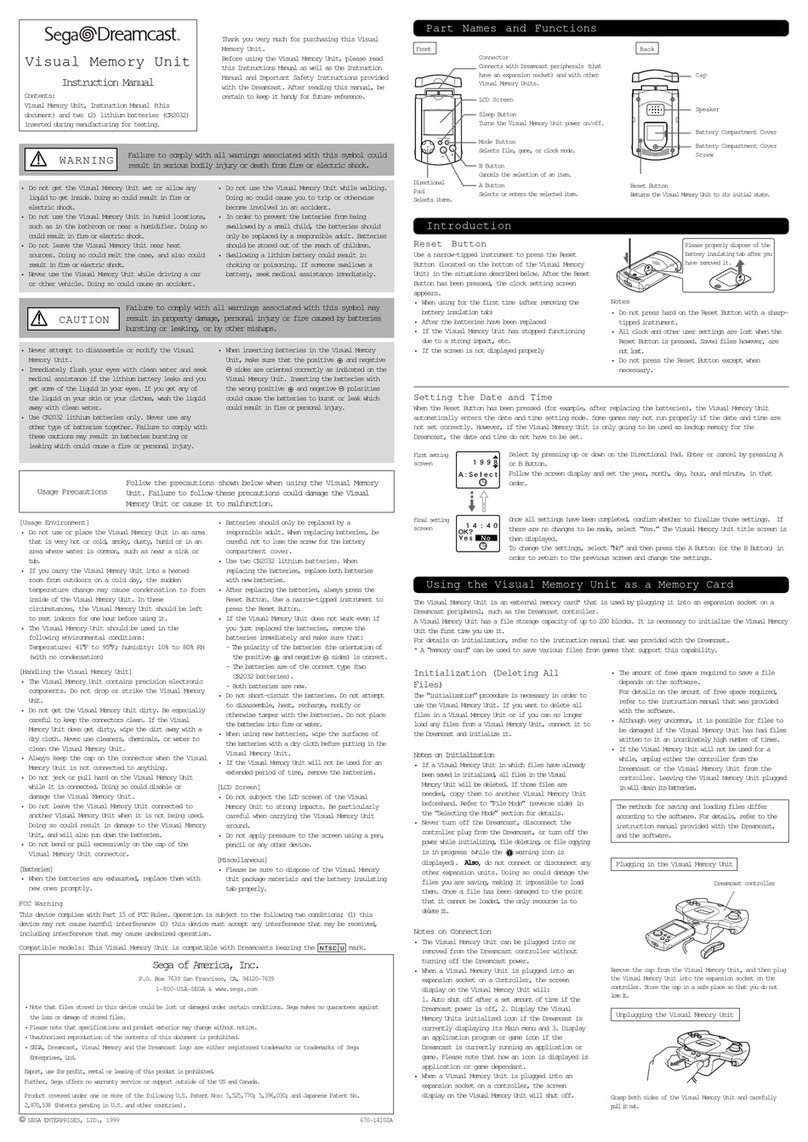
BOARDMASTER
Front
Player1rapidreswitches Coinswitch Player2rapidreswitches
Player 1 Player 2
8directionslever 8directionslever
Rear
1.Picturehorizontaladjustment
2.Testswitch
3.Volumeadjustment
4.Rapidrespeedswitch
5.+5Vadjustment
6.S-Videooutput
7.Videooutput(yellow)
8.Audiooutput(white)
9.8pinRGBvideoandaudiooutput
10.Fuseholder(+12V1A)
11.Fuseholder(-5V1A)
12.Fuseholder(+5V7A)
13.Powerswitch
14.Mainfuse(1A)
15.Powercord
Video,audioandothercablesarenotincluded.Pleaseacquireavideo, S-VideoorRGB
cablecompatiblewithyourset-up.
INSTRUCTIONMANUAL
ThankyouforpurchasingtheBoardmaster.
Pleasereadthismanualcarefullybeforeuse.

www.arts-negatifs.com - v.1.2 2
22
Z A
1
Inordertoplaywithyourgameboard(PCB),youneedtousetheintermediateharnessthat
connects to both the Boardmaster left side connector and the PCB (JAMMA standard or
compatible).
Gameboard
(PCB)
Controlbox
Boardmaster
Left side
Donotinverse!
Connector wiring diagram
Pleaseusetheintermediateharnesstoconnecttheabovecontrolboxconnectorandthe
gameboard.Sincemostofthegameboards(exceptoldgames,mahjonggamesandsome
others)areusingtheJAMMAstandard,pleaseonlyconnecttheJAMMAcompliantinterme-
diateharnesstotheTaitoconnector.
PleasealwaysturnthepoweroffwhendisconnectingthePCB.
PleasemakesuretonotinverttheconnectorpitchwhenplugginginthePCBandthe
harness.
(Itcandamageboththecontrolboxandgameboard.)
Itispossibletoactivateanddeactivatetherapidreduringthegame.
(MaynotbecompatiblewithsomePCB.)
ThetestswitchisusedtotestthePCBandchangeitssettings.
(SincesomePCBhavetheirowntestswitch,pleasereadthePCBmanualcarefully.)
Taitostandardconnector
Intermediate
harness

www.arts-negatifs.com - v.1.2 3
Taito standard connector wiring diagram
Bottom Top
Ground A 1 Ground
Ground B2Ground
Ground C3Ground
Speaker- D 4 Speaker+
+12V E 5 +12V
-5V F 6 -5V
Player1up H 7 Player1C
Player2up J 8Player2C
+5V K 9 +5V
Player1B L 10 Player1down
Player2B M11 Player2down
Player2start N 12 Testswitch
Player1start P 13 Coinswitch
Player1right R 14 Player 1 A
Player1left S 15 Videored
Videoblue T 16 Player2right
Videogreen U 17 Player2left
Synchro V 18 Player 2 A
Empty W 19 Empty
Player2C´X 20 Player1C´
Player2B´Y 21 Player1B´
Player 2 A´Z 22 Player 1 A´

www.arts-negatifs.com - v.1.2 4
JAMMA standard connector wiring diagram
Solder side Component side
Ground A 1 Ground
Ground B2Ground
+5V C3+5V
+5V D 4 +5V
-5V E 5 -5V
+12V F 6 +12V
Inversionprotectionpin H 7 Inversionprotectionpin
Coincounter2 J 8Coincounter1
K 9
Speaker- L10 Speaker+
M11
Videogreen N 12 Videored
Videosync P 13 Videoblue
Serviceswitch R 14 Videoground
Tiltswitch S 15 Testswitch
Coin2 T 16 Coin1
Player2start U 17 Player1start
Player2up V 18 Player1up
Player2down W 19 Player1down
Player2left X 20 Player1left
Player2right Y 21 Player1right
Player2shoot1 Z 22 Player1shoot1
Player2shoot2 a 23 Player1shoot2
Player2shoot3 b 24 Player1shoot3
c25
d 26
Ground e 27 Ground
Ground f28 Ground

www.arts-negatifs.com - v.1.2 5
CN2 CN1
1 2 3 4 5 6 7 8 9 10 11
CN4
CN3
About the power supply
RatedvoltageofthegameboardICis5V.Avoltagetoohigh(morethan5,25V)maydamage
theIC,sopleasemakesuretousea5Vorlessvoltage.Alowvoltagemaynotallowthe
gametostartorcauseittoreset,butitwon’tdamagetheboard.Ifyoudon’tgetanypicture
orsound,pleasecheckthefuse.
About the audio output
Ifyouwishtoconnectanexternalspeakeramplier,itwillusetheinputfromtheamplier
ofthegameboard,sopleasesetthevolumeoftheboardamptolowbeforeincreasingit.
Sincethevideoandsoundoutputsareadjacent,pleasebeverycarefulnottoconnectthem
incorrectly.
About the rapid re
Therapidrecanbeusedwithallbuttons.Pleaseadjustitaccordingtotheboard.(Depen-
dingontheboard,therapidremaynotwork.)
About the video converter settings
Pleasenotethatbecausethegameboardsaredesignedtoworkwithprofessionalmonitors,
theremaybeincompatibilitieswithhouseholdtelevisions.
3.579545MHzadjustmenttrimmer.
If the picture has no colors when using the video or
S-Video output, or if the colors are bleeding out, it
servesasanadjustment.Thispartisstructurallyfra-
gilebynature.Sincewealreadyadjusteditatthetime
ofshipment,pleaserefrainfromtouchingit.Werecom-
mendtousetheS-Videooutput.
1.C
2.GND
3. Y
4.GND
5.Video
6. 5V
7.GND
8.Sync
9.B
10.G
11. R
Videoconversionboard
Xtal
Picturehorizontaladjustment
Rapidre30/s-15/sswitch
Manufacturedandsoldby
Board-A
KokoroCorp.A
561Higashihiraga
Matsudo,Chiba270-0003
TEL-FAX047-309-8661
Table of contents