BenQ X500i User manual

Digital Projector
User Manual
Console Gaming Projector I X500i V 1.00

2 Warranty and Copyright information
Warranty and Copyright information
Limited warranty
BenQ warrants this product against any defects in material and workmanship, under normal
usage and storage.
Proof of purchase date will be required with any warranty claim. In the event this product is
found to be defective within the warranty period, BenQ's only obligation and your exclusive
remedy shall be replacement of any defective parts (labor included). To obtain warranty
service, immediately notify the dealer from which you purchased the product of any defects.
Important: The above warranty shall be void if the customer fails to operate the product in
accordance with BenQ's written instructions, especially the ambient humidity must be
in-between 10% and 90%, temperature in-between 0°C and 35°C, altitude lower than 4920 feet,
and avoiding to operate the projector in a dusty environment. This warranty gives you specific
legal rights, and you may have other rights which vary from country to country.
For other information, please visit www.BenQ.com.
Copyright
Copyright 2023 by BenQ Corporation. All rights reserved. No part of this publication may be
reproduced, transmitted, transcribed, stored in a retrieval system or translated into any
language or computer language, in any form or by any means, electronic, mechanical,
magnetic, optical, chemical, manual or otherwise, without the prior written permission of BenQ
Corporation.
Disclaimer
BenQ Corporation makes no representations or warranties, either expressed or implied, with
respect to the contents hereof and specifically disclaims any warranties, merchantability or
fitness for any particular purpose. Further, BenQ Corporation reserves the right to revise this
publication and to make changes from time to time in the contents hereof without obligation to
notify any person of such revision or changes.
*DLP, Digital Micromirror Device and DMD are trademarks of Texas Instruments. Others are
copyrights of their respective companies or organizations.
Patents
Please go to http://patmarking.benq.com/ for the details on BenQ projector patent coverage.

3Table of Contents
Table of Contents
Warranty and Copyright information ...............................................................................2
Important safety instructions .........................................................................................4
Introduction ....................................................................................................................7
Shipping contents ............................................................................................................. 7
Installing the QS02 HDMI Media Streaming .................................................................... 9
Projector exterior view.................................................................................................... 10
Terminals......................................................................................................................... 11
Controls and functions ................................................................................................... 12
Positioning your projector ............................................................................................14
Choosing a location ........................................................................................................14
Obtaining a preferred projected image size.................................................................. 15
Mounting the projector ................................................................................................... 16
Adjusting the projected image....................................................................................... 17
Connection ...................................................................................................................19
Operation .....................................................................................................................20
Starting up the projector .................................................................................................20
Setting up the QS02 HDMI Media Streaming................................................................ 23
Using the menus ............................................................................................................. 25
Securing the projector .................................................................................................... 26
Switching input signal ..................................................................................................... 28
Presenting from a Media Reader ................................................................................... 29
Shutting down the projector........................................................................................... 30
Menu operation ............................................................................................................31
Basic menu ......................................................................................................................31
Advanced menu .............................................................................................................. 32
Maintenance ................................................................................................................49
Care of the projector ....................................................................................................... 49
Light source information ................................................................................................ 50
Troubleshooting ...........................................................................................................52
Specifications ..............................................................................................................53
Projector specifications .................................................................................................53
Dimensions...................................................................................................................... 54
Timing chart .................................................................................................................... 55
RS232 command ............................................................................................................ 59

4 Important safety instructions
Important safety instructions
Your projector is designed and tested to meet the latest standards for safety of information
technology equipment. However, to ensure safe use of this product, it is important that you
follow the instructions mentioned in this manual and marked on the product.
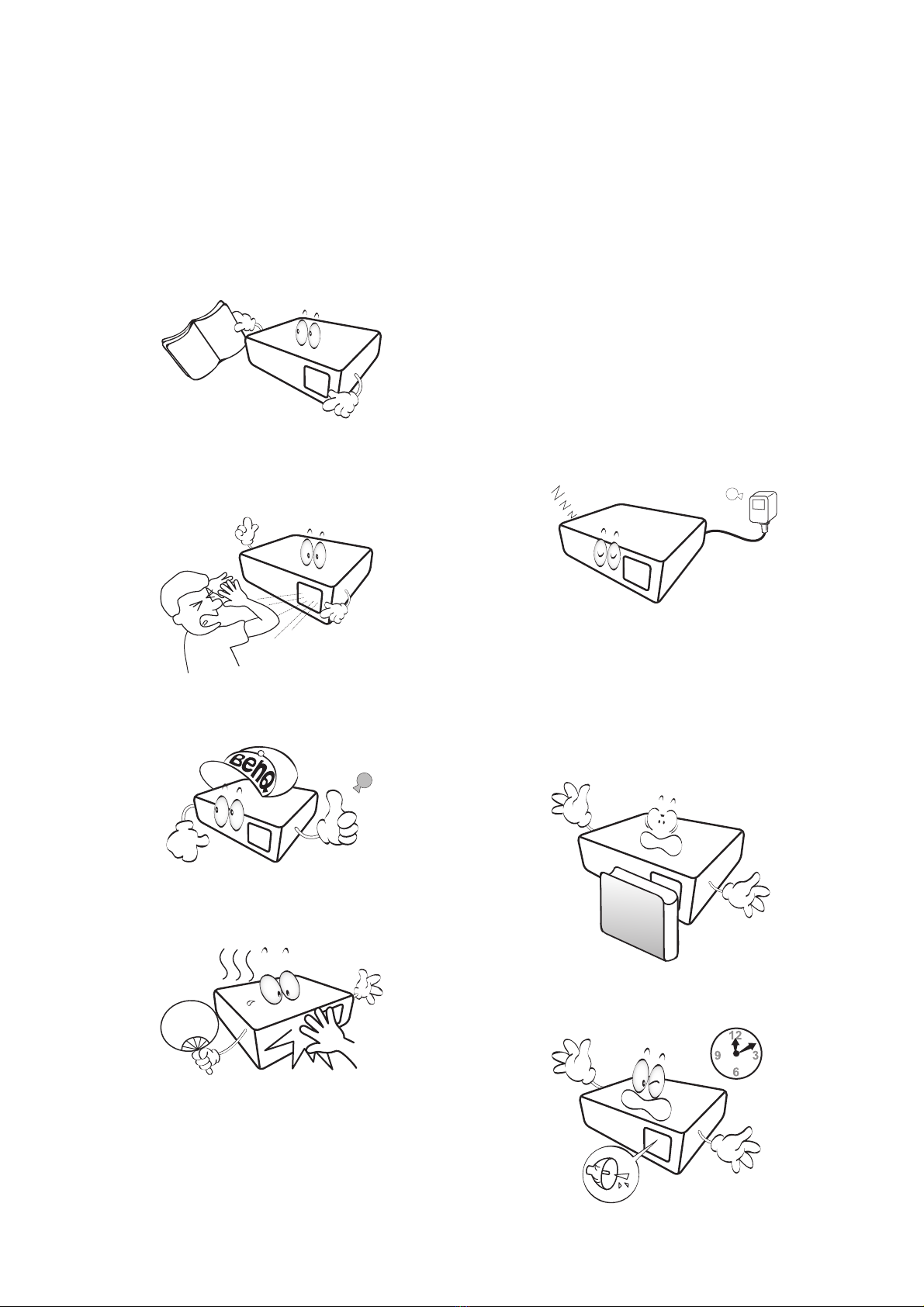
1. Please read this manual before you
operate your projector. Save it for future
reference.
2. Do not look straight at the projector lens
during operation. The intense light beam
may damage your eyes.
3. Refer servicing to qualified service
personnel.
4. The light source becomes extremely hot
during operation.
5. In some countries, the line voltage is
NOT stable. This projector is designed to
operate safely within a mains voltage
between 100 to 240 volts AC, but could
fail if power cuts or surges of ±10 volts
occur. In areas where the mains voltage
may fluctuate or cut out, it is
recommended that you connect your
projector through a power stabilizer,
surge protector or uninterruptible power
supply (UPS).
6. Do not block the projection lens with any
objects when the projector is under
operation as this could cause the
objects to become heated and deformed
or even cause a fire. To temporarily turn
off the light source, press the ECO
BLANK button.
7. Do not operate light sources beyond the
rated light source life.

5Important safety instructions
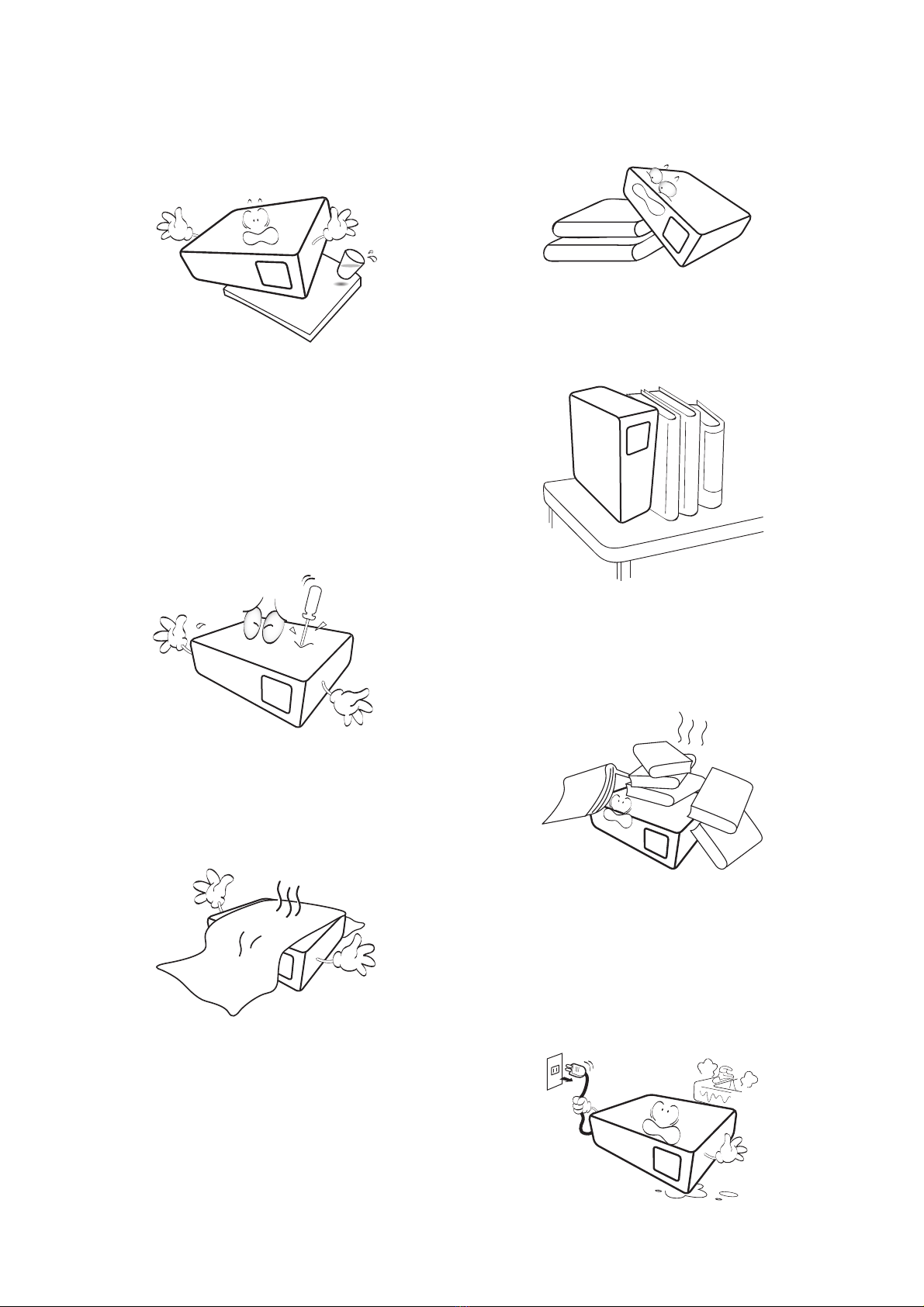
8. Do not place this product on an
unstable cart, stand, or table. The
product may fall, sustaining serious
damage.
9. Do not attempt to disassemble this
projector. There are dangerous high
voltages inside which may cause death
if you should come into contact with
live parts.
Under no circumstances should you
ever undo or remove any other covers.
Refer servicing only to suitably qualified
professional service personnel.
10. Do not block the ventilation holes.
- Do not place this projector on a blanket,
bedding or any other soft surface.
- Do not cover this projector with a cloth or any
other item.
- Do not place inflammables near the projector.
If the ventilation holes are seriously
obstructed, overheating inside the
projector may result in a fire.
11. Always place the projector on a level,
horizontal surface during operation.
12. Do not stand the projector on end
vertically. Doing so may cause the
projector to fall over, causing injury or
resulting in damage to the projector.
13. Do not step on the projector or place
any objects upon it. Besides probable
physical damage to the projector, doing
so may result in accidents and possible
injury.
14. Do not place liquids near or on the
projector. Liquids spilled into the
projector may cause it to fail. If the
projector does become wet, disconnect
it from the power supply's power outlet
and call BenQ to have the projector
serviced.

6 Important safety instructions
15. This product is capable of displaying
inverted images for ceiling mount
installation.
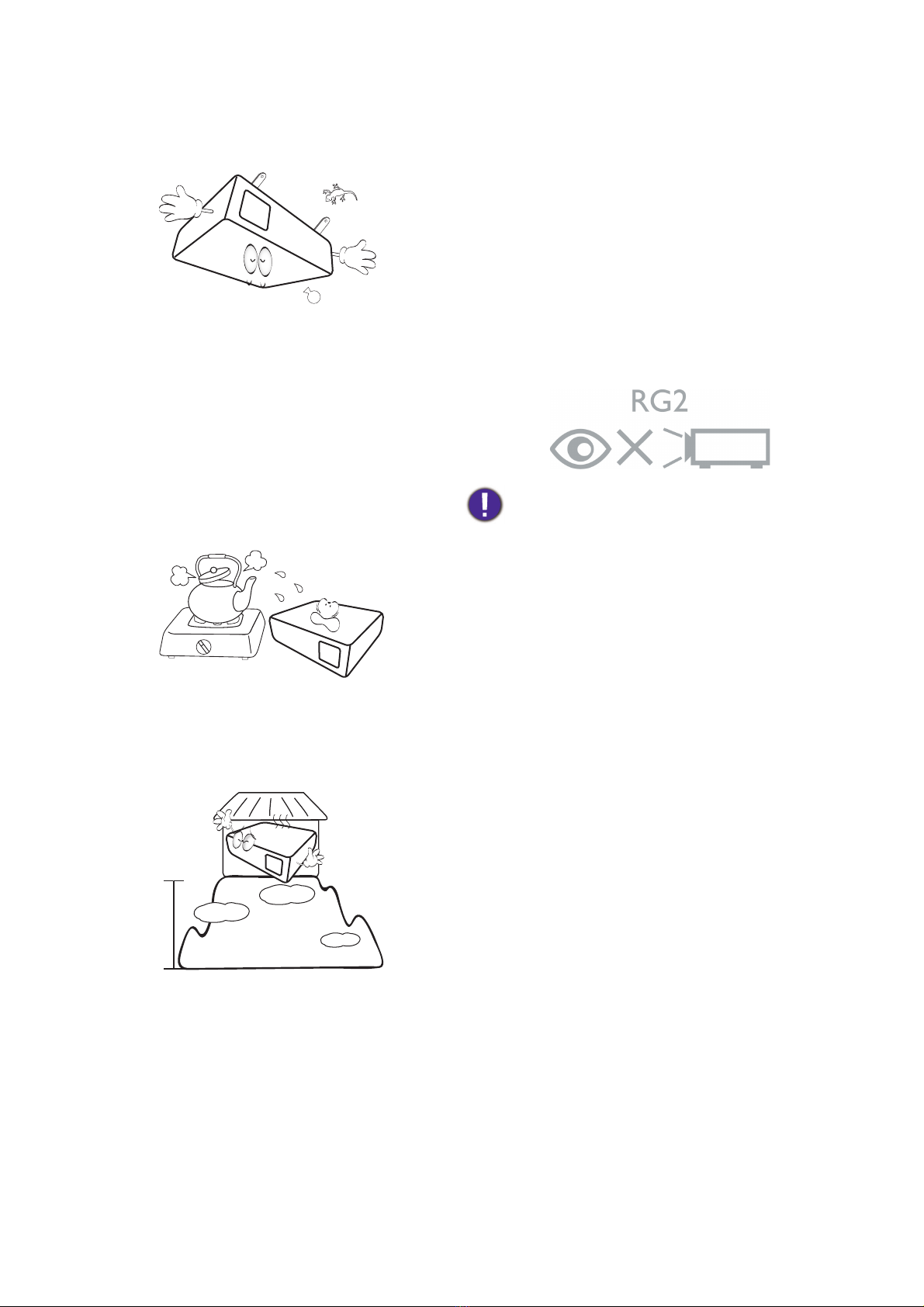
16. Do not place this projector in any of the
following environments.
- Space that is poorly ventilated or confined.
Allow at least 50 cm clearance from walls and
free flow of air around the projector.
- Locations where temperatures may become
excessively high, such as the inside of a car
with all windows rolled up.
- Locations where excessive humidity, dust, or
cigarette smoke may contaminate optical
components, shorten the projector's life span
and darken the image.
- Locations near fire alarms
- Locations with an ambient temperature above
40°C / 104°F
- Locations where the altitudes are higher than
3000 m (10000 feet).
17. This apparatus must be earthed.
18. When the projector is under operation,
you may sense some heated air and
odor from its ventilation grill. It is a
normal phenomenon and not a product
defect.
Risk Group 2
1. According to the classification of
photobiological safety of light source
and light source systems, this product is
Risk Group 2, IEC 62471-5:2015.
2. Possibly hazardous optical radiation
emitted from this product.
3. Do not stare at operating light source.
May be harmful to the eyes.
4. As with any bright source, do not stare
into the direct beam.
To avoid damaging the DLP chips, never aim a
high-power laser beam into the projection lens.
3000 m
(10000
feet)
0 m
(0 feet)

7Introduction
Introduction
Shipping contents
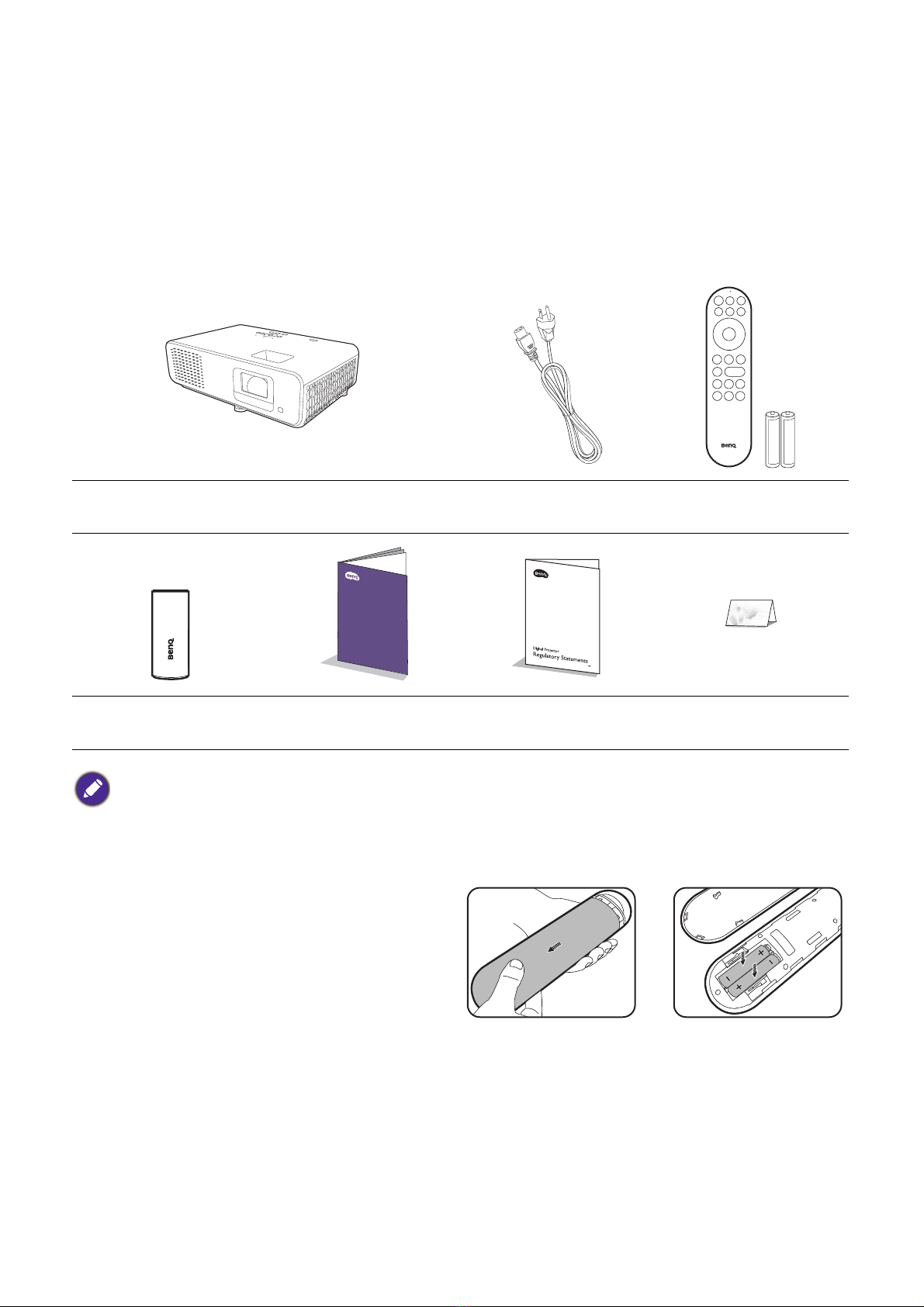
Carefully unpack and verify that you have all of the items shown below. If any of these items are
missing, please contact your place of purchase.
Standard accessories
Replacing the remote control batteries
1. Press and slide off the battery cover, as
illustrated.
2. Remove the old batteries (if applicable) and
install two AAA batteries. Make sure that
the positive and negative ends are
positioned correctly, as illustrated.
3. Slide the battery cover in until it clicks into
place.
Projector Power cord Remote control with
batteries
QS02 HDMI Media
Streaming Quick start guide Regulatory
statements Warranty card*
• The supplied accessories will be suitable for your region, and may differ from those illustrated.
• *The warranty card is only supplied in some specific regions. Please consult your dealer for detailed
information.

8 Introduction
• Avoid leaving the remote control and batteries in an excessive heat or humid environment like the
kitchen, bathroom, sauna, sunroom or in a closed car.
• Replace only with the same or equivalent type recommended by the battery manufacturer.
• Dispose of the used batteries according to the manufacturer's instructions and local environment
regulations for your region.
• Never throw the batteries into a fire. There may be danger of an explosion.
• If the batteries are dead or if you will not be using the remote control for an extended period of time,
remove the batteries to avoid damage to the remote control from possible battery leakage.

9Introduction
Installing the QS02 HDMI Media Streaming
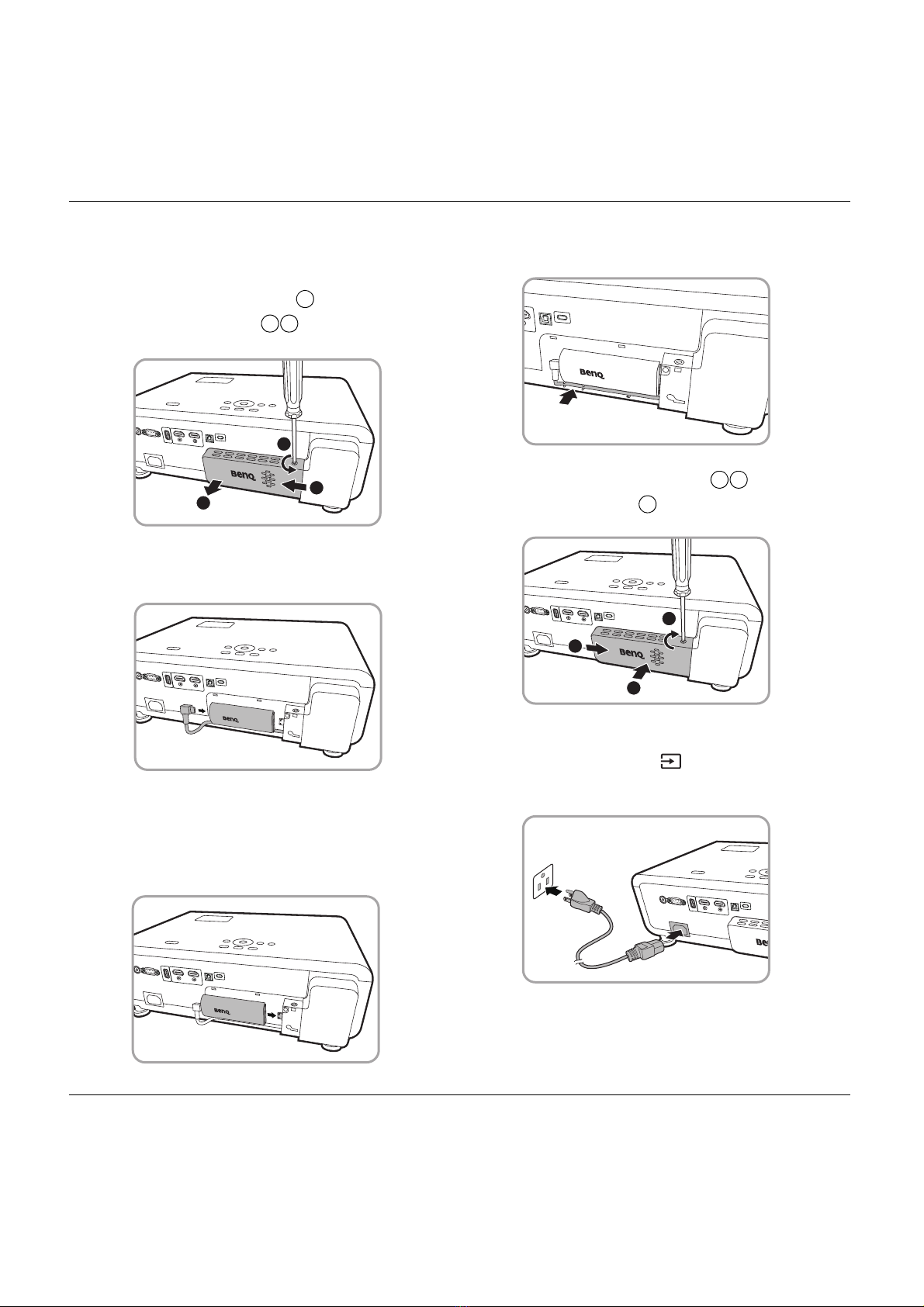
The supplied QS02 HDMI Media Streaming is an Android TV (ATV) dongle to be used with the
projector. See the instructions below to install the dongle. With a successful installation, you
can enjoy more entertainment programs through this projector.
1. Make sure the projector is turned off
and the power cord is disconnected.
2. Loosen the screws that secure the
top of projector cover . Slide to
remove the cover .
3. Plug the USB Micro B cable to the
dongle.
4. Plug the dongle to the HDMI* port on
the projector.
*This HDMI port is for connecting QS02 HDMI
Media Streaming only.
5. Arrange the USB Micro B cable in place
below the dongle.
6. Replace the projector cover , and
tighten the screws .
7. Connect the power cord to the projector
and turn it on. Press to select Android
TV.
1
2
3
1
2
3
1
2
3
3
2
1

10 Introduction
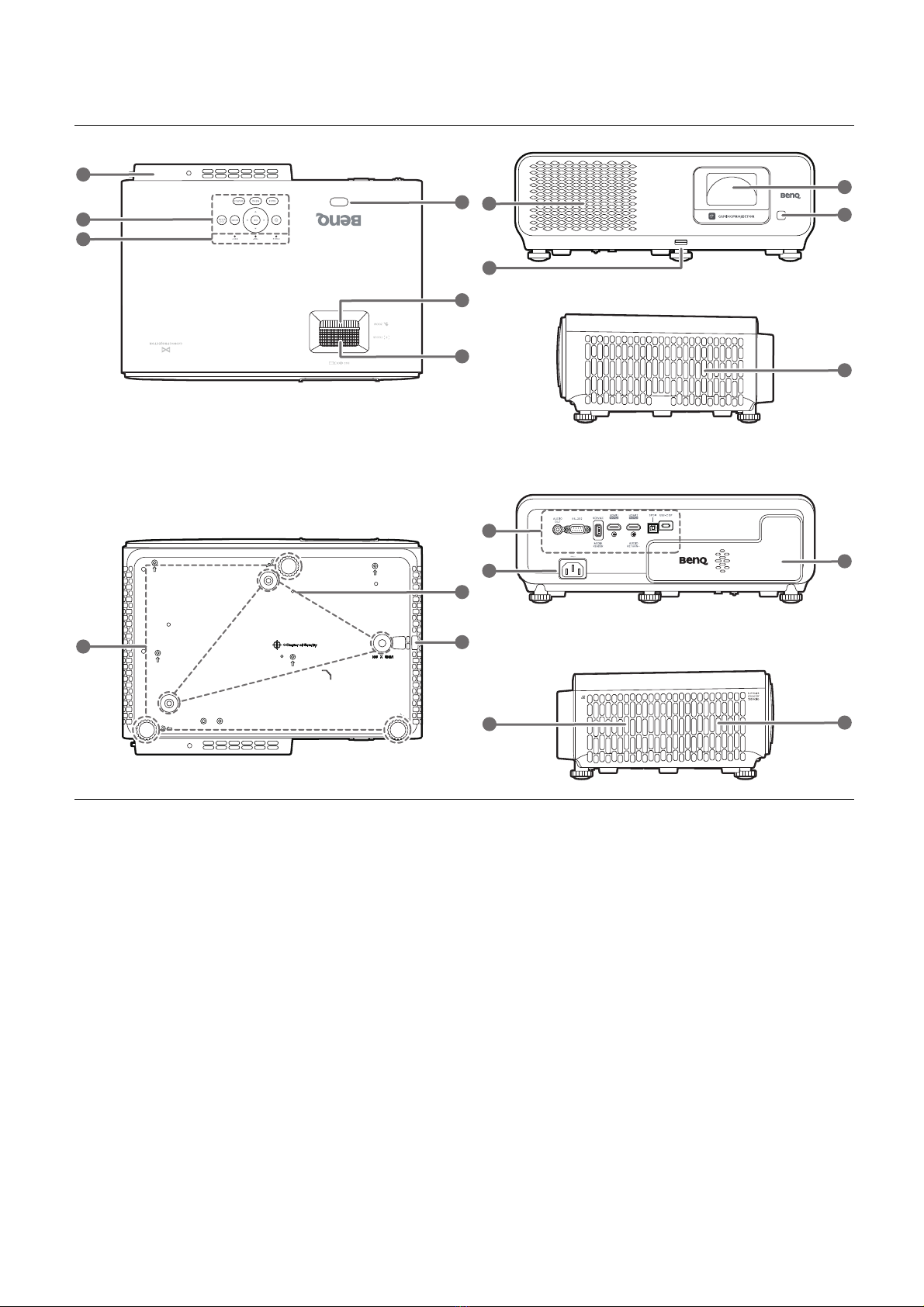
Projector exterior view
1. QS02 HDMI Media Streaming port
(Android TV dongle)
See Installing the QS02 HDMI Media
Streaming on page 9 for how to remove
the cover.
2. External control panel
See Controls and functions on page 12.
3. LIGHT/TEMP/POWER status indicator
See Indicators on page 51.
4. IR remote sensor
5. Zoom ring
6. Focus ring
7. Adjuster feet
8. Ceiling mount holes
9. Anti-theft security bar
10. Vent (air inlet)
11. Adjuster button
Push up to release the front adjuster
foot.
12. Projection lens
13. IR remote sensor
14. Connector panel
See Terminals on page 11.
15. AC power jack
16. Vent (air exhaust)
17. Speaker grill
15
14
11
16
1
2
3
7
4
9
8
12
13
1
17
10
5
6
10
Other manuals for X500i
1
Table of contents
Other BenQ Projector manuals

BenQ
BenQ LU951ST Installation and operating instructions

BenQ
BenQ TH685i User manual

BenQ
BenQ MS517 User manual

BenQ
BenQ Commuter CP120 User manual

BenQ
BenQ Joybee GP2 User manual

BenQ
BenQ PB6100 - SVGA DLP Projector User manual

BenQ
BenQ W703D Instructions for use

BenQ
BenQ MX825STH User manual

BenQ
BenQ MW870UST Use and maintenance manual

BenQ
BenQ W6000 Home Cinema Series User manual

BenQ
BenQ LX890USTD User manual

BenQ
BenQ LU9915 User manual

BenQ
BenQ MS517 User manual

BenQ
BenQ L720 Series User manual

BenQ
BenQ Portable Entertainment Series User manual

BenQ
BenQ WI 1000H8060 User manual

BenQ
BenQ MX722 User manual

BenQ
BenQ GV1 User manual

BenQ
BenQ HT2150ST User manual

BenQ
BenQ MX766 User manual