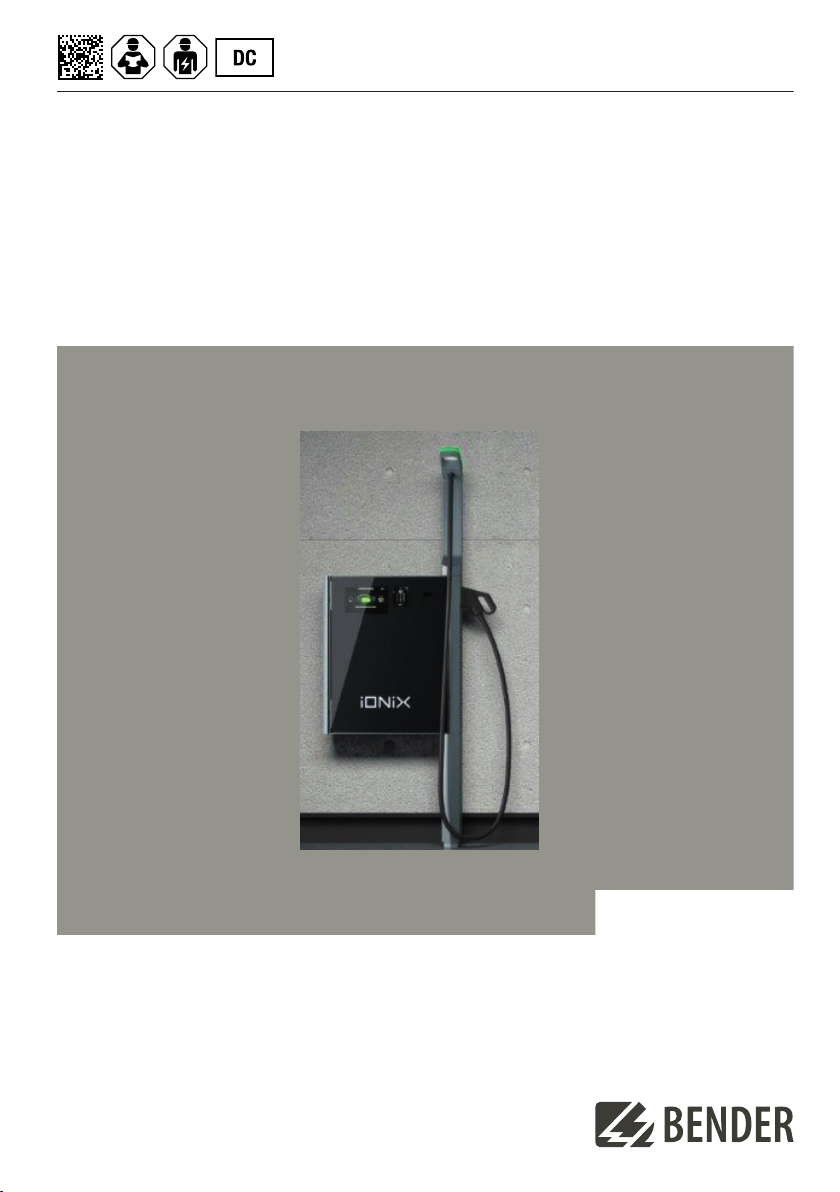
Bender iONiX Light 25 Wallbox Datasheet
Installation quick-start guide EN
iONiX Light 25 Wallbox
iONiX Medium 25 Wallbox
iONiX Supreme 25 Wallbox
Charging point for electric vehicles according to CCS2 standard
iONiX 25_DC-Wallbox_D00 61_00_Q_XXEN/11.2023

Table of contents
Table of contents
Installation quick-start guide............................................................................ 3
1.1 Scope of delivery............................................................................................................................................. 3
1.2 Dimensions.........................................................................................................................................................
1.3 Requirements....................................................................................................................................................
1. Mechanical installation..................................................................................................................................5
1. .1 Tools......................................................................................................................................................................5
1. .2 Mounting dimensions....................................................................................................................................6
1. .3 Procedure............................................................................................................................................................7
1.5 Electrical installation.......................................................................................................................................9
1.5.1 Tools................................................................................................................................................................... 10
1.5.2 Procedure......................................................................................................................................................... 10
1.6 Commissioning...............................................................................................................................................12
1.7 Technical data.................................................................................................................................................12
1.8 Approvals..........................................................................................................................................................1
2 iONiX 25_DC-Wallbox_D00 61_00_Q_XXEN/11.2023
iONiX Light 25 Wallbox
iONiX Medium 25 Wallbox
iONiX Supreme 25 Wallbox
Installation quick-start guide
In addition to this quick-start guide for mechanical and electrical installation, additional documents, such as
the manual, are available for download on the product page of the device.
Product
page
Mounting
video
Indication of important instructions
DANGER
Indicates a high risk of danger that will result in death or serious injury if not avoided.
WARNING
Indicates a medium risk of danger that can lead to death or serious injury if not avoided.
CAUTION
Indicates a low-level risk that can result in minor or moderate injury or damage to property if not
avoided.
ADVICE
Indicates important facts that are not associated with the risk of immediate injury. They can lead to
malfunctions in situations in which the device is handled incorrectly, for example.
. Scope of delivery
The DC Wallbox is delivered as a complete device, upright, in a package on a pallet. Included in the scope of
delivery:
•1x DC Wallbox including cable cover
•1x mounting rail
•5x screws (8 x 60) according to DIN 571 (type 107 with associated plugs for mounting on a concrete wall)
•1x key set with 3x keys
•1x key tag
•1x screw for the cable cover
•1x TPE Uni insert (seal for power supply)
•1x washer
•1x nut
•1x drilling template
•1x Installation quick-start guide
ADVICE
For a concrete wall, use the screws supplied. If the wall is not a concrete wall, the appropriate screws
must be used.
iONiX 25_DC-Wallbox_D00 61_00_Q_XXEN/11.2023 3
Installation quick-start guide
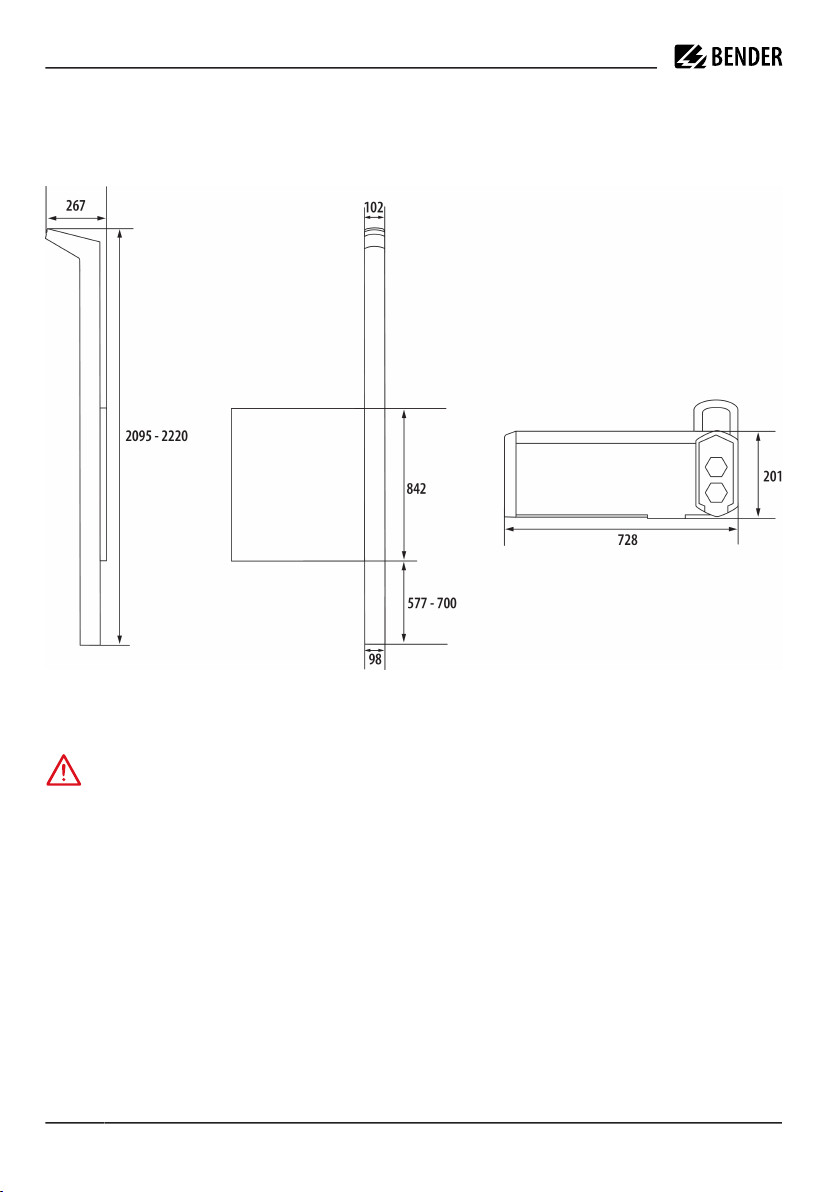
.2 Dimensions
Device dimensions
Dimensions in mm
View from the right View from the front Bottom view
.3 Requirements
DANGER Electric shock
Danger to life
The electrical supply line, which is supplied from the sub-distribution, must be de-energised during
the entire mechanical mounting process and electrical installation. The galvanic connection to the
low-voltage network may only be established after the mounting process and electrical installation
have been completed.
For proper and safe operation, the following conditions must be met:
•The wall on which the DC Wallbox is to be installed must be designed for its weight (see “Technical data”,
page 12).
•To ensure good ventilation, clearance of at least 500 mm to the left and right of the DC Wallbox must be
planned.
•The installation site must be chosen in compliance with the locally applicable regulations for noise
emissions.
•Heating from external sources must be avoided.
iONiX 25_DC-Wallbox_D00 61_00_Q_XXEN/11.2023
iONiX Light 25 Wallbox
iONiX Medium 25 Wallbox
iONiX Supreme 25 Wallbox
•If the installation site is outside a protected area of a building, additional lightning protection measures
must be taken.
•The ceiling height of the installation site should be at least 2.30 m.
•Protect the power cord for the supply as follows:
– Residual current circuit breaker (RCD type A)
– Overvoltage protection, type 1 (SPD type 1, normally part of the building power supply)
–≤ 50 A circuit breaker
– Earth terminal at least 10 mm² Cu
– Permissible cross-section of the connection in the Wallbox: max. 10mm² flexible with ferrule;
max. 16 mm² rigid conductor
•Permissible network types: TT, TN-S, TN-C-S
•Connectivity: Ethernet, GSM/LTE, WiFi
ADVICE
Before establishing the electrical connection, ensure that the device is dry (e.g. no condensation). If
necessary, the device can be dried using an external hot air blower (Tmax=50°).
.4 Mechanical installation
.4. Tools
Tools needed
•Lifting table: Adjustment range from 570 mm to 700 mm
•Lifting aid (designed for at least 90 kg)
•Impact drilling machine
•Masonry drill bit Ø 10 mm
•Spirit level
•Pencil
•Rubber mallet
•Open-end spanner (width across flats 12mm) and/or socket spanner with extension
and corresponding socket
CAUTION Lifting the DC Wallbox without an aid
Injury
Using a lifting aid for wall mounting
iONiX 25_DC-Wallbox_D00 61_00_Q_XXEN/11.2023 5
Installation quick-start guide
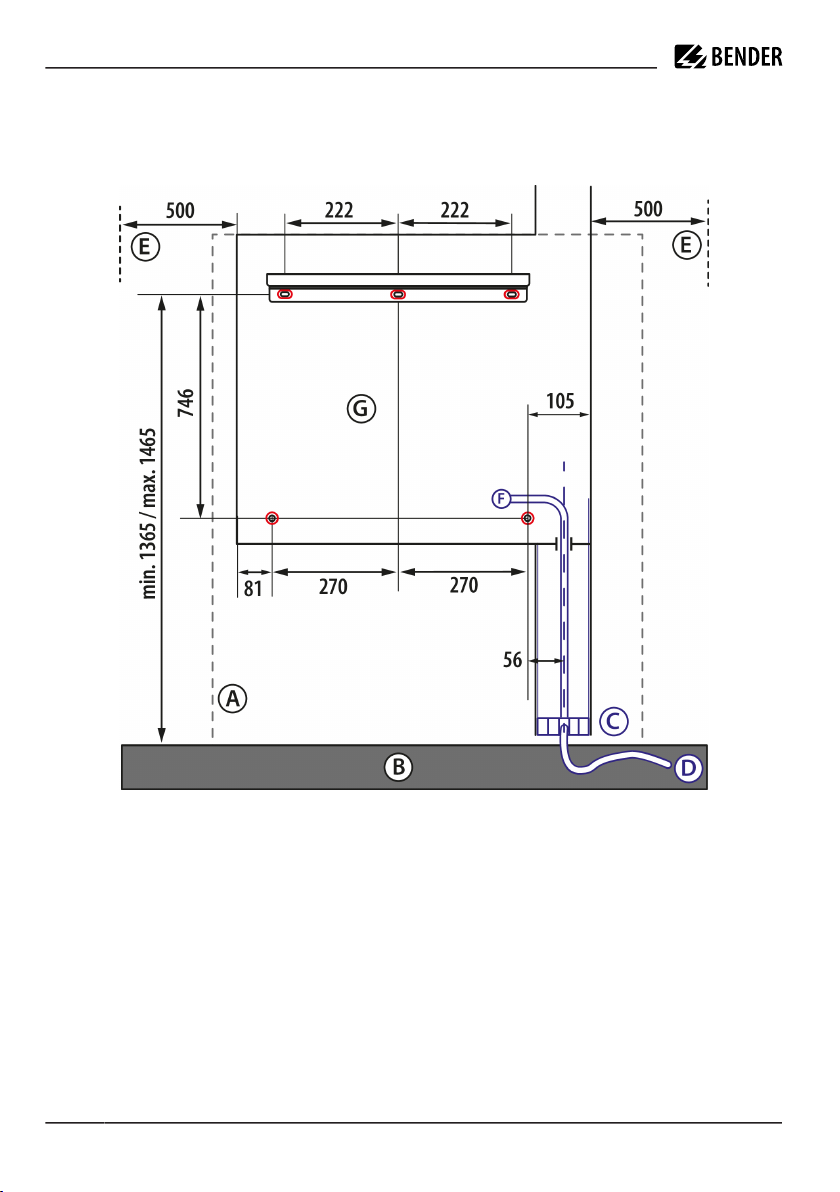
.4.2 Mounting dimensions
Mounting dimensions
Dimensions in mm
View on mounting surface and mounting rail
A Wall
B Floor
C Interface area
D Infrastructure cable (cable length above ground at least 1000 mm)
E
F
Clearance of at least 500mm on the left and right
Network connection
G Outline of DC Wallbox with holding rail, cable cover and cut of upper status and lighting mast
Red Drilling holes (top)
Attachment points (bottom)
Blue Positioning area for the network connection
6 iONiX 25_DC-Wallbox_D00 61_00_Q_XXEN/11.2023
iONiX Light 25 Wallbox
iONiX Medium 25 Wallbox
iONiX Supreme 25 Wallbox
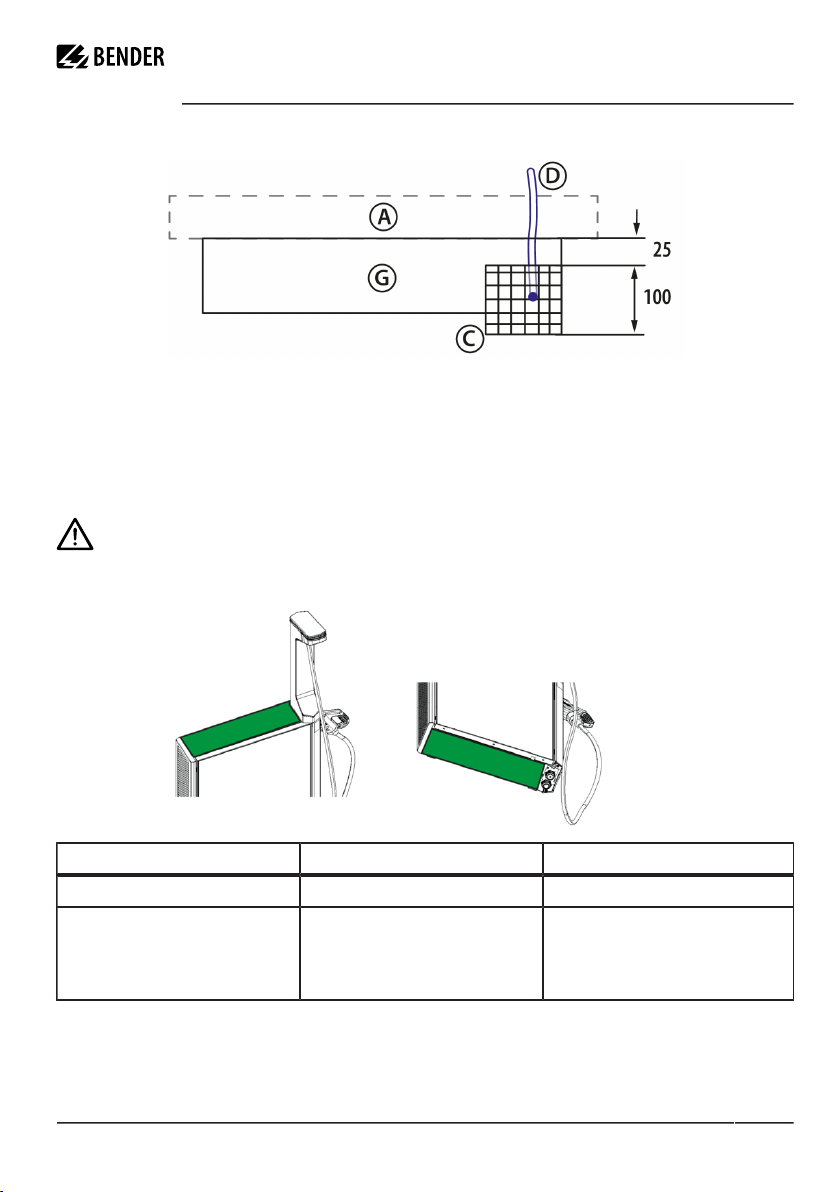
Dimensions of infrastructure of network connection
Dimensions in mm
Top view
A Wall
C Interface area
D Infrastructure cable (cable length above ground at least 1000 mm)
G Outline DC Wallbox
.4.3 Procedure
ADVICE
Wearing safety shoes and gloves is recommended.
Holding surfaces
Surface Colour Enclosure element
Surfaces that may be touched Green Top and bottom
Surfaces that may not be touched White Door (glass)
Side parts (plastic in some cases)
Status and ambient lighting
Status and lighting mast
iONiX 25_DC-Wallbox_D00 61_00_Q_XXEN/11.2023 7

Installation quick-start guide
Mounting, top
View of the mounting rail
Mounting rail for attachment to the wall
: Retaining lug, top (outside)
Mounting, bottom
2: Spacer for attachment points, bottom (outside)
View with the door of the DC Wallbox open
: Attachment points, bottom (inside)
8 iONiX 25_DC-Wallbox_D00 61_00_Q_XXEN/11.2023

iONiX Light 25 Wallbox
iONiX Medium 25 Wallbox
iONiX Supreme 25 Wallbox
Action steps
1. Remove the top cardboard sleeve
2. Check the scope of delivery
3. Attach the drilling template to the desired location of the charging station
. Use a spirit level to check the horizontal alignment of the drilling template
5. Mark the drill holes
6. Drill
7. Use a rubber mallet to hammer in the dowels
8. Use an open-end spanner or socket spanner with a width across flats of 12mm to screw on the mounting
rail
9. Place the lifting table on the wall below the mounting rail
10. Use a fork lift or lifting aid to place the DC Wallbox on the lifting table and align it on the wall
11. Adjust the height of the lifting table to hang the DC Wallbox on the mounting rail
12. Use a key to unlock the DC Wallbox and unlatch it; the lock and lever for unlatching are recessed at the
bottom of the right front side of the enclosure
13. Open the door
1 . Check that the lower fastening hole of the DC Wallbox is accurately aligned with the holes in the
enclosure; correct any horizontal offset and remove plugs if necessary
15. Use socket spanner with width across flats of 12 mm to screw on the DC Wallbox
16. Remove the lift table and other packaging
.5 Electrical installation
All work on the DC Wallbox, such as mounting, installation, servicing and dismantling, may
only be carried out by a qualified electrically skilled person in accordance with DIN VDE
0100-10 who is also certified to work on the DC Wallbox.
Refrain from any operation that impairs the safety of the DC Wallbox.
ADVICE
Only installation companies registered in the installation directory of the respective system operator
are allowed to connect the DC Wallbox to the power supply (Section 13 of Germany’s Low-Voltage
Connection Ordinance – NAV).
Only trained personnel are authorised to commission the device. To be able to carry out work on
the IONIX Wallbox, the installer needs to obtain the certification issued by the Bender Academy or a
system partner.
Installation guidelines of the respective system operator must be observed.
iONiX 25_DC-Wallbox_D00 61_00_Q_XXEN/11.2023 9
Installation quick-start guide
.5. Tools
Tools needed
•Stripping tool
•Open-end spanners with width across flats 10mm, 0mm and 3mm
.5.2 Procedure
WARNING
Before starting work, make sure that the cables for the power supply of the DC Wallbox are dead and
secured against being switched on again. The five safety rules according to DIN VDE 0105-100 must
be observed!
ADVICE
Before installing the DC Wallbox, check that the connectors are correctly joined, as connectors can come
loose during transport. If a plug has come loose, press it in again to ensure the correct fit of the plug in the
plug tray.
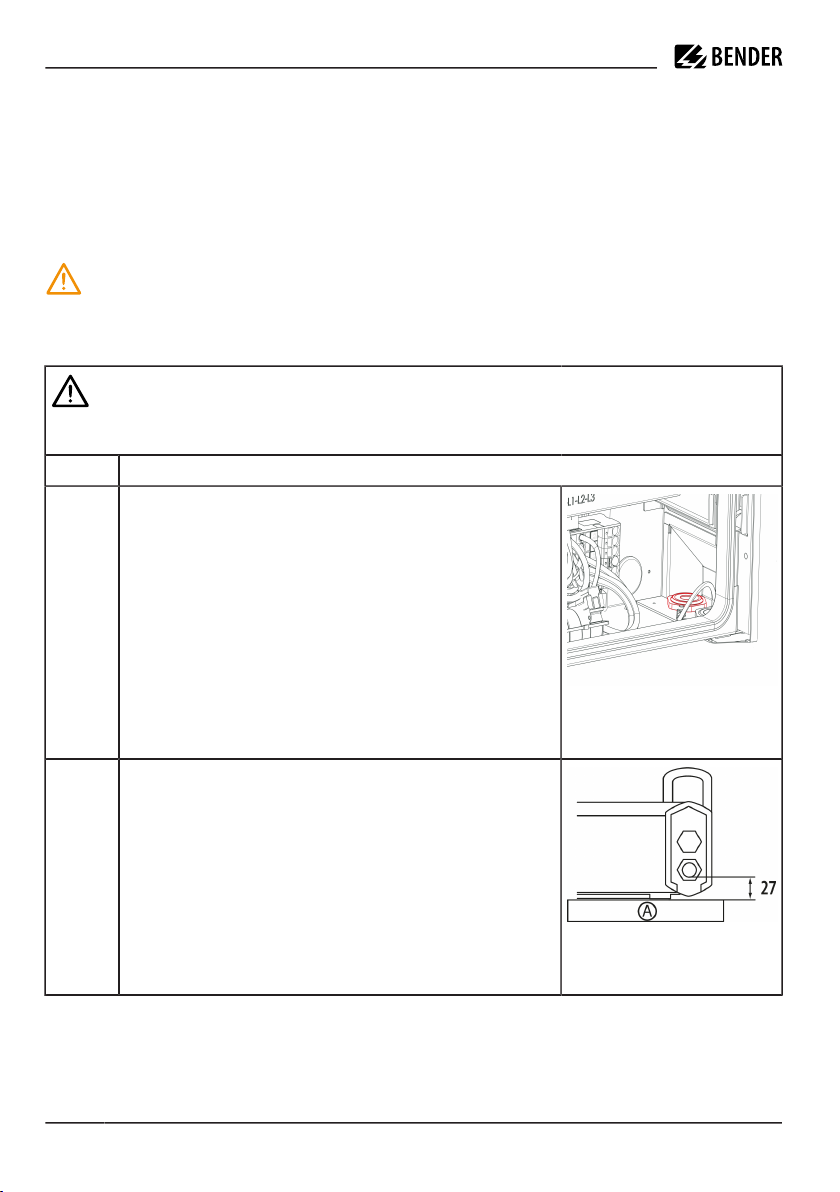
. Strip the cables for L , L2, L3, N and PE: 8 mm to 20 mm
2. Insert the power cord from below into the DC Wallbox through the
rear cable gland and secure it; loosen with an open-ended spanner if
necessary.
Figure - : Cable gland position
View inside the DC Wallbox bottom
right
Figure -2: A: Wall
Network connection wiring / View
from below / Dimensions in mm
10 iONiX 25_DC-Wallbox_D00 61_00_Q_XXEN/11.2023
This manual suits for next models
2
Table of contents