BBK Dk960S User manual

TUNED
ST. 3D
MEM
AM
ALL FM
VOL1 VOL2
SERVICE MANUAL
Dk960S

C O N T E N T S
1. S AF E T Y P R IC AUT IONS 1
2. P R E V E NT IO N OF E LE C T R O S TATIC DIS C HAR G E (E S D)TO E LE C T R OS TATIC ALLY
S E NS IT IV E (E S )DE V IC E S 1
4. P R E V E R T ION OF S TATIC E LE C T R IC IT Y DIS C HAR G E 4
5. AS S E MB LING AND DIS AS S E MB LING T HE ME C HANIS M UNIT 5
5.1 OP T IC AL P IC K UP UNIT E X P L OS E D V IE W AND PAR T LIS T 5
5.2 B R AC K E T E XP LOS E D V IE W AND PAR T LIS T 7
6. E LE C T R IC AL C ONF IR MAT IO N 9
6.1 V IDE O OUT P U T (LUMINANC E S IG NAL ) C ONF IR MAT IO N 9
6.2 V IDE O OUT P U T (C HR O MINANC E S IG NAL ) C O NF IR MATIO N 10
7. MP E G B OAR D C HE C K WAVE F OR M 11
8. IC B LOC K DIAG R AM & DE S C R IP T ION 12
9. S C HE MAT IC & P C B W IR ING DIAG R AM
42
10. S PAR E PAR T S L IS T 59
8.1 MT 1336 12
8.2 MT 137920
8.3 U214 HY 29F 800 36
8.4 HY57V641620HG
39
3. C ONT R OL B UT T ON LOC AT IONS AND E X P L ANAT IONS 2
5.3 MIS C E LLANE O US 8

1.1 GENERAL GUIDELINES
1. When servicing, observe the original lead dress. if a short circuit is found, replace all parts which have
been overheated or damaged by the short circuit.
2. After servicing, see to it that all the protective devices such as insulation barrier, insulation papers
shields are properly installed.
3. After servicing, make the following leakage current checks to prevent the customer from being exposed
to shock hazards.
Some semiconductor(solid state)devices can be damaged easily by static electricity. Such components
commonly are called Electrostatically Sensitive(ES)Devices. Examples of typical ES devices are integrated
circuits and some field-effect transistors and semiconductor chip components. The following techniques
should be used to help reduce the incidence of component damage caused by electro static discharge(ESD).
1. Immediately before handling any semiconductor component or semiconductor-equipped assembly, drain
off any ESD on your body by touching a known earth ground. Alternatively, obtain and wear a commercially
availabel discharging ESD wrist strap, which should be removed for potential shock reasons prior to
applying power to the unit under test.
2. After removing an electrical assembly equipped with ES devices,place the assembly on a conductive
surface such as alminum foil, to prevent electrostatic charge buildup or exposure of the assembly.
3. Use only a grounded-tip soldering iron to solder or unsolder ES devices.
4. Use only an anti-static solder removal device. Some solder removal devices not classified as anti-static
(ESD protected)can generate electrical charge sufficient to damage ES devices.
5. Do not use freon-propelled chemicals. These can generate electrical charges sufficient to damage ES
devices.
6. Do not remove a replacement ES device from its protective package until immediately before you are
ready to install it.(Most replacement ES devices are packaged with leads electrically shorted together by
conductive foam, alminum foil or comparable conductive material).
7. Immediately before removing the protective material from the leads of a replacement ES device, touch
the protective material to the chassis or circuit assembly into which the device will be installed.
Caution
Be sure no power is applied to the chassis or circuit, and observe all other safety precautions.
8. Minimize bodily motions when handling unpackaged replacement ES devices. (Otherwise harmless motion
such as the brushing together of your clothes fabric or the lifting of your foot from a carpeted floor can
generate static electricity(ESD).
notice (1885x323x2 tiff)

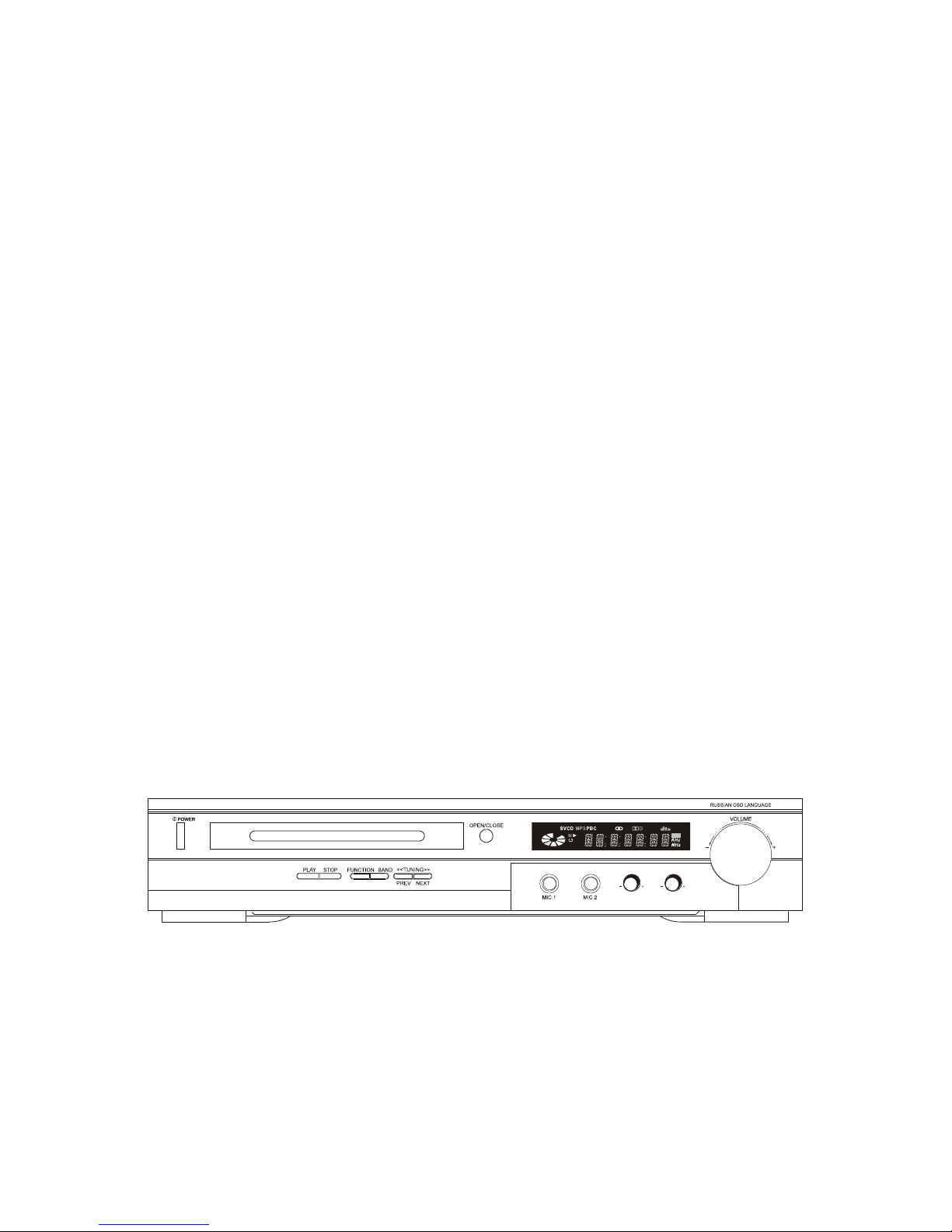
3.Control Button Locations and Explanations
Front Panel Illustration
POWER switch
2Disc tray
4VFD display window
5VOLUME knob
6PLAY button
7STOP button
8
FUNCTION button
9
DVD MODE: PAUSE button
TUNER MODE: BAND button
DVD MODE PREV button
TUNER MODE TUNING button
10
12
MIC 1 jack
13
MIC 2 jack
14
MIC VOLUME 1 knob
DVD MODE: NEXT button
TUNER MODE: TUNING button
11
3OPEN/CLOSE button
15
MIC VOLUME 2 knob
4
3
7 8 9 10 11 12 13 14 15
6
5
2
TUNED
ST. 3D
MEM
AM
ALL FM
VOL1 VOL2

Change the audio language.
Switch the TV system between PAL, NTSC and AUTO.
DVD titles.
Open/close the virtual keyboard function.
Pause playback.
Normal playback.
Function setup.
Change subtitle languages/Switch JPEG display modes.
Repeat playback.
Sleep timer.
Stations saving button, up to 20 FM/AM stations can
be saved respectively/Set the played image as the
power-on logo
Slow playback.
MIC button
14
AUDIO button
2
SUBTITLE button
3
PANEL button
5
6P/N button
TITLE button
7
SLOW button
13
10 SETUP button
PLAY button
11
PAUSE button
12
NUMBERED buttons
4
Tuning up/down stations.
FWD/REW button
Fast forward/backward playback.
TUNING +/- buttons
19
MAN/AUTO buttou/Q-PLAY button
20
Manual/automatic tuning switch/Skip the advertisement/
warning and play the DVD directly.
FM/AM switch/
Switch video to the progressive Y Pb Pr
mode.
Switch Video output to the interlacing
mode./
Increase/decrease bass.
Increase/decrease treble.
Increase/decrease power amplifier's channel volume.
Select power amplifier's channel volume.
Turn off/on audio outputs
Increase/decrease the master volume.
Select the preset channels.
Select previous/next chapter or track when playing.
SAVE/LOGO button
18
24 VOL +/- button
SPEAKERS button
25
BASS +/- button
22
TREBLE +/- button
23
MUTE button
27
PREVIOUS/NEXT button
PRESET +/- button
26
Play from the desired point.
Camera angles switch, MP3/JPEG playback modes switch.
DISC/RADIO/AUX IN switch.
GOTO button
36
ANGLE button
37
Open/Close the disc tray.
FUNCTION button
38
EJECT button
39
Switch new user interface.
INFO button
29
Repeat the selected section A-B.
MAIN VOL button
27
28
A-B button
2730
Back to the previous menu.
Display the disc menu, PBC ON/OFF button.
MENU button
33
Zoom in/out the playing frame.
Display the disc information.
ZOOM button
34
OSD button
35
Stop playback.
STOP button
31
RETURN button
32
BAND button/IS/PS button
21
8DIRECTION ARROWS
SELECT button
9
6
3
2
5
7
8
9
12
11
13
14
15
16
39
38
37
34
35
36
32
33
19
18
20
21
22 23
24
25
26
29
30
31
28
27
17
4
10
REPEAT button
15
SLEEP button
16
Enter or exit the standby mode.
STANDBY button
Control Button Locations and Explanations (Continued)
Remote Control Illustration
UP/DOWN/LEFT/RIGHT DIRECTION ARROW.
A-B
9 0 +10
56 7 8
1 2 34
STANDBY
EJECT
AUDIO
SUBTITLE ANGLE FUNCTION
GOTO
OSD
ZOOM
P/NPANEL
TITLE
SELECT
SETUP RETURN
PLAY PAUSE STOP
SLOW REPEAT
MAIN
INFO
MUTE
BAND BASS VOL
MAN/AUTO
Q-PLAY
PS/IS
SAVE
SLEEP
TUNING
MIC VOCAL
PRESET
SPEAKERS
TREBLE
MENU
VOL
Select the Karaoke sing-along mode
17 VOCAL Button
Karaoke operation menu.
LOGO

The laser diode in the traverse unit (optical pickup)may brake down due to static electricity of clothes or human
body.Use due caution to electrostatic breakdown when servicing and handling the laser diode.
4.1.Grounding for electrostatic breakdown prevention
Some devices such as the DVD player use the optical pickup(laser diode)and the optical pickup will be damaged
by static electricity in the working environment.Proceed servicing works under the working environment where
grounding works is completed.
4.1.1. Worktable grounding
1. Put a conductive material(sheet)or iron sheet on the area where the optical pickup is placed,and ground the
4.1.2.Human body grounding
1 Use the anti-static wrist strap to discharge the static electricity from your body.
4.1.3.Handling of optical pickup
1. To keep the good quality of the optical pickup maintenance parts during transportation and before
installation, the both ends of the laser diode are short-circuited.After replacing the parts with new ones,
remove the short circuit according to the correct procedure. (See this Technical Guide).
2. Do not use a tester to check the laser diode for the optical pickup .Failure to do so willdamage the laser
diode due to the power supply in the tester.
4.2. Handling precautions for Traverse Unit (Optical Pickup)
1. Do not give a considerable shock to the traverse unit(optical pickup)as it has an extremely high-precise
structure.
2. When replacing the optical pickup, install the flexible cable and cut is short land with a nipper. See the
optical pickup replacement procedure in this Technical Guide. Before replacing the traverse unit, remove
the short pin for preventingstatic electricity and install a new unit.Connect the connector as short times as
possible.
3. The flexible cable may be cut off if an excessive force is applied to it.Use caution when handling the cable.
4. The half-fixed resistor for laser power adjustment cannot be adjusted. Do not turn the resistor.
safety_3 (1577x409x2 tiff)
sheet.

5.1 Optical pickup Unit Explosed View and Part List
Pic (1)

Materials to Pic (1)
No. PARTS CODE PARTS NAME Q ty
14692200 SF-HD60 1
1 1EA0311A06300 ASSY, CHASSIS, COMPLETE 1
2 1EA0M10A15500 ASSY, MOTOR, SLED 1
Or 1EA0M10A15501 ASSY, MOTOR, SLED 1
3 1EA2451A24700 HOLDER, SHAFT 3
4 1EA2511A29100 GEAR, RACK 1
5 1EA2511A29200 GEAR, DRIVE 1
6 1EA2511A29300 GEAR, MIDDLE, A 1
7 1EA2511A29400 GEAR, MIDDLE, B 1
8 1EA2744A03000 SHAFT, SLIDE 1
9 1EA2744A03100 SHAFT, SLIDE, SUB 1
10 1EA2812A15300 SPRING, COMP, TYOUSEI 3
11 1EA2812A15400 SPRING, COMP, RACK 1
21 1EA0B10B20100 ASSY, PWB 1
Or 1EA0B10B20200 ASSY, PWB 1
31 SEXEA25700--- SPECIAL SCREW BIN+-M2X11 3
32 SEXEA25900--- SPECIAL SCREW M1.7X2.2 2
33 SFBPN204R0SE- SCR S-TPG PAN 2X4 2
34 SFSFN266R0SE- SCR S-TPG FLT 2.6X6 1
35 SWXEA15400--- SPECIAL WASHER 1.8X4 X0.25 2
Note : This parts list is not for service parts supply.

5.2 Bracket Explosed View and Part List
Pic (2)
Materials to Pic(2)
1.bracket 14.frontsiliconrubber
2.belt15.Backsiliconrubber
3.screw 16.Pick-up
4.beltwheel 17.Pick-up
5.gearwheel 18.switch
6.ironchip 19.Five-pinflatplug
7. Immobility mechanism equipment 20. screw
8.Magnet 21.PCB
9.Platen 22.motor
10.Bridgebracket 23.Motorwheel
11.screw 24.screw
12.screw 25.tray
13. Big bracket
Before going process with disassembly and installation, please carefully both
peruse the chart and confirm the materials.

5.3 MISCELLANEOUS
5.3.1 Protection of the LD(Laser diode)
Short the parts of LD circuit pattern by soldering.
5.3.2 Cautions on assembly and adjustment
Make sure that the workbenches,jigs,tips,tips of soldering irons and measuring instruments are
grounded,and that personnel wear wrist straps for ground.
Open the LD short lands quickly with a soldering iron after a circuit is connected.
Keep the power source of the pick-up protected from internal and external sources of electrical
noise.
Refrain from operation and storage in atmospheres containing corrosive gases (such as H2S,SO2,
NO2 and Cl2)or toxic gases or in locations containing substances(especially from the organic silicon,cyan,
formalin and phenol groups)which emit toxic gases.It is particularly important to ensure that none of the
above substances are present inside the unit.Otherwise,the motor may no longer run.
Table of contents
Other BBK Home Theater System manuals


