baiMobile 3000MP User manual
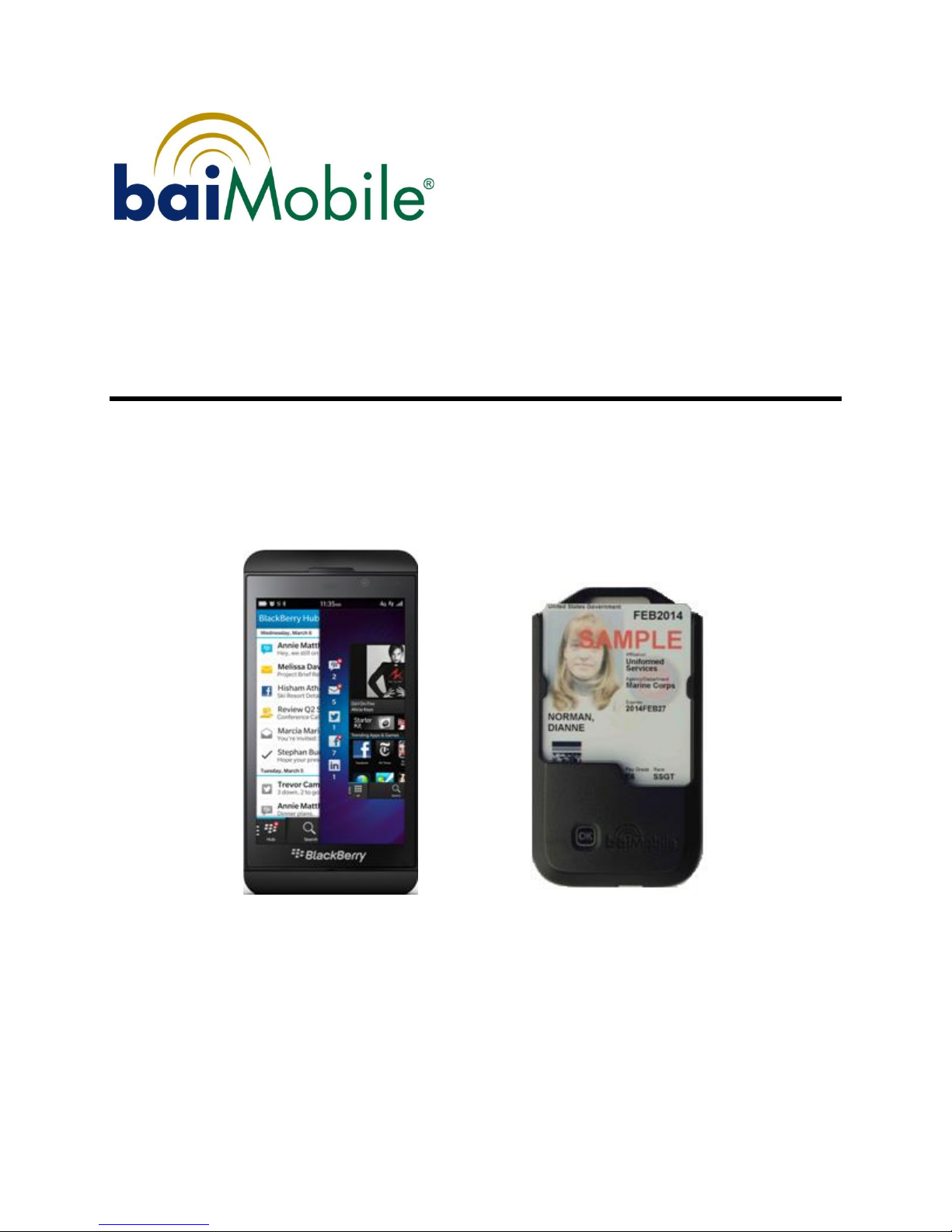
Model 3000MP Bluetooth Smart Card Reader
User Guide
for BlackBerry 10 devices
Version 3.5 30000MP
Date: October 13, 2014

Support
For support relating to baiMobile™Bluetooth Smart Card Readers:
Biometric Associates, Inc
Main Office (410) 252-7210
support@baimobile.com
Field support:
Michael Smith (407) 823-8130 (cell)
msmith@baimobile.com

iii
Contents
Before you get started ................................................................................................5
Proper Care of your baiMobile™ 3000MP Bluetooth Smart Card Reader ..........................5
Welcome...................................................................................................................5
Hardware and Software Requirements ..........................................................................5
Hardware Requirements ...........................................................................................5
Software Requirements ............................................................................................5
Supported Smart Cards ............................................................................................6
baiMobile™ Bluetooth Smart Card Reader Specifications .................................................6
Accessories ...............................................................................................................7
Reader Basics ............................................................................................................7
Reader Features ......................................................................................................7
Power consumption .................................................................................................8
Powering on the Reader ...........................................................................................9
Accepting a Bluetooth connection ............................................................................10
Powering off the Reader ......................................................................................... 11
Charging the Reader .............................................................................................. 11
Upgrading the Reader Firmware .............................................................................11
LED Panel Icons ....................................................................................................12
Home Screen ..................................................................................................... 12
Data Transfer Screen .......................................................................................... 13
Battery Status Icons .............................................................................................. 13
Inserting a CAC or PIV card .................................................................................... 14
Battery................................................................................................................. 14
Reader Error Massages........................................................................................... 14
Installing the baiMobile Reader Driver ...................................................................... 15
Pairing .................................................................................................................... 15
Troubleshooting - Other ......................................................................................... 22
Testing the baiMobile® 3000MP Bluetooth Reader ..................................................... 23
Index ..................................................................................................................... 26


5
Before you get started
This User’s Guide is designed for the BlackBerry 10 devices using the OS version 10.2.1.2179
and higher. If you are using another device, the information herein may be different or may
not apply. If you have questions, contact your network administrator or email
support@baimobile.com.
Proper Care of your baiMobile™3000MP Bluetooth Smart Card Reader
Your baiMobile™3000MP Bluetooth Smart Card Reader is an electronic product similar
to a cell phone or MP3 player that may be damaged by excessive moisture, sand, dirt and
impact. Taking proper care of your reader is essential for continued, trouble-free operation.
Welcome
The baiMobile™solution for the BlackBerry 10 devices includes:
1. baiMobile™3000MP Reader
2. baiMobile™BlackBerry 10 reader driver (baiMobile-0_0_1.183 or higher)–This
file must be installed on your devices via a BES.
This baiMobile 3000MP solution permits you to perform many of the same functions on a
mobile device that are available on a desktop PC including:
digitally sign and decrypt emails and documents
log on to web sites and network servers that require smart card (CAC or PIV)
authentication
other applications that require smart card authentication.
Hardware and Software Requirements
This section describes the minimum hardware and software requirements necessary to use
your Reader with and BlackBerry 10 device.
Hardware Requirements
The baiMobile 3000MP reader with firmware version 2.03.01.
Software Requirements
The following software components are required on your BlackBerry 10 device:
1. BlackBerry 10 version 10.2.1.2179 or higher
2. baiMobile reader driver (baiMobile-0_0_1.183 or higher).

6
Supported Smart Cards
The baiMobile middleware libraries contain the PKCS#11 command set that is specific to
each smart card type. Support for CAC, PIV and the SafeNet 330 smart cards are included
in the BlackBerry 10 OS. For support for other smart card types, please contact your
administrator or email support@baimobile.com.
baiMobile™ Bluetooth Smart Card Reader Specifications
Specifications
Description
baiMobile 3000MP Bluetooth Smart Card Reader
Hardware Specifications
Dimensions
62 mm (2.44 in) wide x 110 mm (4.33 in) high x 20 mm (4.79 in) thick
Weight
70g (2.46 oz)
Status Indicator
LCD panel provides connection indication, signal strength, battery capacity, device
name, version info, aided pairing. Configurable LED indicators (use/don’t use) for
connection indication, user attention and LCD backlighting
Battery
Removable PolyFlex cell; rated capacity 580 mAh, normal voltage 3.7v; in low power
mode - 3.5mA, (~7 days batt life) On but BT connection; 14mA, (~2 days batt life) power
on with BT connection.
Power On / Off
Power on activated by card insertion and/or front OK button. Power off activated by
card removal or application/device security policy.
Charging Port
Mini-B USB (Charger included with Reader)
Wireless Communications
Communications Protocol
2.4 GHz frequency ISM band. IEEE 802.15.1 (Bluetooth) with full security enabled
RF Transmission range
10 meters
Supported Bluetooth versions
Devices with Bluetooth ver 2.1 and higher and the BlueZ stack
Data Throughput
750 kb/s to 1 Mb/s
baiMobile Middleware Libraries / Security
Bluetooth & AES
Mode 4: service level security; FIPS 140-2 approved AES-256 encryption overlay
Authentication Method
S/MIME, SSL and PKI
Mobile Device Security
Custom Reader firmware; FIPS 140-2 certified version of the OpenSSL library on reader
and device (NIST certification number 1051);
Mobile Operating Systems
Supported Operating Systems
iPhone/iPad iOS version 4.0 and higher, Android version 2.2 and higher, BlackBerry OS
7.0 and higher, BlackBerry 10.2.1 and higher, Windows 7 and higher
7
Accessories
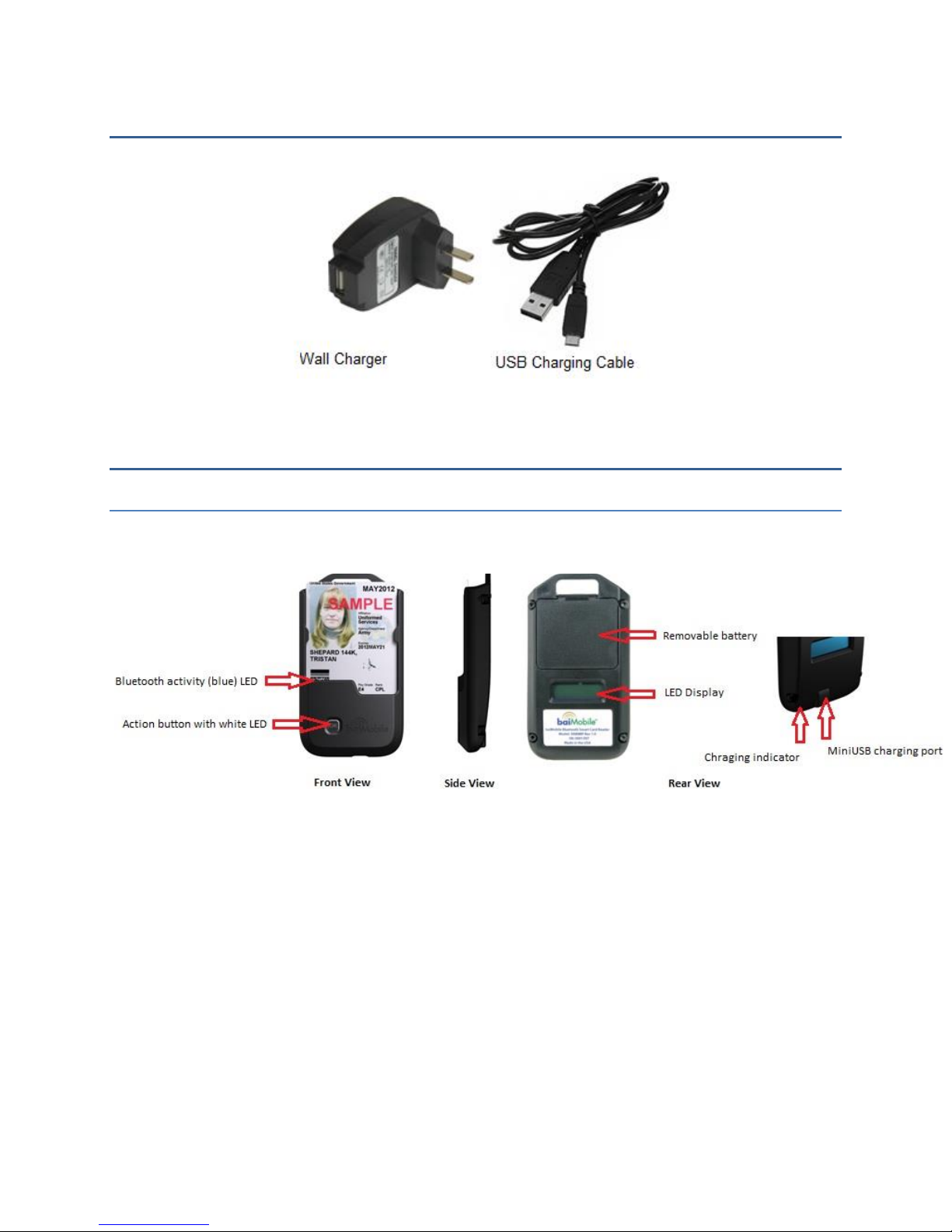
Included with your Reader is a charging cable, comprised of a plug and a mini-USB cable.
Reader Basics
Reader Features
Please familiarize yourself with the features of the baiMobile 3000MP Reader.
Blue LED indicator The blue LED indicator is located on the front portion of the
reader, facing the Smart Card. It will flash when the reader’s Bluetooth radio is on
and is transmitting or receiving data.
OK Button with White LED indicator The OK button is located on the front portion
of the reader. Certain functions, such as pairing and reconnecting to the BlackBerry
10 device, require an acknowledgment by the user. A white LED indicator will flash
whenever an action or acknowledgment must be performed by the user.
Removable Battery/Battery Cover The reader battery is the only component that
will need to be replaced periodically, depending on usage. The battery is rated for 600
charge-discharge cycles, or about two years of normal use. Should the battery need
replacing, remove the battery cover and replace the old battery with a new (baiMobile
approved) battery. Note: This reader uses a battery custom built for the reader.
Inserting a battery other than a baiMobile approved battery will cause serious damage
to the reader and will void its warranty.

8
LED Display The LED display is located on the rear of the reader and will display
various messages and reader status icons when the reader is powered on.
MiniUSB Charging Port The reader’s battery is charged using a charging cable and
power supply. The power cable is inserted into the miniUSB port located at the bottom
of the reader. Note that the miniUSB port is for charging only and will not support the
transfer of data.
Power consumption
The baiMobile 3000MP smart card reader includes a low-power mode. The operation of
the low power modes is complex and based on idle timeouts.
Reader firmware version 2.2.0 and higher
oFull power consumption (50-60mA)
During pairing
During each reader or card command execution duration
Each lasts a few seconds, max
oIdle Power Mode (25mA)
Lasts 8 seconds after the last command execution is completed
oLow Power Mode –connected (3.5mA)
Starts 8 seconds after the last command execution is completed
oLow Power Mode –not connected (3.5mA)
Starts immediately after booting is complete (and LCD back light is off)
Starts immediately following a disconnection from Bluetooth.
oFor any duration that the LCD back light is on, add another 30mA, but the
back light only stays on for short durations (6 seconds, or during pairing, or
while holding down the button to see version number, etc.)
To calculate the length of time the reader could continue in any one of these modes, use
this equation:
Time in hours = 600 / (mA consumption)
For instance, while connected but in Low Power Mode (3.5mA)
600 / 3.5 = 171 hours (or over 7 days)
9
Powering on the Reader
The baiMobile 3000MP Reader does not have an On/Off switch or button. Your reader is
powered on by inserting your smart card into your reader. If your smart card is already
inserted in your reader, slide it out and then reinsert the card. You will notice the reader’s
Home Screen displayed on the LED panel on the back of the reader.
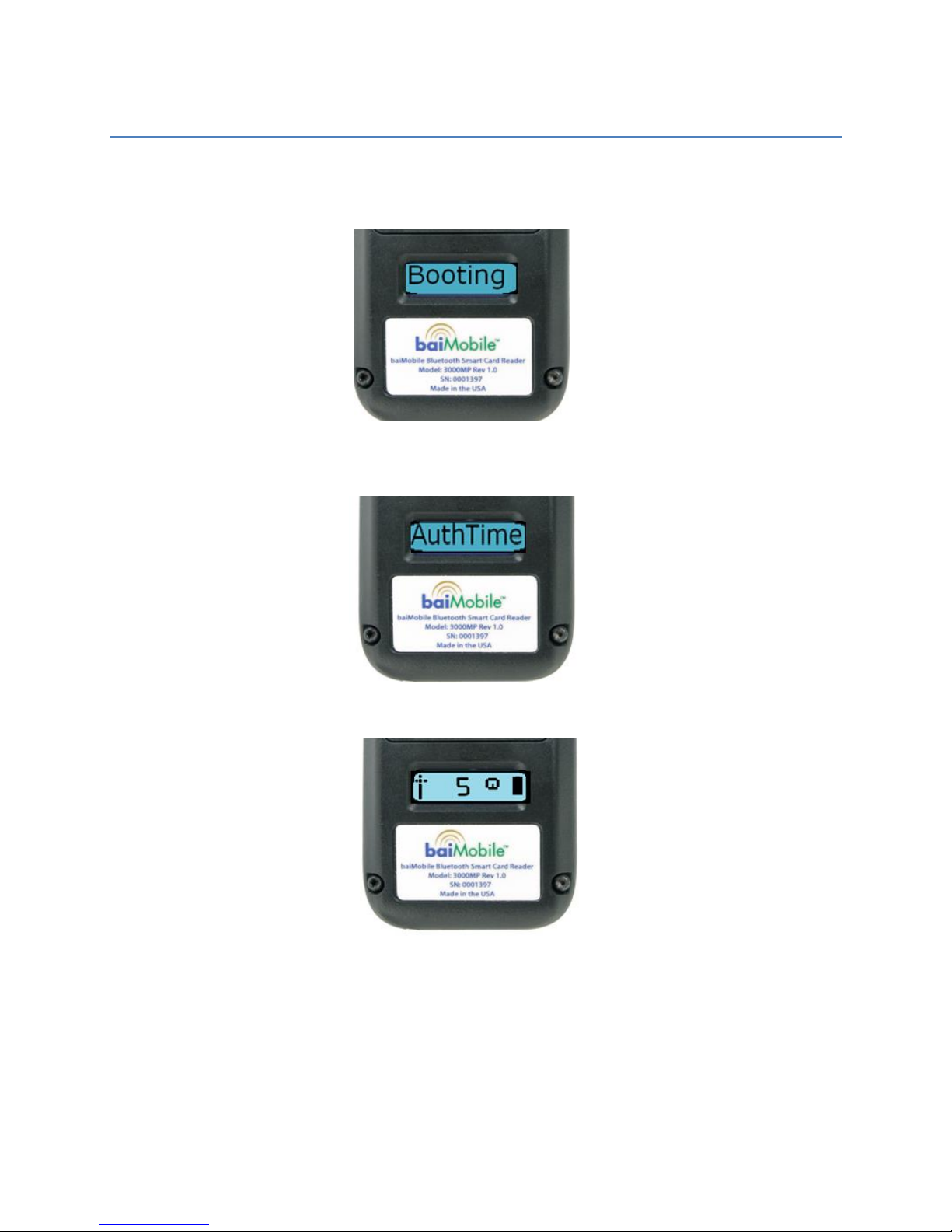
Power On Screen 1 –displayed for about 1.7 seconds when reader is first powered on
Power On Screen 2 –displayed for about 1.7 seconds
Power On Screen 3 –Reader will accept a Bluetooth connection request from an application
on your BlackBerry 10 device without requiring the user to press the OK button for 5 minutes
10
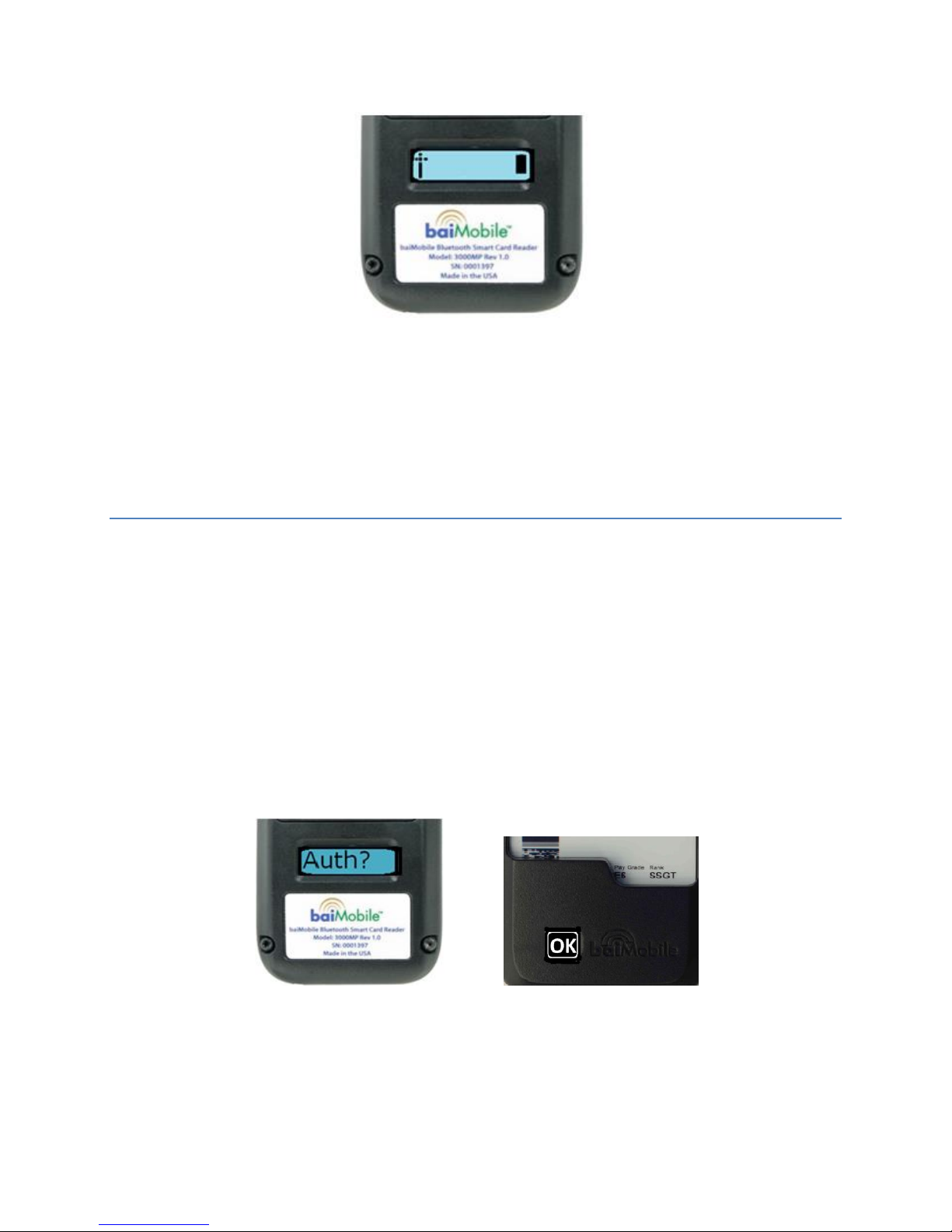
Power On Screen 4 –Reader is now powered on and is “listening” for a Bluetooth connection
request from an application on your BlackBerry 10 device. User must first press the OK
button to accept a connection request. The reader will stay in this state for approximately 7
days until the battery is exhausted (firmware version 2.02.00 and higher) or until the Smart
Card is removed from the Reader, whichever occurs first. If the reader receives a connection
request from the BlackBerry 10 device, you may be prompted to authorize the request by
pressing and releasing the 0K button on the front of the reader.
Accepting a Bluetooth connection
NSA security requirements state that the user must accept (acknowledge) all Bluetooth
connection requests from his or her mobile device.
Examples:
When a client application on the mobile device needs to establish a Bluetooth
connection to the reader to access information (certificates) residing on the Smart
Card
When a client application on the mobile device requires that the user acknowledge an
action (digital signing) involving the Smart Card
In such cases, the reader will display a message prompt such as “Auth?” and the white LED
beneath the OK button will flash repeatedly until the OK button is pressed.
Other manuals for 3000MP
7
Table of contents