AVer X30i User manual

X30i
User Manual

WARNING
ALWAYS FOLLOW SAFETY PRECAUTIONS
NEVER climb, sit
or stand on the cart.
ONLY ADULTS should
move the cart.
To reduce risk
of electric shock
ONLY use indoors.
Death or serious injury may occur when children climb on audio and/or
video equipment furniture. A remote control or toys placed on the
furnishing may encourage a child to climb on the furnishing and as a
result the furnishing may tip over on to the child.
Relocating audio and/or video equipment to furniture not specifically
designed to support audio and/or video equipment may result in death
or serious injury due to the furnishing collapsing or over turning onto a
child.

CAUTION!
DO NOT allow anyone to sit, stand or climb on the cart.
DO NOT lift the cart.
DO NOT block the ventilation holes used for air circulation.
DO NOT overload objects on the cart shelves. (Work platform maximum
loading = 20kg / 44.09lbs; each shelf maximum loading = 27kg / 59.53lbs).
DO NOT put any devices that the weight is over the maximum loading weight
on top of cart.
When moving the cart, DO NOT put any devices (ex: TV, Monitor,
Documents camera…etc.) on top of cart.
No TV/monitor is to be used on top of cart.
Before moving the cart, disconnect the power from the wall outlet.
While moving the cart, make sure the power cord is secured and tightly
wrapped.

FCC NOTICE (Class A)
NOTE: This equipment has been tested and found to comply with the
limits for a Class A digital device, pursuant to part 15 of the FCC Rules.
These limits are designed to pro-vide reasonable protection against
harmful interference when the equipment is operate din a commercial environment.
This equipment generates, uses, and can radiate radiofrequency energy and, if not
installed and used in accordance with the instruction manual, may cause harmful
interference to radio communications. Operation of this equipment in a residential
area is likely to cause harmful interference in which case the user will be required
to correct the interference at his own expense.
FCC Caution: Any changes or modifications not expressly approved by the party
responsible for compliance could void the user's authority to operate this
equipment.
This device complies with part 15 of the FCC Rules.
Operation is subject to the following two conditions:
(1) This device may not cause harmful interference, and
(2) this device must accept any interference received, including interference that
may cause undesired operation.
DISCLAIMER
No warranty or representation, either expressed or implied, is made with respect to
the contents of this documentation, its quality, performance, merchantability, or
fitness for a particular purpose. Information presented in this documentation has
been carefully checked for reliability; however, no responsibility is assumed for
inaccuracies. The information contained in this documentation is subject to change
without notice.
In no event will AVer Information Inc. be liable for direct, indirect, special, incidental,
or consequential damages arising out of the use or inability to use this product or
documentation, even if advised of the possibility of such damages.
TRADEMARKS
“AVer” is a trademark owned by AVer Information Inc. Other trademarks used
herein for description purpose only belong to each of their companies.
COPYRIGHT
©2018 AVer Information Inc. All rights reserved.
All rights of this object belong to AVer Information Inc. Reproduced or transmitted
in any form or by any means without the prior written permission of AVer
Information Inc. is prohibited. All information or specifications are subject to
change without prior notice.

The mark of Crossed-out wheeled bin indicates that this product must
not be disposed of with your other household waste. Instead, you need
to dispose of the waste equipment by handing it over to a designated
collection point for the recycling of waste electrical and electronic
equipment. For more information about where to drop off your waste
equipment for recycling, please contact your household waste disposal
service or the shop where you purchased the product.
Contact Information
Global
AVer Information Inc.
www.aver.com
8F, No.157, Da-An Rd., Tucheng
Dist.,
New Taipei City
Taiwan
Tel: +886-2-2269-8535
USA
AVer Information Inc.
668 Mission Ct
Fremont, CA 94539
www.averusa.com
Toll-free: 1(877)528-7824
Local: 1(408)263-3828
Su
pp
ort.usa
@
aver.com

Contents
Package Contents ................................................................................................ 1
Dimensions ........................................................................................................... 1
Diagram ................................................................................................................ 2
LED Indicators ...................................................................................................... 3
Secure the Cart..................................................................................................... 4
Door Lock ............................................................................................................. 4
Cable Management .............................................................................................. 6
Charging Cart ....................................................................................................... 8
Adaptive Intelligent Charging System................................................................... 9
Troubleshooting .................................................................................................. 10
Specifications.......................................................................................................11
Service and Warranty ......................................................................................... 12

1
Package Contents
The following items are included in the package. Please check if each item is
available before using.
User Manual Door key x4
Power cable
X30i Cart
Dimensions
636.5mm(25.06”) 638mm(25.12”)
1070mm(42.13”)

2
Diagram
2
4
3
11
78
9
6
5
Front Side Back
1. Work platform 7. LED panel 14. Ventilation holes
2. Ventilation holes 8. Auxiliary outlets 15. Door lock
3. Handle
4. Door lock
9. USB firmware upgrade
port (not for charging
or storage)
16. Security hook
5. 5" caster
6. 5" lockable caster
10. Power switch
11. Power cable wrap
brackets
12. Ventilation holes
13. Power inlet
3
LED Indicators
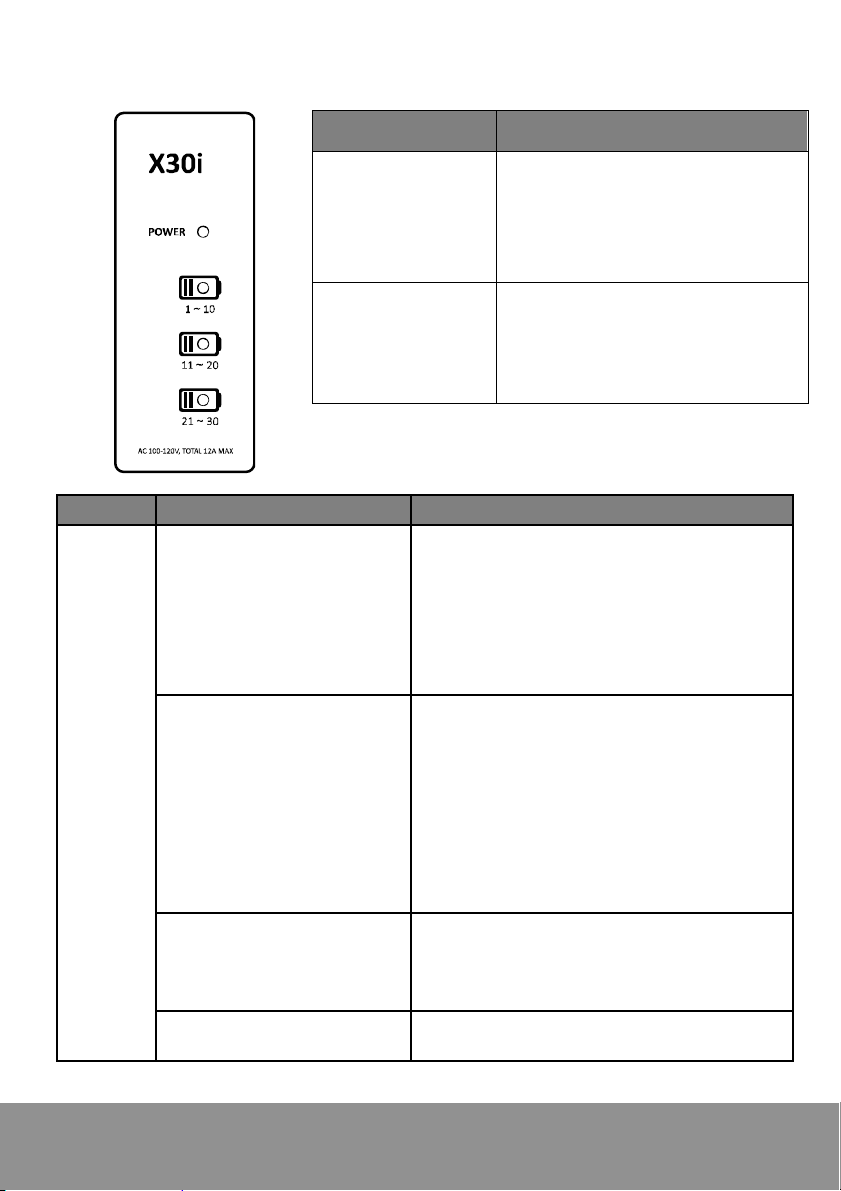
LED Status
Power x1
1. Solid Green: ON
2. Flashing Green / Orange /
Red: Abnormal situation
( please check below table for
details )
Device Status x3
1. All Off: Power draw is less
than 1A or all devices are fully
charged
2. Off: No Charging
3. Solid Blue: Charging
LED Status Description
Power
Flashing Green and
Orange: Power Overload
(AUX is turned off and
charging is still available)
Situation:
The total power draw of auxiliary outlet
and charging zone caused power
overloaded.
Solution:
Power off, remove anything connected
to auxiliary outlets and power back on.
Flashing Orange: Power
Overload
Situation:
Power draw of auxiliary outlet or one of
charging zone caused power
overloaded.
Solution:
Check whether there is any high power
devices such as heater…etc.,
connected to auxiliary outlet or
charging zone.
Solid Orange: Short
Protection
Solution: Please check devices which
connected to auxiliary outlet and
charging zone for it might have
problems.
Flashing Red: Abnormal
Failure
Solution: Contact Support
(Support.usa@aver.com)

4
Secure the Cart
Door Lock
Unlock the door
The number on the key
must match the number
on the door lock
Use key to unlock the door.
1
2
Turn the door lock to vertical position
to open the door.
Table of contents
Other AVer Outdoor Cart manuals