Audiothingies Micromonsta User manual

Audiothingies Micromonsta
User manual preliminary version

Overview
Specifications
The Micromonsta is an 8-voice polyphonic desktop synthesizer.
Small, powerful, great sound, usa ility and easy editing were key elements while designing the
Micromonsta.
It features:
•8 voices of polyphony
•2 oscillators, 1 su oscillator, 1 multimode filter, 3 envelopes, 3 LFOs, 6 modulation slots, 3
scalers, 1 lag operator per voice
•12 oscillator types + 30 (multi-sampled) waveta les (15 factory featuring oth evolving
sweeps and totally random waveta les + 15 user for your own creations)
Audiothingies Micromonsta user manual 2

•8 filter types
•Powerful detuning options ( oth per voice and per oscillator)
•Powerful arpeggiator with step pattern editor, slide and accent capa le for 303-ish
arpeggiated phrases
•Deep modulation matrix (with for example filter parameters, envelope or LFO speeds as
destination)
•A chorder module allowing the generation of 4-note chords within a key/scale
•Internal FXs
•384 preset slots to store your sound creations
Audiothingies Micromonsta user manual 3
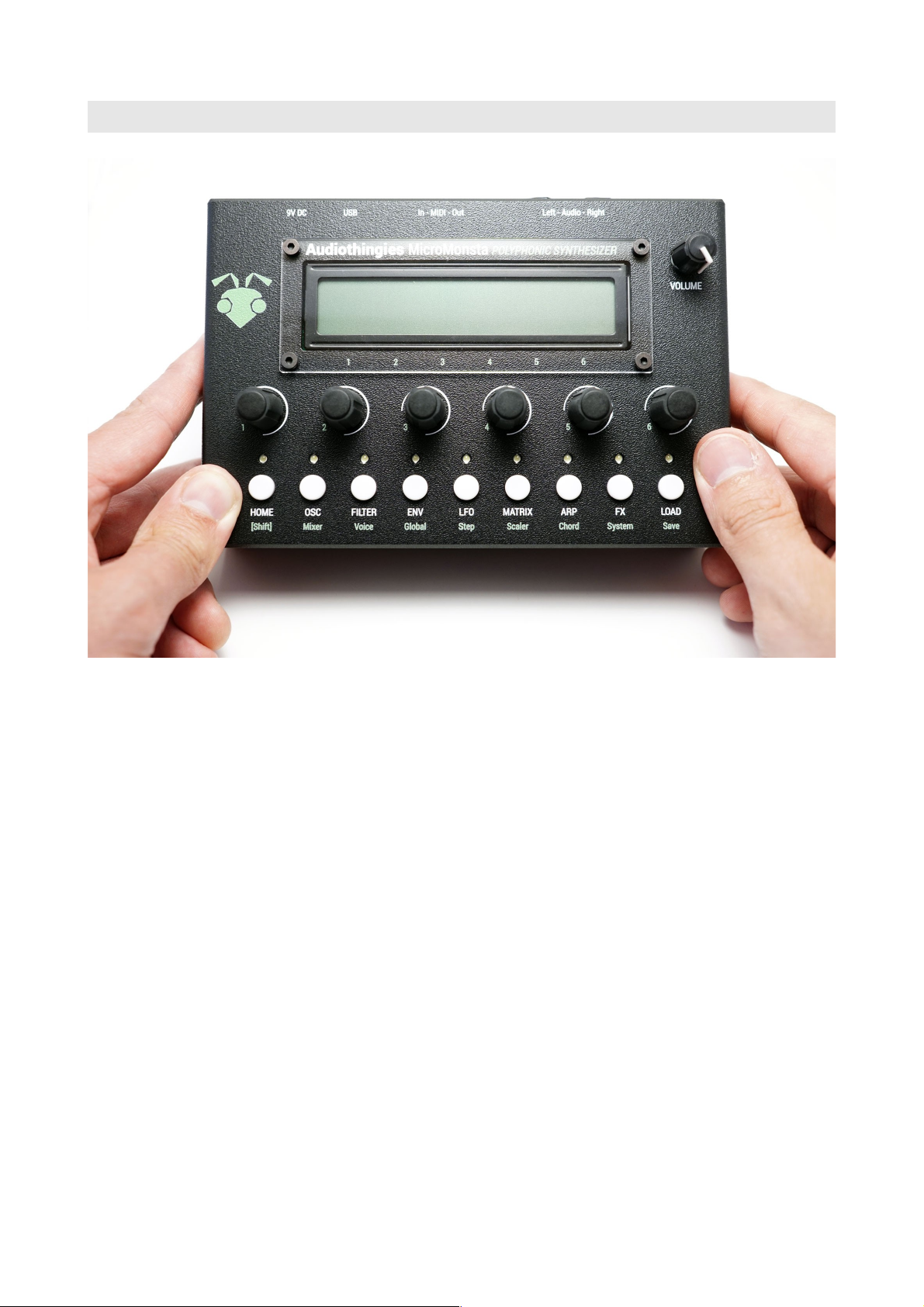
Front panel
On the front panel you will find:
•2 x 24 characters LCD screen – Black on white
•6 encoders
•9 push uttons with their associated LEDs
Audiothingies Micromonsta user manual 4

Rear panel
On the rear panel, from left to right on the a ove picture
•Audio outputs (use left output when using mono)
•MIDI connectors
•USB port – used only for firmware update and user waveta le update
•9V DC input socket
•Power switch
Audiothingies Micromonsta user manual 5

Quick start
1. Connect audio outs to a mix ta le, turn the volume kno fully clockwise.
2. Connect a MIDI key oard into the MIDI Input
3. Power the MM with a 9V DC 2.1mm PSU.
4. Play some notes on MIDI channel 1, you should hear patch num er 1 playing
5. Press Load
6. Turn encoder 6 to navigate thru the patches. Press Load again to load selected patch, press
Home to cancel and return to previously loaded sound.
7. Alternatively, you can push encoder 1 & 2 to navigate and load the previous or next patch
Audiothingies Micromonsta user manual 6

Using the Micromonsta
The MM has een developed with easy editing in mind and we do think it is really easy to edit
given the synthesis complexity featured on oard. However, some parameters may need some
explanations that you will find in this manual.
Navigating pages
How to navigate throughout the MM architecture?
Parameters are mapped across different sections accessed y pressing a corresponding utton on the
front panel.
When a section has several pages, you access them y successively pressing the same utton several
times. When you are on the last page, it returns to the first one.
For example, pressing OSC several times will make you travel the following pages: OSC1 > OSC2
> SUB > OSC1 > OSC2 etc.
Some sections (the ones la elled in green) are accessi le y simultaneously pressing Home [shift] +
another utton. For example [shift] + OSC will take you to the Mixer page.
E iting parameters
The LCD provides up to 6 parameters to edit.
Use encoders 1-6 to change their corresponding parameter value.
Some parameters can e reset to a default value when pushing the corresponding encoder (all
ipolar parameters for example).
Audiothingies Micromonsta user manual 7

HOME | Main page
This is where you land when you power your MM polyphonic synthesizer
P038 cut res mix bpm
RandJuno 0 100 74 100
You get the program num er and name as well as shortcuts to 4 different parameters.
You can set these parameters, per preset, in the Glo als menu (2nd page)
You can navigate presets from this screen y pressing encoder uttons 1 and 2.
Quite useful in a live situation.
NOTE: When in this mode, LEDs 2 to 9 will show the activit of voices 1 to 8.
Audiothingies Micromonsta user manual 8

OSC | Oscillators
Oscillator 1
Oscillator 1 is the main oscillator. It also drives the su oscillator.
OSC1 trs tun shp lfo1 mix
sa +3 +5 15 -25 121
•OSC1 oscillator algorithm selector
•trs patch transpose (+- 2 octaves per semitone step)
•tun oscillator fine tune
•shp oscillator shape modifier
•lfo1 lfo1 modulation amount (targets shape parameter)
•mix oscillator mix level
Oscillator 2
Oscillator 2 is functionally the same as oscillator 1, ut its tune can e offset from -24 to 24
semitones.
OSC2 rng tun shp env3 mix
sin -7 -15 100 +10 99
•OSC2 oscillator algorithm selector
•rng oscillator coarse tune
•tun oscillator fine tune
•shp oscillator shape modifier
•env3 env3 modulation amount
•mix oscillator mix level
Audiothingies Micromonsta user manual 9

Sub / Noise
In this page, you access oscillator 1′ su oscillator and noise parameters.
SUB oct mix NZE mix
squ -1 127 -9 25
•SUB su shape
•oct su oscillator octave num er
•mix su oscillator mix level
•nze noise filter
•mix noise mix level
The oscillator algorithms
12 oscillators, 15 factory waveta les and 15 user waveta les are availa le for each of the 2 main
oscillators.
mph
Morphing oscillator, when turning the shape parameter, it morphs from triangle (shape = 0), to
sawtooth (shape = 42), to square (shape = 84) to pulse width.
Quite a very versatile oscillator, it can do lots of things other algorithms aren’t capa le of doing.
sin
A sinus oscillator that turns into a asic FM operator with the shape control
tri
A triangle oscillator into a fold ack digital distortion. Shape controls the gain.
When shape is set to 127, the oscillator will produce a triangle wave with its pitch one octave and a
fifth higher.
Audiothingies Micromonsta user manual 10
Table of contents
Other Audiothingies Synthesizer manuals