
Audio-Techica ATH-TWX9 User manual

ATH-TWX9
Wireless Headphones
User Manual
English

5
Notes on use
Be sure to read the connected device’s user manual before use.
Audio-Technica will not be liable in any way for any loss of data in the unlikely event that such losses should occur
while using the product.
On public transportation or in other public places, keep the volume low so as not to disturb other people.
Minimize the volume on your device before connecting the product.
When using the product in a dry environment, you may feel a tingling sensation in your ears. This is caused by static
electricity accumulated on your body, not by product malfunction.
Do not subject the product to strong impact.
Do not store the product in direct sunlight, near heating devices, or in hot, humid, or dusty places. Additionally, do
not allow the product to get wet.
When the product is used for a long time, the product may become discolored due to ultraviolet light (especially
direct sunlight) and wear.
If the charging case is placed in a bag while the USB charging cable is still connected, the USB charging cable may
become caught, severed, or broken.
Make sure to hold the plug when connecting and disconnecting the USB charging cable. The USB charging cable
may become severed or an accident may occur if you pull on the cable itself.
When you are not using the USB charging cable, disconnect it from the charging case.
When you are not using the product, store it in the included charging case.
If you use eartips other than those included, the headphones may not fit into the charging case, or may not charge.
Be sure to use the included eartips.
When using the product, select the eartips that fit your ears best, and wear the product securely.
This product can be used to talk on the phone only when using a mobile telephone network. Support for telephony
apps that use a mobile data network is not guaranteed.
If you use the product near an electronic device or transmitter (such as a mobile phone), unwanted noise may be
heard. In this case, move the product away from the electronic device or transmitter.
If you use the product near a TV or radio antenna, noise may be seen or heard in the television or radio signal. In this
case, move the product away from the TV or radio antenna.
To protect the built-in rechargeable battery, charge it at least once every 6 months. If too much time passes between
charges, the life of the rechargeable battery may be reduced, or the rechargeable battery may no longer be able to be
charged.
Charge the product in a well-ventilated place (10 to 35°C (50 to 95°F)) away from direct sunlight. Otherwise, the
battery may deteriorate, possibly resulting in shorter periods of continuous use or may fail to charge.
If the headphones are wet, wipe them with a dry cloth before placing them in the charging case. The charging case is
not water-resistant (drip-proof). Do not charge the product if the headphones are wet.
The hear-through function of the product allows you to hear the sounds around you through the built-in microphone.
Depending on the volume of the music being played back, the surrounding sounds may be difficult to hear. In this
case, turn down the volume of the music.
Depending on your surroundings, the ambient sounds may be difficult to hear even when using the product’s hear-
through function. Do not use the product in places that are dangerous if you cannot hear the surrounding sounds,
such as places with heavy traffic.
Operate the touch sensor with one finger. Operating with a sharp-tipped object, such as a ballpoint pen or pencil,
may result not only in incorrect operation, but also damage to the touch sensor.
Do not touch the touch sensor with your fingertips. Doing so may cause your fingernail to break.

Notes on use
6
If the product does not operate at all or as intended when touched, check to make sure that your other fingers, parts
of your hand, or clothing items are not in contact when touching. Also, the product may not operate correctly if you
are wearing gloves or if your fingertips are too dry.
The product may not operate correctly if the touch sensor is dirty from sweat. Remove the dirt before operating the
product.

7
About the active noise-cancelling function
The product is designed to use its built-in microphone to pick up noise from the surrounding environment (noise from
vehicles, noise from air conditioners, etc.) and to cancel out that noise by producing sounds in negative phase. This
results in a reduction in the sounds in your environment.
The product’s noise-cancelling function is mainly effective against noises in the lower frequency range, but not all
noises are cancelled.
Depending on the type of noise (or in quiet locations), you may not notice the noise-cancelling effect.
A slight humming sound may be heard when using the noise-cancelling function. This is a sound generated by the
noise-cancelling function; it is not a malfunction.
The noise-cancelling effect may vary or a bleep (howling) may occur depending on how you wear the product. In
these cases, take off the product and put the product in your ears again correctly.
To maximize the noise-cancelling effect, select the eartips that offer the best sound insulation for each side to block
surrounding sound, and insert the headphones into the ears correctly.
When you use the product in a train or a vehicle such as bus or truck, noise may be heard depending on rail/street
conditions.

8
About water-resistant (drip-proof) performance
The water-resistant (drip-proof) specification of this product applies only to the headphones, not the charging case.
Although the headphones have water-resistant (drip-proof) capabilities equivalent to IPX4, the part where the sound
comes from is not water-resistant (drip-proof).
The water-resistant (drip-proof) performance is designed to protect the headphones if they get wet from rain, etc.
(equivalent to IPX4). JIS/IEC protection grade IPX4 means that the product is protected against exposure to flying
water from all directions.
The headphones cannot be used underwater.
The headphones cannot be used in hot and humid places, such as bathrooms.
The headphones are not waterproof. Submerging them in water may cause damage.
The headphones may not function properly if they become wet. Wipe the headphones with a dry cloth, shake them
multiple times to remove any excess water, and allow the headphones to dry thoroughly before use.
9
About the sanitization function
Sanitizing the headphones
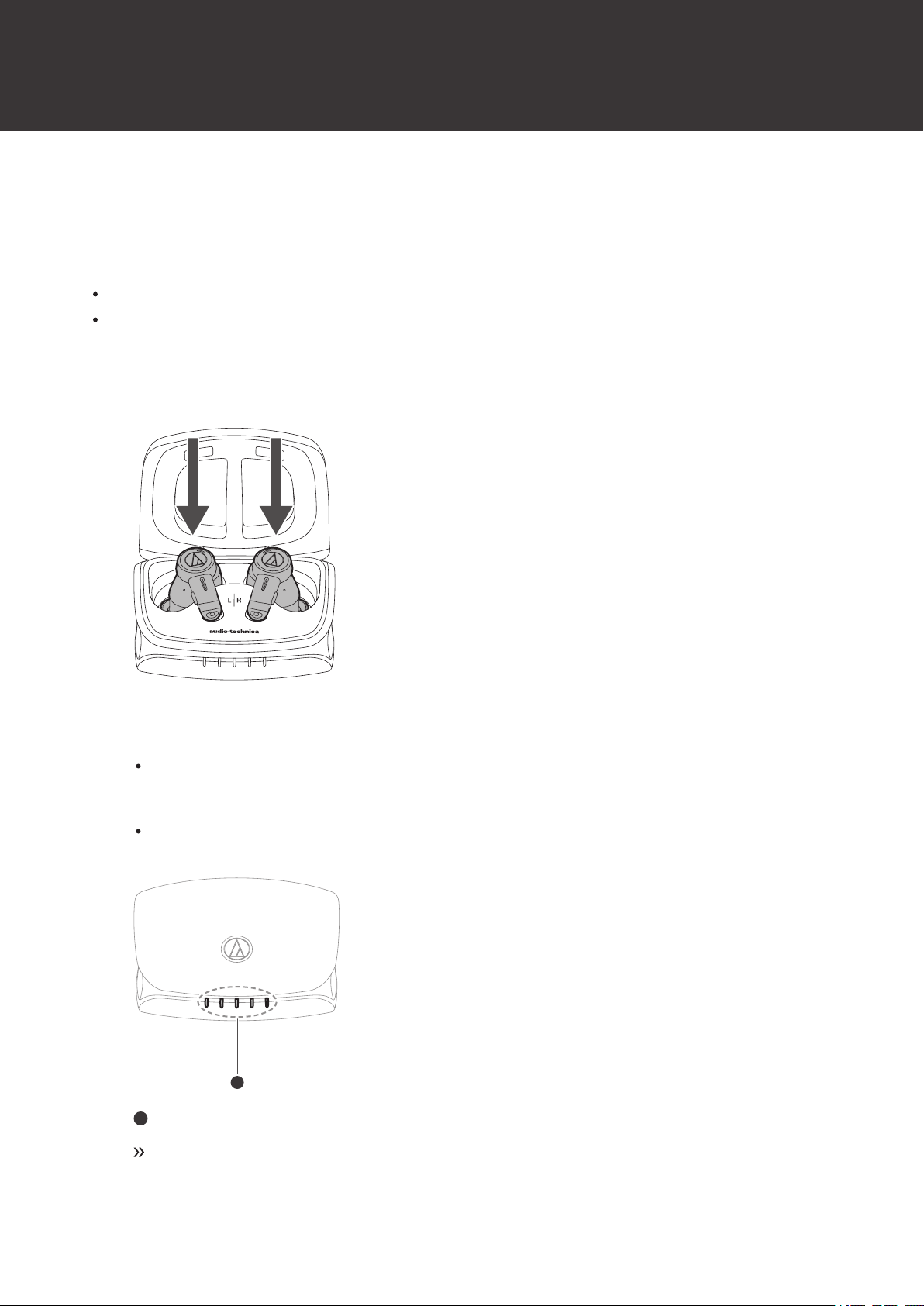
When the headphones are placed in the charging case and the cover is closed, the headphones will be automatically
sanitized using a deep UV LED.
Only the surface of the eartips is sanitized.
To prevent the deep UV LED from being directly visible, the sanitization function is activated only after the charging
case cover has been closed.
1Place the headphones in the charging case and close the cover.
2The headphones will be automatically sanitized using a deep UV LED.
The indicator lamp on the charging case will flash in purple while sanitization is in progress (flashing occurs
from the center towards both ends). Do not open the charging case cover if the indicator lamp is flashing in
purple.
Opening the charging case cover while sanitization is in progress would cause the deep UV LED to turn off
and the sanitization function to stop.
1
1
Charging indicator lamps
Once sanitization is complete, the indicator lamps turn off.
About the sanitization function
10
Once sanitization by the deep UV LED is complete, sanitization will not be performed again for
approximately 1 hour, even if the headphones are placed in the charging case. However, if sanitization is
stopped due to the charging case cover being opened, it will restart once the cover is closed again, even
within 1 hour.
Notes for sanitization
Sanitization using the deep UV LED will not be performed if the headphones are not placed in the charging case
correctly.
Sanitization of objects other than the headphones is not possible. Do not place any object other than the headphones
inside the charging case.
The indicator lamp on the charging case will flash in purple while sanitization is in progress. Do not open the
charging case cover if the indicator lamp is flashing in purple.
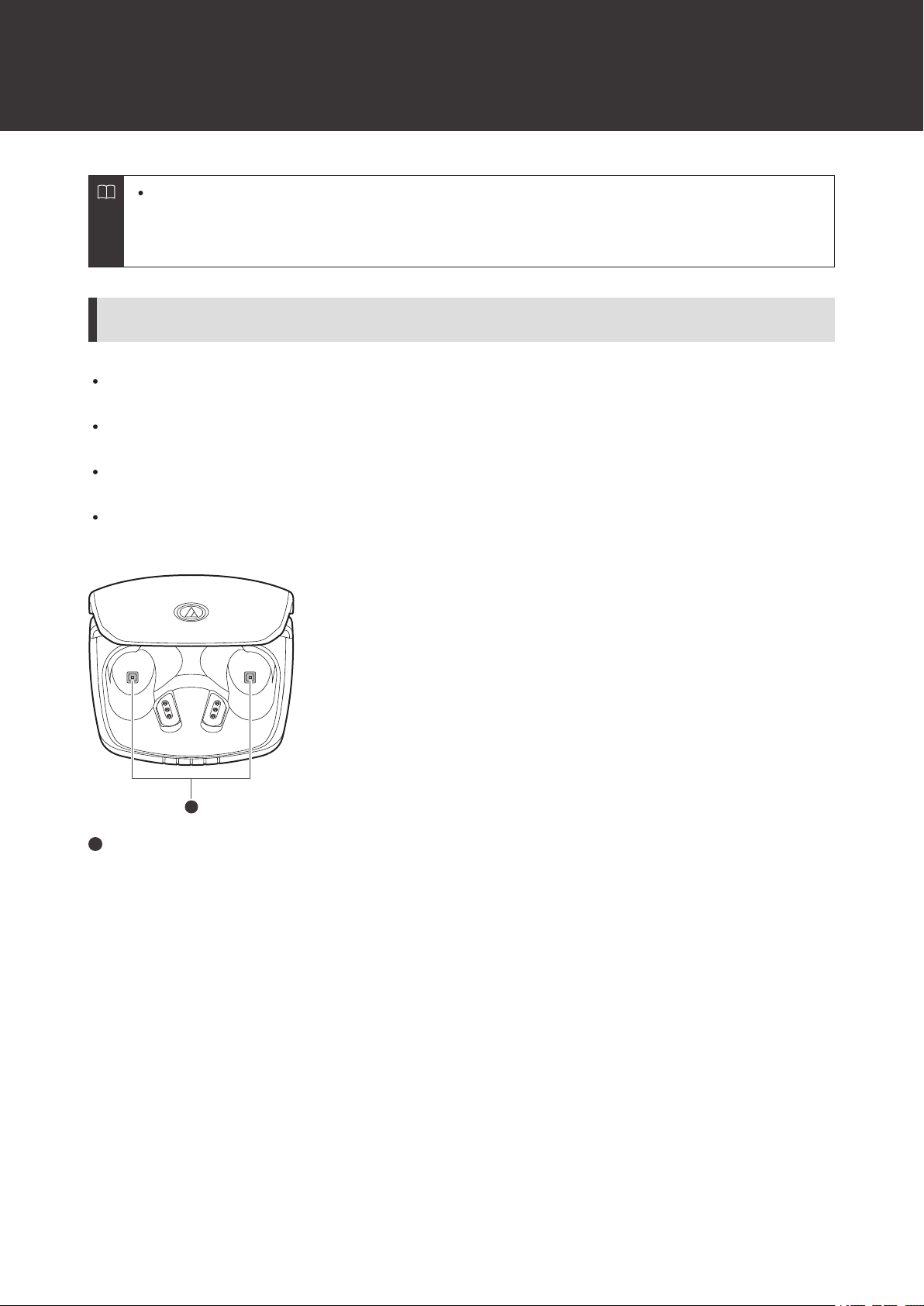
If the product begins to operate abnormally, such as if the deep UV LED glows when the cover of the charging case
is open, immediately stop using the product and contact your local Audio-Technica dealer.
1
1
Deep UV LED
11
For a more comfortable Bluetooth communication
experience
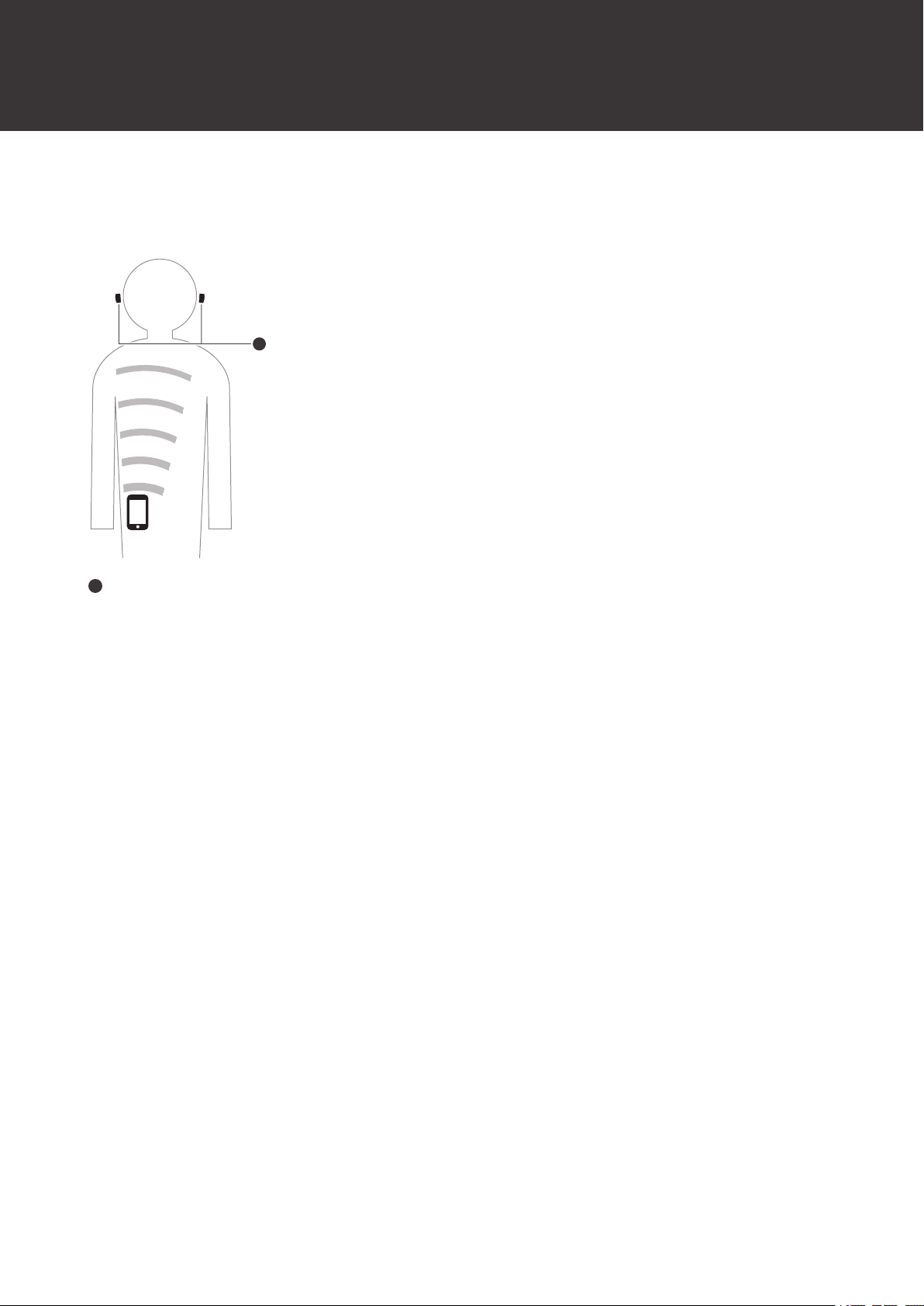
The effective communication range of this product varies depending on obstructions and radio wave conditions. For a
more enjoyable experience, please use the product as close as possible to the Bluetooth device. To minimize noise and
sound disruptions, avoid placing your body or other obstacles between the product’s antenna and the Bluetooth device.
1
1
Antenna
12
Part names and functions
Headphones
3
5
4
6
5
2
1
1
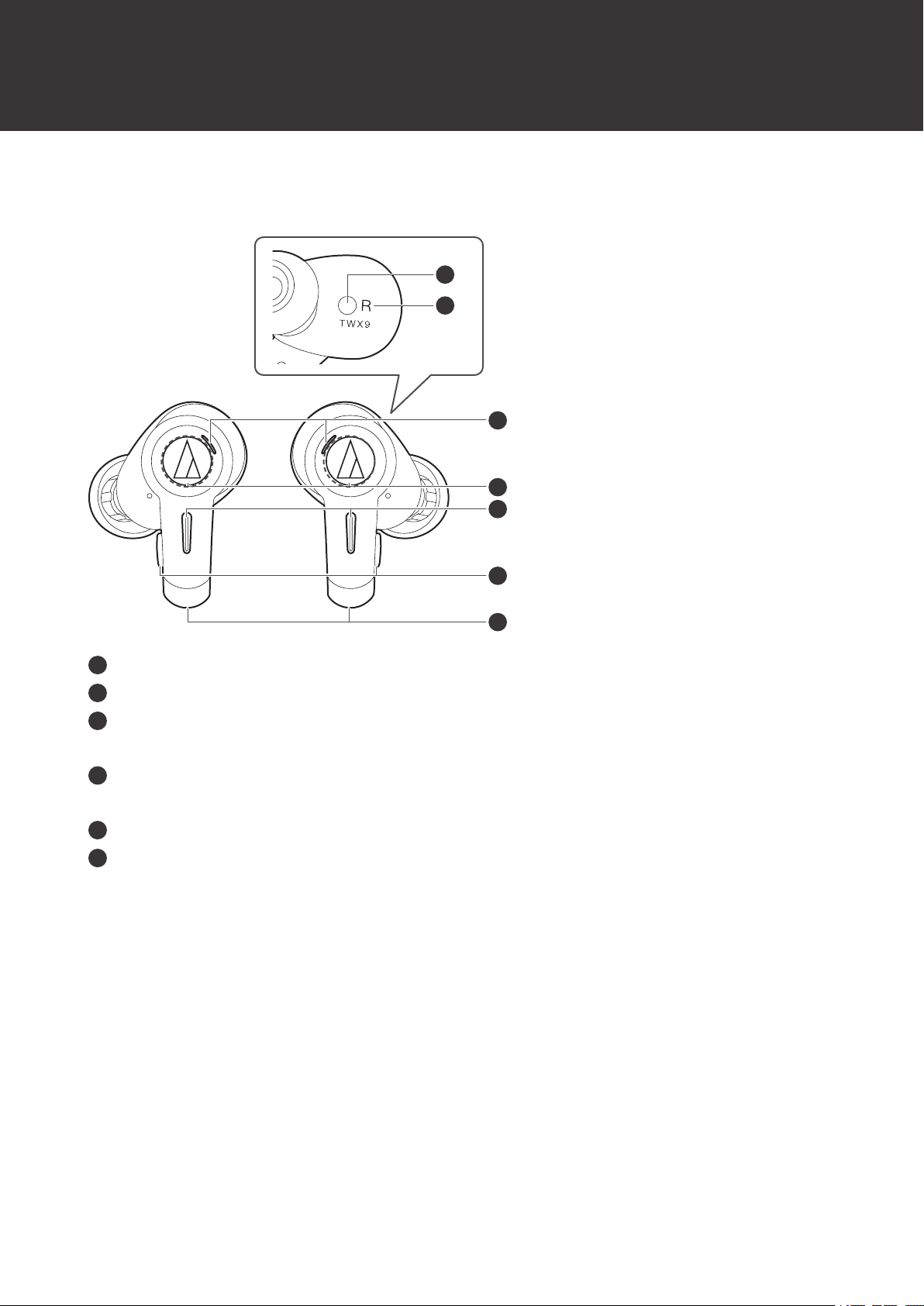
Ear detection sensor
2
L/R (left/right) indicator
3
Indicator lamps
Display the operating status and battery level of the headphones.
4
Touch sensors
Use to operate specific functions, such as turning ambience control on and off.
5
Microphones
6
Multifunction buttons
Use to play/pause music and answer phone calls. Also use to adjust the volume (+/–).
Part names and functions
13
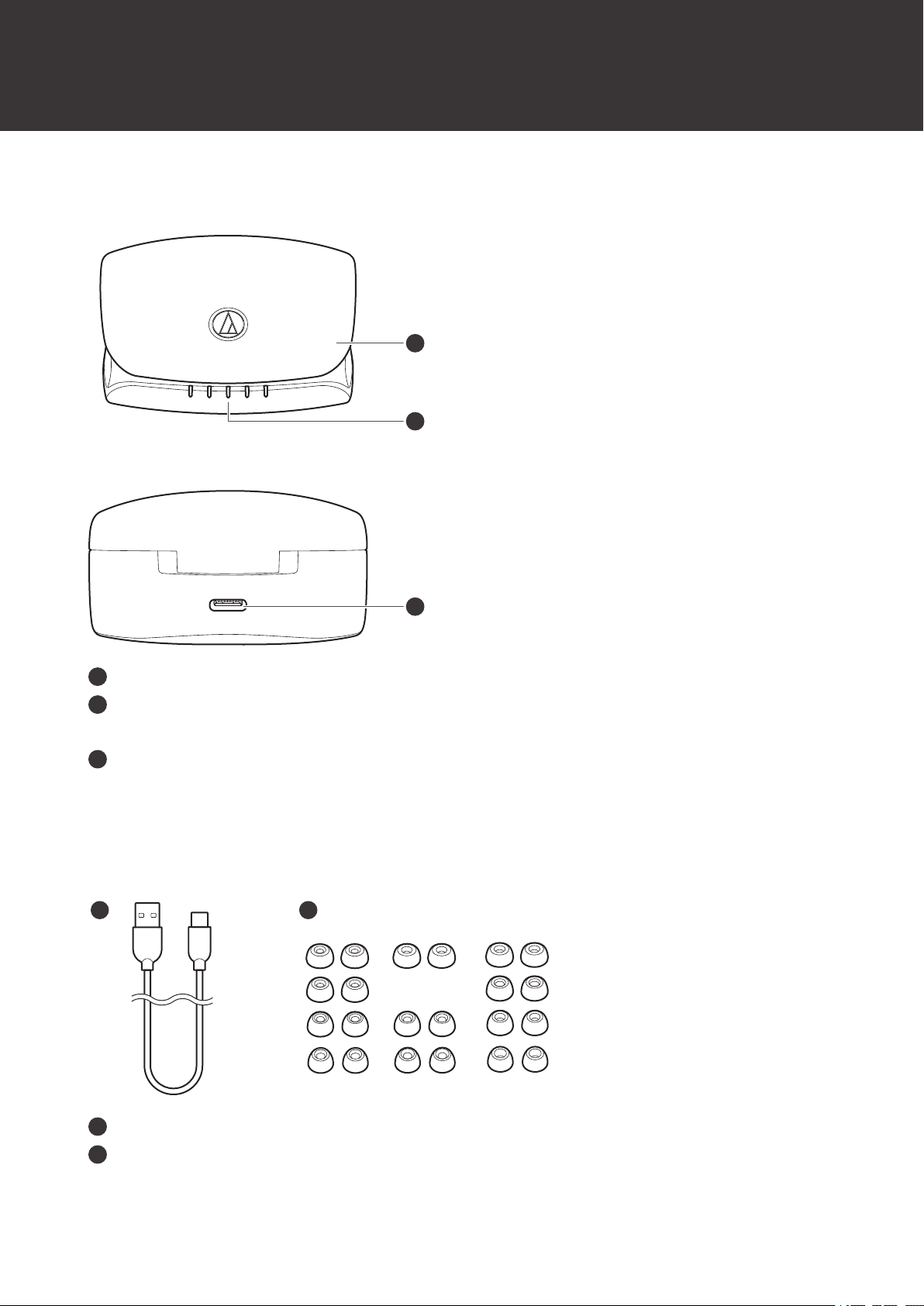
Charging case
1
2
3
1
Cover
2
Charging indicator lamps
Light/flash when charging the charging case. Also display the battery level of the charging case and headphones.
3
Battery jack
Use to connect the included USB charging cable and charge the product.
Accessories
21
1
USB charging cable (30cm (12"), USB Type-A / USB Type-C)
2
Eartips (XS, S, M, L)
At the time of purchase, the M-size (standard) eartips are attached to the product.
Table of contents
Other Audio-Techica Headphones manuals


