AUDIFIED MultiDrive Pedal Pro User manual


MultiDrive Pedal ‣
1
áUDIFIED
Table of contents
Introduction 2
Installation 2
iLok Protection (Pro version only) 2
Uninstallation 2
Effect pedals list 3
Pro version 3
LE Version 3
Acknowledgement 3
Controls 4
Presets 4
Pedal controls description 5
808-Scream 5
9-Scream 5
B-Drive 6
O-Drive 7
S-Drive 7
One-Distortion 8
BAT-Distortion 8
XXL Distortion+ 9
M-Distortion 9
M-FUZZ 10
F-FUZZ 10
T-Booster 11
Technical specification 12
Specification 12
Requirements 12
Conclusion 12

MultiDrive Pedal ‣
2
áUDIFIED
Introduction
Dear musician,
Thank you for purchasing Audified MultiDrive Pedal Pro. We hope that you will be pleased
with its sound and that it will bring you new inspiration for your work.
Although the plug-in is very simple to use, we have created this manual to sum up the basics
and to give you some additional information.
Installation
Download the recent version of the plug-in:
http://services.audified.com/download/
Windows: Unzip and run the installer and follow the on-screen instructions. You can select
the destination path and the installed plug-in format during the process.
"
Mac: Unzip and mount the provided disk image and run the installer. You can select
the installed plug-in format by clicking the Customize button.
iLok Protection (Pro version only)
‣This plug-in is protected by iLok (a software machine license or a USB dongle).
‣It requires iLok License Manager 5.2 or newer.
‣Please make sure you have activated a valid license in your iLok account.
‣Please refer to this guide: https://shop.audified.com/pages/how-to-activate-ilok-
license
Uninstallation
Windows: Navigate to MultiDrive Pedal Pro program folder in the Start menu and run the
uninstaller.
Mac: Open the provided disk image and run the uninstaller.

MultiDrive Pedal ‣
3
áUDIFIED
Effect pedals list
Pro version
‣808-Scream
‣9-Scream
‣B-Drive
‣O-Drive
‣S-Drive
‣One-Distortion
‣BAT-Distortion
‣XXL-Distortion
‣M-Distortion
‣F-Fuzz
‣M-Fuzz
‣T-Boost"
LE Version
‣O-Drive
Acknowledgement
All pedals are modeled with deep respect to the work of hardware engineers who
designed the hardware products. All related product names, designs and trademarks are
the property of their respective owners.#

MultiDrive Pedal ‣
4
áUDIFIED
Controls
Presets
Parameters of the plug-in can be saved as presets. These are available from the upper drop-
down list of the GUI.
To save your preset, click the Store menu and choose Save (for updating existing preset) or
Save As. The preset will be stored after clicking the green target button.
To delete a preset, click the appropriate item in the Delete list.
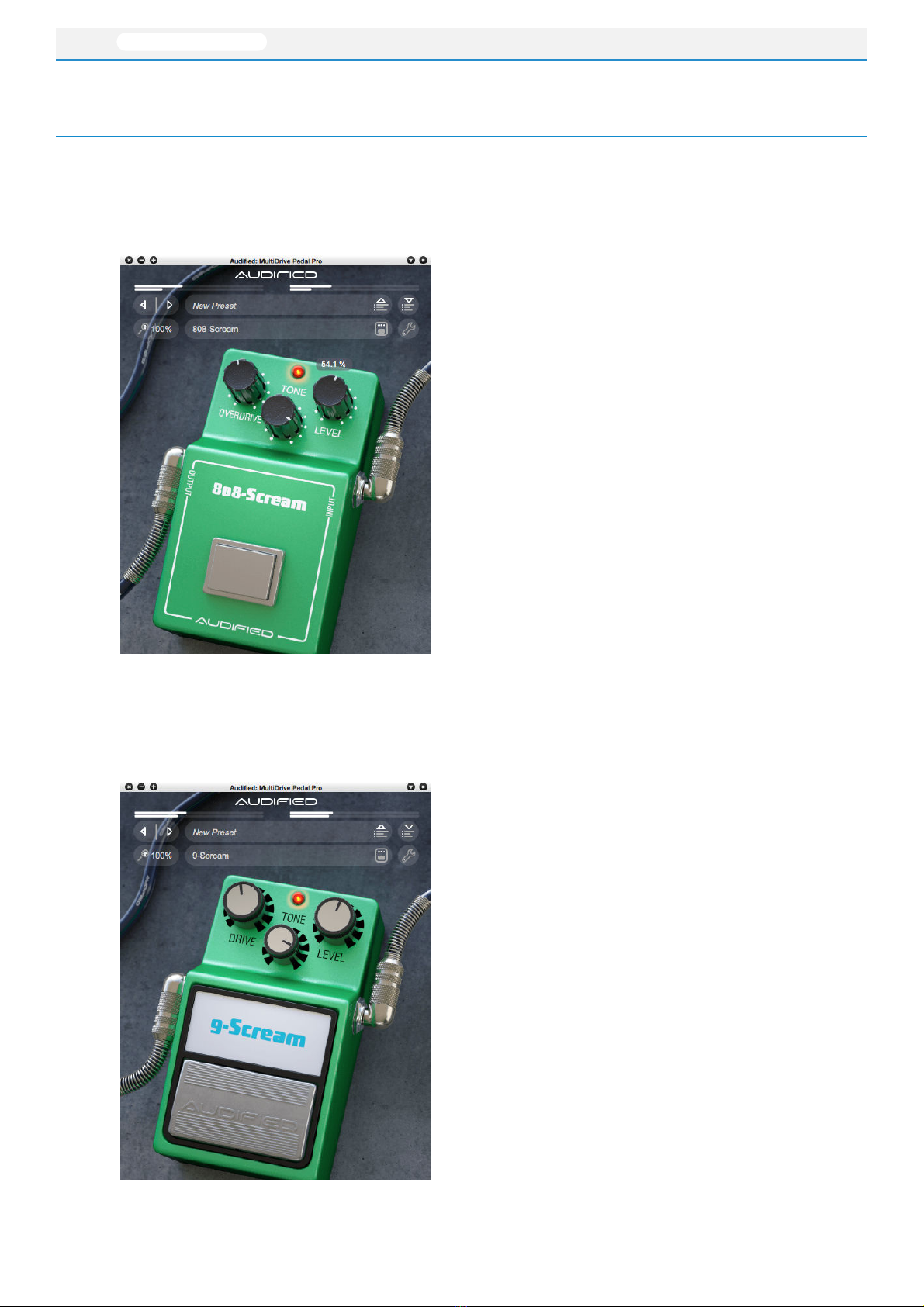
Preset selection.
Select a user or factory
preset from a menu here.
Parameter controls.
The controls work the
same way as on hardware
pedals.
Preset storage.
Save or delete user
presets here.
Preset selection.
Select the next or
previous preset.
Zoom,
Select the zoom value
from the menu.
Services menu.
Manual
Updates
Support
Feedback
Copy/Paste the
state
Pedal selection.
Select one of the pedal
models.
MultiDrive Pedal ‣
5
áUDIFIED
!
Pedal controls description
808-Scream
DRIVE
Adjusts the level of overdrive.
TONE
Adds crispiness (clockwise) or softens the sound
(counterclockwise).
LEVEL
Adjusts the volume of the sound
9-Scream
OVERDRIVE
Adjusts the level of overdrive.
TONE
Adds crispiness (clockwise) or softens the sound
(counterclockwise).
LEVEL
Adjusts the volume of the sound

MultiDrive Pedal ‣
6
áUDIFIED
B-Drive
GAIN
Adjusts the amount of overdrive.
TONE
Controls the tone of the effect. Turn clockwise to
get brighter sound and vice versa.
LEVEL
Adjusts the output volume.
"

MultiDrive Pedal ‣
7
áUDIFIED
O-Drive
OVER DRIVE
Adjusts the amount of over drive.
LEVEL
Adjusts the output volume.
S-Drive
DRIVE
Adjusts the amount of over drive.
TONE
Controls the tone of the effect. Turn clockwise to
get brighter sound and vice versa.
LEVEL
Adjusts the output volume.
"

MultiDrive Pedal ‣
8
áUDIFIED
One-Distortion
DIST
Adjusts the amount of distortion.
TONE
Controls the tone of the effect. Turn clockwise to
get brighter sound and vice versa.
LEVEL
Adjusts the output volume.
BAT-Distortion
DISTORTION
Controls the gain of the circuit, more gain =
more distortion.
FILTER
Adjusts the amount of treble. The more to the
right, the less treble.
VOLUME
Sets the signal output level of the pedal.
"

MultiDrive Pedal ‣
9
áUDIFIED
XXL Distortion+
DISTORTION
Controls the amount of distortion.
OUTPUT
Adjusts the output volume of the pedal.
M-Distortion
DIST
Adjusts the intensity of distortion.
LEVEL
Adjusts the effect volume level.
LOW
Controls the volume of low frequencies
(±15 dB)."
HIGH"
Controls the volume of high frequencies (±15
dB).
MID LEVEL
Controls the volume of middle frequencies (±15
dB)."
MID FREQ"
Sets the frequency of the middle range.
Table of contents