AtVideo NVR Series User manual

User Manual
4/8/16/32Ch NVR (Network Video Recorder)
Please read this manual thoroughly before use and keep it handy for future reference.

3
WARNING
TO REDUCE THE RISK OF FIRE OR ELECTRIC SHOCK, DO NOT EX-
POSE THIS PRODUCT TO RAIN OR MOISTURE. DO NOT INSERT ANY
METALLIC OBJECT THROUGH THE VENTILATION GRILLS OR OTHER
OPENNINGS ON THE EQUIPMENT.
CAUTION
EXPLANATION OF GRAPHICAL SYMBOLS
The lightning flash with arrowhead symbol, within an equilateral triangle, is in-
tended to
alert the user to the presence of dangerous voltage within the products
enclosure that may be
of sufficient magnitude to constitute a risk of electric shock
to persons.
The exclamation point within an equilateral triangle is intended to alert the user
to the
presence of important operating and maintenance (servicing) instructions
in the literature
accompanying theproduct.
CAUTION
RISK OF ELECTRIC SHOCK
DO NOT OPEN
WARNING: TO REDUCE THE RISK OF ELECTRICSHOCK,
DO NOT REMOVE COVER (OR BACK).
NO USER-SERVICABLE PARTSINSIDE.
REFER SERVICING TO QUALIFIED SERVICE PERSONNEL

4
FCC COMPLIANCE STATEMENT
CE COMPLIANCE STATEMENT
This device complies with Part 15 of the FCC Rules. Operation is subject
to the following two conditions: (1) this device may not cause harmful inter-
ference, and (2) this device must accept any interference received, including
interference that may cause undesired operation.
FCC INFORMATION: This equipment has been tested and found to
comply with the limits for a Class A digital device, pursuant to Part 15 of
the FCC Rules. These limits are designed to provide reasonable protection
against harmful interference when the equipment is operated in a commer-
cial environment. This equipment generates, uses, and can radiate radio
frequency energy and, if not installed and used in accordance with the in-
struction manual, may cause harmful interference to radio communications.
Operation of this equipment in a residential area is likely to cause harmful in-
terference in which case the user will be required to correct the interference
at his own expense.
CAUTION: Changes or modifications not expressly approved by the party
responsible for compliance could void the user’s authority to operate the
equipment.
This Class A digital apparatus complies with Canadian ICES-003.
Cet
appareil
nume
`
rique
de
la
classe
A
est
conforme
a
´
la
norme
NMB-003
du
Canada.
WARNING
This is a Class A product. In a domestic environment this product may cause
radio interference in which case the user may be required to take adequate
measures.
CAUTION
RISK OF EXPLOSION IF BATTERYIS REPLACED BYAN INCORRECT TYPE.
DISPOSE OF USED BATTERIESACCORDING TOTHE INSTRUCTIONS.

5
IMPORTANT SAFETY INSTRUCTIONS
1. Read these instructions.
2. Keep these instructions.
3. Heed all warnings.
4. Follow all instructions.
5. Do not use this apparatus near water.
6. Clean only with dry cloth.
7. Do not block any ventilation openings. Install in accordance with the manufacturer’s
instructions.
8. Do not install near any heat sources such as radiators, heat registers, stoves, or other
apparatus (including amplifiers) that produce heat.
9. Do not defeat the safety purpose of the polarized or grounding-type plug. A polarized
plug has two blades with one wider than the other. A grounding type plug has two
blades and a third grounding prong. The wide blade or the third prong is provided for
your safety. If the provided plug does not fit into your outlet, consult an electrician for
replacement of the obsolete outlet.
10. Protect the power cord from being walked on or pinched particularly at plugs,
convenience receptacles, and the point where they exit from the apparatus.
11. Only use attachments/accessories specified by the manufacturer.
12. Use only with the cart, stand, tripod, bracket, or table specified by
the manufacturer, or sold with the apparatus. When a cart is used,
use caution when moving the cart/apparatus combination to avoid
injury from tip-over.
13. Unplug this apparatus during lightning storms or when unused for
long periods of time.
14. Refer all servicing to qualified service personnel. Servicing is
required when the apparatus has been damaged in any way, such as power-supply
cord or plug is damaged, liquid has been spilled or objects have fallen into the
apparatus, the apparatus has been exposed to rain or moisture, does not operate
normally, or has been dropped.
15. CAUTION –THESE SERVICING INSTRUCTIONS ARE FOR USE BY QUALIFIED
SERVICE PERSONNEL ONLY. TO REDUCE THE RISK OF ELECTRIC SHOCK DO
NOT PERFORM ANY SERVICING OTHER THAN THAT CONTAINED IN THE
OPERATING INSTRUCTIONS UNLESS YOU ARE QUALIFIED TO DO SO.
16. Use satisfy clause 2.5 of IEC60950-1/UL60950-1 or Certified/Listed Class 2
power source only.
17. ITE is to be connected only to PoE networks without routing to the outside plant.

Table of Contents
Table of Contents................................................................................................................................. 1
1. Overview 3
1.1 Package Contents ...................................................................................................................... 4
1.2 NVR Description......................................................................................................................... 4
2. Installation 7
2.1 Installing HDD ........................................................................................................................... 8
2.2 Connecting with Exterior Device .................................................................................................. 8
2.3 Starting System ....................................................................................................................... 10
2.4 Quick Setup............................................................................................................................. 11
2.4.1 Account...................................................................................................................... 11
2.4.2 System....................................................................................................................... 12
2.4.3 Network ..................................................................................................................... 13
2.4.4 Time/Date.................................................................................................................. 13
2.4.5 Easy Installation Wizard............................................................................................... 14
3. Live Screen Configuration 15
3.1 Icons in Live screen.................................................................................................................. 16
3.2 Live Launcher menu ................................................................................................................. 18
3.2.1 Backup....................................................................................................................... 19
3.3 Quick menu ............................................................................................................................. 21
3.3.1 PTZ Control ................................................................................................................ 23
3.3.2 Camera Registration .................................................................................................... 24
3.3.3 Status > System log.................................................................................................... 25
3.3.4 Status > Event............................................................................................................ 27
3.3.5 Status > Record.......................................................................................................... 28
3.3.6 Status > Disk.............................................................................................................. 29
4. Setup menu 30
4.1 General buttons in Setup menu ................................................................................................. 32
4.2 SYSTEM .................................................................................................................................. 33
4.2.1 System....................................................................................................................... 33
4.2.2 Time/Date.................................................................................................................. 35
4.2.3 Account > User........................................................................................................... 38
4.2.4 Config (Configuration) ................................................................................................. 40

4.3 CAMERA.................................................................................................................................. 42
4.3.1 Basic.......................................................................................................................... 42
4.3.2 Advanced ................................................................................................................... 45
4.3.3 Registration ................................................................................................................ 51
4.4 DEVICE ................................................................................................................................... 53
4.4.1 Display....................................................................................................................... 53
4.4.2 Disk > Setup .............................................................................................................. 57
4.4.3 PTZ > PTZ ................................................................................................................. 60
4.4.4 Serial Device > Serial Device........................................................................................ 61
4.4.5 TEXT > TEXT ............................................................................................................. 62
4.5 RECORD.................................................................................................................................. 64
4.5.1 Schedule > Schedule................................................................................................... 64
4.5.2 Stream....................................................................................................................... 67
4.6 EVENT .................................................................................................................................... 71
4.6.1 System/Disk ............................................................................................................... 71
4.6.2 Alarm In..................................................................................................................... 73
4.6.3 Motion ....................................................................................................................... 76
4.6.4 Video Loss > Setup ..................................................................................................... 78
4.6.5 Notification................................................................................................................. 79
4.7 NETWORK ............................................................................................................................... 81
4.7.1 Basic.......................................................................................................................... 81
4.7.2 DVRNS/DDNS ............................................................................................................. 84
4.7.3 E-Mail ........................................................................................................................ 86
4.7.4 FTP............................................................................................................................ 87
4.7.5 Warp ......................................................................................................................... 88
4.7.6 P2P............................................................................................................................ 90
4.7.7 Notification Server....................................................................................................... 91
5. Search/Playback 94
5.1 Search .................................................................................................................................... 94
5.2 Playback................................................................................................................................ 100
6. Webviewer 102
7. Appendix 106
7.1 Installing System Keyboard ..................................................................................................... 106
7.2 Product Specification .............................................................................................................. 111

1. Overview
This chapter describes NVR overview, components and their terms and features.
This manual introduces a network video recorder (NVR) which monitors or record, controls images via a
network camera.
Multiple users may monitor video at the same time, and many cameras can be controlled simultaneously
by a manager. Also, through a PC or a smartphone, video might be monitored by transmitting video and
audio using a network.
The device features include the following:
Convenient UI from user’s viewpoint
IP camera input 4/8/16/32 channels
Providing H.264 and H.265 compression
Up to 4K real time recording
HDD information and status presentation
HDD overwriting
High capacity back-up with USB 3.0
Simultaneous recoding and playing of 4/8/16/32 channels
Various search mode (time, event, thumbnail, smart search, text and VCA)
Various recording mode (manual, event, timed recording, panic recording)
Remote monitoring through a network viewer, a web viewer, and a mobile viewer

1.1 Package Contents
The device package contents consist of the following:
Note
Please check all components involved.
Table 1-1 Package contents
No.
Name
No.
Name
1
NVR
2
DC Adapter(4/8ch only)
3
Power cord
4
Mouse
5
SATA cable
6
SATA power cable
7
HDD fixing screw
8
Rack mount bracket & screws
9
Program CD
10
Quick guide(This document)
1.2 NVR Description
Each part is listed in the below:
Figure 1-1 Name and Connection of each front section
Table 1-2 Name and Function of each front section
No.
Name
Function
1
Power status LED
Pointing out device on/off.
2
Recording status
LED
Pointing out recording in process.
3
Network LED
With a network viewer, pointing out network in connection.
4
USB port
USB port is connected for USB mouse or firmware upgrade, and data
back-up.

4CH NVR(2HDDs)
8CH NVR(2HDDS)
16CH NVR(2HDDs)
16/32CH NVR(4HDDs)
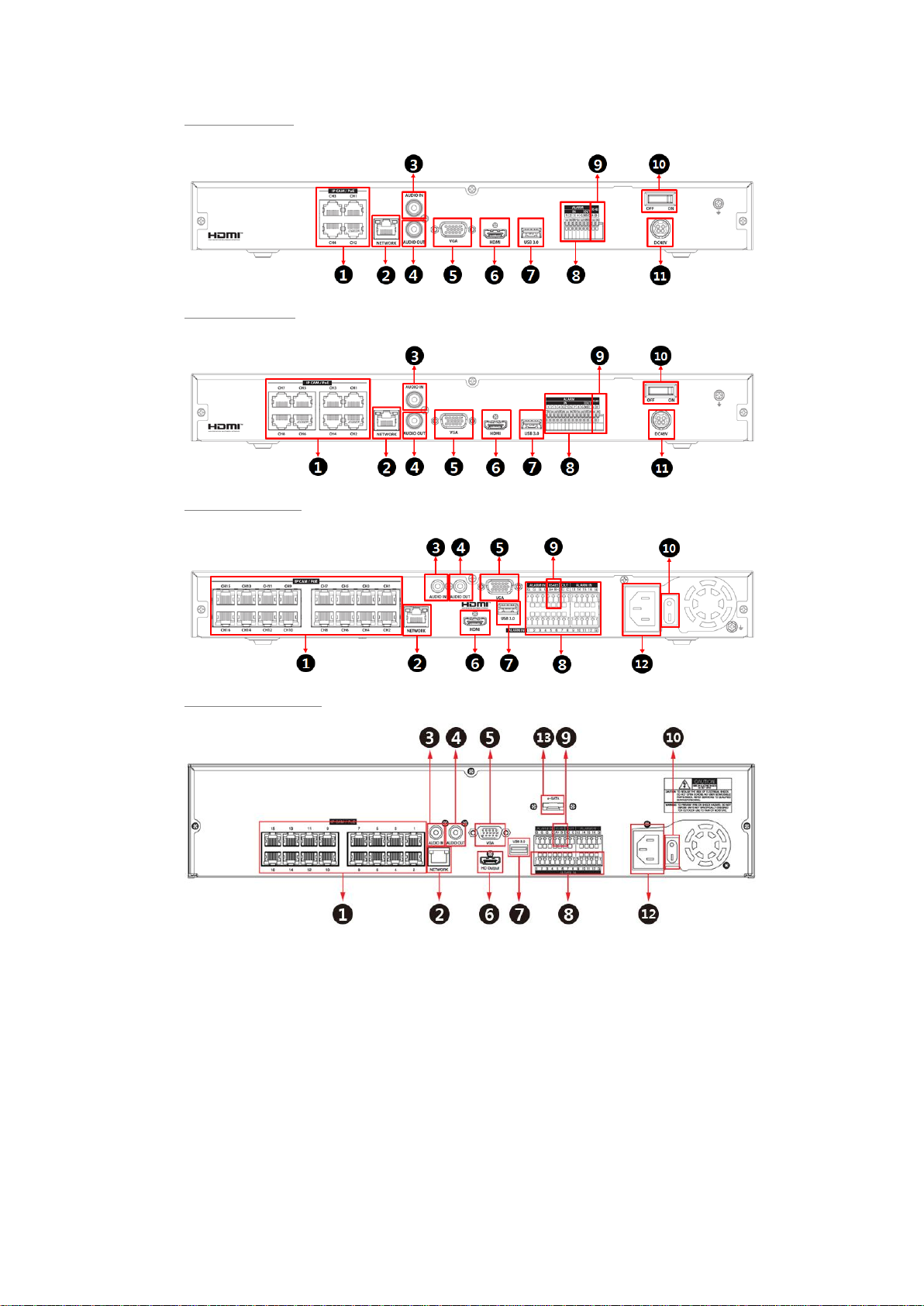
Figure 1-2 Name and Connection of rear section of 4ch, 8ch and 16ch NVR

Table 1-3 Name and Function of rear section of 4ch, 8ch and 16ch NVR
No.
Name
Function
1
IP CAM / PoE
IP camera input port, IEEE802.3at PoE support.
2
Network
Network connector.
3
Audio In
Audio input port.
4
Audio Out
Audio output port.
5
VGA
VGA output port.
6
HDMI
HDMI output port.
7
USB 3.0
USB 3.0 port is connected for data back-up.
8
Alarm In/Out
Alarm connector.
9
RS485
RS-485 communication connector.
10
Power Switch
Power On-Off.
11
DC48V
DC adapter input port.
12
AC POWER INPUT
AC Power cord input port.
13
e-SATA
e-SATA storage connection connector.
Table of contents
Other AtVideo DVR manuals