
ATEN Altusen KL1508Ai User manual
Enterprise Solutions
1
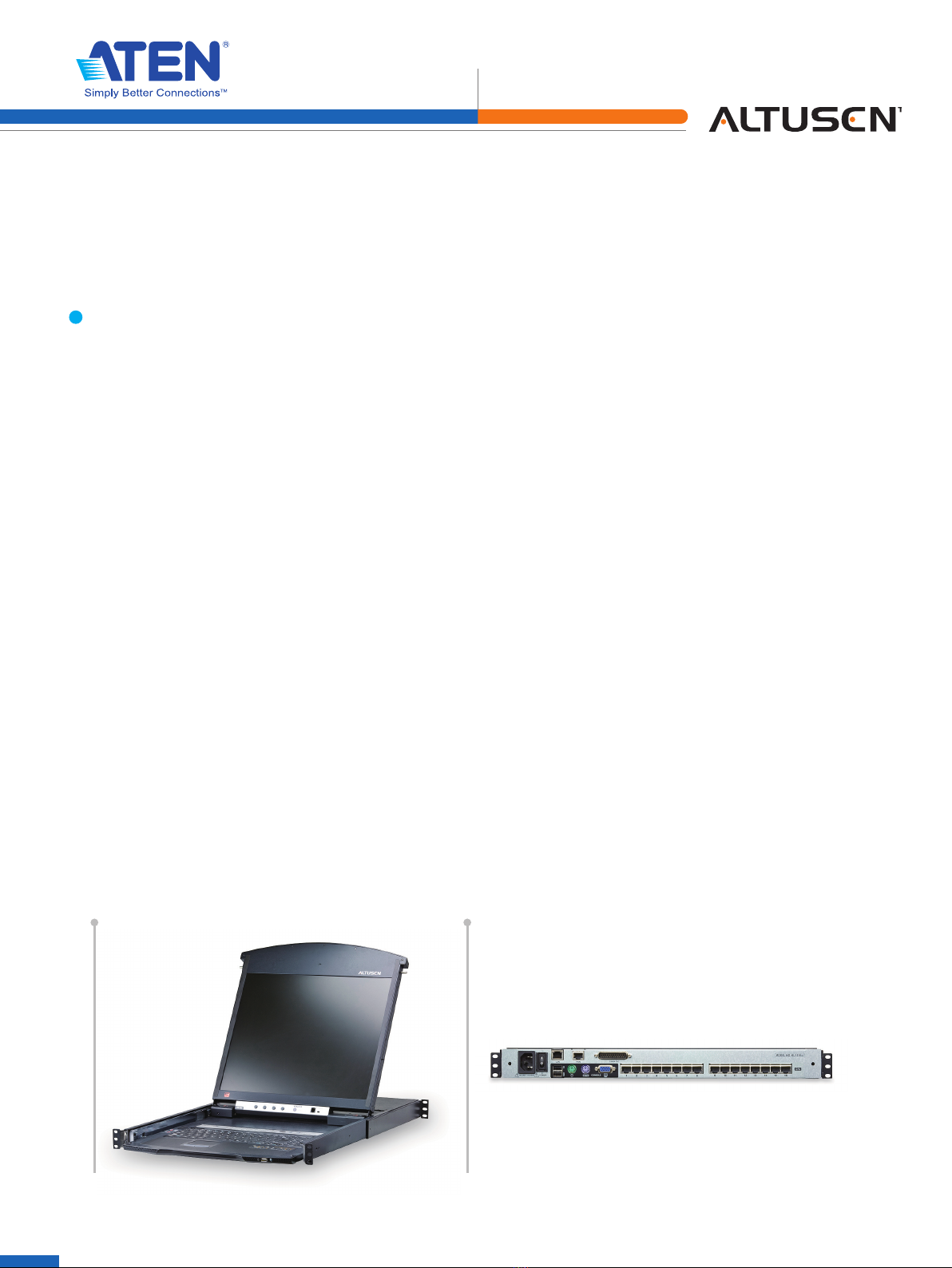
The KL1508Ai and KL1516Ai Dual Rail LCD KVM Switches are control units that allow secure access up to 8/16
computers from a single KVM (keyboard, video, and mouse) console. They consist of an integrated LCD monitor,
keyboard, and touchpad in a 1U rack-mountable retractable sliding housing.
The LCD and keyboard/touchpad modules slide independently of each other. To maximize space in your data
center, the keyboard/touchpad module slides back to "hide away" when not in use, while the thin profile LCD
monitor rotates back – flush against the rack – allowing convenient monitoring of computer activity.
The KL1508Ai / KL1516Ai features IP-based connectivity that allows local and remote operators to monitor and
access the computers on your installation. Because it uses TCP/IP for its communications protocol, the KL1508Ai /
KL1516Ai can be accessed from any computer on the LAN, WAN, or Internet – whether that computer is located
down the hall, down the street, or halfway around the world.
Compact, high-density, RJ-45 connectors and Cat 5e/6 cable make for a compact, efficient, wiring configuration,
while the use of KVM Adapter Cables to link to the computers, permits any combination of PCs, Macs, Sun
computers, and serial devices to coexist on the installation.
For added convenience, ports for an external keyboard, monitor, and mouse are provided on the rear panel –
permitting you to manage the switch from a local console. There is also an external USB mouse port on the
keyboard module, allowing you to use an external mouse, rather than the touchpad.
Enhanced features include a Panel Array Mode™ that displays the video output of up to 16 computers at the
same time, and a Message Board that allows logged in users to conveniently and instantly communicate with
one other – no matter where in the world they actually are. The KL1508Ai / KL1516Ai is an ideal solution for your
server room management.
KL1508Ai / KL1516Ai
8/16-Port Dual Rail LCD KVM Switch
LCD Console + Cat 5 High-Density KVM Switch with KVM over IP
KL1516Ai Front view KL1516Ai Rear view
Enterprise Solutions
2
Features
Hardware
•IntegratedKVMconsolewith17”or19”LCDmonitorinaDualRailhousing
•Asingleconsolecontrolsupto8(KL1508Ai) or 16 (KL1516Ai) computers
•Daisychainupto15additionalKVMswitchestocontrolupto256computers*
•OnebusforremoteKVMoverIPaccess
•Space-savingRJ-45connectorsandCat5e/6cabling
•KVMadaptercablesdesignedwithautomaticconversiontoallowexibleinterfacecombinations(PS/2,USB,Sunand
serial) to control all computer types
•Extraconsoleport–managecomputersintheLCDKVMswitchfromanexternalconsole(monitor,USBorPS/2
keyboard,andUSBorPS/2mouse)
•Multiplatformsupport:PC,Mac,SunandSerial
•SupportsexternalUSBmouse
•DualRailhousingisslightlylessthan1Uwithtopandbottomclearanceforsmoothoperationin1Uofrackspace
•DualRail–LCDmonitorslidesindependentlyofthekeyboard/touchpad
•LCDmodulerotatesupto120degreesforamorecomfortableviewingangle
•Consolelock–enablestheconsoledrawertoremainsecurelylockedawayinpositionwhennotinuse
•LCDpowerbuttonhelpssaveenergyandprolongdisplays’life
*CompatibleKVMswitches:KH1508A/KH1516A,KH0116,ACS1208A/ACS1216A,CS1708A/CS1716A,KH1508/KH1516
Management
•Upto64useraccounts–upto32concurrentremotelogins
•Endsessionfeature–administratorscanterminateanyrunningsession
•AdapterID–storesportinformationallowingadministratorstorelocateserverstodifferentports,withouthavingto
reconfigure the adapters and switch
•PortShareModeallowsmultipleuserstogainaccesstoaserversimultaneously
•RemotepowercontrolforattachedPowerOvertheNET™devices
•IntegrationwithALTUSENCC2000Managementsoftware
•EventloggingandWindows-basedLogServersupport
•LocalLogEvent
•Firmwareupgradeable
•IPv6capable
Easy-to-Use Interface
•Easycomputerselectionviapushbuttons,HotkeyMode,OSD(OnScreenDisplay),andBrowser-basedGUI
•LocalConsole,Browser,andAPGUIsofferauniedmultilanguageinterfacetominimizeusertrainingtimeand
increase productivity
•Multiplatformclientsupport(Windows,MacOSX,Linux,Sun)
•Multi-browsersupport:InternetExplorer,Chrome,Firefox,Safari,Opera,Mozilla,Netscape
•Browser-basedUIinpureWebtechnologyallowsadministratorstoperformadministrativetaskswithouttheneedfor
Java to be pre-installed
•PanelArrayMode™
•Keyboardbroadcast*– keyboard input can be duplicated on all the attached servers
* Local Console only
Advanced Security
•Remoteauthenticationsupport:RADIUS,LDAP,LDAPS,andMSActiveDirectory
•128-bitSSLencryptiontoprotectpasswordwhenuserslogin
•Flexibleencryptiondesignallowsuserstochooseanycombinationof56-bitDES,168-bit3DES256-bitAES,128-bit
RC4, or Random for independent KB/Mouse, and video data encryption
•IP/MACFiltersupportforenhancedsecurityprotection
•Congurableuserandgrouppermissionsforserveraccessandcontrol

Enterprise Solutions
3
Virtual Remote Desktop
•Videoqualityandvideotolerancecanbeadjustedtooptimizedatatransferspeed;monochromecolordepthsetting,
threshold and noise settings for compression of the data bandwidth in low bandwidth situations
•Full-screenorsizableandscalableVirtualRemoteDesktop
•Message board feature allows logged in users to communicate with each other
•MouseDynaSync™–automaticallysynchronizesthelocalandremotemousemovements
•On-screenkeyboardwithmultilanguagesupport
•BIOS-levelaccess
Benefits
Space Efficient
The KL1508Ai/KL1516Ai provides a streamlined method to conserve server room
rack space by integrating a retractable LCD monitor, keyboard, and touchpad in a
1U Dual Rail housing that is designed to install easily and operate smoothly.
Convenient Monitoring
The Dual Rail system separates the LCD module from keyboard/touchpad module
so they can move independently of each other. This allows the keyboard/touchpad
to be pushed back into the housing and out of the way when not in use, while
the LCD screen can be rotated up to the rack for convenient monitoring of server
operation–theLCDmodule'srangeofrotationisadjustabletoprovidethebest
viewing angle.
Enhanced Console Control
The extra console ports provide administrators with the ability to use a standard
keyboard/monitor/mouseconsole,iftheylike.Other,evenmorepowerfuloptions
for the external console ports are to connect a KVM extender.
Easy Cabling
The KL1508Ai/KL1516Ai features RJ-45 connectors and Cat 5e/6 cable to link to the
computers.UtilizingPS/2,USB,andserialKVMAdapterCablesforthenallinkup,
the KL1508Ai/KL1516Ai reduces cable bulk and simplifies cable management.
Adapter Cables with ID
The KL1508Ai/KL1516Ai supports automatic ID recognition of the new ATEN KVM
CableAdapterKA7000series.UsingthenewadaptercableswithIDmeansitis
notrequiredtochangecablecongurationsettingswhenmovingcablesfromport
to port– allowing you to hot-swap port connections without having to reconfigure
attributes.
Panel Array Mode™
Panel Array Mode™ permits simultaneous monitoring of the video output of
theinstallations’servers.Operatorscanmonitorthescreendisplayofupto8/16
servers for real-time server monitoring.
Mouse DynaSync™ Automatically synchronizes the local and remote mouse movements for perfect
alignment of mouse pointers, regardless of server mouse acceleration settings.
Message Board
To alleviate the problem of access conflicts arising from multiple logins, the
Message Board functions like an Internet chat program, allowing users who are
logged in to instantly communicate with each other.
Enterprise Solutions
4
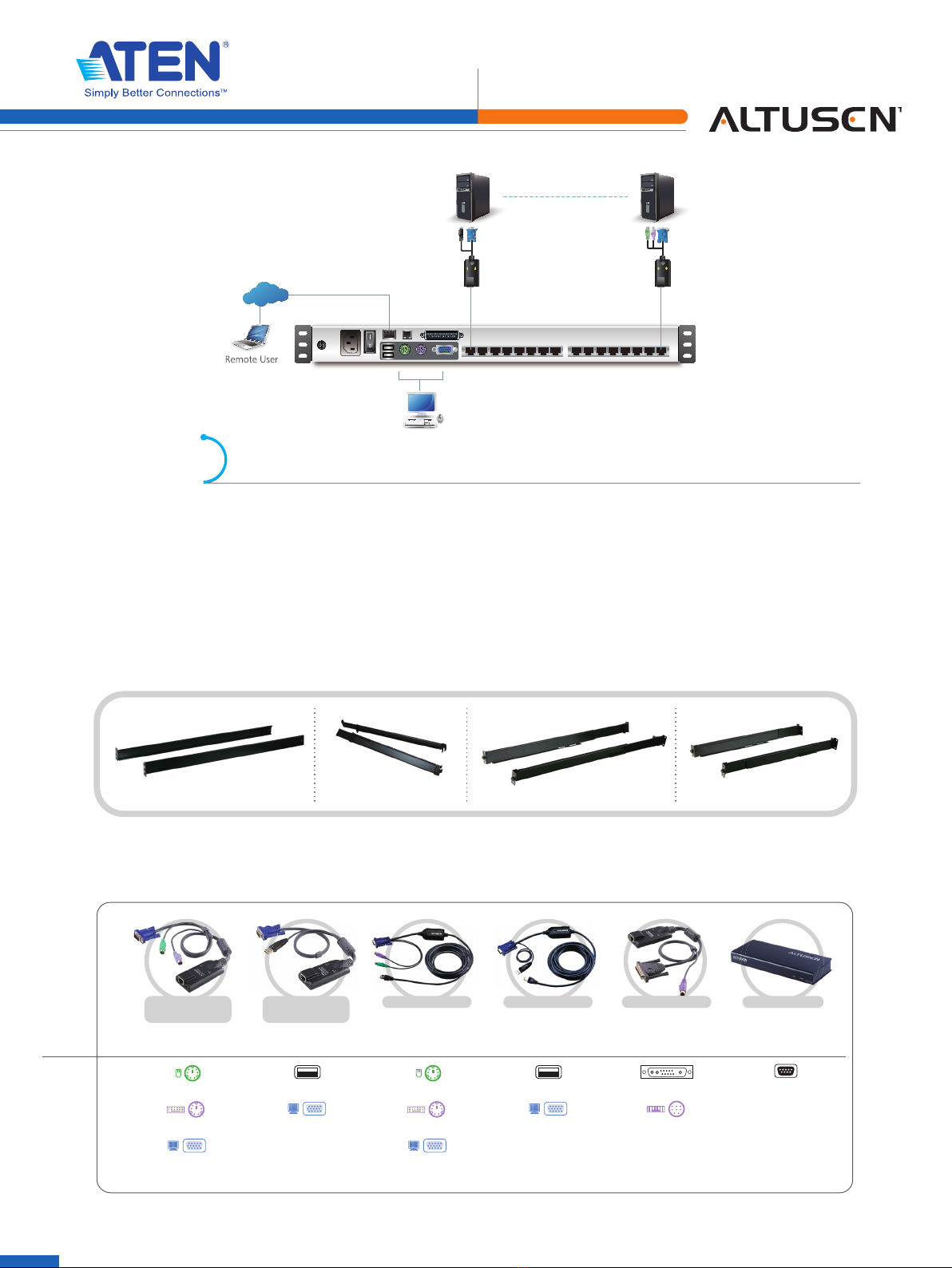
Cat 5e/6 cable
External Console
KL1516Ai (Rear)
KVM Adapter Cable
Remote User
Remote User
Internet
/LAN
Optional
Rack Mount Kits
ALTUSEN LCD KVM Switches allow you to choose from a host of optional rack mount kits to meet your needs,
including the Single Person Easy Installation Rack Mount Kit, which streamlines the rack mounting process.
Normal rack mounting procedures call for at least two people to rack mount a KVM switch. The Single Person Easy
InstallationRackMountKitenablesonepersontorackmountaLCDKVMSwitch.Injustamatterofminutes,your
new LCD KVM Switch can go from the box to the rack.
Forconvenienceandexibility,thereisonestandard,andthreeoptionalrackmountingkitsavailable:
2X-010G Short 2X-011G2X-012G
USB
HDB-15 Male
USB Type A Male
KA7170/KA7570
KA9170/KA9570
Sun Legacy
KA9130/KA7130
13W3 Male
DIN 8 pin Male
RS-232 DB-9 Female
Serial
KA9140
Type:
Interface:
KA7120/KA7520
KA9120/KA9520
PS/2
6-pin Mini-DIN Male
6-pin Mini-DIN Male
HDB-15 Male
USB
HDB-15 Male
USB Type A Male
KA7970
KA7920
PS/2
6-pin Mini-DIN Male
6-pin Mini-DIN Male
HDB-15 Male
KVM Adapter Cables
ThefollowingKVMAdapterCablesarerequiredforusewiththeKL1508Ai / KL1516Ai:
Enterprise Solutions
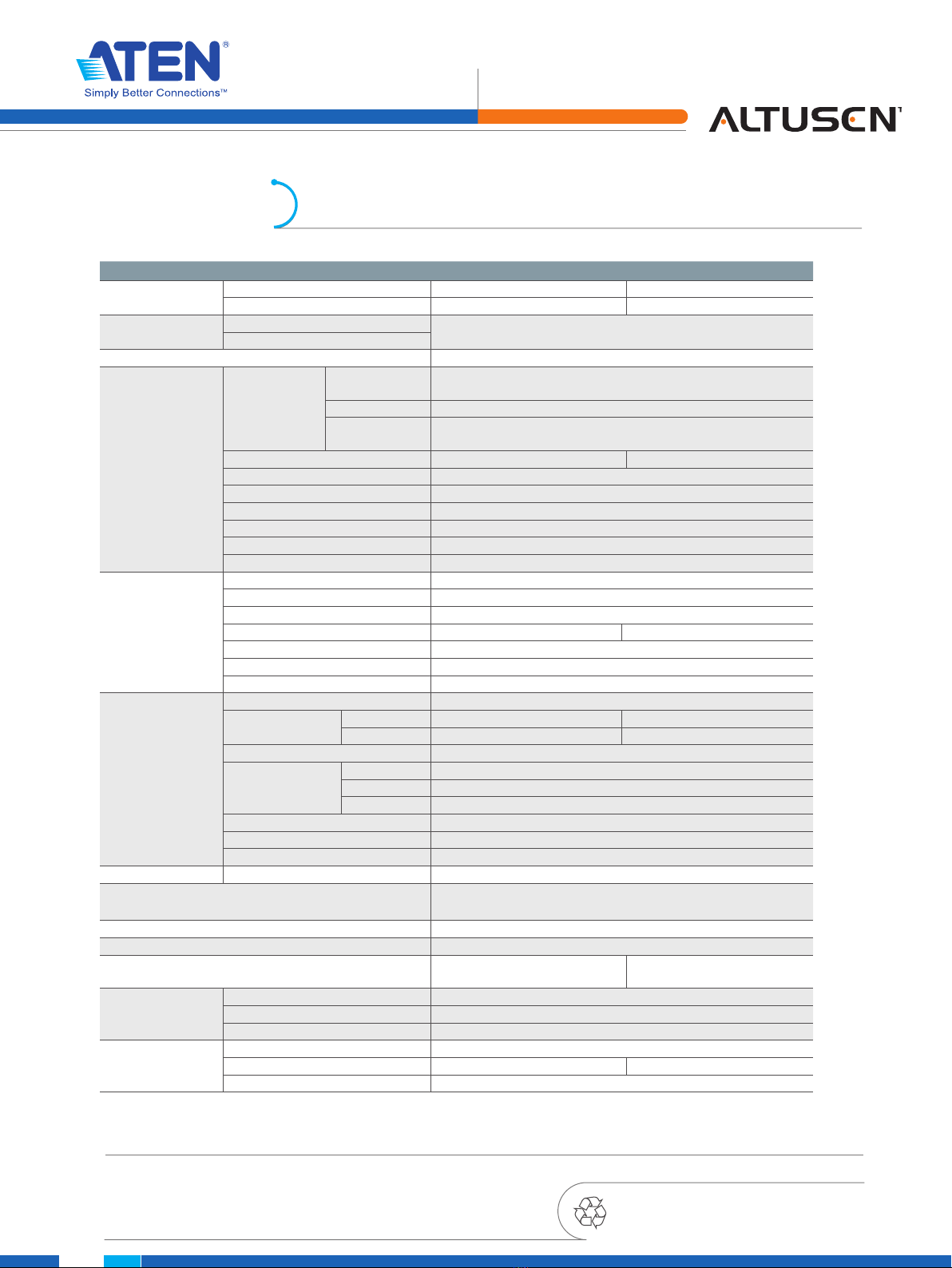
Function KL1508Ai KL1516Ai
Computer
Connections
Direct 8 16
Max. 128(viaDaisy-Chain) 256(viaDaisy-Chain)
Console
Connections
Local 1
Remote
Port Selection OSD,Hotkey,Pushbutton
Connectors
Console Ports
Keyboard 1 x 6-pin Mini-DIN Female (Purple)
1 x USB Type A Female (White)
Video 1xHDB-15Female(Blue)
Mouse 1x6-pinMini-DINFemale(Green)
1 x USB Type A Female (White)
KVM Ports 8 x RJ-45 Female 16 x RJ-45 Female
Daisy Chain 1xDB-25Male(Black)
Power 1x3-prongACsocket
F/W Upgrade 1 x RJ-11 Female (Black)
External Mouse 1 x USB Type A (Female)
LAN 1 x RJ-45 Female
PON 1XRJ-45Female
Switches
Power 1 x Rocker
LCD Power 1 x Pushbutton
LCMAdjustment 4 x Pushbutton
Port Selection 8 x Pushbutton 16 x Pushbutton
F/W Upgrade 1 x Slide
KVM Reset 1 x Semi-recessed Pushbutton
Station 2xPushbutton
LEDs
Station 2x7Segments(Orange)
Port Online 8(Green) 16(Green)
Selected 8(Orange) 16(Orange)
Power 1 (Blue)
Lock
Num 1(Green)
Caps 1(Green)
Scroll 1(Green)
Link 1(Green)
10/100 Mbps 1(Orange/Green)
LCD Power 1(Orange)
Emulation Keyboard/Mouse PS/2;USB
Video 1280x1024@75Hz;DDC2B(50m*,Local);1600x1200@60Hz;
DDC2B(40m*, Remote)
Scan Interval 1–255secs
Input 100–240VAC,50/60Hz,1A
Power Consumption 120V,31W/230V,32W(17”);
120V,33W/230V,34W(19”)
120V,33W/230V,34W(17”);
120V,34W/230V,36W(19”)
Environment
OperatingTemp. 0–40° C
Storage Temp. -20–60°C
Humidity 0–80%RH,Non-condensing
Physical Properties
Housing Metal
Weight(17”/19”) 15.96kg/16.19kg 16.00/16.25kg
Dimensions(LxWxH) 70.12x48.00x4.40cm
*WithKVMAdapterCableKA7000series,pleaseseepage4fordetails.
5
ATEN International Co., Ltd.
3F.,No.125,Sec.2,DatongRd.,SijhihDistrict.,NewTaipeiCity221,Taiwan
Phone:886-2-8692-6789Fax:886-2-8692-6767
www.aten.comE-mail:[email protected]
©Copyright2011ATEN®InternationalCo.,Ltd.
ATEN and the ATEN logo are trademarks of ATEN International Co., Ltd.
All rights reserved. All other trademarks are the property of their
respective owners.
Printed01/2012V1.0
Specification
Other manuals for Altusen KL1508Ai
6
This manual suits for next models
1
Table of contents
Other ATEN Switch manuals


ATEN
ATEN KVMP CS1782A User manual

ATEN
ATEN CS1942 User manual

ATEN
ATEN VM7804 User manual

ATEN
ATEN CL1016M User manual

ATEN
ATEN Altusen KL1508Ai Operating and maintenance instructions

ATEN
ATEN VS-201 User manual

ATEN
ATEN CS1953 User manual

ATEN
ATEN RCM Series User manual

ATEN
ATEN US3312 User manual

ATEN
ATEN Altusen KH1508a User manual


