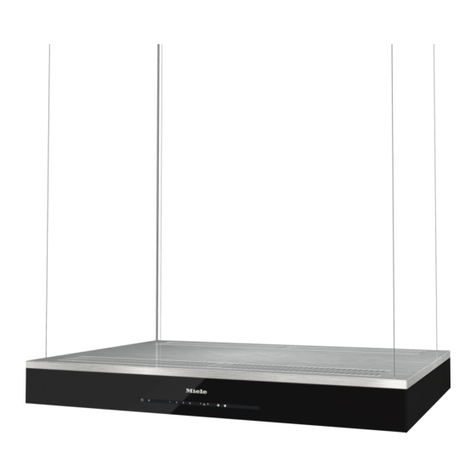
Atag WS90 MG User manual

INSTRUCTIONS FOR USE
Cooker hood
WS90__MG
ES10__MG

3Pictograms used ........................................
4Safety ..........................................................
4.....................................................................
7Your cooker hood ......................................
7Dear customer! ............................................
8Description user interface ............................
8Cooker hood functions .................................
9Operation ....................................................
9Switching extraction on and off ...................
9Switch on the boost setting ..........................
9Switching on automatic delayed shut-off .....
10Switching the light on and off ......................
10Changing the colour temperature ................
10Recirculation use .........................................
10Switching on the recirculation function ........
10Switch off the recirculation function .............
11Clean Air function ........................................
11Active mode .................................................
12
Making the connection between cooker hood
and hob ........................................................
13Wi-Fi-connectivity ......................................
13Wi-Fi/ConnectLife-app .................................
17Maintenance ...............................................
17Cleaning .......................................................
18
Replacing the odour/particulate matters
(PM2.5) filter .................................................
19Lighting ........................................................
20Technical data ............................................
20EU Product Sheet ........................................
20EU Product Fiche .........................................
21Compliance information ...............................
22Installation ..................................................
22.....................................................................
24Preparations for installation .........................
26Electrical connection ...................................
26Appliance dimensions .................................
27Built-in ..........................................................
38Environmental aspects ..............................
38
Tips for energy-efficient cooking with
hoods ...........................................................
38Disposal of the appliance and packaging ....
39Your notes ..................................................
Contents
The following symbols are used throughout the manual, and they have the following meanings:
INFORMATION!
Information, advice, tip, or recommendation
WARNING!
Warning –general danger
ELECTRIC SHOCK!
Warning –danger of electric shock
HOT SURFACE!
Warning –danger of hot surface
DANGER OF FIRE!
Warning –danger of fire
It is important that you carefully read the instructions.
3
Pictograms used

WARNING!
READ CAREFULLY AND KEEP IT FOR FUTURE REFERENCE!
Safe use
•This appliance is only designed for household use.
•CAUTION: Accessible parts may become hot when used with
cooking appliances.
•This appliance can be used by children aged from 8 years and
above and persons with reduced physical, sensory or mental
capabilities or lack of experience and knowledge if they have
been given supervision or instruction concerning use of the
appliance in a safe way and understand the hazards involved.
•Do not allow children to play with the appliance.
•Do not allow children to clean or maintain the appliance unless
supervised.
•Always provide adequate ventilation!
•There shall be adequate ventilation of the room when the range
hood is used at the same time as appliances burning gas or other
fuels.
•When the range hood and appliances supplied with energy other
than electricity are simultaneously in operation, the negative
pressure in the room must not exceed 4 Pa (4 × 10⁻⁵ bar).
•Local regulations concerning the discharge of air have to be
fulfilled.
•Never use a pressure cleaner or steam cleaner to clean the
appliance.
ELECTRIC SHOCK!
Avoid the risk of electric shock; make sure the appliance is
switched off before cleaning the appliance.
•Only use the appliance inside the home.
4
Safety

•Do not use the cooker hood if the grease filter has not been fitted
properly!
•Do not lean against the cooker hood.
•Never use the cooker hood as a working surface unless this is
indicated explicitly.
•Grease and oil are inflammable when overheated. Remain in the
cooking area when preparing meals.
•To prevent hot fat from catching fire, you should only deep-fry
under continuous supervision.
•The cooker hood should be cleaned regularly both on the outside
as well as the inside (at least 1 x per month). Insufficient cleaning
or a delay in the replacement of filters can cause a fire hazard.
•Clean the filters on time.
•The grease filters can become hot during use. After cooking wait
at least 30 minutes before cleaning.
•Please note! Intensive use can lead to condensation on the
cooker hood. Condensation is simple to remove with a dry cloth.
•Follow the instructions in the manual for cleaning or replacing the
grease filters and/or carbon filters!
DANGER OF FIRE!
There is a risk of fire if the instructions for cleaning or replacing
grease filters and/or carbon filters are not followed.
Through grease deposits in the metal grease filter. Never work
with open flame under the appliance (eg. flambéing). Always use
the appliance with the metal grease filter. Clean the grease filter
regularly.
Through overheated fat or oil. Never extinguish a fire with water;
always use a fire blanket, lid or plate.
•The appliance may have sharp edges; please be careful during
cleaning.
5
Safety

•The light emitted by LED lights is very dazzling and can damage
the eyes. Do not look directly into the switched on LED lights for
longer than 100 seconds.
•When washing grease filters in the dishwasher it is recommended
to use a short, non-intensive programme. Check the grease filter
after washing in the dishwasher for wear (loose material). Wear
can occur as a result of frequent washing. If loose material is
visible, replace the filters in order to prevent this loose material
from ending up in the food that is cooked.
•Do not use the appliance in temperatures below 5 °C.
•Keep a 20 cm separation distance to the appliance.
6
Safety

Dear customer!
Please read the operating instructions before use. They include general tips, information about the
settings and adjustments you can make, and the best way to take care of your appliance.
TIP!
You can find the most recent version of the instructions for use on our website.
Enjoy your cooking!
7
Your cooker hood

Description user interface
1. Switching on/off and dimming the lighting
2. Reducing air extraction capacity and switching off
3. Grease filter and combi filter cleaning indicator
4. Proximity sensor
5. Display status
6. Proximity sensor
7. Wi-Fi
8. Switching on and increasing air extraction capacity
9. Switch on automatic delayed shut-off
Cooker hood functions
Recirculation
If it is not possible to discharge the air to the outside via an exhaust duct, you can choose to filter
the extracted air and blow it back into the kitchen, the recirculation system. When using the
recirculation system, the air after passing the grease filters is purified by a combi-filter and blown
back into the kitchen. This system is energy efficient because no warm air is discharged to the
outside.
If you use the recirculation system, you should activate the 'Filter cleaning indicator' described in
the ‘Maintenance’paragraph.
Active mode
The proximity sensor detects a user standing in front of the hood and will illuminate the icons.
Automatic delayed shut-off
The time-controlled delayed shut-off ensures that the last cooking vapours are still extracted.
The delayed shut-off mode switches off automatically after 10 minutes.
Clean Air function
The Clean Air function switch on automatically for 10 minutes every 24 hours at the lowest speed
setting.
8
Your cooker hood

Switching extraction on and off
1. Touch the + (plus) key.
•The cooker hood will switch on at the lowest setting.
2. Touch the + (plus) key for a higher fan setting. Touch the + (plus)
key for 2 seconds to select the highest setting (boost) (see 'Switch
on the boost setting').
3. Touch the –(minus) key to select a lower setting.
•The extraction setting can be read in the display.
•The extraction setting can be set between speeds level 1 to 5.
4. If the extraction setting is set at 1, you can switch off the cooker
hood by touching the –(minus) key.
5. Touch the –(minus) key for at least 2 seconds to switch off the
cooker hood.
Switch on the boost setting
1. Touch the + (plus) key for at least 2 seconds.
•The boost setting (setting ‘b’) is switched on for 10 minutes.
The display will flash during this period. The original extraction
setting will be reactivated after this period.
2. Short touch the –(minus) key to switch off the boost setting.
NOTE!
Boost is not available in recirculation mode.
Switching on automatic delayed shut-off
1. Touch the automatic delayed shut-off key.
•The automatic delayed shut-off indicator will flash.
•The cooker hood will switch off automatically after 10 minutes.
2. Switch off automatic delayed shut-off by touching a random key
(except the lighting key).
NOTE!
If the boost setting has been selected, the timer function cannot be activated.
9
Operation
Switching the light on and off
1. Short touch the lighting key.
•The lighting changes from maximum to minimum strength and
vice versa.
2. Long touch the lighting key to set the lighting strength.
3. Short touch the lighting key to turn off the light.
Changing the colour temperature
You can adjust the lighting temperature.
1. Long touch the lighting key and simultaneously the –(minus) key to make the light ‘colder’or
the + (plus) key to select a ‘warmer’light.
Recirculation use
NOTE!
On delivery, this cooker hood is set for exhaust air to the outside. The hood can also be set to
recirculation use (the air is blown back into the room after filtration through grease filters and a
combi-filter).
With an RMS kit (recirculation modification set), the air will first be cleaned by the grease filters,
and then odours will be filtered by the combi-filter. The cleaned air is recirculated back into the
kitchen.
Switching on the recirculation function
1. Continuously touch the timer key and the lighting key simultaneously
until the filter indicator flashes 3 times.
•The cooker hood is set for recirculation use.
Switch off the recirculation function
1. Simultaneously short touch the timer key and the lighting key until the filter indicator stays on.
10
Operation
This manual suits for next models
1
Table of contents
Other Atag Ventilation Hood manuals

Atag
Atag CU1050SMR User manual

Atag
Atag ES902 MS Series User manual

Atag
Atag WV63 LM Series User manual

Atag
Atag WS9011QAM User manual

Atag
Atag WS6011MR User manual

Atag
Atag WS9011HM Technical manual

Atag
Atag ES10 MG User manual

Atag
Atag WS7011MAM User manual

Atag
Atag WI6111CM User manual

Atag
Atag WS9111VAM User manual

Atag
Atag WG3 series B Centur User manual

Atag
Atag WS9111MRL User manual

Atag
Atag WU50311BM User manual

Atag
Atag WU5011BM Operation manual

Atag
Atag WV6011LM User manual

Atag
Atag WS6111MR User manual

Atag
Atag WV6211LM Operation manual

Atag
Atag WU7011RM User manual

Atag
Atag WS9111MR/A01 User manual

Atag
Atag ES9011QM Technical manual