Asus Xonar U3 User manual

Xonar U3
Mobile Headphone Amp USB Soundcard
User manual

ii
E7803
Second Edition (V2)
October 2012
Copyright © 2012 ASUSTeK Computer Inc. All Rights Reserved.
No part of this manual, including the products and software described in it, may be reproduced,
transmitted, transcribed, stored in a retrieval system, or translated into any language in any form or by any
means, except documentation kept by the purchaser for backup purposes, without the express written
permission of ASUSTeK COMPUTER INC. (“ASUS”).
Product warranty or service will not be extended if: (1) the product is repaired, modied or altered, unless
such repair, modication of alteration is authorized in writing by ASUS; or (2) the serial number of the
product is defaced or missing.
ASUS PROVIDES THIS MANUAL “AS IS” WITHOUT WARRANTY OF ANY KIND, EITHER EXPRESS
OR IMPLIED, INCLUDING BUT NOT LIMITED TO THE IMPLIED WARRANTIES OR CONDITIONS OF
MERCHANTABILITY OR FITNESS FOR A PARTICULAR PURPOSE. IN NO EVENT SHALL ASUS, ITS
DIRECTORS, OFFICERS, EMPLOYEES OR AGENTS BE LIABLE FOR ANY INDIRECT, SPECIAL,
INCIDENTAL, OR CONSEQUENTIAL DAMAGES (INCLUDING DAMAGES FOR LOSS OF PROFITS,
LOSS OF BUSINESS, LOSS OF USE OR DATA, INTERRUPTION OF BUSINESS AND THE LIKE),
EVEN IF ASUS HAS BEEN ADVISED OF THE POSSIBILITY OF SUCH DAMAGES ARISING FROM ANY
DEFECT OR ERROR IN THIS MANUAL OR PRODUCT.
SPECIFICATIONS AND INFORMATION CONTAINED IN THIS MANUAL ARE FURNISHED FOR
INFORMATIONAL USE ONLY, AND ARE SUBJECT TO CHANGE AT ANY TIME WITHOUT NOTICE,
AND SHOULD NOT BE CONSTRUED AS A COMMITMENT BY ASUS. ASUS ASSUMES NO
RESPONSIBILITY OR LIABILITY FOR ANY ERRORS OR INACCURACIES THAT MAY APPEAR IN THIS
MANUAL, INCLUDING THE PRODUCTS AND SOFTWARE DESCRIBED IN IT.
Products and corporate names appearing in this manual may or may not be registered trademarks or
copyrights of their respective companies, and are used only for identication or explanation and to the
owners’ benet, without intent to infringe.

iii
Contents
Notices......................................................................................................... iv
Safety information ....................................................................................... v
Trademarks................................................................................................... v
License ......................................................................................................... v
1. Package contents............................................................................ 1
2. System requirements...................................................................... 1
3. Specicationssummary................................................................. 1
4. Card Installation .............................................................................. 3
5. Driver installation............................................................................ 3
6. Hardware introduction.................................................................... 4
7. Connecting speakers...................................................................... 5
8. Xonar Audio Center......................................................................... 7
8.1 Xonar Audio Center GUI .................................................... 7
8.2 Main Setting ....................................................................... 9
8.3 Mixer/Volume ................................................................... 17
8.4 Effects .............................................................................. 19
8.5 Karaoke / Magic Voice ..................................................... 21
8.6 VocalFX............................................................................ 22
8.7 Smart Volume Normalization ........................................... 25
8.8 DS3D GX2.5 and DSP Modes ......................................... 27
9. Troubleshooting and FAQs .......................................................... 29

iv
Notices
Federal Communications Commission Statement
This device complies with Part 15 of the FCC Rules. Operation is subject to the
following two conditions:
•
This device may not cause harmful interference, and
•
This device must accept any interference received including interference that
may cause undesired operation.
This equipment has been tested and found to comply with the limits for a
Class B digital device, pursuant to Part 15 of the FCC Rules. These limits are
designed to provide reasonable protection against harmful interference in a
residential installation. This equipment generates, uses and can radiate radio
frequency energy and, if not installed and used in accordance with manufacturer’s
instructions, may cause harmful interference to radio communications. However,
there is no guarantee that interference will not occur in a particular installation. If
this equipment does cause harmful interference to radio or television reception,
which can be determined by turning the equipment off and on, the user is
encouraged to try to correct the interference by one or more of the following
measures:
•
Reorient or relocate the receiving antenna.
•
Increase the separation between the equipment and receiver.
•
Connect the equipment to an outlet on a circuit different from that to which the
receiver is connected.
•
Consult the dealer or an experienced radio/TV technician for help.
Canadian Department of Communications Statement
This digital apparatus does not exceed the Class B limits for radio noise emissions
from digital apparatus set out in the Radio Interference Regulations of the
Canadian Department of Communications.
This class B digital apparatus complies with Canadian ICES-003.
Australia statement notice
From 1 January 2012 updated warranties apply to all ASUS products, consistent
with the Australian Consumer Law. For the latest product warranty details please
visit http://support.asus.com. Our goods come with guarantees that cannot be
excluded under the Australian Consumer Law. You are entitled to a replacement or
refund for a major failure and compensation for any other reasonably foreseeable
loss or damage. You are also entitled to have the goods repaired or replaced if the
goods fail to be of acceptable quality and the failure does not amount to a major
failure.
If you require assistance please call ASUS Customer Service 1300 2787 88 or visit
us at http://support.asus.com

v
This symbol of the crossed out wheeled bin indicates that the product (electrical
and electronic equipment) should not be placed in municipal waste. Check local
regulations for disposal of electronic products.
Safety information
•
Before installing the device on a motherboard, carefully read all the manuals
that came with the package.
•
To prevent electrical shock hazard or short circuits, switch off the power supply
before installing the device on a motherboard or connecting any singal cables
to the device.
•
If the device is broken, do not try to x it by yourself. Contact a qualied service
technician or your retailer.
•
Before using the product, make sure all cables are correctly connected. If you
detect any damage, contact your dealer immediately.
•
To avoid short circuits, keep paper clips, screws, and staples away from
connectors, sockets and circuitry.
•
Avoid dust, humidity, and temperature extremes. Do not place the product in
any area where it may become wet.
•
Place the product on a stable surface.
•
If you encounter technical problems with the product, contact a qualied
service technician or your retailer.
Trademarks
Xonar and ASUS logo are trademarks of ASUSTek Computer Inc. “Dolby”
and “Dolby Digital Live”, “Dolby Pro Logic IIx”, “Dolby Virtual Speaker”, “Dolby
Headphone” are trademarks of Dolby Laboratories. EAX and A3D are trademarks
of Creative Technology Ltd. Microsoft, DirectSound3D, Windows are trademarks of
Microsoft Corporation. Other company and product names may be trademarks of
the respective companies with which they are associated. ASIO is a trademark and
software of Steinberg Media Technologies GmbH
License
Dolby Master Studio driver is manufactured under license from Dolby Laboratories.

vi

1ASUS Xonar U3
1. Package contents
Check your ASUS Xonar U3 external USB audio card package for the following
items:
• ASUS Xonar U3 external USB audio card
• S/PDIF TOSLINK optical adapter x 1
• Driver / User Manual CD x 1
• Quick Start Guide x 1
2. System requirements
To ensure a successful installation of the Xonar U3 external USB audio card, your
computer must meet the following requirements:
• IBM compatible PC with one USB1.1 (or higher) compatible port for the USB
audio device
• Microsoft®Windows®7 / Vista / XP(32/64bit) / MCE2005
• Intel®Pentium® 4 1.4GHz or AMD Athlon 1400 CPU or faster CPU
• 256 MB DRAM system memory
• 60 MB available HDD space for driver installation package
• CD-ROM drive (or DVD-ROM drive) for software installation
• High-quality headphones or powered analog speakers to enjoy the ultra-high
delity sound of the card
3. Specicationssummary
Category Item Description
Audio Controller
and Codec Audio Chipset ASUS UA100 USB Audio Chip
Bus Interface USB Bus USB 2.0 and 1.0 Full-speed compatible
USB Audio Class USB Audio Device Class v1.0 compatible
I/O Ports
Analog Output Jack &
Digital S/PDIF Output
Combo
3.50mm mini analog and digital combo jack*1
(Headphone/Speakers/SPDIF output)
Built-in Headphone
Amplier
98dB SNR
>1.1Vrms full-scale output voltage for >32
ohms load
Frequency Response (-3dB/48KHz):
20~20KHz for 32ohms
Analog Input Jack: 3.50mm mini shared jack *1 (Line-In/Mic-In)
(continued on the next page)

2 ASUS Xonar U3
*Specicationsaresubjecttochangewithoutnotice.
Category Item Description
Outlook
Features
LED indicator Play music. Idle: LED on
Mute: LED off
Operation System Windows®7/Vista/XP(32/64bit)
Dolby®Technologies Dolby®Headphone, Dolby®Virtual Speaker,
Dolby®Pro-Logic IIx, Dolby®Digital Live
Driver Features
Smart Volume
Normalizer™
Normalizes the volume of all audio sources
into a constant level
Xear 3D™ Virtual
Speaker Shifter Virtual 7.1speaker positioning
Magic Voice™ Modies the sound of your voice, for VOIP and
online chat applications (Windows XP)
Karaoke Functions Music Key-Shifting and Microphone Echo
effects (Windows XP)
Other Effects 10-band Equalizer/27 Environment Effects
3D Sound Engines/APIs EAX®2.0&1.0, A3D®1.0, DirectSound®HW &
SW, OpenAL generic modes
S/PDIF Digital Output PCM, Dolby Digital
Audio
Performance
Output Signal-to-Noise
Ratio (silence, A-
Weighted):
~100dB
Output THD+N
(1kHz -3dBFs) <0.005%
Cross-talk (10Kohms,
1KHz) -104dB
Frequency Response
(-1dB, 48KHz): < 20Hz to 20KHz
Output/Input Full-Scale
Voltage 2.0 Vrms / 2.0 Vrms
Accessories S/PDIF optical adaptor*1, Driver CD*1, Quick Start Guide*1

3ASUS Xonar U3
4. Card Installation
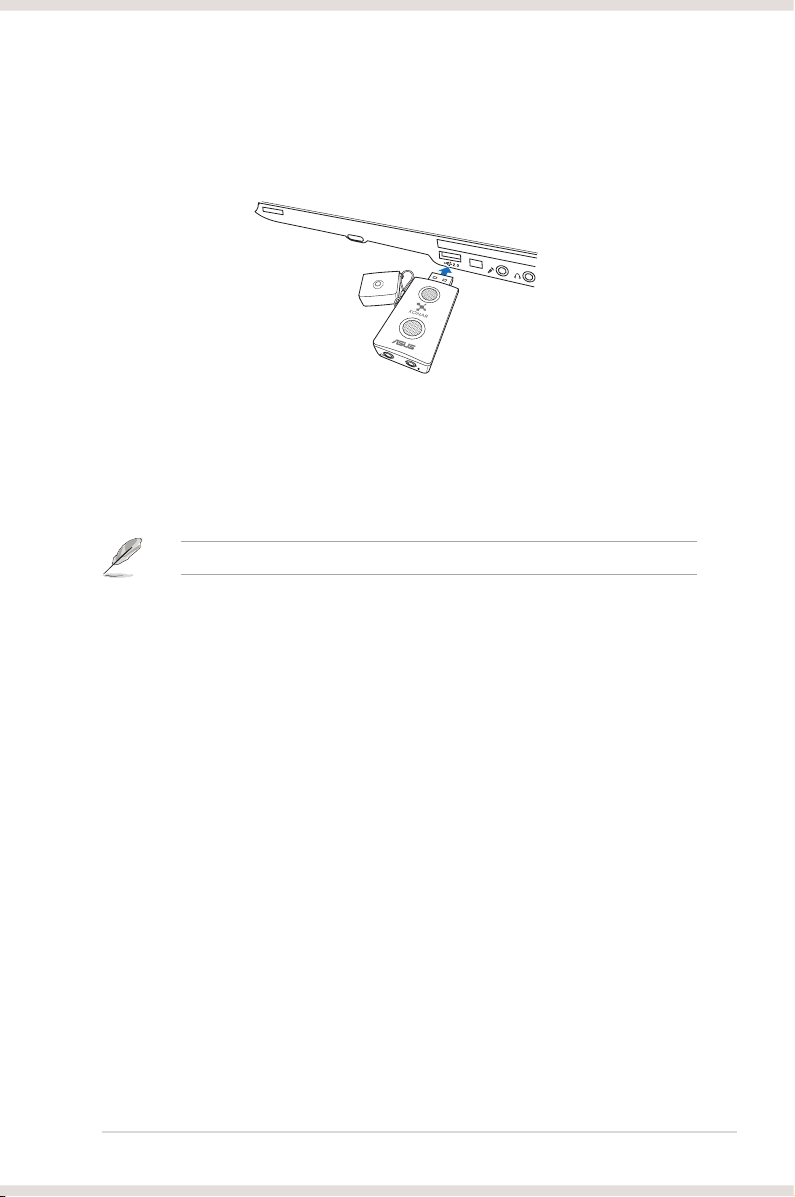
Connect the USB connector to any USB 2.0 port on your notebook or PC as the
following drawing shows.
5. Driver installation
After installing the Xonar U3 external USB audio card on your computer, you
need to install the device driver that enables the Xonar U3 audio card to work with
Windows operating system.
The version and content of the support CD are subject to change without notice.
To install the device driver:
1. Insert the ASUS Xonar U3 support CD into your optical drive. If Autorun is
enabled, the ASUS Xonar Card Driver screen appears automatically. Go to
step 4. If Autorun is not enabled in your computer, perform step 2.
2. Click My Computer on your desktop and double-click the optical drive icon.
3. Double-click the setup.exe icon located on the optical drive.
4. Follow the on-screen instructions to complete the installation. Read the
END USER LICENSE AGREEMENT in the process and make sure that you
understand and accept it before continuing the installation.
5. When the installation nishes, you may be prompted to restart your computer.
You can choose to restart the computer later if desired.

4 ASUS Xonar U3
6. Hardware introduction
Xonar U3 external USB audio card layout
1. Light indicator
3
2
1
Description Status
Play music (not Mute) LED on
Play music (Mute) LED off
Idle (not Mute) LED on
Idle (Mute) LED off
2. Headphone & S/PDIF-Out port
3. Mic & Line-in port
Other manuals for Xonar U3
2
Table of contents
Other Asus Sound Card manuals

Asus
Asus Essence STX II User manual

Asus
Asus PCI-V264CT User manual

Asus
Asus XONAR PHOEBUS User manual

Asus
Asus Xonar DG SI User manual

Asus
Asus XONAR ESSENCE ST User manual

Asus
Asus Xonar D-Kara User manual

Asus
Asus Xonar DGX User manual

Asus
Asus Xonar U7 User manual

Asus
Asus Xonar DGX User manual

Asus
Asus Xonar U3 User manual

Asus
Asus XONAR DG User manual

Asus
Asus Audio Card Xonar D2X User manual

Asus
Asus Xonar U3 PLUS User manual

Asus
Asus XONAR DX User manual

Asus
Asus Xonar U5 User manual

Asus
Asus Xonar DSX User manual

Asus
Asus Audio Card Xonar D2 User manual

Asus
Asus Xonar DS User manual

Asus
Asus Xonar U1 Lite User manual

Asus
Asus XONAR ESSENCE ST User manual