Asko CBB862W User manual

INSTRUCTIONS FOR USE
Cooker hood
EN
CBB862W

3Use ..............................................................
3Introduction ..................................................
4Description hood .........................................
4Description button control ...........................
5Operation ....................................................
5Switching extraction on and off ...................
5Switch on the boost setting ..........................
5Switching on the timer .................................
6Switching on recirculation mode .................
6Switching off recirculation mode .................
6Clean Air function ........................................
7Switching the light on and off ......................
7Changing the colour temperature ................
8Remote control ...........................................
8Description remote control ..........................
8Pairing the remote ........................................
9Switching extraction on and off ...................
9Switch on the boost setting ..........................
9Switching on the timer .................................
10Switching on recirculation mode .................
10Switching off recirculation mode .................
10Clean Air function ........................................
11Switching the light on and off ......................
11Changing the colour lighting temperature ....
12Maintenance ...............................................
12Cleaning .......................................................
14Filter indicator ..............................................
14Lighting ........................................................
15Battery of the remote ...................................
16Technical data ............................................
16EU Product Sheet ........................................
16EU Product Fiche .........................................
17Environmental aspects ..............................
17
Tips for energy-efficient cooking with
hoods ...........................................................
17Disposal of the appliance and packaging ....
Contents

Introduction
On reading these user manuals you will soon become familiar with the features of this appliance.
Please read the appliance’s safety and maintenance instructions.
Compliance information
Cooker hood (Built-in Unit)Radio equipment type
2402 -2477 MHz (16 channels)Operating frequency range
-5.2 dBm EIRP average (calculated)Maximum output power
-7 dBiMaximum antenna gain
Hereby, ASKO Appliances AB declares that the radio equipment type Cooker hood (Ceiling unit) is
in compliance with Directive 2014/53/EU.
The following symbols are used throughout the manual and they have the following meanings:
INFORMATION!
Information, advice, tip, or recommendation
WARNING!
Warning –general danger
It is important that you carefully read the instructions.
WARNING!
Before use, read the separate safety instructions first!
3
Use

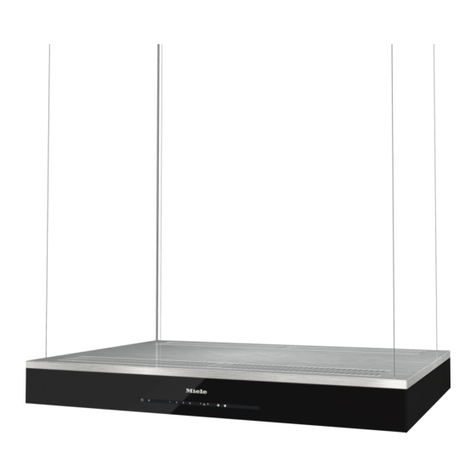
Description hood
1. Button Control
2. LED bar
3. Edge extraction
panel
4. Grease filter
5. Magnet
Description button control
1. Filter reset button, signals when filters require cleaning
2. Filter indicator
3. Lighting button, switches on/off and dims the lighting
4. Light indicator
5. Speed down button, reduces air extraction capacity and switches off
6. Speed up button, switches on and increases air extraction capacity
7. Speed level 1 indicator
8. Speed level 2 indicator
9. Speed level 3 indicator
10. Speed level 4/boost indicator
11. Timer function, turns off hood after time
12. Timer indicator
4
Use

Switching extraction on and off
1. Press the ‘+’button.
The cooker hood will switch on at the lowest setting.
2. Press the ‘+’button again for a higher fan setting. Press and hold the ‘+’button for 1 second to
select the highest setting (boost).
3. Press the ‘-’key to select a lower setting.
The extraction setting is indicated in the speed level indicators.
Each light area represents a speed level. Speed level indicator 4 also serves as a boost indicator
when it blinks.
4. If the extraction setting is set at 1, you can switch off the cooker hood by quickly pressing and
releasing the ‘-’button.
5. To switch off the cooker hood from, press and hold the ‘-’button for at least 1 second.
Switch on the boost setting
1. Press and hold the ‘+’button for at least 1 second.
The boost setting is switched on for 10 minutes. The speed level 4 indicator will flash during this
period. The original extraction setting will be reactivated after this period.
2. Press and release the ‘-’key to switch off the boost setting.
NOTE!
If the boost setting has been selected, the timer function cannot be activated.
Switching on the timer
1. Press the timer key.
The timer indicator will start to blink.
The cooker hood will switch off automatically after 10 minutes.
2. Switch off the timer function by pressing a random button (except the one for lighting).
5
Operation

TIP!
The cooker hood can be used in extraction mode or recirculation mode. The air extraction capacity
is adapted to the selected mode. The hood will start up in the default extraction mode. Is has to
be reset for recirculation mode.
With an RMS kit (Recirculation modification set) the air will first be cleaned by the grease filters
and then odours will be filtered by the charcoal filter. The cleaned air is recirculated back into the
kitchen.
Switching on recirculation mode
Simultaneously press and hold the timer button and the light button until the filter indicator flashes
3 times.
The carbon filter indicator is activated.
Switching off recirculation mode
Simultaneously press and hold the timer button and the light button until the filter indicator lights up
for 3 seconds and then turns off.
Clean Air function
The Clean Air function allows you to freshen the air in your kitchen for a maximum of 24 hours at
level 1.
1. Switch off the cooker hood.
2. Press and hold the timer button for approximately 3 seconds.
The cooker hood will switch on automatically for 10 minutes every hour at the lowest speed
setting. During extraction the display will show a fast moving ‘snake’. When the hood switches
off after 10 minutes, the display will show a slow moving ‘snake’until the hood switches on again
after 50 minutes.
3. Switch off the Clean Air function in the meantime by pressing a random button (any button other
than the light button).
6
Operation

Switching the light on and off
1. Quickly press and release the light button.
The light switches on at maximum strength.
2. Press and hold the lighting button to set the lighting strength.
3. To turn off the light, quickly press and release the light button while the light is on.
The lighting changes from maximum to minimum strength and vice versa.
Changing the colour temperature
You can adjust the lighting temperature.
Press and hold the light button. Press the ‘-’button to make the light ‘colder’or press the ‘+’button
to make the light ‘warmer’.
7
Operation

Description remote control
NOTE!
The remote control is available as an accessory for this cooker hood and is not included with this
appliance.
1. Timer function
2. Increase light intensity
3. Colder light temperature
4. Decrease light intensity
5. Decrease air extraction capacity
6. Clean Air function
7. Warmer light temperature
8. Switch on/off lighting
9. Increase air extraction capacity
10. Fan on/off
Pairing the remote
This remote control must be paired to the cooker hood before first use.
1. Start up the appliance (power on). Press and hold the -’and ‘+ for 3 seconds. The hood will start
‘pairing mode’for 5 minutes.
2. Activate the ’Remote pairing mode’by holding ‘c’and ‘w’for 3 sec.
3. During pairing all the indicators on the hood and remote will blink. All indicators will turn off when
the connection is established.
If the connection is not established repeat the entire pairing process.
NOTE!
Remote control will go into standby after 30 seconds. The remote will wake up when it is picked
up or detects movement.
8
Remote control

Switching extraction on and off
1. Press and hold the ‘Fan’key on the remote for 1 second.
The cooker hood will switch on at the lowest setting.
2. Press the ‘+’key again for a higher fan setting. Press and hold the ‘+’key for 1 second to select
the highest setting (boost).
3. Press the ‘-’key to select a lower setting.
The extraction setting is indicated by the speed level indicators on the hood.
4. To switch off the cooker hood, press and hold the ‘Fan’key for 1 second.
NOTE!
Lighting and motor key must be pressed for at least 1 second. This is to prevent the functions
from being accidentally switched on or off.
Switch on the boost setting
1. Press and hold the ‘+’button for at least 1 second.
The boost setting is switched on for 10 minutes. The speed level 4 indicator will flash during this
period. The original extraction setting will be reactivated after this period.
2. Press and release the ‘-’key to switch off the boost setting.
NOTE!
If the boost setting has been selected, the timer function cannot be activated.
Switching on the timer
1. Press the timer key.
The timer indicator will start to blink.
The cooker hood will switch off automatically after 10 minutes.
2. Switch off the timer function by pressing a random button (except the one for lighting).
9
Remote control

TIP!
The cooker hood can be used in extraction mode or recirculation mode. The air extraction capacity
is adapted to the selected mode. The hood will start up in the default extraction mode. Is has to
be reset for recirculation mode.
With an RMS kit (Recirculation modification set) the air will first be cleaned by the grease filters
and then odours will be filtered by the charcoal filter. The cleaned air is recirculated back into the
kitchen.
Switching on recirculation mode
When the light and fan are off, simultaneously hold the timer key and
the light key until the filter indicator flashes 3 times.
The carbon filter indicator is activated.
Switching off recirculation mode
When the light and fan are off, simultaneously hold the timer key and the light key until the filter
indicator lights up for 3 seconds and then turns off.
Clean Air function
The Clean Air function allows you to freshen the air in your kitchen for a maximum of 24 hours at
level 1.
1. Switch off the cooker hood.
2. Press and hold the ‘clean air’key for approximately 3 seconds.
The cooker hood will switch on automatically for 10 minutes every hour at the lowest speed
setting. During extraction the display will show a fast moving ‘snake’. When the hood switches
off after 10 minutes, the display will show a slow moving ‘snake’until the hood switches on again
after 50 minutes.
3. Switch off the Clean Air function by pressing the timer, clean air, ‘-’or ‘+’keys (any key other
than the light key).
10
Remote control
Table of contents
Other Asko Ventilation Hood manuals
Asko
Asko CW4634S/4000 User manual

Asko
Asko CW4939S/WS90FETGG User manual

Asko
Asko CW4935SCN User manual

Asko
Asko CW4936S User manual

Asko
Asko CH060-60 User manual

Asko
Asko CC4840S User manual

Asko
Asko CCT9051S User manual

Asko
Asko CCT1252WC User manual

Asko
Asko CC4520 User manual

Asko
Asko CC4527S User manual


