
ASAHOM S1023 User manual

User Manual
Model: S1023
ASAHOM
User Manual
EN
DE
FR
I T
SP
.................................................01
.................................................04
.................................................08
.................................................12
.................................................16

01
Introduction
Thank you for choosing the ASAHOM LED Bulb String Lights. This product has an IP65
water-resistant rating, making them ideal for outdoor use. You can adjust the
brightness and set up a timer through the Tuya Smart app.
Installing Steps
Hang the light bulbs onto the rope using the hook.
Installing Your Device
The adapter is not waterproof. Exercise caution when using the adapter outdoors.
Connect the string lights as indicated in the picture.
Firmly screw the wire nut
Notice: Only 2 string lights can be connected in a series.
Control String Lights in Series
EN
Pairing Your Device with the Tuya Smart App
What You Need:
·A smartphone or tablet running iOS 8.0 (or above) or Android 4.3 (or above).
·The device is powered on.

02
1.Download the Tuya Smart app from the App Store (iOS devices) or Google Play
(Android devices).
2.Turn on the Bluetooth on your smartphone.
3.Keep the distance between the smartphone and the control box within 25m(82ft)
4.Open the app, tap the “+” icon in the top right corner , the device will automatically
appear in the scan list.
5.Tap the device icon and follow the on-screen instructions to complete pairing.
Repeat the above part or click this icon to enter the automatic scan again
1 2
Troubleshooting
1. APP can't scan the device
·Ensure the string lights are powered on.
·Confirm Bluetooth on your smartphone is enabled.
·Position your smartphone close to the control box, then try again.
·If it still fails to scan, plug and unplug the power supply 5 times, the light starts to flash
and try again.
2. Can't connect to app after device reset.
·Delete the original device in the APP.

03
Input ( Adapter) AC 100-240V 50 / 60Hz 0.8A MAX
Output (Adapter) DC 12V,2A
Color RGB
Number of Bulbs 15
Water Resistance IP65 (String Lights) / IPX0 (Adapter)
Working Temperature -20﹢50℃ / -4﹢122℉
Length 48ft / 15m
Specifications
·Plug and unplug the power supply 3 times, position your smartphone close to the
control box, then re-add the device in the APP.
3.Some of the bulbs do not work
·Unplug the adapter, then plug it in again.
·If the problem persists, please contact Customer Service.

1.Laden Sie die Tuya Smart App aus dem App Store (iOS-Geräte) oder Google Play
(Android-Geräte) herunter.
2.Schalten Sie Bluetooth auf Ihrem Smartphone ein.
04
Installationsschritte
Hängen Sie die Glühbirnen mit dem Haken an das Seil.
Installieren Ihres Geräts
Der Adapter ist nicht wasserdicht. Seien Sie vorsichtig, wenn Sie den Adapter im Freien
verwenden.
Schließen Sie die Lichterketten wie im Bild gezeigt an.
Firmly screw the wire nut
Hinweis: Es können nur 2 Lichterketten in Reihe geschaltet werden.
Lichterketten in Serie steuern
DE
Koppeln Ihres Geräts mit der Tuya Smart App
Was du brauchst:
·Ein Smartphone oder Tablet mit iOS 8.0 (oder höher) oder Android 4.3 (oder höher).
·Das Gerät ist eingeschaltet.

05
3.Halten Sie den Abstand zwischen dem Smartphone und der Steuerbox innerhalb
von 25 m (82 Fuß).
4.Öffnen Sie die App, tippen Sie auf das „+“-Symbol in der oberen rechten Ecke ---
wählen Sie Auto Scan, und das Gerät wird automatisch in der Scan-Liste angezeigt.
Wiederholen Sie den obigen Teil oder klicken Sie auf dieses Symbol, um den automa-
tischen Scan erneut aufzurufen
5.Tippen Sie auf das Gerätesymbol und befolgen Sie die Anweisungen auf dem
Bildschirm, um die Kopplung abzuschließen.
1 2
Fehlerbehebung
1. APP kann das Gerät nicht scannen
·Stellen Sie sicher, dass die Lichterketten eingeschaltet sind.
·estätigen Sie, dass Bluetooth auf Ihrem Smartphone aktiviert ist.
·Positionieren Sie Ihr Smartphone in der Nähe der Kontrollbox und versuchen Sie es
erneut.
·Wenn das Scannen immer noch fehlschlägt, stecken Sie das Netzteil 3 Mal ein und
aus, das Licht beginnt zu blinken und versuchen es erneut.

06
2. Kann nach dem Zurücksetzen des Geräts keine Verbindung zur App
herstellen
·Löschen Sie das ursprüngliche Gerät in der App
·Schließen Sie das Netzteil dreimal an und ab, positionieren Sie Ihr Smartphone in der
Nähe der Steuerbox und fügen Sie das Gerät dann erneut in der App hinzu.
3. Einige Glühbirnen funktionieren nicht.
·Ziehen Sie den Adapter ab und stecken Sie ihn wieder ein.
·Wenn das Problem weiterhin besteht, wenden Sie sich bitte an den Kundendienst.
Eingang (Adapter) AC 100-240V 50 / 60Hz 0.8A MAX
Ausgang (Adapter) DC 12V,2A
Farbe RGB
Anzahl der Glühbirnen 15
Wasserbeständigkeit IP65 (String Lights) / IPX0 (Adapter)
Arbeitstemperatur -20﹢50℃ / -4﹢122℉
Länge 48ft / 15m
Spezifikationen

07
Étapes d'installation
Accrochez les ampoules à la corde à l'aide du crochet.
Installation de votre appareil
L'adaptateur n'est pas étanche. Soyez prudent lorsque vous utilisez l'adaptateur
à l'extérieur.
Connectez les guirlandes lumineuses comme indiqué sur l'image.
Firmly screw the wire nut
Remarque: seules 2 guirlandes lumineuses peuvent être connectées en série.
Guirlandes lumineuses de contrôle en série
FR
Couplage de votre appareil avec l'application Tuya Smart
De quoi as-tu besoin:
·Un smartphone ou une tablette sous iOS 8.0 (ou supérieur) ou Android 4.3 (ou supérieur).
·L'appareil est sous tension.
1.Téléchargez l'application Tuya Smart depuis l'App Store (appareils iOS) ou Google Play
(appareils Android).
2.Activez le Bluetooth sur votre smartphone.
08
3.Gardez la distance entre le smartphone et le boîtier de commande à moins de 25 m
(82 pieds)
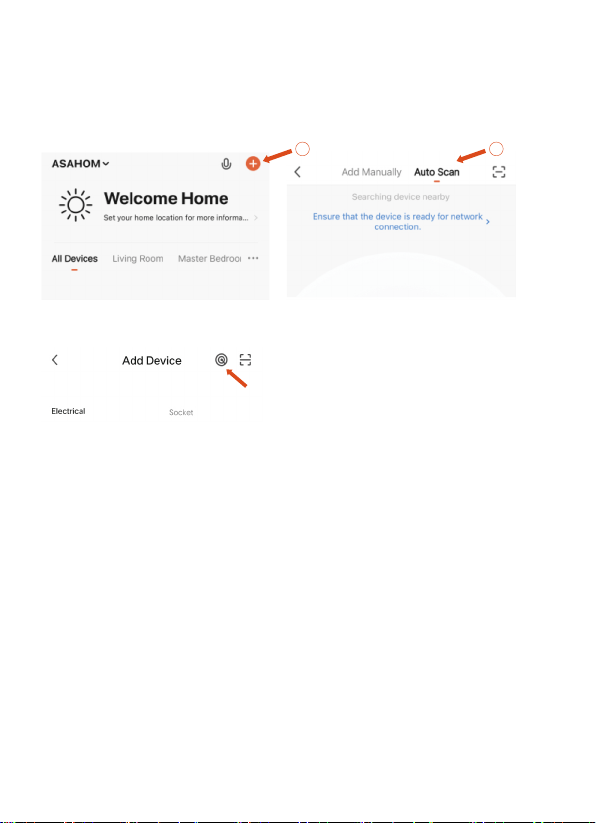
4.Ouvrez l'application, appuyez sur l'icône "+" dans le coin supérieur droit ---
choisissez Analyse automatique, et l'appareil apparaîtra automatiquement dans la
liste d'analyse.
Répétez la partie ci-dessus ou cliquez sur cette icône pour entrer à nouveau dans
l'analyse automatique
5.Appuyez sur l'icône de l'appareil et suivez les instructions à l'écran pour terminer le
jumelage.
Dépannage
1. L'APP ne peut pas scanner l'appareil
·Assurez-vous que les guirlandes lumineuses sont allumées.
·Confirmez que Bluetooth sur votre smartphone est activé.
·Positionnez votre smartphone à proximité du boîtier de commande, puis réessayez.
·S'il ne parvient toujours pas à numériser, branchez et débranchez l'alimentation 3 fois,
le voyant commence à clignoter et réessayez
21
Table of contents
Languages:
Other ASAHOM Lighting Equipment manuals


Popular Lighting Equipment manuals by other brands


Qazqa
Qazqa Suplux SL 3 Black 103062 instruction manual

Commercial Electric
Commercial Electric 54568141 Use and care guide

CREE LIGHTING
CREE LIGHTING 304 Series installation instructions

Goobay
Goobay 49867 user manual

ECOMAN ITALIA
ECOMAN ITALIA LED T8 instruction manual

Alkalite
Alkalite Krypton KT-81 user manual


