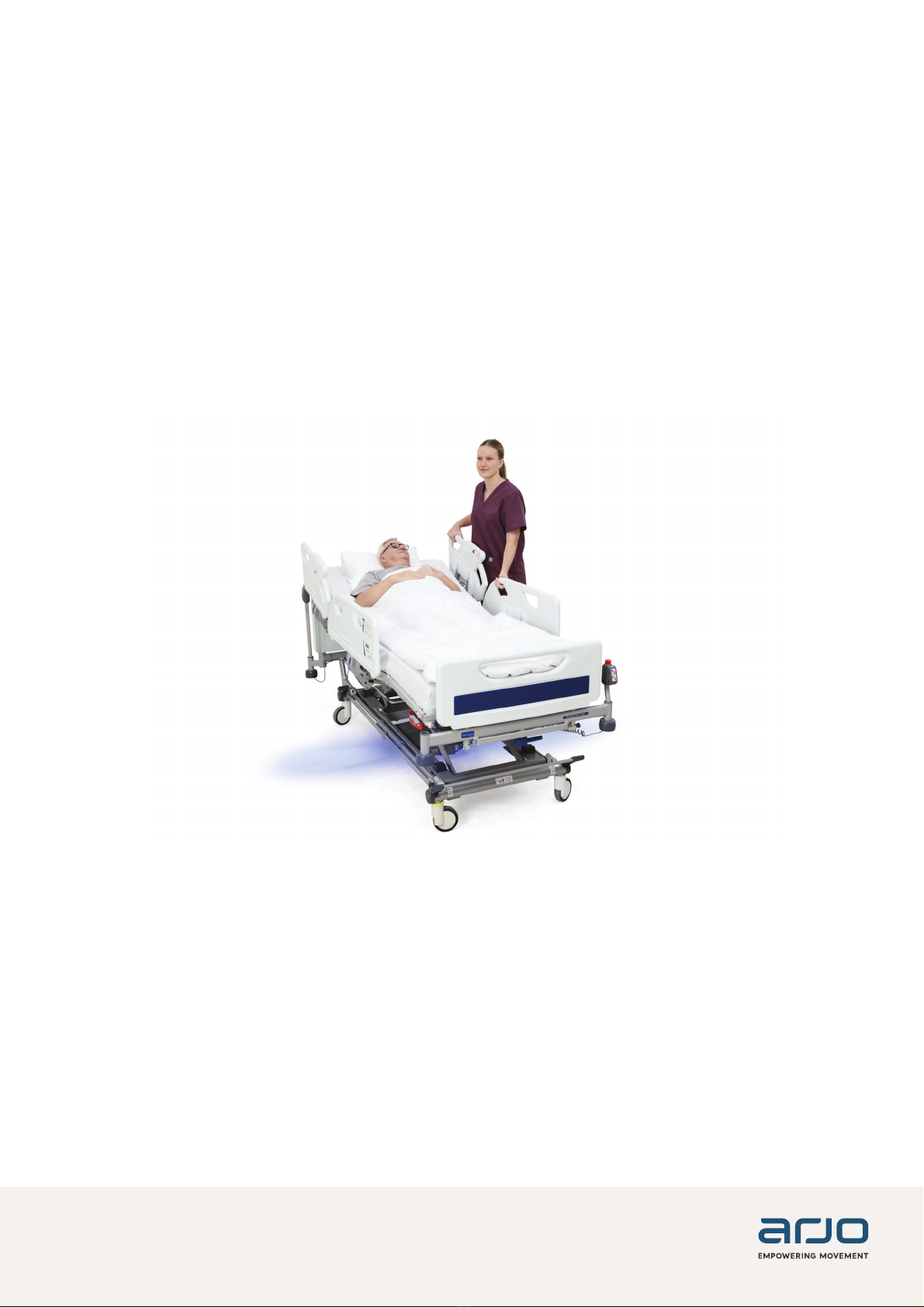
Arjo IndiGo User manual
416260-EN Rev 4 · 02/2023
INSTRUCTIONS FOR USE
IndiGo
Intuitive Drive Assist

Design Policy and Copyright
® and ™ are trademarks belonging to the Arjo group of companies.
© Arjo 2023.
As our policy is one of continuous improvement, we reserve the right to modify designs without prior notice. The
content of this publication may not be copied either whole or in part without the consent of Arjo.
WARNING
To avoid injury, always read this Instructions For Use and accompanied documents before
using the product.

3
TABLE OF CONTENTS
Foreword ...................................................................................................................................... 4
Support ...................................................................................................................................... 4
'H¿QLWLRQVLQWKLV,)8 ............................................................................................................... 4
Warning means: Safety warning. Failure to understand and obey this warning may result in
injury for you or other............................................................................................................................4
Safety Instructions ...................................................................................................................... 4
Introduction.................................................................................................................................. 5
Product Overview...................................................................................................................... 5
Intended use for IndiGo Drive Assist ...................................................................................... 5
Before Using IndiGo .................................................................................................................... 6
Using IndiGo ................................................................................................................................ 6
IndiGo Activation / Deactivation and Brakes ........................................................................ 6
Emergency Stop Switch.............................................................................................................. 7
Move the bed ............................................................................................................................. 8
Sleep Mode .............................................................................................................................. 10
Light Indications ......................................................................................................................11
After Using IndiGo ......................................................................................................................11
Cleaning and Disinfection......................................................................................................... 12
Care and Preventive Maintenance ........................................................................................... 12
General..................................................................................................................................... 12
Troubleshooting......................................................................................................................... 13
6SHFL¿FDWLRQV ........................................................................................................................... 15
Recycling.................................................................................................................................... 15
Operating, Transport and Storage Conditions ....................................................................... 15
Explanation of Symbols Used .................................................................................................. 16
FCC compliance Statement: ..................................................................................................... 18
Requirements for Canada:........................................................................................................ 18
Electrical Magnetic Compatibility Information........................................................................ 19
4
FOREWORD
Thank you for purchasing Arjo equipment.
Please contact us if you have any questions
about the operation or maintenance of your
Arjo equipment.
Please read and fully understand these
Instructions for Use (IFU) before using
your IndiGo™ Intuitive Drive Assist .
Information in this IFU is necessary to perform
the proper operation and maintenance of the
equipment. It will help to protect your product and
make sure that the equipment performs to your
satisfaction. The information in this IFU is important
for your safety and must be read and understood
to help prevent possible injury. Unauthorized
PRGL¿FDWLRQVRQDQ\
$UMRHTXLSPHQWFDQDႇHFWVDIHW\
Arjo will not be held responsible for any accidents,
incidents or lack of performance that occur as a
UHVXOWRIDQ\XQDXWKRUL]HGPRGL¿FDWLRQ
to its products.
Assembly, extensions, re-adjustments,
PRGL¿FDWLRQVWHFKQLFDOPDLQWHQDQFHRUUHSDLUV
PXVWEHSHUIRUPHGE\TXDOL¿HGSHUVRQQHO
authorized by Arjo. Contact Arjo for information
regarding maintenance and repair.
Refer to the IFU of the bed to which IndiGoLV¿WWHG
for intended use and complete system information.
IndiGo is available on the following bed frame
systems:
• Citadel™ Bed Frame System
• Enterprise® 5000X Acute Care Hospital Bed
(excluding folded side rails)
• Enterprise® 8000X Acute Care Hospital Bed
• Enterprise® 9000X Acute Care Hospital Bed
Support
Routine maintenance must be performed on your
IndiGo to maintain safety and reliability of the
equipment. See Care and Preventive Maintenance
section, page 13.
If you require further information, please contact
Arjo for comprehensive support and maintenance to
maximize the long-term safety, reliability and value
of the product.
Contact your local Arjo representative
for spare parts. The telephone numbers appear
in the back of this IFU.
Software updates are planned and will occur
throughout life of product.
Denitions in this IFU
Warning means: Safety warning. Failure to
understand and obey this warning may result in
injury for you or other
Caution means: Failure to follow these instructions
may cause damage to all or parts of the system or
equipment.
Note means: This is important information for the
correct use of this system or equipment.
SAFETY INSTRUCTIONS
WARNING
CAUTION
NOTE
WARNING
To minimize the risk of serious injury, carefully
read and follow all safety information and
operating instructions before operating IndiGo.
Ensure all physician orders and facility protocols
are followed.
WARNING
To avoid injury, activate the brake on the bed and
call maintenance if unanticipated motion occurs.
CAUTION
Floor lifts and other care equipment that normally
go under the bed must be handled with caution in
order to not interfere with IndiGo.
CAUTION
Do not place any items on the IndiGo cover during
transport or storage.
CAUTION
Do not use on slopes greater than 6°. Do not use
IndiGo to load a bed into van or truck.
CAUTION
Low bed height will be reduced by approximately
17mm when using taller load cell screw covers.
CAUTION
When operating IndiGo, maintain contact with bed
at all times.
5
INTRODUCTION
These instructions contain information about IndiGo on Arjo beds. IndiGo works as an Intuitive drive assist
when moving beds.
Product Overview
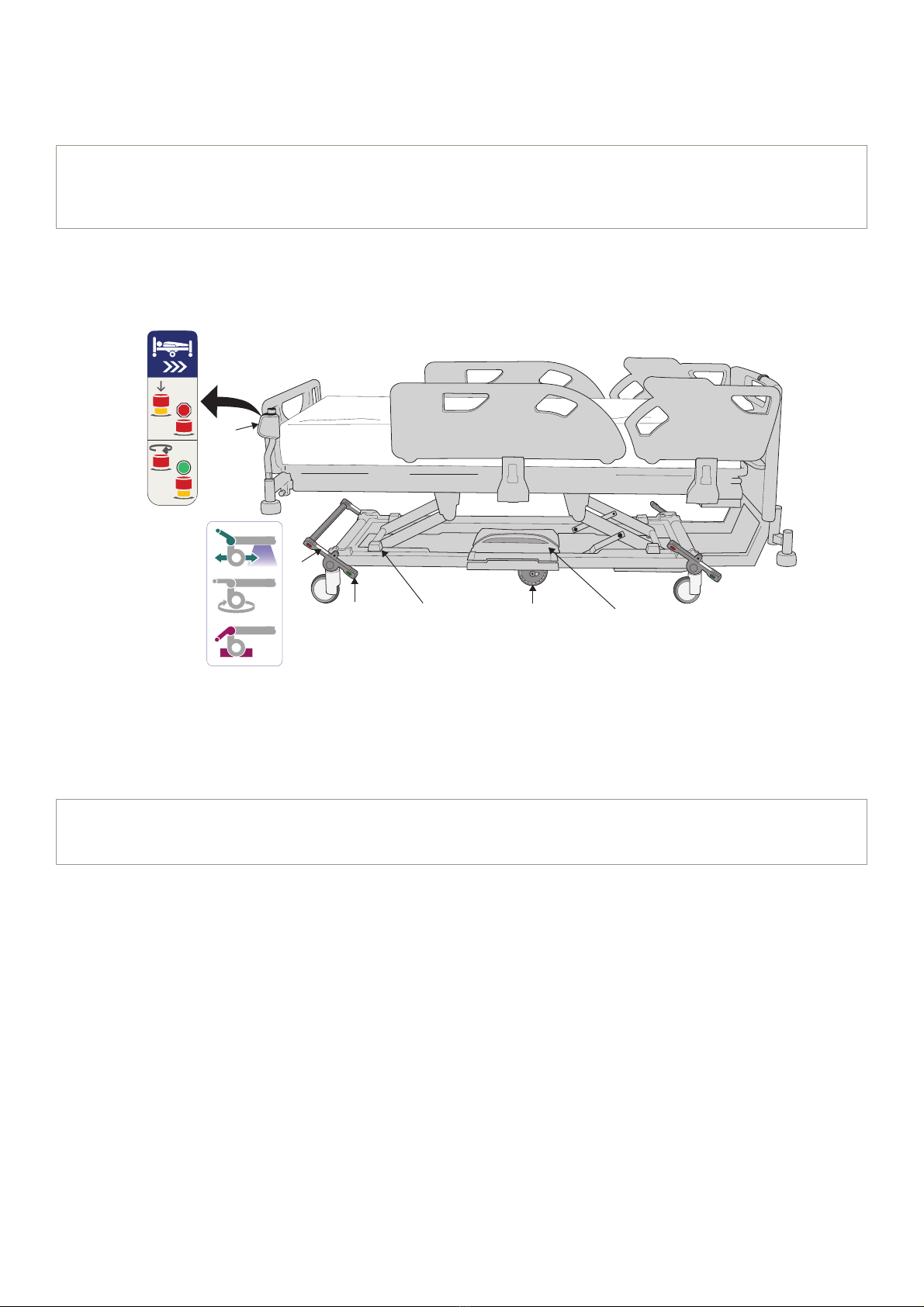
1. Cover
2. Wheel
3. Activation / Deactivation and Brakes label (located on or near all pedal locations)
4. Pedal
5. Emergency stop switch (located at head and foot ends of bed)
6. Load cell screw cover (only used on Enterprise 9000X and Citadel Bed Frame System beds)
Intended use for IndiGo Drive Assist
The IndiGo drive assist is intended to provide assistance for medical beds during patient transfer.
It should only be assembled onto compatible Arjo medical beds listed in the IFU.
The IndiGo drive assist unit should be used by appropriately trained personnel and for the purpose
VSHFL¿HGLQWKH,)8$Q\RWKHUXVHLVSURKLELWHG
NOTE
IndiGo must be used by appropriately trained caregivers or porters with adequate product
knowledge.
1
2
3
46
5
NOTE
Refer to page 7 for further description on IndiGo Activation, Deactivation and Brakes.
Fig. 1
6
BEFORE USING IndiGo
1. Identify that the bed is equipped with IndiGo by locating the IndiGo emergency stop switch,
the IndiGo cover and/or the IndiGo wheel.
2. Prepare for patient transport according to bed IFU and all applicable safety information
and operating instructions.
USING IndiGo
IndiGo Activation / Deactivation and Brakes
Activate / deactivate IndiGo and brake using the pedals located on each corner of the bed. Operate
the pedals with your feet while wearing suitable shoes. Do not operate the pedals with your hands.
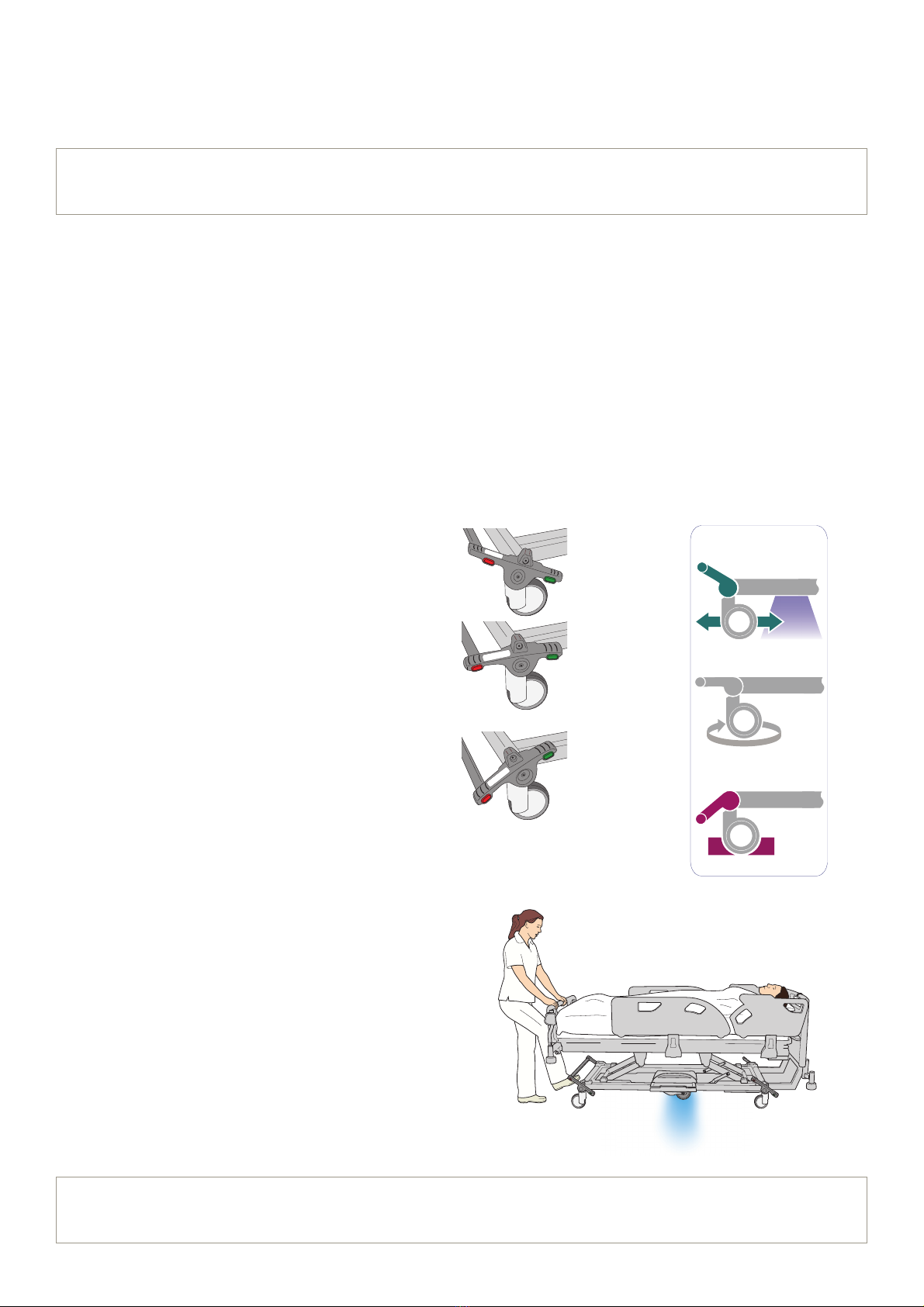
The pedals have three positions as shown in Fig. 2:
IndiGo ACTIVATED: a centered drive wheel
HQJDJHVWKHÀRRUZKHQIndiGo is activated.
FREE: all four casters are free to rotate and
swivel and IndiGoZKHHOLVOLIWHGRႇWKHÀRRU
BRAKE: brakes are applied on all four casters
and IndiGo ZKHHOLVOLIWHGRႇWKHÀRRU
When activating IndiGo, place the pedal in the
most upright position. The IndiGo wheel will be
ORZHUHGWRWKHÀRRUDQGEOXHOLJKWVLOOXPLQDWHWR
signify IndiGo is active.
See Fig. 3:
NOTE
,QGL*RKDVWKHVDPHVDIHZRUNLQJORDGDVWKHEHGWRZKLFKLWLV¿WWHG
Fig. 3
NOTE
Refer to Light Indications (shown on page 12) to determine when IndiGo is ready to use.
Fig. 2
7
EMERGENCY STOP SWITCH
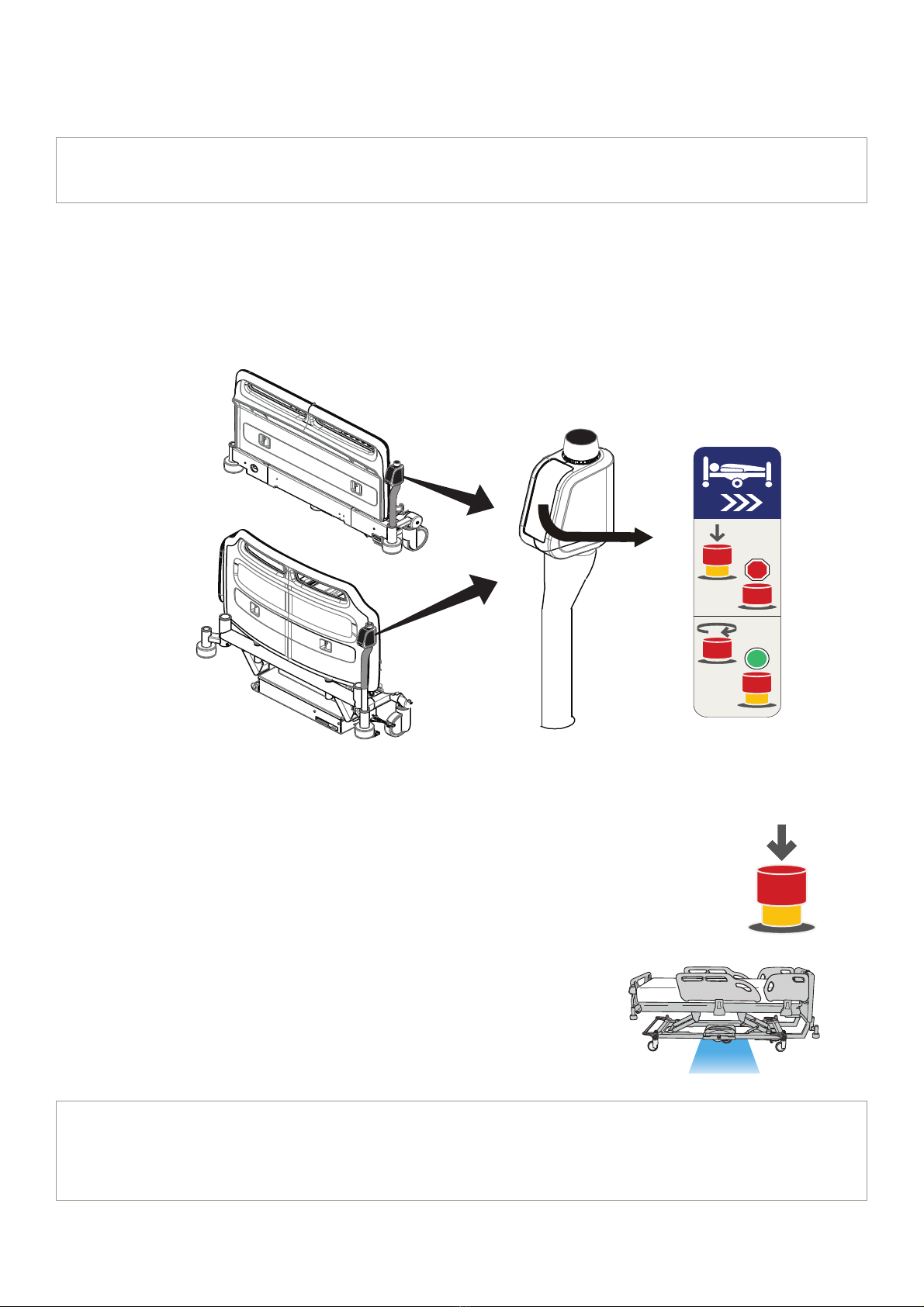
The IndiGo Intuitive Drive Assist comes equipped with Emergency Stop Switches located at both the foot
and head ends of the bed.
When the emergency stop switch is activated, an electric brake is applied to reduce momentum and slow
WKHEHGGRZQXQWLOVWRSSHG$WWKHVDPHWLPHWKHEOXHOLJKWVZLOOWXUQRႇDQGWKHGULYHZKHHOZLOOUDLVHXS
IURPWKHÀRRU
Emergency Stop Switch Locations
Activate Emergency Stop Switch
• When the emergency stop switch is pushed down, the electric brakes
are applied to reduce momentum and slow the bed until stopped.
• 7KHEOXHOLJKWVWXUQRႇDQGWKHGULYHZKHHOUHWUDFWVXS
XQGHUWKHEHGDQGRႇWKHÀRRU
NOTE
The emergency stop switch provides a gradual, slow stop rather than an immediate hard stop.
Foot End
Head End
X
X
NOTE
Once the switch is pushed down, it will stay down, with IndiGo deactivated, until the emergency
stop switch is reset and the brake pedal is cycled to the free position then back to the activated
position.
Fig. 4
Fig. 5
Fig. 6
8
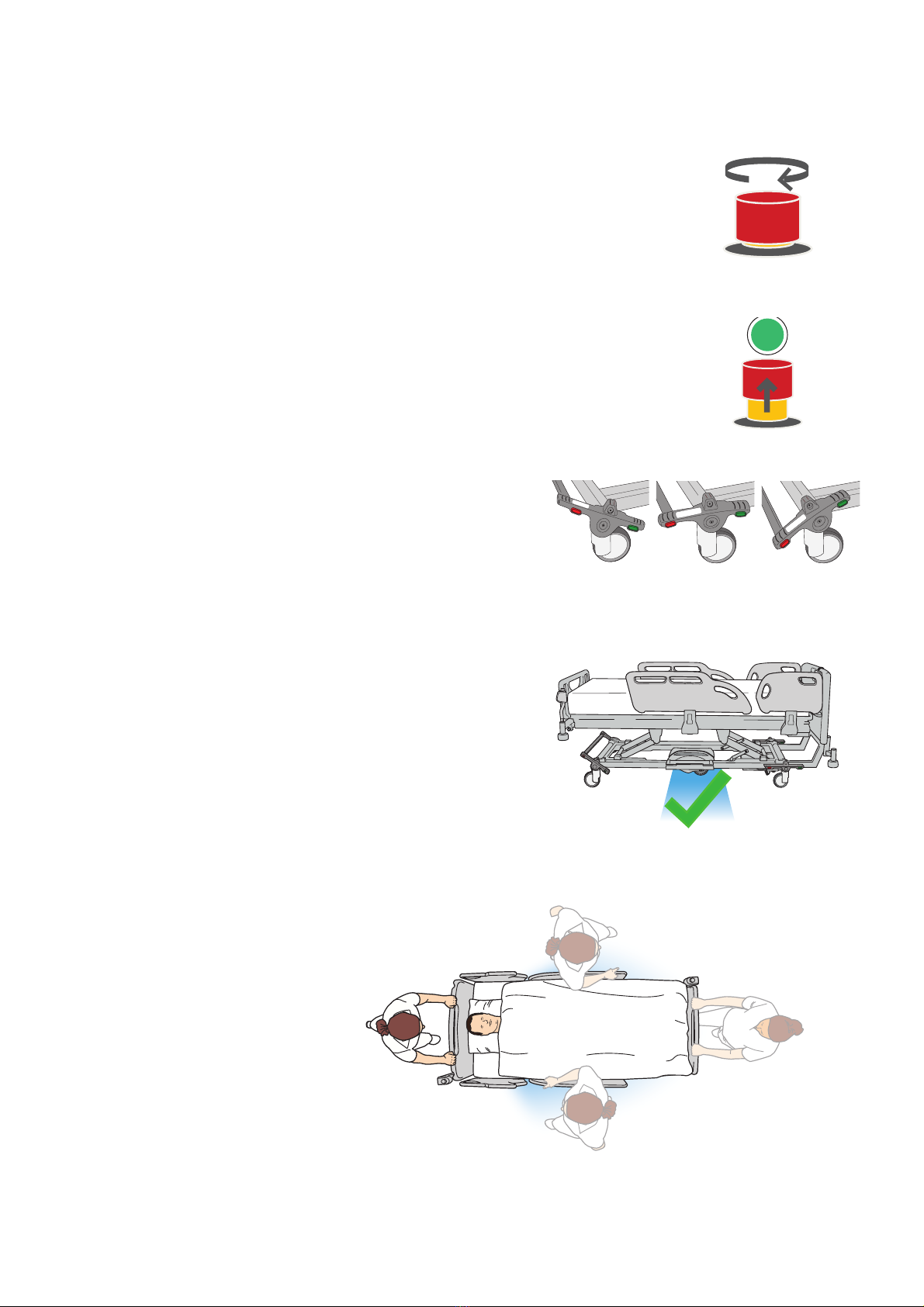
Reset Emergency Stop Switch
1. Twist the emergency stop switch clockwise.
2. The switch will pop up and is now reset.
To reset the drive wheel:
1. Cycle the brake pedal down to the free position and
then back up to the activated position. The drive wheel
ZLOOORZHUWRWKHÀRRU
2. The blue LED lights will turn on indicating
WKHGULYHZKHHOKDVORZHUHGWRWKHÀRRU
and IndiGo is now activated.
Move the bed
360 interface
Since IndiGo is built into the bed
LWVHOIWKHUHLVQRVSHFL¿FJULS
or handle. Push or pull the bed
from the foot board, head board
or the side rails as you normally
would when moving the bed.
See Fig. 11
Activated Free Brake
Fig. 8
Fig. 7
Fig. 9
Fig. 11
Fig. 10
9
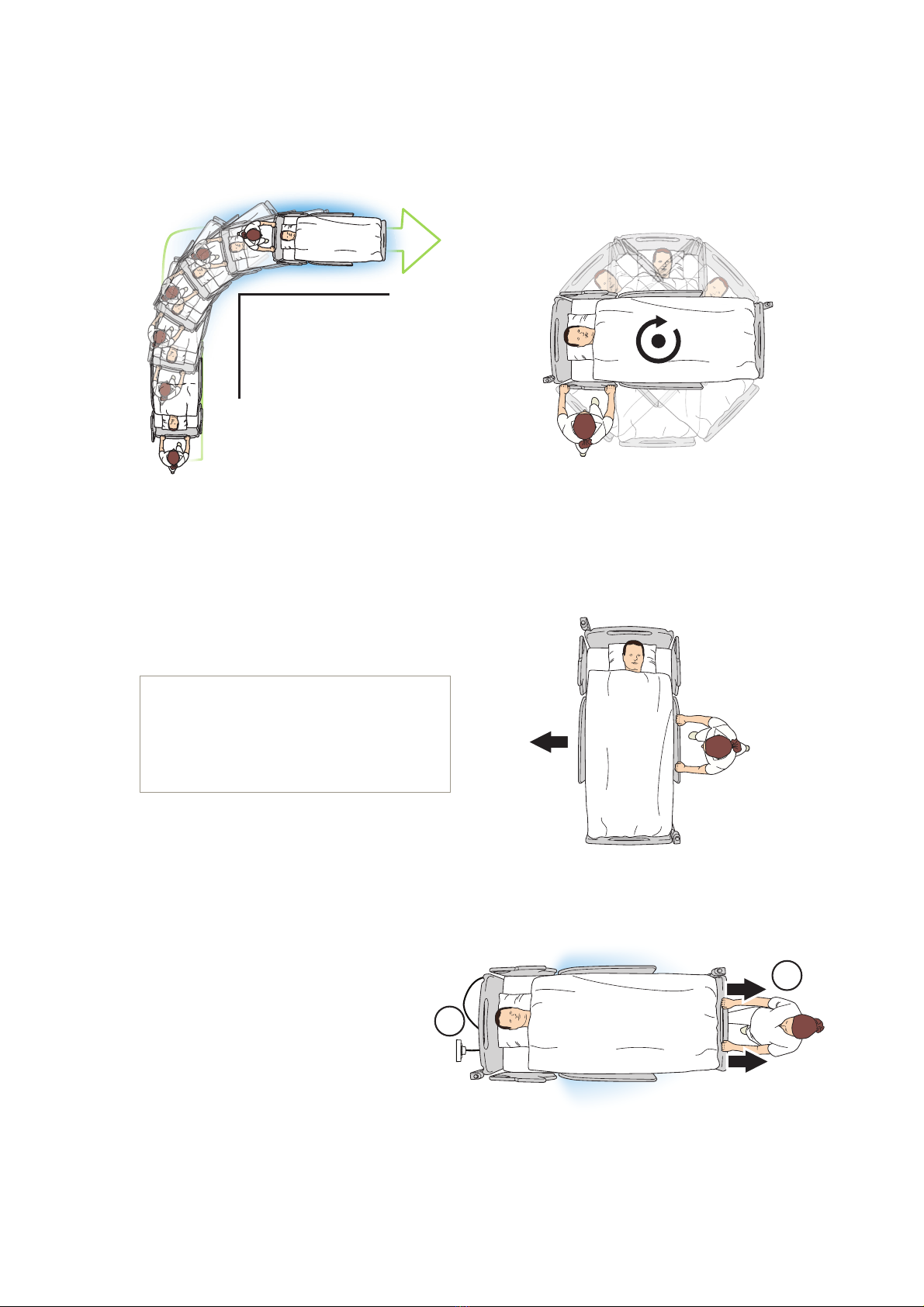
Maneuverability
IndiGo replaces the bed's ordinary steer lock function with a drive wheel centered under the bed, which
LPSURYHVWKHPDQHXYHUDELOLW\DQGFRQWURO7KHGULYHZKHHOHႇHFWLYHO\PLQLPL]HVWKHVSDFHQHHGHGZKHQ
taking corners or full 360° turns. See Fig. 12 and 13
,QPRVWFDVHVLWLVEHQH¿FLDOWRNHHSIndiGo
DFWLYDWHGLQFRQ¿QHGVSDFHVDQGFURZGHGDUHDV
Ensure there is space to operate before forward
or reverse movement.
Drive Assistance
To use IndiGo:
• Activate IndiGo (1) using the
pedals on any corner of the bed.
• Move bed slightly away from
wall to access to the bed's
power cord (2). See Fig. 15.
• Unplug power cord from
the wall.
• Push or pull bed gently to begin drive assisted movement.
NOTE
Deactivating IndiGo
(pedal in free position), allows for
small positioning adjustments and
sideways movement. See Fig. 14
1
2
Fig. 12 Fig. 13
Fig. 14
Fig. 15
10
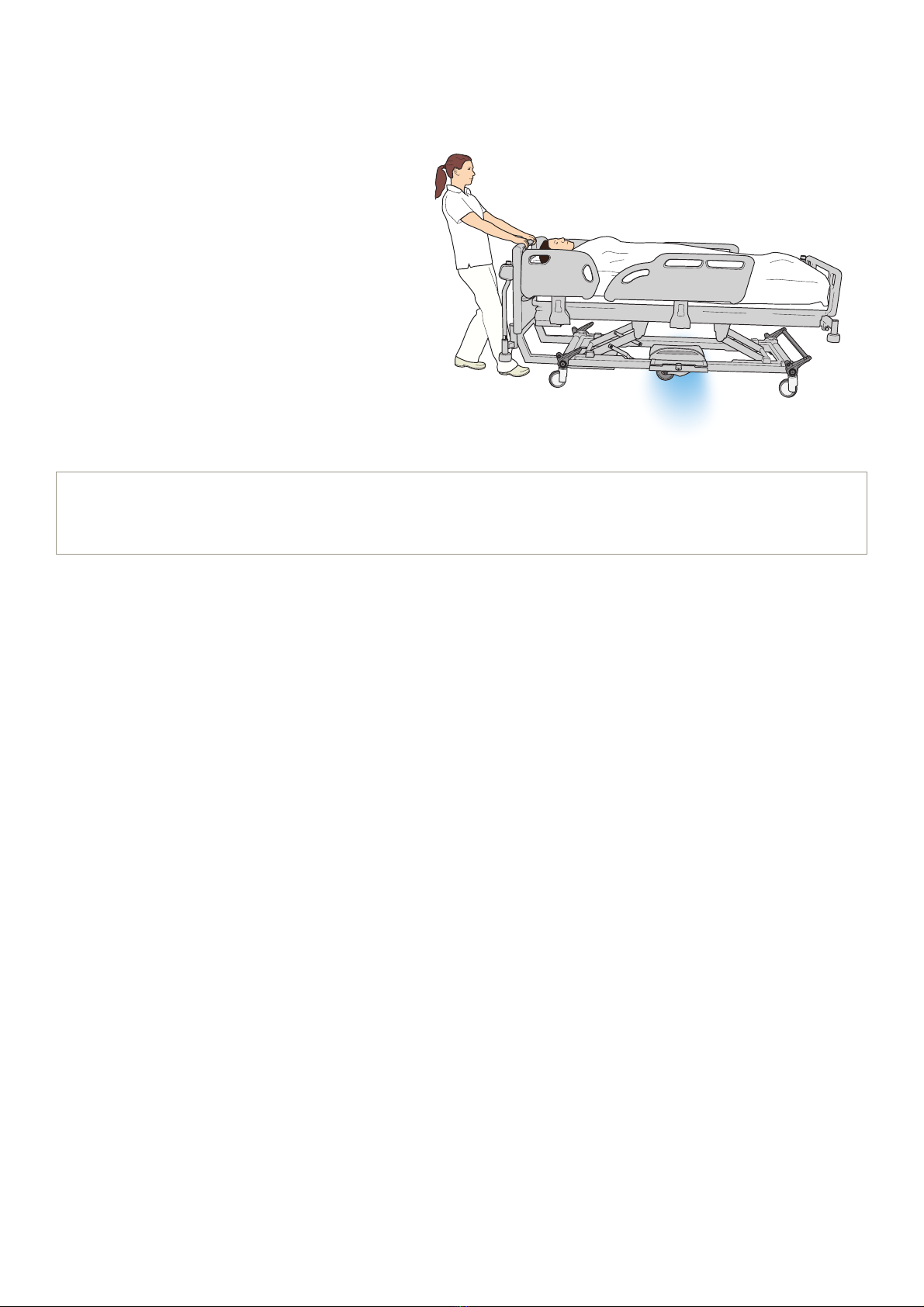
7RIXOO\EHQH¿WIURPIndiGo:
• .HHSDFRQVWDQWSUHVVXUHZKLOHPRYLQJRQÀDWVXUIDFHVDQGXSVORSHV
• Pull gently to decelerate and lean backwards to stop (brake assistance). See Fig. 16
• Control speed by a light constant pull
while moving down slopes (brake
assistance). IndiGo will provide brake
assistance. See Fig. 16.
• IndiGo may be kept activated in and
out of elevators. Note that temporary
deactivation allows for small positioning
adjustments and sideways movement
if required.
Sleep Mode
When IndiGoLVDFWLYDWHGDQGWKHEHGLVQRWPRYHGIRUDSSUR[LPDWHO\¿YHPLQXWHVIndiGo goes into sleep
PRGH7KHZKHHOOLIWVRႇWKHÀRRUDQGWKHEOXHOLJKWVWXUQRႇ
To re-engage IndiGo, move the brake pedal to the free position and then back up to the activated position.
7KHGULYHZKHHOORZHUVWRWKHÀRRUDQGWKHEOXHOLJKWVWXUQRQLQGLFDWLQJIndiGo is now active.
NOTE
IndiGo reacts to force applied by the user. IndiGo gives progressive assistance up to a maximum
speed of 5km/h (3mph).
Fig. 16
Table of contents
Other Arjo Medical Equipment manuals

Arjo
Arjo AtmosAir Velaris User manual

Arjo
Arjo Enterprise ENT-ACC32 User manual

Arjo
Arjo FIRST STEP User manual

Arjo
Arjo LGMAT/13 User manual

Arjo
Arjo Miranti User manual

Arjo
Arjo SARA Combilizer User manual

Arjo
Arjo Alpha Active User manual

Arjo
Arjo Enterprise ENT-ACC05 User manual

Arjo
Arjo AtmosAir User manual

Arjo
Arjo Auralis User manual

Arjo
Arjo Pentaflex User manual

Arjo
Arjo Malibu User manual

Arjo
Arjo Miranti User manual

Arjo
Arjo Alpha Active 3 User manual

Arjo
Arjo Sara 3000 User manual

Arjo
Arjo Dual-Loop Attachment Straps User manual

Arjo
Arjo Prioma Semi Electric Couch Series User manual

Arjo
Arjo Auralis User manual

Arjo
Arjo Evenda EV-ACC01 User manual

Arjo
Arjo Century User manual