Ariston NEVIS EVO RC User manual


02
NOT SURE WHAT A FUNCTION DOES?
Refer to the How to Use Basic Functions and How to Use Advanced Functions sections
of this manual for a detailed description of how to use your air conditioner.
SPECIAL NOTE
• Button designs on your unit may differ slightly from the example shown.
If the indoor unit does not have a particular function, pressing that function’s button on
the remote control will have no effect.
When there are wide differentces between “Remote controller Manual” and “USER’S
MANUAL” on function description, the description of “USER’S MANUAL” shall prevail.
•
•
02
Remote Controller Specifications
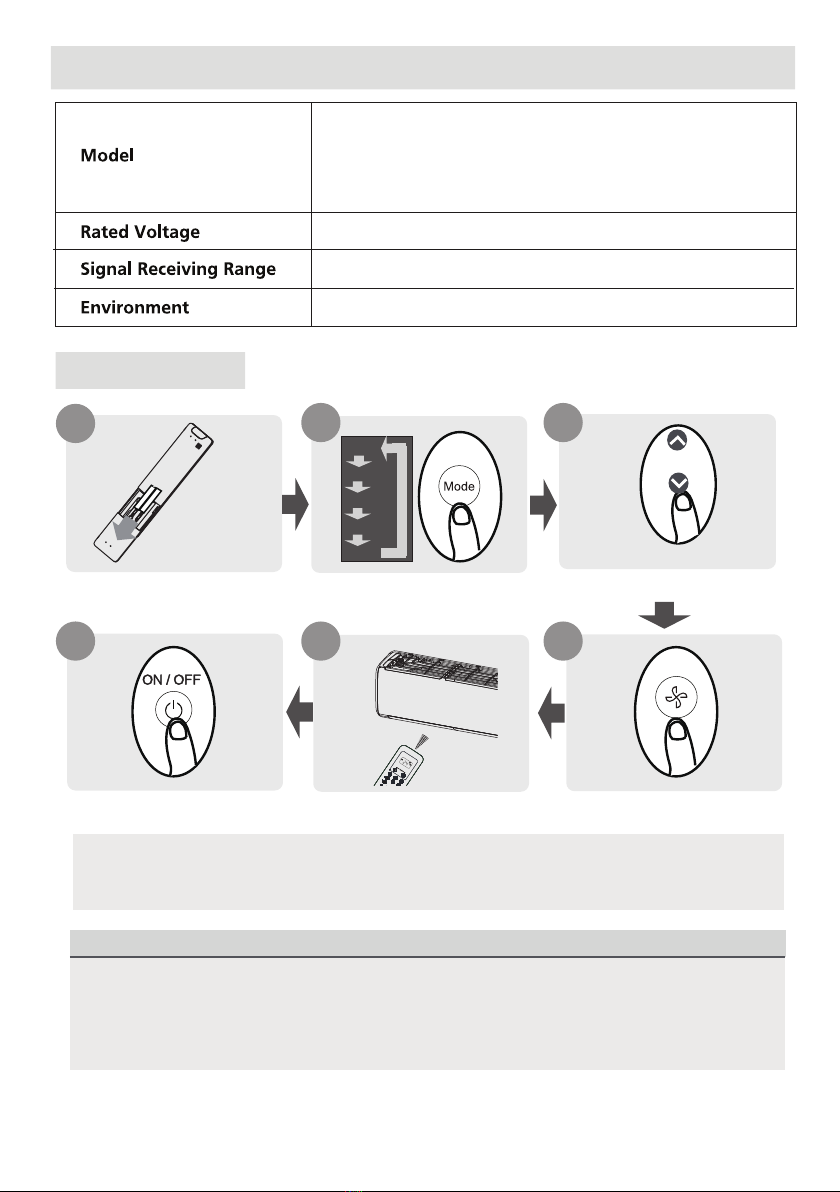
Quick Start Guide
NEVIS EVO RC
8m
3.0V( Dry batteries R03/LR03×2)
-5°C~60°C(23°F~140°F)
FIT BATTERIES
POINT REMOTE TOWARD UNIT
PRESS POWER BUTTON
SELECT MODE SELECT TEMPERATURE
SELECT FAN SPEED
1
6
2
5 4
My Mode Follow Me LED Turbo
Ioniser
Swing
Timer
SelfClean
Mode On/Off Fan
Sleep
AUTO
COOL
DRY
HEAT
FAN
HIGH
MED
LOW
SETTEMPERATURE
3
AUTO
COOL
DRY
HEAT
FAN

03


05
08
Remote Screen Indicators
Note:
All indicators shown in the figure are for the purpose of clear presentation. But during the actaul
operation, only the relative function signs are shown on the display window.
Information are displayed when the remote controller is power up.
Breeze Away display(some units)
Transmission Indicator
MODE display
TIMER ON display
FAN SPEED display
TIMER OFF display
Silence feature
display
ECO display
GEAR display
LOCK display
Horizontal louver
swing display
Vertical louver auto
swing display
TURBO mode display
Not available for
this unit
Temperature/Timer/Fan speed
display
Active clean feature display
Fresh feature display
Sleep mode display
Follow me feature display
Wireless control feature display
Low battery detection display(If flashes)
Displays when LOCK feature
is activated.
Silence
LOW
MED
HIGH
AUTO
Lights up when remote
sends signal to indoor
unit
Displays selected fan speed:
Displays the current
including:
mode,
2%-20%
21%-40%
41%-60%
61%-80%
81%-100%
1%
This fan speed can not be
adjusted in AUTO or DRY
mode.
Displays when ECO
feature is activated
Displays when GEAR
feature is activated
Displays the set temperature
by default, or fan speed or
timer setting when using
TIMER ON/OFF functions.
Temperature range:
oo
oo
16-30 C //60-86 F
Timer setting range:
0-24 hours
Fan speed setting range:
AU -100%
This display is blank when
operating in FAN mode.
(20-28 C/68-82 F)
(Model dependent)
Note:
Not all the models can display
the fan speed values between
AU-100%.
[ ]
***
*
*
*
*

06
09
MODE
How to Use Basic Functions
AUTO Mode
COOL or HEAT Mode
DRY Mode
Select AUTO mode Set your desired temperature
NOTE:
1. In AUTO mode,
the unit will automatically select the COOL, FAN, or HEAT function based on
the set temperature.
2. In AUTO mode, fan speed can not be set.
Turn on the air conditioner
Select DRY mode Set your desired temperature Turn on the air conditioner
FAN Mode
Select FAN mode Turn on the air conditioner
Select COOL/HEAT mode Set the temperature Turn on the air
conditioner
Set the fan speed
Set the fan speed
NOTE: In DRY mode, fan speed can not be set since it has already been automatically controlled.
NOTE: In FAN mode, you can’t set the temperature. As a result , no temperature displays in remote screen.
Before operation, please ensure the unit is plugged in and power is available.
ATTENTION
MODE
MODE
MODE

07
10
Setting the TIMER
TIMER ON setting
TIMER OFF setting
TIMER ON & OFF setting(example)
TIMER ON/OFF - Set the amount of time after which the unit will automatically turn on/off.
Press TIMER button to initiate
the ON time sequence. Press Temp. up or down button for
for multiple times to set the desired
time to turn on the unit.
Press Temp. up or down button for
for multiple times to set the desired
time to turn off the unit.
NOTE:
1. When setting the TIMER ON or TIMER OFF, the time will increase by 30 minutes increments with each
press, up to 10 hours. After 10 hours and up to 24, it will increase in 1 hour increments. (For example,
press 5 times to get 2.5h, and press 10 times to get 5h,) The timer will revert to 0.0 after 24.
2. Cancel either function by setting its timer to 0.0h.
Point remote to unit and wait 1sec,
the TIMER ON will be activated.
Press TIMER button to initiate
the OFF time sequence. Point remote to unit and wait 1sec,
the TIMER OFF will be activated.
Current
time 1PM
2:00PM 3:00PM 4PM 5PM 6PM
Timer starts Unit turns
ON
Unit turns
OFF
2.5 hours later
5 hours later
3:30PM
Example: If current timer is 1:00PM,
to set the timer as above steps, the
unit will turn on 2.5h later (3:30PM)
and turn off at 6:00PM.
ON/OFF
MODE
FAN
SHORT
CUT
TIMERON
TIMEROF
F
TEMP
SLEEP
1sec
ON/OFF
MODE
FAN
SHORT
CUT
TI
M
E
R
O
N
TIMEROF
F
TEMP
SLEEP
ON/OFF
MODE
FAN
SHORT
CUT
TI
M
E
R
O
N
TIMEROF
F
TEMP
SLEEP
ON/OFF
MODE
FAN
SHORT
CUT
TIMERON
TIMEROF
F
TEMP
SLEEP
1sec
x5
xn xn
x10
xn
Keep in mind that the time periods you set for both functions refer to hours after the current time.
TIMER
TIMER
TIMER
TIMER

08
11
How to Use Advanced Functions
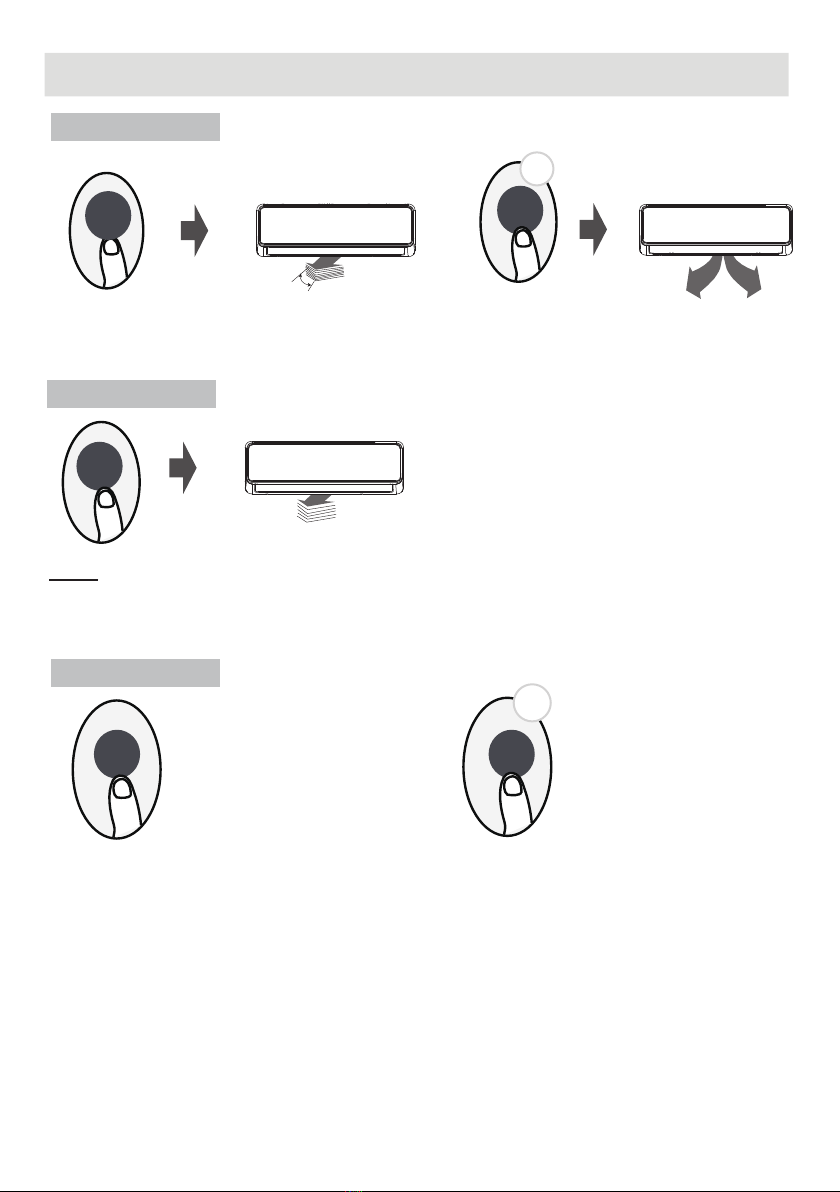
Swing function
Airflow direction
LED DISPLAY
Press Swing button
The horizontal louver will swing up and down
automatically when pressing Swing button.
Press again to make it stop.
If continue to press the SWING button, five
different airflow directions can be set. The
louver can be move at a certain range each
time you press the button. Press the button
until the direction you prefer is reached.
NOTE: When the unit is off, press and hold MODE and SWING buttons together for one second,
the louver will open for a certain angle, which makes it very convenient for cleaning. Press and hold
MODE and SWING buttons together for one second to reset the louver.
Keep pressing this button more than 2 seconds,
the vertical louver swing function is activated.
2s
Keep pressing this button more than 5 seconds,
the indoor unit will display the actual room
temperature. Press more than 5 seconds again
will revert back to display the setting temperature.
Press this button to turn on and turn off
the display on the indoor unit.
5s
Press LED button Press this button more
than 5 seconds(some units)
Swing
LED LED
Swing
Swing
Table of contents
Languages:
Other Ariston Remote Control manuals