
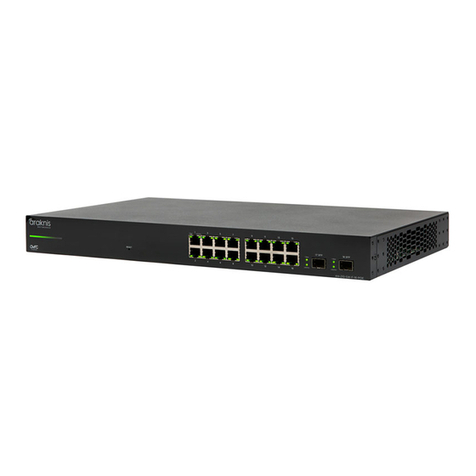
araknis AN-620-SW User manual

AN-620-SW
Araknis 620 Switch Quick Start Guide
Welcome to Araknis Networks™
Thank you for choosing an Araknis 620 series managed switch. With multi-gigabit
connectivity on all ports, updated modern aesthetics, and a managed interface, the
Araknis 620 series switch is a sleek and highly capable addition to any network.
Series overview
Model Ethernet
Ports SFP+Ports
PoE
Budget
(Watts)
AN-620-SW-R-8-POE 8 2 240
AN-620-SW-R-24-POE 24 2 720
1

Unboxing
The package contains:
Switch Rubber feet for flat
surfaces (4)
Rack-mount kit:
ears (2), screws
(8)
Quick Start Guide
QRcard
AC power cord
2

Installing the switch
Rack mount Shelf mount
Caution: -.To avoid possible interference or damage, do not stack equipment on top
of the switch.
Rack mounting guidelines
lThe maximum ambient temperature of the space the switch is installed in should
not exceed 122 °F/50 °C.
lAllow to air flow through the rack.
lVerify all the leveling feet or casters are adjusted correctly and they come in
contact with the supporting surface. Always load heavier equipment at the
bottom of the rack.
lMake sure the rack is grounded and the equipment is surge protected.
3


Step 3: Connections
SFP+ ports
The SFP+ (Small Form Factor Pluggable plus) ports support up to 10 Gbps connection
and are typically used to connect switches together. Use SFP+ adapters for RJ45 or
multi-mode fiber cables (sold separately).
5

PoE budgeting
The PoE budget (Power over Ethernet) limits the amount of power available to all ports,
with a maximum of 60W on an individual port. Add the total number of possible watts
that the connected devices can consume to make sure everything can receive power
reliably. See the example below.
Model PoE budget
(Watts)
AN-620-SW-R-8-
POE 240
AN-620-SW-R-
24-POE 720
Total PoE budget available = 240
Total PoE device consumption = 47
Remaining PoE budget available = 193
6

LED states &reset procedures
Front
LED LED state Description
Power
On The switch is powered on.
Off The switch is powered off.
Speed/PoE
On The port is passing 2.5Gbps and/or PoE.*
Off The port is not passing 2.5Gbps and/or PoE.*
Link/Act
On The port detects a connection.
Blinking Packets are flowing through the port.
Off The port does not detect a connection or the
port is disabled.
*Configurable in the web interface.
7

Rear
LED LED state Description
RJ45 2.5G
On The RJ45 port is negotiating packets at 2.5Gbps.
Off
The RJ45 port is not negotiating 2.5Gbps but may be
passing traffic. Check the Link/Act LED to verify if packets
are flowing through the port.
SFP 10G
On The SFP port is negotiating packets at 10Gbps.
Off
The SFP port is not negotiating 10Gbps but may be
passing traffic. Check the Link/Act LED to verify if packets
are flowing through the port.
Link/Act
Blinking Packets are flowing through the port.
Off The port does not detect a connection.
8

Reset procedures
The reset button is on the back of the
switch.
Note: -__.The front and back power LEDs have the same behavior.
Reset button action LEDstate Description
Hold the reset button for 1-9
seconds Blinking slowly Restarts the switch
Hold the reset button for 10-
19 seconds
Blinking
moderately
Resets the username and
password to araknis.
Hold the reset button for
more than 20 seconds Blinking rapidly Resets the switch to factory
defaults.
9

Step 5: Configuration
Araknis switches can be configured through OvrC or the local interface. The local
interface is accessible using OvrC’s webconnect feature, typing the switch’s DHCP
address into your browser’s address bar, or using the switch’s default IP address.
Configuring the switch in OvrC
OvrC provides remote device management, real-time notifications, and intuitive
customer management, using your computer or mobile device. Setup is plug-and-play,
with no port forwarding or DDNS address required.
To add this device to your OvrC account:
1. Connect the switch to the internet.
2. Log into OvrC (www.ovrc.com).
3. Scan the site using an OvrC Pro
device, or add the switch manually
by entering the MAC address and
Service Tag.
Logging into the web interface
1. Log into the switch using the default
credentials:
Username araknis
Password araknis
2. You must update the password after
initial login.
10
Table of contents
Other araknis Switch manuals

araknis
araknis AN-100-SW-R-5 User manual

araknis
araknis AN-300-SW-F/R-8 User manual

araknis
araknis AN-210-SW-F/R-8-POE User manual

araknis
araknis AN-100-SW-R-5 User manual

araknis
araknis 310 Series User manual

araknis
araknis AN-110-SW-C-5P User manual

araknis
araknis 300 - SERIES User manual

araknis
araknis 210 Series User manual
araknis
araknis AN-210-SW-R-8-POE User manual


