Aposen H21s User manual

Instruction Manual
Wireless Vacuum Cleaner
MODEL NO.: H21s
Please read this user manual carefully before using the product and keep it properly for reference.
English
日本語

CONTENT
IMPORTANT SAFEGUARDS
PRODUCT DESCRIPTION
OPERATION INSTRUCTIONS
INSTRUCTIONS FOR MITE CLEANING FUNCTION
CLEANING AND MAINTENANCE
TROUBLESHOOTING
SPECIFICATIONS
01
02
04
07
09
11
12
English
日本語
安全上のご注意
製品について
操作説明について
ダニ除去性能の説明
お手入れ
FAQ
仕様
13
14
16
19
21
23
24


IMPORTANT SAFEGUARDS
When using your vacuum cleaner, basic safety precautions should always
be followed. Read all below instructions before using.
1. Please read all the contents of this manual carefully before using the product.
2. Any operation that does not conform to the instructions may result in serious personal injury,
property loss or damage to the product itself.
3. Our company is not liable for the loss caused by failing to operate in accordance with the instruc-
tions of this product.
Using Environment
1. The product is not waterproof. Do not let it inhale water or wet dust.
2. The product is a household vacuum cleaner. Please do not use it to absorb construction waste or
dust of heavy metal. It should not be used in industrial occasions.
Personnel Safety
1. Please operate cautiously to avoid danger when the product is working.
2. Do not stand or squat on this product.
3. Do not store the product in a high place to avoid the danger of accidental fall.
Safety Instructions for Product
1. This product can be used by children aged from 8 years and above and persons with reduced
physical, sensory or mental capabilities or lack of experience and knowledge if they have been
given supervision or instruction concerning use of this device in a safe way and understand the
hazards involved.
2. This product is only suitable for working in dry environment. Do not use it in humid environment.
3. Do not let it inhale high temperature substances (cigarette ends, matches or hot ash), superfine
substances (such as lime, cement, wood chips, gypsum powder, ash, carbon powder, etc.), large
pieces of sharp debris (such as glass, nails, pins, etc.), dangerous substances (such as solvents,
scale eliminators, etc.), chemical substances (such as acidic substances, detergents), flammable
and explosive liquids (gasoline, alcohol products).
4. Please keep the air inhalation duct and moving part away from hair, plush clothing, fingers and
other parts of body.
5. Please check the cleaning area before use. If pieces of paper, paper balls, plastic cloth or sharp
objects and things larger than the diameter of the suction pipe are found, please clean up them in
advance so as to avoid blockage of the suction pipe which affects the use of the product.
6. If electric leakage, excess temperature of motor, abnormal sound, overheating of main body,
abnormal smell or weak suction is found while using, users are supposed to stop using immediately.
01

PRODUCT DESCRIPTION
Main Parts of Product
7. Please check the dust cup regularly. If there is too much rubbish in it, please clean it up in time.
Keep the ventilation aperture unblocked to avoid blockage which will reduce suction and cause
motor heating, affecting the service life of machine.
8. When cleaning the product, do not use lubricants, detergents, polishes and so on to clean any
parts.
9. When the machine malfunctions, don't repair it by yourself. Please call our after-sales department
for help.
02
Main body
Power adapter
Wall hanger
Long crevice tool
Extension tube
Electric floor brush
Two-in-one brush
Mite cleaning brush

Packing List of Product
Name of Parts
03
Main Body
Extension
Tube
Electric Brush
Mite Cleaning
Brush
Wall Hanger
Power Adapter
Instruction
Manual
Long Crevice
Tool
Two-in-one
Brush
1
1
1
1
1
1
1
1
1
Power switch button
Power indicator
Dust cup
Handle
Air outlet
Gear switch button
Charging port
Dust cup
release button
Extension tube
release button
UV lamp window
Vibration switch
Main wheel
Light induction sensor
Second wheel
Vibration plate
UV lamp
Light induction sensor
Suction inlet

OPERATION INSTRUCTIONS
Charging Instructions
04
Check whether the electricity is sufficient. In order to ensure the normal use of the product, please
charge more than 3 hours before the first use.
The charging head on the power adapter is inserted into the charging port of the main body, and then
insert the power adapter into the power socket to start charging.
Charging port Charging plug
Dust cup bottom lid
Dust cup
Stainless steel filter
Superfine filter
Extension tube
Floor brush release button

05
Notes:
1. When the green power indicator flashes on the main body, it indicates that it is charging. When all
three green lights are on, it indicates that the power is full. Please remove the power adapter in
time.
2. When the main body starts charging, the power switch button of the main body automatically locks
up and the main body stops working and cannot be started. When the charging head of the power
adapter is removed, the machine can work normally.
3. When charging normally, the green power indicator flashes according to the amount of electricity in
the battery. As shown in Fig. 1, 2 and 3, three lights represent the amount of electricity respectively.
When No. 1 light flashes, it shows that the power of the battery is relatively low which needs to
continue charging. When the second light flashes, the first light is always on. When the third light
flashes, and the second light is always on.When all three lights are always on, it indicates that the
power is full, please unplug the adapter from the power socket in time and stop charging.
Cleaning Function Instruction
Component assembly
Connection of electric brush: insert one end of electric brush into one end of extension tube and hear
the locking sound of "click", then insert the other end of extension tube into interface of the main
body and hear the locking sound of "click". (as shown below)
1
2
3
06
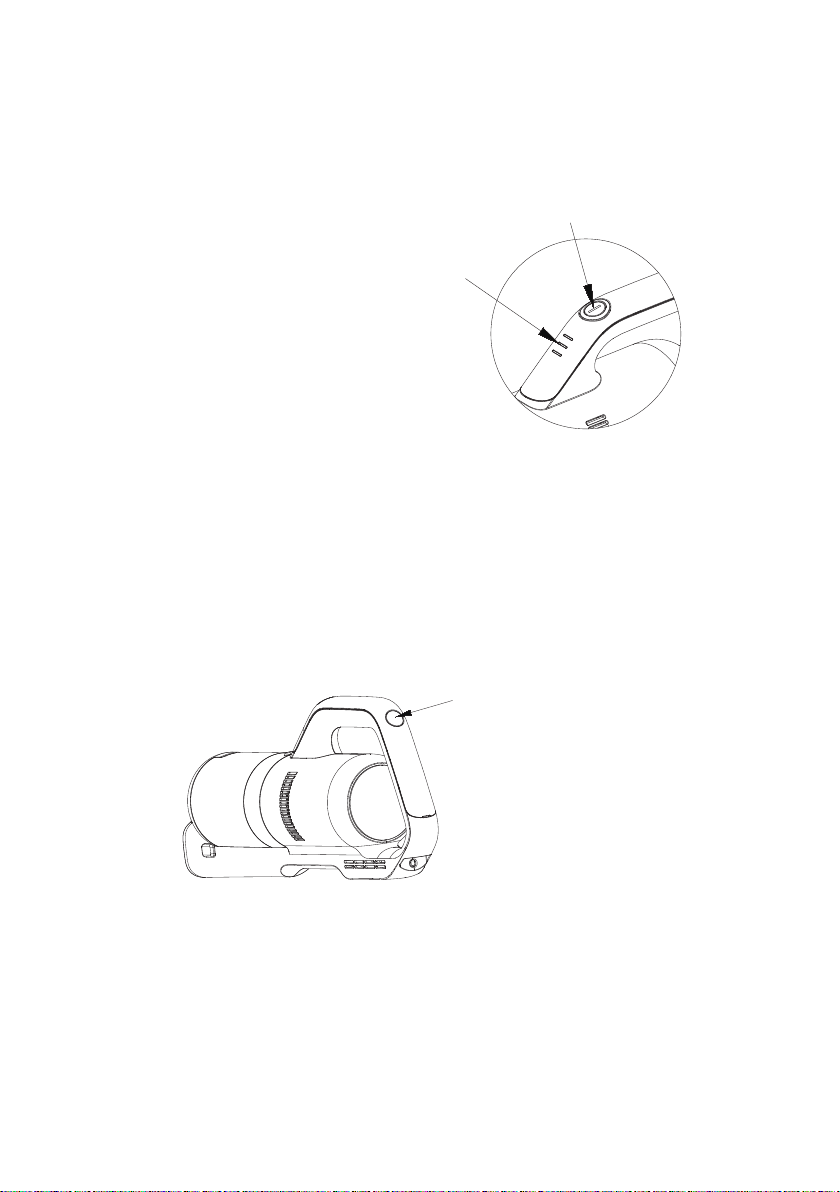
1. Press the power switch button to turn on the cleaner as the motor inside will start working and the
green indicator lights would be on. Press the button again to stop the product working and all green
lights would go out.
2. Press the high and low gear switch button, the machine changes from low speed gear to high
speed gear as the sound of the motor becomes louder and the suction would be increased. Press
the switch again and the machine turns to low gear. Repeatedly press the high and low gear speed
switch, the machine switches between the high speed gear and low speed gear. The machine
works for more than 13 minutes in high gear and 30 minutes in low gear when it is full of electricity.
3. In the process of using the machine, the power indicator shows the amount of electricity. When all
three lights are on, it indicates that the power is full. In the process of power consumption, the
indicator light would go out as left quantity decrease. When only one light is on and flashes, it
indicates that the power is running out, and the machine should stop working to charge the battery.
Press the power switch button to start the working.
Indicator lights will show green.
Press the gear switch button
to switch between high and
low speed gear.
This manual suits for next models
1
Table of contents
Other Aposen Vacuum Cleaner manuals