Apeks QuantumX User manual

Owner's Manual

2
Contents
FOR YOUR SAFETY..................................................................5
INTRODUCTION.....................................................................7
SECTION 1: Using the QuantumX on the Surface.....................8
The Push Buttons ...................................................................................................8
Time Display Mode (pre-dive).............................................................................10
Backlight ...................................................................................................... 12
Low Battery Indicator .................................................................................... 12
Time Display Mode (post-dive) ...........................................................................13
Wait-to-y Guidelines ...........................................................................................14
Compass Mode......................................................................................................15
Dive Settings Mode...............................................................................................18
Plan Mode .............................................................................................................24
Logbook Mode......................................................................................................25
Prole Mode .........................................................................................................28
History Mode ........................................................................................................30
PC Transfer Mode.................................................................................................31

3
QuantumX Owner's Manual
Time Settings Mode..............................................................................................32
Change Units of Measure.....................................................................................33
SECTION 2: Diving with the QuantumX ..................................34
Pre-Dive Checklist.................................................................................................34
Automatic Activation............................................................................................35
No-decompression Dive Mode.............................................................................36
Primary Display............................................................................................. 36
Alternate Displays .......................................................................................... 38
Safety Stop..................................................................................................... 39
Switching Nitrox Mixes................................................................................... 40
Decompression Dive Mode ..................................................................................41
Deep Stops..................................................................................................... 42
Summary of Warnings and Alarms......................................................................43
FO2 Warning ................................................................................................ 43
Fast Ascent Warning ...................................................................................... 43
PO2 Warnings ............................................................................................. 44
No-decompression limit warning ....................................................................... 45
Decompression Stop Violation Warning.............................................................. 45
Oxygen Limit Warnings .................................................................................. 46
Out-of-Range Warning.................................................................................... 47

4
Gage Mode............................................................................................................48
Primary display ............................................................................................. 48
Alternate displays........................................................................................... 49
System Reset Button .............................................................................................50
CARE & MAINTENANCE........................................................51
Care before the dive .............................................................................................51
Care during the dive.............................................................................................51
Care after the dive ................................................................................................52
Changing the Battery ...........................................................................................52
TECHNICAL SPECIFICATIONS.............................................56
Accuracy ................................................................................................................56
Measurement Range.............................................................................................56
Nitrox Settings ......................................................................................................57
Operational Limits ...............................................................................................57
Battery ...................................................................................................................57
Physical Dimensions .............................................................................................58
Algorithm..............................................................................................................58

5
QuantumX Owner's Manual
FOR YOUR SAFETY
All warnings and cautions are identified with the triangle symbol. Whenever you see
a warning or a caution, read it carefully, as it may protect you from serious injury or
damage to the product. Read the manual in its entirety before attempting to use the
QuantumX computer.
WARNING: Decompression sickness (aka, “the bends”) is an inherent risk of
SCUBA diving. Even if you properly follow all the instructions in this manual,
and dive within the recreational limits of SCUBA diving, you still run the risk
of getting decompression sickness, or some other inherent risk of SCUBA
diving. Unless you are fully aware of these risks and are willing to personally
accept and assume responsibility for those risks, do not use the QuantumX
dive computer
The QuantumX, or any other dive computer, does not actually monitor changes that
occur in your body as you dive. Rather, it is performing calculations using algo-
rithms developed by leading decompression experts and backed by years of research
and thousands of dives. However, these algorithms cannot account for factors like
dehydration, fatigue, obesity, or poor physical conditioning. Therefore, always leave
a comfortable safety margin in respect to no-decompression time and ascent speed.
The computer is designed to ASSIST you in making a dive, not to CONTROL your
dive.

6
WARNING: Using the QuantumX will not prevent decompression sickness,
but using it sensibly reduces this risk. You must accept that there is no
device or procedure that will totally prevent the possibility of a decompres-
sion accident.

7
QuantumX Owner's Manual
INTRODUCTION
Congratulations on the purchase of your new QuantumX dive computer. As with all
diving equipment, it is important to understand the features and functions of the
QuantumX. Before using the computer, read this manual in its entirety. Contained
within this manual are illustrations to aid you in understanding the computer.
Section 1 instructs you on how to navigate through the QuantumX’s surface modes.
Section 2 describes all the underwater displays and functions while diving with the
QuantumX. Lastly, Section 3 covers care & maintenance.
This manual will clearly and concisely instruct you on the use of the QuantumX.
However, if you have any questions on the material contained in this manual, please
contact your nearest authorized dealer.

8
SECTION 1
Using the QuantumX on the Surface
The Push Buttons
The QuantumX has three buttons that allow you to
access modes, change settings and switch displays.
Throughout this manual, the buttons will be referred
to as MODE, A, and B. The detailed function of each
button is explained throughout this manual.
The Mode Button
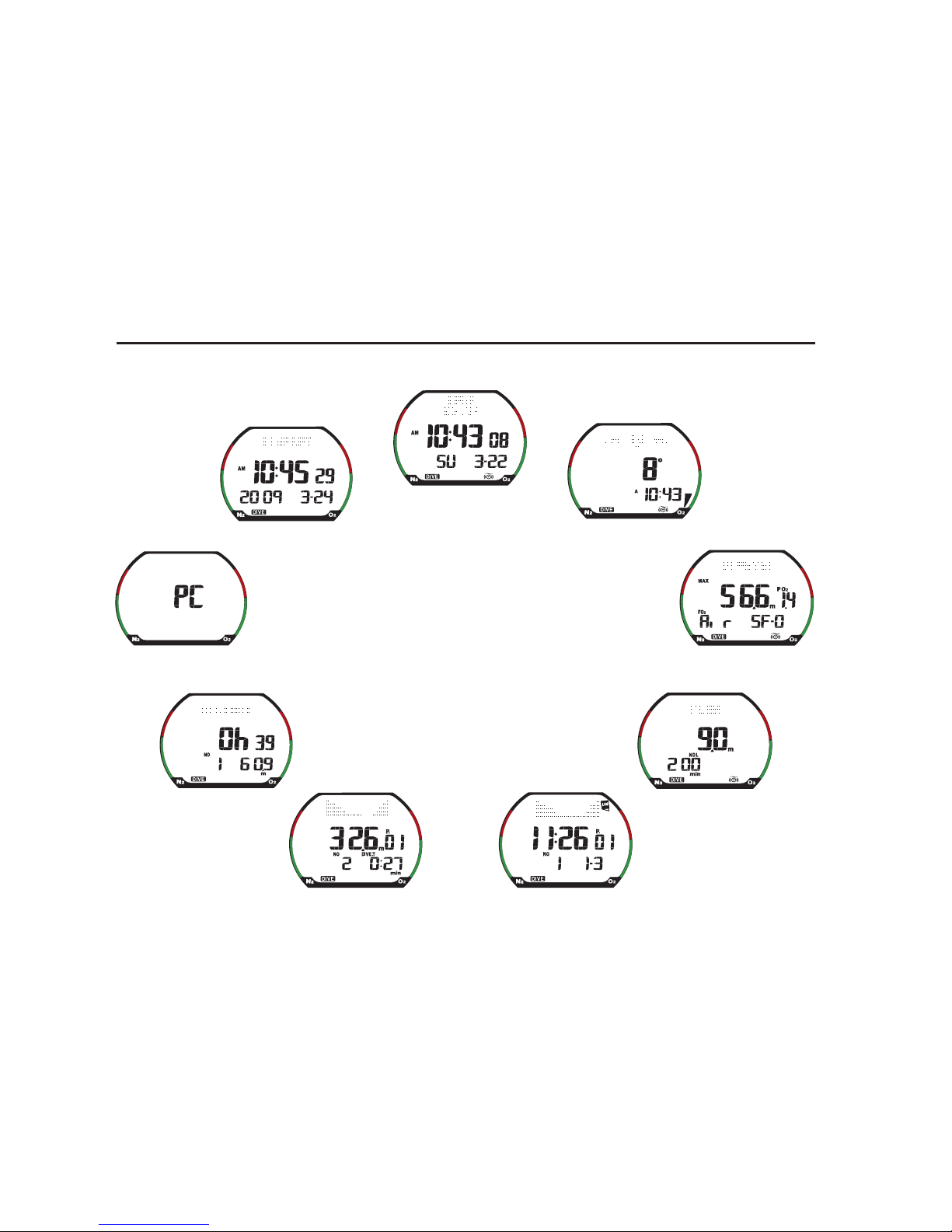
All the surface functions are accessed by pressing
the MODE button. The QuantumX has nine surface
modes: TIME/DATE, COMPASS, DIVESET, PLAN,
LOGBOOK, PROFILE, HISTORY, PC (PC download)
and TIMESET (see opposite page).
Pressing the MODE button scrolls through the nine modes. As you scroll through the
modes, the first screen of each mode is displayed. In this section, each mode will be
explained in the order it appears.
A B
MODE
9
QuantumX Owner's Manual
Sequence
of the nine
modes
1. Time/Date (Home)
2. Compass
3. Dive Set
4. Plan Mode
5. Logbook
!"#$%&'()
7. History
8. PC Download
9. Set Time/Date
10
Time Display Mode (pre-dive)
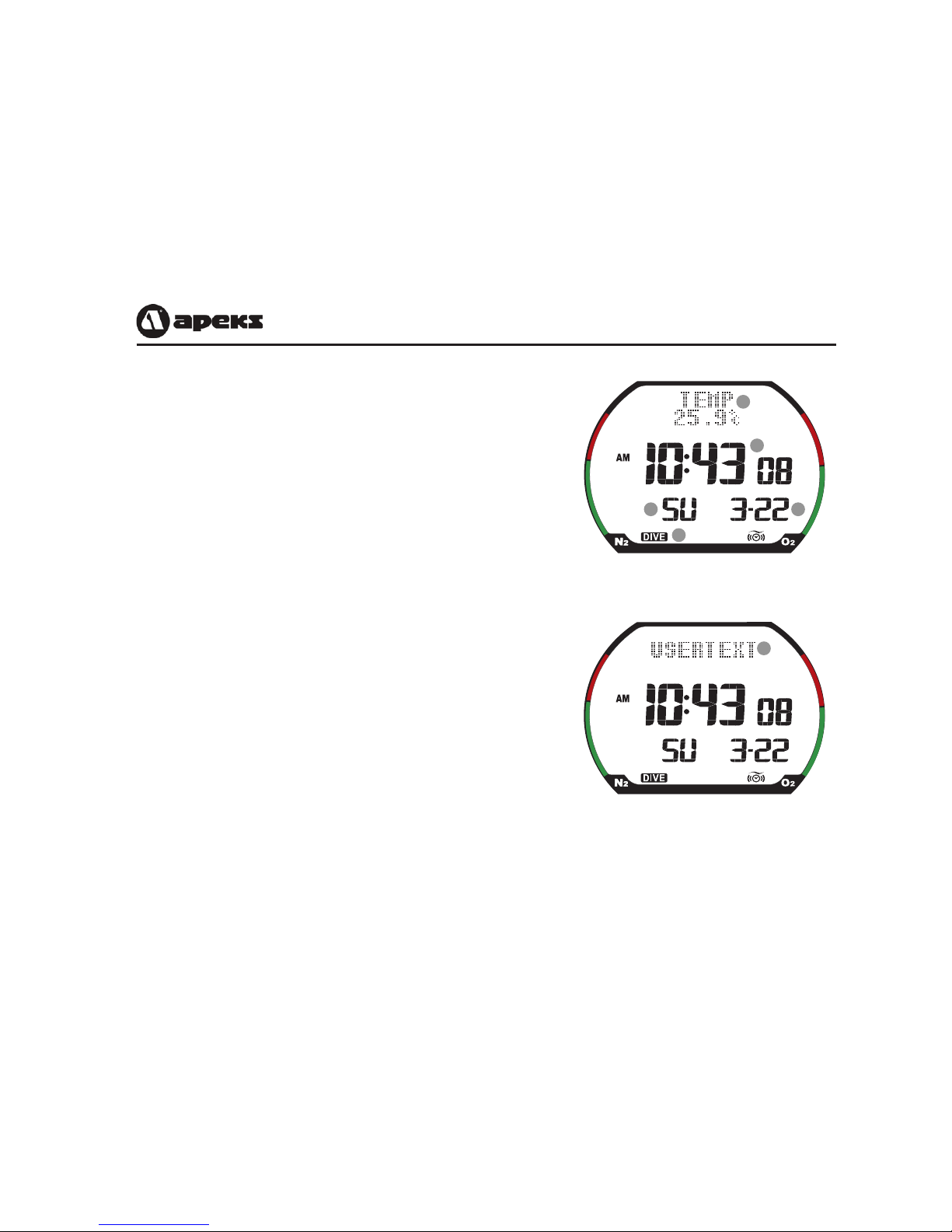
The QuantumX’s default mode is the Time Display
Mode. The computer always returns to the time
display after making a dive or exiting from one of
the other modes, such as Plan Mode or Log Mode. If
there is no button activity for several minutes while
in another mode, the computer will automatically
exit back to the time display.
a. Time of day: Displayed in HH:MM:SS. Displayed
in 12-hour or 24-hour format. The 24-hour
format does not use AM and PM. For example,
15:45 is the same as 3:45 PM. Selecting the 12-
or 24-hour format is explained on pages 32-33.
b. Day of the week: Displayed as a two-letter ab-
breviation.
c. Date: Displayed in Month-Day format.
d. Diving Mode Indicator: Displays DIVE if the
computer is set to Dive Mode, or GAGE if set to
Gage Mode. For more information setting the
diving mode, see page 18.
Time Display Mode with Temperature
Time Display Mode with User Text
a
bc
d
e
f
Table of contents
Other Apeks Diving Instrument manuals

Apeks
Apeks XTX200 User manual

Apeks
Apeks TX Series User manual

Apeks
Apeks ThermiQ Dry Advanced User manual

Apeks
Apeks WTX User manual

Apeks
Apeks ATX 200 User manual

Apeks
Apeks XL4 SECOND STAGE User manual

Apeks
Apeks WTX-D User manual

Apeks
Apeks wtx series User manual

Apeks
Apeks MTX-R User manual

Apeks
Apeks wtx series User manual

Apeks
Apeks 388300 User manual

Apeks
Apeks BLACK SAPPHIRE User manual

Apeks
Apeks ThermiQ Dry Advanced User manual

Apeks
Apeks wtx series User manual

Apeks
Apeks WTX INFLATOR User manual

Apeks
Apeks Quantum User manual

Apeks
Apeks 427106 User manual

Apeks
Apeks NS158000 User manual

Apeks
Apeks Regulator User manual

Apeks
Apeks Black Ice Twin Cylinder Kit User manual