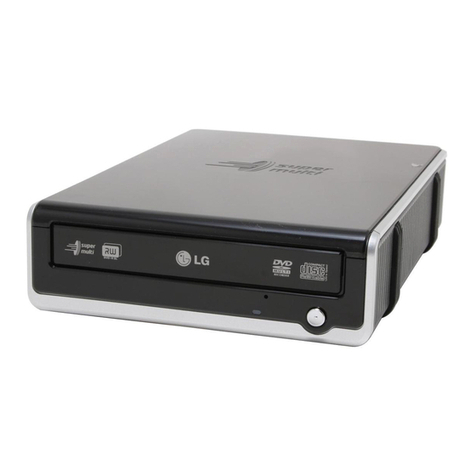
AOpen DUW160812X0502A User manual

Copyright
© Copyright 2005. All rights reserved. No part of this publication may be reproduced, transmitted,
transcribed, stored in a retrieval system, or translated into any language or computer language, in
any form or by any means, electronic, mechanical, magnetic, optical, chemical, manual or
otherwise, without the prior written permission of our company. All brand and product names are
trademarks and/or registered trademarks of their respective holders.
Disclaimer
We make no representations or warranties, either expressed or implied, with respect to the
contents hereof and specifically disclaims any warranties, merchantability or fitness for any
particular purpose. Any software described in this manual is sold or licensed “as is”. Should the
programs prove defective following their purchase, the buyer (and not our company., its
distributor, or its dealer) assumes the entire cost of all necessary servicing, repair, and any
incidental or consequential damages resulting from any defect in the software. Further, we
reserve the right to revise this publication and to make changes from time to time in the contents
hereof without obligation to notify any person of such revision or changes.
Federal Communications Commission (FCC) Statement
This equipment has been tested and found to comply with the limits for a class B device, pursuant
to part 15 of the FCC rules. These limits are designed to provide reasonable protection against
harmful interference in residential installation. This equipment generates, uses, and can radiate
radio frequency energy and, if not installed and used in accordance with the instructions may
cause harmful interference to radio communications. However, there is no guarantee that
interference will not occur in a particular installation. If this equipment does cause harmful
interference to radio or television reception, which can be determined by turning equipment off
and on, the user is encouraged to try to correct the interference by one or more of the following
measures:
yReorient or relocate the receiving antenna.
yIncrease the separation between the equipment and receiver.
yConnect the equipment into an outlet on a circuit different from that to which the
receiver is connected.
yConsult the dealer or an experienced radio / TV technician help.
FCC Warning
Changes or modification not expressly approved by the party responsible for compliance could
void the user’s authority to operate the equipment.
CLASS 1 LASER PRODUCT
APPAREILA LASER DE CLASSE 1
LASER KLASSE 1
LOUKAN 1 LASERLAITE
PRODUIT LASER
CATEGORIE 1

Table of Contents
1. Use Precautions................................................................1
Warning for Safety...................................................................................1
Warning as to Use...................................................................................5
2. Introduction.......................................................................6
Overview .................................................................................................6
Features..................................................................................................7
Format Compatibility................................................................................8
Type of Writing Mode ..............................................................................9
Disc-At-Once...........................................................................................9
Track-At-Once.........................................................................................9
Session-At-Once.....................................................................................9
Multi-session...........................................................................................9
Packet Write............................................................................................9
3. Hardware Installaton ......................................................10
System Requirements...........................................................................10
Hardware Instruction .............................................................................11
3.2.1 Front Panel...................................................................................11
3.2.2 Rear Panel...................................................................................13
Installing the 16x DVD Dual drive..........................................................15
Required Tools......................................................................................15
Installation Procedure ...........................................................................15
DVD Region Coding..............................................................................20
Supported DVD±RW/±R, CD-R and CD-RW Media..............................21
Supported Media...................................................................................21
The handling of DVD±RW/±R, CD-R and CD-RW Discs......................22
4. Software Installation.......................................................23
Before You Start....................................................................................23
Installing Software.................................................................................23
Installing Nero 6 OEM Suite..................................................................23
Installing PowerDVD 5..........................................................................25
5. The Latest Features........................................................27
Auto Balance System (ABS):.................................................................27
Dynamic Damping System (DDS):........................................................27

Noise Control System (NCS):................................................................28
Buffer underrun Prevention (JustLink):..................................................28
Writing Speed Control (JustSpeed):......................................................29
Running Optimum Power Control (ROPC):...........................................29
Perfect Compatibility with blank media..................................................29
Chameleon Bezel..................................................................................30
Double Layer.........................................................................................30
Universal Bezel .....................................................................................30
6. Technical Support ..........................................................31
Firmware Upgrade.................................................................................31
Troubleshooting.....................................................................................31
Appendix A. Glossary...................................................................34
Appendix B. Frequently Asked Question (FAQ) ........................37

Use Precautions English
1. Use Precautions
These precautions explain how to use the device correctly and safely, thereby
preventing injury to you or to others. This section relates to your personal safety, and
also helps you minimize the risk of damaging the device. Please read carefully before
proceeding.
Warning for Safety
When you use this 16x DVD Dual, please pay heed to the following
At the time of installation:
As suggested in your
specifications please do not
install in an unstable
position or in one that
vibrates.
Do not install in high humidity,
direct sunlight, or damp
conditions.
Do not use near magnetic
fields, or place near a television
or a radio signal as the
performance of the device may
be affected.
Do not open to try to repair
as the laser may be harmful.
-- E-1 --

Use Precautions English
yRead these instructions carefully. Save these instructions for future reference.
yFollow all warnings and instructions marked on the product.
yDo not use this product near water.
yThis product should be operated from the type of power indicated on the
marking label. If you are not sure of the type of power available, consult your
dealer or local power company.
yNever push objects of any kind into this product through cabinet slots as they
may touch dangerous voltage points or short out parts that could result in a fire
or electric shock. Never spill liquid of any kind on the product.
yDo not attempt to service this product yourself, as opening or removing covers
may expose you to dangerous voltage points or other risks. Refer all servicing
to qualified service personnel.
yDo not move from a cool environment to a warm one, as this will abruptly
change the temperature of the device
yWhen moving the device, remove any disc from the device because any harm
caused to the disc may result in data loss.
yPrevent liquids or metals from entering the device. If this situation should occur
please contact your reseller for advice.
yDo not use any evaporating solvents to clean the device. If a spray solvent
does happen to spray on the device please use a cloth to wipe it clean, or use a
neutral cleaner to dilute the solvent and wipe the device clean.
yWhen the device is reading/writing please do not interrupt power supply.
yDo not place damaged discs inside the device. In the winter do not use discs
brought in from outside immediately but wait until they have reached room
temperature.
yUnplug this product and refer servicing to qualified service personnel under the
following conditions:
a. When the power cord or plug is damaged or frayed
b. If liquid has been spilled into the product
c. If the product has been exposed to rain or water
d. If the product does not operate normally when the operating
instructions are followed. Adjust only those controls that are
covered by the operating instructions since improper adjustment of
other controls may result in damage and will often require
extensive work by a qualified technician to restore the product to
normal condition.
e. If the product has been dropped or the cabinet has been damaged
f. If the product exhibits a distinct change in performance, indicating
a need for service.
-- E-2 --

Use Precautions English
When installing the IDE device please pay attention to these
following details:
yKeep the IDE cable within 6 inches in length (15 cm).
yBefore connecting the IDE cable, please make sure the power supply is off.
When cleaning CD / DVD disc, please note:
yPress the eject button to remove the disc
yUse compressed air to rid dust from the disc (spray with compressed air for
about five seconds)
-- E-3 --

Use Precautions English
yWhen checking for dust, please make sure that your hands do not touch the
surface of the disc.
Other points to pay attention to:
When moving the drive, please make sure that the disc has already been ejected.
yIf you have not used the drive for some time, there will be dust collected on the
cover and in the tray. Before using the drive spray with compressed air to clean
it of dust.
yBefore connecting all cables and wires, please make sure the power supply is
off otherwise this may cause a short circuit.
-- E-4 --

Use Precautions English
Warning as to Use
This 16x DVD Dual drive together with software is a product for utilizing 16x DVD
Dual recording media with rewriting, erasing and readout capabilities, as an internal
computer memory device. Except in the case where copying of
CD-ROMs/DVD-ROMs or the like is especially recognized under the copyrights laws
as being for the purpose of individual use by the customer or the like, or in the case
where the customer has obtained permission to make copies from the right holder,
reproduction of CD-ROMs/DVD-ROMs and copyright laws. Take notice that
unauthorized copying may be subject to claims for damages and to penalties.
DANGER
INVISIBLE / VISIBLE RADIATION
WHEN OPEN. AVOID EXPOSURE TO
BEAM.
-- E-5 --

Introduction English
2. Introduction
Overview
Thank you for purchasing this 16x DVD Dual drive. In this manual, we will explain how to
install your 16x DVD Dual drive correctly. Please read this manual carefully before using
the drive.
High Speed
This 16x DVD Dual drive offers unprecedented performance to handle today’s
demands by reading DVD’s at up to 16x speed and writing DVD+R(Single Layer)
discs at 12x speed. This product writes a DVD+R 4.7 GB disc in about 6 minutes.
Beside, this product writes CD-R or CD-RW discs at fast 48x / 32x speed. To read
CD’s up to 40x speed.
High Reliability
An improved anti-heat design and the OPC design boost recording reliability.
Optimum Power Control continually monitors signal levels during recording and
adjusts laser power to compensate for a dirty disc. This feature ensures a flat signal,
significantly enhancing reliability.
High Compatibility
This product supports all major CD / DVD formats, offering full backward-compatibility
through the huge installed base of CD-ROM/DVD-ROM drives and media. What’s
more, reordered DVD±RW/±R media can be played in a DVD player with multi-read
feature, maintaining future compatibility.
-- E-6 --

Introduction English
Features
y8.5GB DVD+R DL (Double Layer) capacity
yUDMA Mode 4 (66MB/sec)
y12x DVD+R writing speed
yLegacy DVD-ROM and DVD Player can play DVD±RW/±R disc
yCan read not only CD-R, CD-RW and DVD±RW/±R discs, but also video CDs,
music CDs, photo CDs, and CD-Text
yJustLink technology prevents buffer underrun.
yJustSpeed technology for adaptive writing speeds.
yExcellent media compatibility: The firmware of 16x DVD Dual drive has tuned
up to the best compatibility.
yRunning Optimum Power Control (ROPC) boosts recording reliability
yVersatile writing mode
yDisc breakage protection mechanism
yExtensive software bundled
yEmergency disk unload
yAutomatic Tilt Calibration System (ATCS) for warped disc.
yDynamic Damping System (DDS) to reduce vibration/noise
yAn improved anti-heat design means that no cooling fan is needed.
yCompliant with Orange Book Part II (CD-R) and Part III, Volume 2 V1.0
(CD-RW)
yBack panel included analog audio output and digital audio output
-- E-7 --
This manual suits for next models
1
Table of contents
Other AOpen DVD Drive manuals