AOK BC168 User manual

Super Speed Balance Charger
BC168
User Manual
- 1 -
Thank you to purchase BC168 Super Speed Balance charger. Please read the
Insruction Manual carefully to ensure well use the product.
Parameter
Input Voltage Range 11~15V DC
Input Power Range 300W
Charge Power 201.6 W (33.6W x 6Cells@Cells=4.2V)
Discharge Power 75.6 W (12.6 W x 6Cells@Cells=4.2V)
Balance Power 201.6 W (33.6W x 6Cells@Cells=4.2V)
Charge Voltage Adjustable range 1.50V~4.20V (default value 4.2V)
Charge Current Adjustable range 0.1A~8.0A (default value 3.0A)
Discharge Voltage Adjustable range 2.00V~4.20V (default value 3.80V)
Discharge Current Adjustable range 0.1A~3.0A (default value 3.0 A)
Balance Voltage Adjustable range 2.00V~4.20V (default value 3.80V)
Balance Current Adjustable range 0.1A~8.0A (default value 3.0 A)
Charge temperature alarm
adjustable range
20℃~80℃ (default value 80℃)
Display backlight brightness
adjustable range
0~5 (default value 5)
Display backlight off time
adjustable range
-:-- ~ 0:05 ~ 5:00 (default value 0:30)
Charge Voltage Precision ±0.001V
Discharge Voltage Precision ±0.001V
Balance voltage Prcision ±0.001V
Charge shift efficiency ≥ 80%
Charger consumed power ≤ 1.8W(12V 0.15A)
Suitable battery type
1Cells ~ 6Cells
( Working well with LiPo/ Lilo / Life)
Weight 1Kg
Dimension 165X123X52mm

- 2 -
Product Function Characteristic:
a. The charger is design for Li-polymer and Lithium Cell. Available to charge,
balance, discharge, measure the series batteries accurately.
b. The charger will use big LCD screen, available to indicate 6 Cell battery
statuses.
c. The charger use 4 button controls all function. 3 of the buttons are shortcut
key, only need to press and then can finish charge, fast charge, balance,
discharge all functions.
d. This charger use high-precision battery detects PCB, the voltage control
accuracy reach ±0.001V. the current control accuracy reach ±0.1A based
on any situation of the battery. Once finished the discharge, the voltage
tolerance of battery will be ≤0.002V.
e. There is no conflit between each circuit. The power can maintain 8A output,
all voltage, current will be display accordingly.
f. Well designed for protection of whole circuit. The product will be stop
working if there is exceed or overload.
g. Automatic heat protection & thermal protection designed.
h. The rate voltage for DC is 11V-15V when input voltage less 11V or over
15V, the charger will be under protection status and then indicate the error
of wrong input voltage.
This charger working with free option input current. The current formula as
followings:
Maximum Power / Input Voltage = Input current.
Warning: The power supply can not work under full load; we need to
work 10% tolerence space for input current.
Caution
a. The product must be working visible to see during the charging. Please
take out the battery when away.
b. Make sure the battery charge voltage factors all correct to avoid any
problems ( Specially Ni-cd battery can not over charge, otherwise will
cause fire)
c. Please don’t disassemble or modify the battery personally.
d. Please don’t cover the heat sink or put it working under sunshine, seal
space or high temperature environment. It will effect the charger can not
work properly.
e. Please don’t put metal or other conductive material to connect to the
charger.
f. Please stop to use while the battery with leaking, expand, peeling off, color
change or other non-common situation.
g. Please ote the case outside temperature will be high while working for high
power.
- 3 -
h. Different battery parameter:
LiPo LiIo LiFe
Battery standard voltage 3.7V/Cell 3.6V/Cell 3.3V/Cell
Maximum charge voltage 4.2V/ Cell 4.1V/Cell 3.6V/Cell
Super speed charge current <1C <1C <4C
Discharge cut-off voltage >3.0V/Cell
>2.5V/Cell
>2.0V/Cell
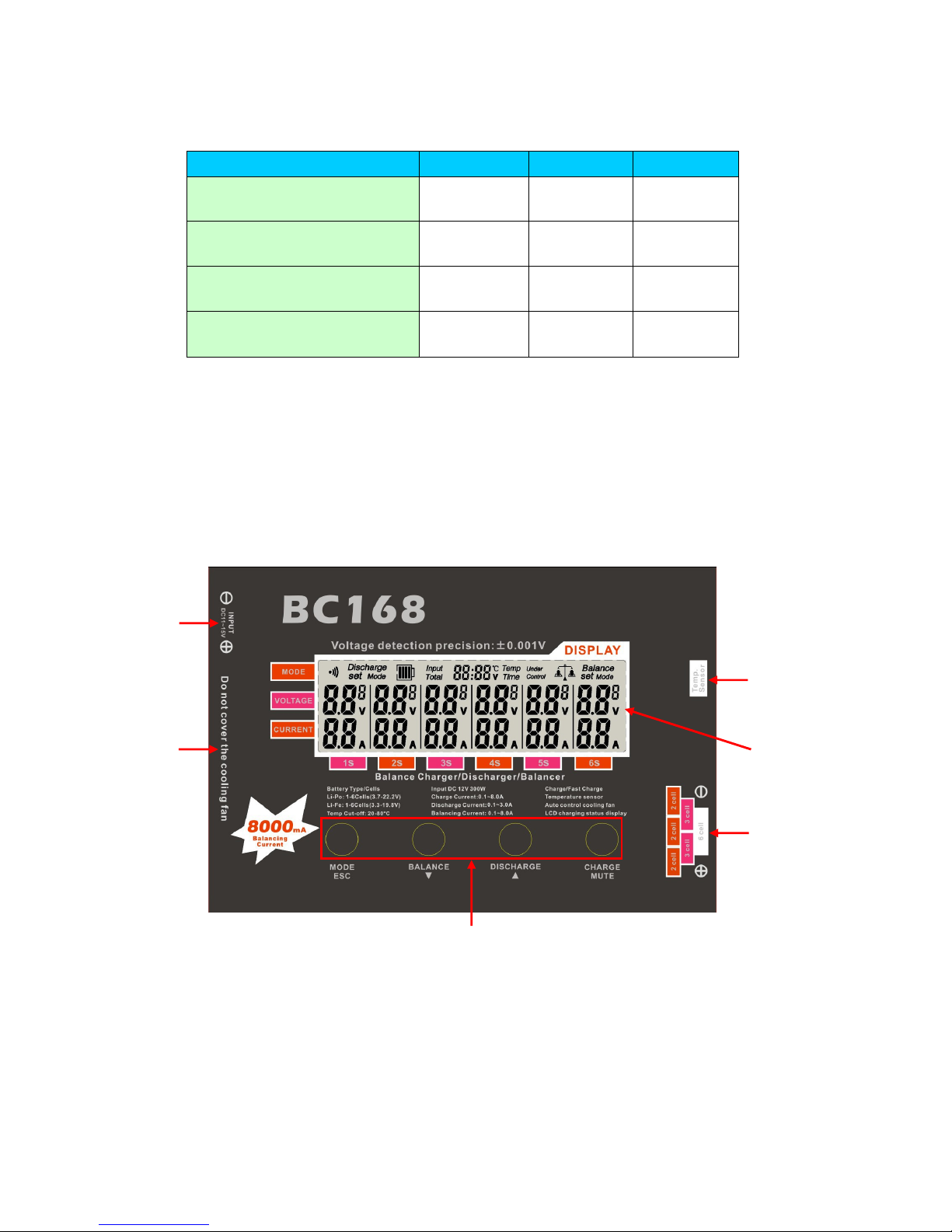
1. Charger screen / button diagram
1. DC input 2. LCD screen 3. Function button 4. Cooling Fan
5. Temperature sensor port/Control Port 6. Output port/Balance socket
Please read the Instruction Manual carefully before use.
①
④
③
②
⑤
⑥
- 4 -
2.Set up:
information tips: Long press the mode button to return to the standby mode.
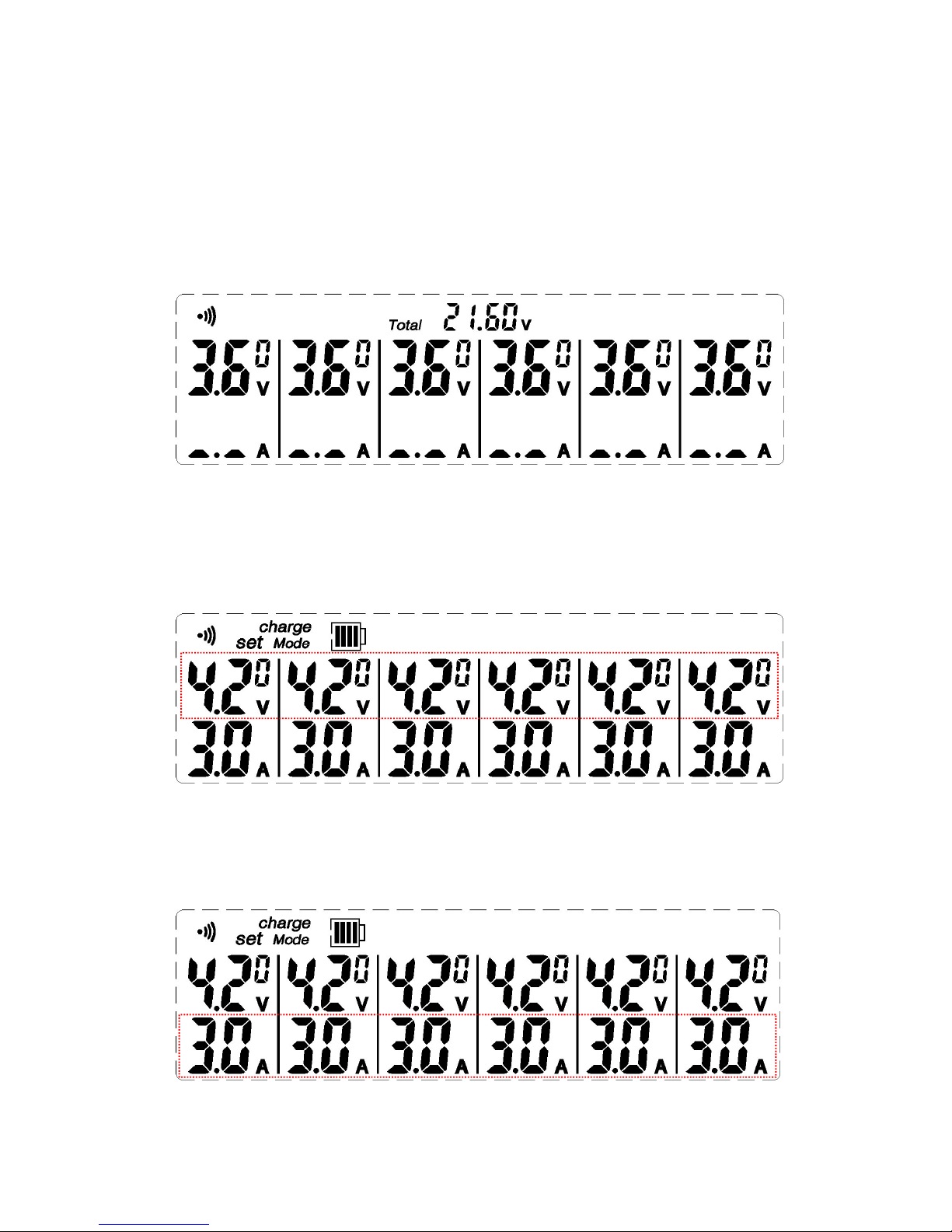
a. Under standard mode, push MODE to enter charge cut-off voltage set up
mode.
b. Unde charge cut-off voltage mode, Push ↑ or ↓ to set up the cut-off voltage.
After that and then push MODE to enter charge current set up mode.
(setting range: 1.50V ~ 4.20V, default value: 4.20V, this only suitable Lipo
batteries, LiFe need to double check with the battery manufacturer.)
c. Under charge current mode, push ↑ or ↓, and then set up charge current.
After that and then push MODE to enter discharge cut-off voltage mode.
(setting range: 0.1A ~ 8.0A, default value 3.0A)

- 5 -
d. Under discharge cut-off voltage mode, Push ↑ or ↓, and then set up
discharge cut-off voltage, after than push MODE to enter discharge current
set up MODE. (setting range: 2.00v ~ 4.20V, default value 3.80V)
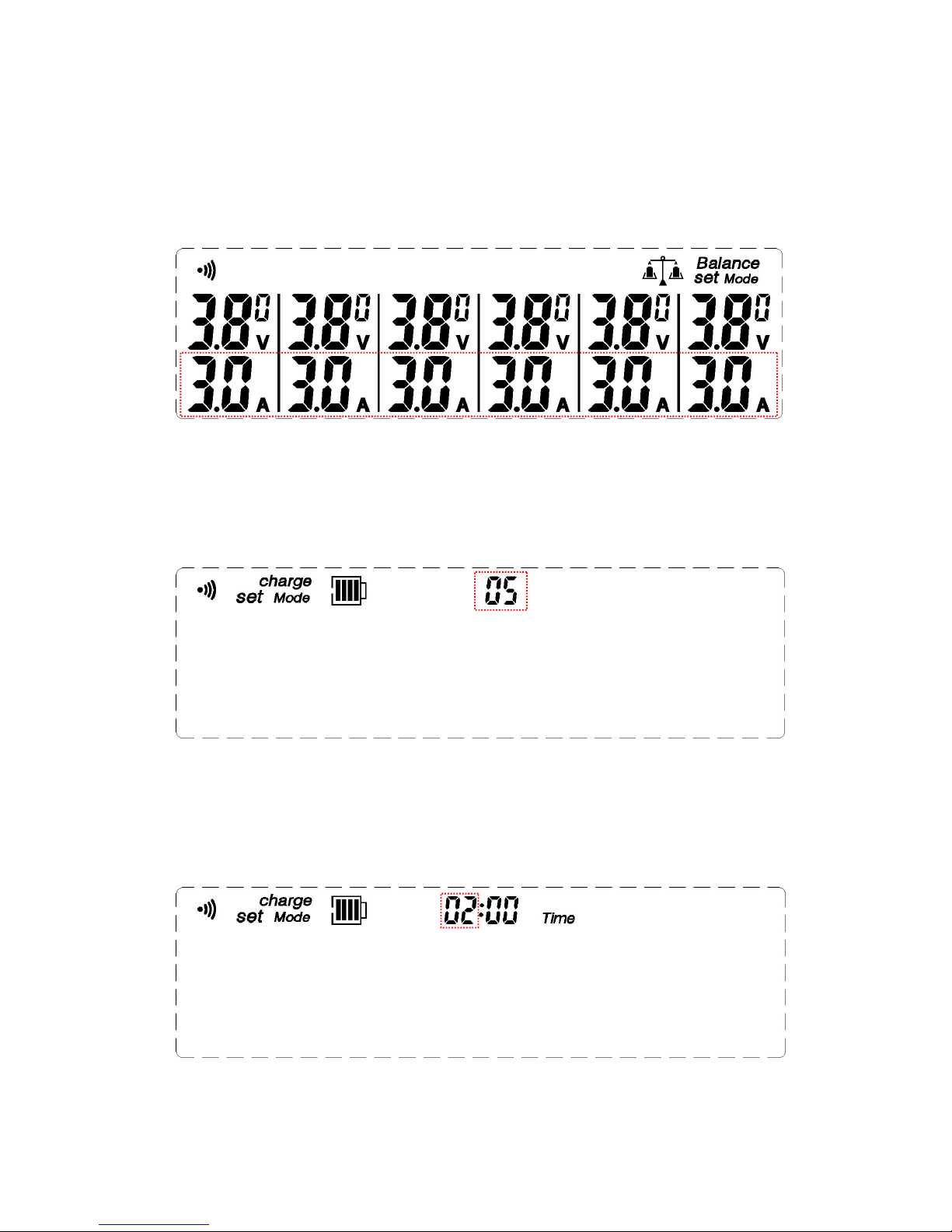
e. Under discharge curent set up Mode, Push ↑ or ↓, and then set up
dicharge current, after than push MODE to enter balance minimum voltage
set up mode. (setting range: 0.1A ~ 3.0A, default value 3.0A)
f. Under Balance minimum voltage set up MODE, Push ↑ or ↓ to set up
balance minimum voltage, after than push MODE to enter balance current
set up mode. (setting range: 2.00V ~ 4.20V, default value 3.80V)
- 6 -
g. Under Balance current set up mode, push ↑ or ↓ to set up balance current,
after that push MODE to enter charge trickle frequency set up mode.
(setting range: 0.1A ~ 8.0A, default value 3.0A)
h. Under charge trickle frequency set up mode, push ↑ or ↓ to adjust the
trickle speed. After that and then push MODE to enter charge time set up
mode. (setting range: 5 ~ 30, default value 5)
i. Under charge time set up mode, push ↑ or ↓ to set up maximum charge
time, after that push MODE to enter charge time (minute) set up. (setting
range: 01:00 ~ 99: 00, default value 2:00)

- 7 -
j. Under charge time (minute) set up mode, push ↑ or ↓ to set up maximum
charge time (minutes), after that push MODE to enter Maximum
Temperature set up mode. (setting range: 00:01 ~ 00:59, default value
2:00)
k. Under Maximum Temperature set up mode, push ↑ or ↓ to set up Maximum
battery temperature, after that push MODE to enter power input warning
set up mode. (setting range: 20℃~ 80℃, default value 80℃)
l. Under power input voltage warning mode, push ↑ or ↓ to set up power input
voltage warning, after that push MODE back to standard mode. (setting
range: 11.0V ~ 15.0V, default value 12.0V)

- 8 -
m. setting mode in the brightness of the display screen, press the up or down
arrow keys, you can set the screen brightness set, press the MODE button
to enter the display backlight off time setting mode. (setting range: 0~5,
default value 5)
n. Set mode display backlight off time,Press the up or down arrow keys,You
can set the display backlight off time,Press the MODE key to return to
the set standard mode。(setting range:-:-- ~ 0:05~5:00,-:-- open display
backlight,default value :0:30,Unit: seconds.)
o. Under any mode, push MUTE to switch off or switch on.
- 9 -
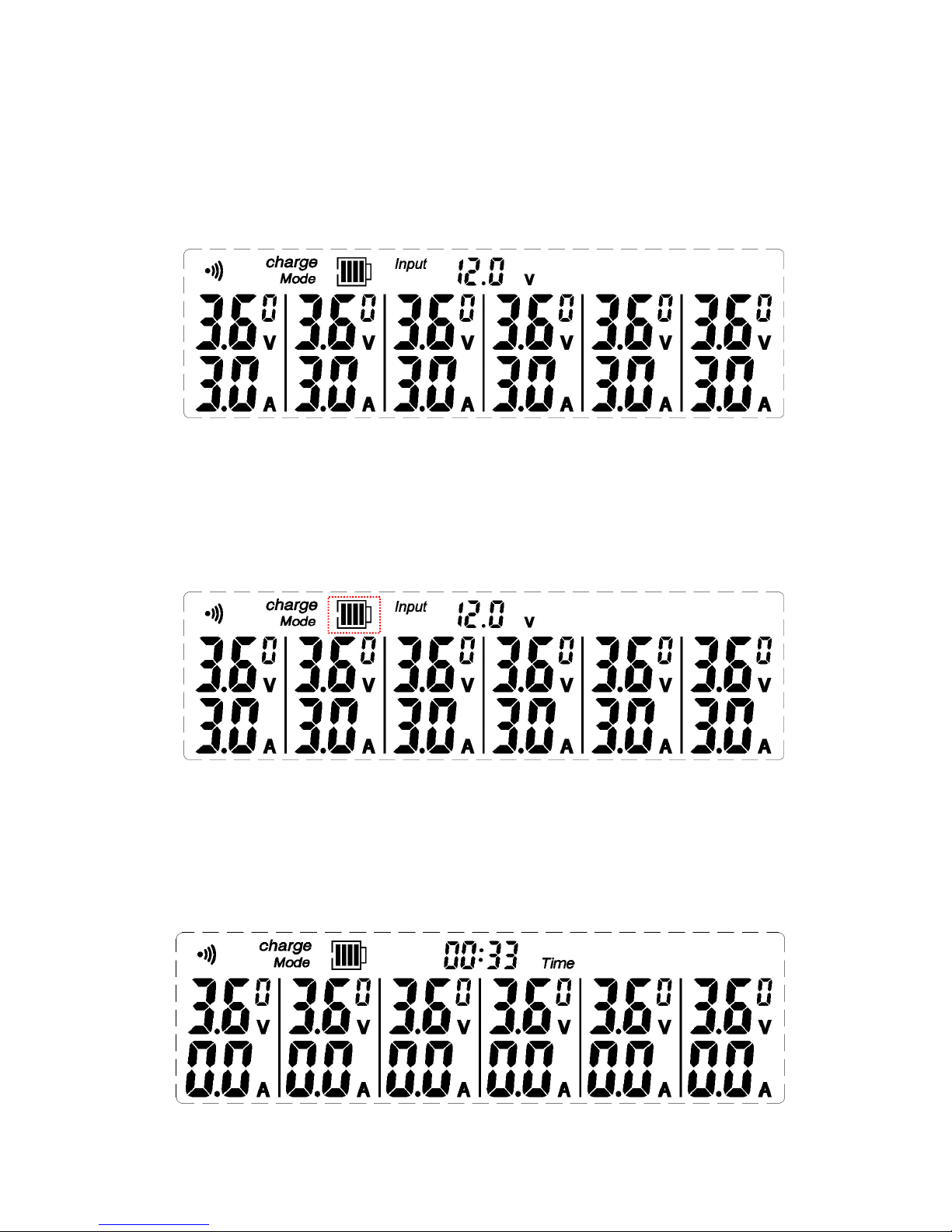
3.Charge:
a. Standard charge:
Under standard charge mode, put battery into the charger, short push
charge button and then go to charge mode.
b. Super speed charge
Under standard mode, connect the battery to charge port, push charge
botton 3 seconds and then go to super speed charge mode. There is a
different icon display between standard charge mode and super speed
charge mode.
(Remark: Super Speed Charge mode comply with no good quality battery
or the situation need fast charge)
c. Pause Charge:
Push charge function button during charge, and the pause charge status
will affect the indicator light flashing.
Table of contents