
AlzaPower PBW10 Series User manual

Power Bank Wireless PBW10x
APW-PBW10x
User Manual


ENGLISH 4
DEUTSCH 11
ČESKY 18
SLOVENSKY 25
MAGYAR 32
ROMÂNĂ 39
FRANÇAIS 46
ITALIANO 53
WARRANTY & SUPPORT 60
GARANTIE & BETREUUNG 60
ZÁRUKA & PODPORA 60
ZÁRUKA & PODPORA 60
GARANCIA & TÁMOGATÁS 60
GARANȚIE ȘI ASISTENȚĂ 60
GARANTIE ET SUPPORT 60
GARANZIA E ASSISTENZA 61

4ENGLISH
We value your trust. We hope that you will be happy with our product, and as excited about it
as we are. We try to offer products of the highest quality that satisfy even the most demanding
requirements. If you are satisfied, it would make us very happy if you chose us again the next
time you make a purchase.
We are environmentally conscious, therefore we use special eco-friendly packaging. Please
recycle!
Recycling and Environmental Protection
We try to avoid using plastic packaging and film and only use them when they are absolutely
necessary to protect the product. So how are we different?
Packaging you can eat… Well, almost. :-)
We use ink made from soybeans as opposed to classic petroleum-based ink.
The majority of our packaging is made from 100% recyclable paper.
We limit the use of adhesives. If absolutely necessary, we make sure to choose only wa-
ter-soluble ones.
We think globally, which means that we actively search for eco-friendly solutions. We keep
an eye on trending technology and place findings of the scientific community into practice.
We don‘t just try to meet quotas and mandates, we aim to exceed them.
THANK YOU FOR CHOOSING US!
5ENGLISH
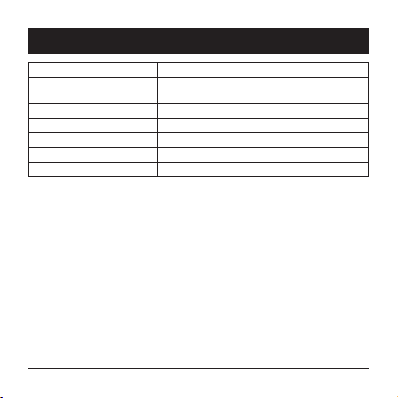
Input USB-C: 5 V/3 A; 9 V/2 A
Output USB-A: 5 V/2.4 A; 9 V/2 A; 12 V/1.5 A
USB-C: 5 V/3 A; 9 V/2 A
Cordless charging output 5 W/7.5 W/10 W
Output 18 W (max)
Dimensions 138×70×18.7mm
Weight 230 ± 10g
Battery capacity 10,000 mAh/3.7 V/37 Wh
TECHNICAL PARAMETERS

6ENGLISH
OVERVIEW
1 USB-A Port for connecting a USB cable
2 Location for cordless charging
3 USB-C Port for connecting a USB cable
4 LED power bank charging status indicators Graphically displays power bank’s bat-
tery status
5 Button for checking power bank charging status Pressing the button checks the power
bank’s battery status
1 3
2
4
5

7ENGLISH
INSTRUCTIONS
Charging the power bank
Before first use, charge the power bank. We recommend checking the power bank’s charge
before each use. Briefly press the power bank’s charge check button, and depending on the
charge, it lights up as follows:
- one LED indicator: power bank charge less than 25%
- two LED indicators: power bank charge 26–50%
- three LED indicators: power bank charge 51–75%
- four LED indicators: power bank charge above 76%
If pressing the button doesn’t light up any LED indicator, the power bank is completely drained
of power.
Connect one end of the charging cable to the power bank’s USB-C port and the other end
to your laptop’s USB port or to a charging adapter (100–240 volts ~, adapter not included).
Based on the power bank’s charging status, the corresponding number of LEDs will light up
white, and other LEDs in the row will flash white. As the power bank charges, all the LEDs will
start flashing one by one and then start to glow steadily. Once all LEDs are glowing steadily,
the power bank is fully charged.
Example: The power bank is charged less than 25%. One LED indicator flashes white (the far-
thest from the edge). As soon as the power bank’s charge exceeds 25%, the flashing LED starts
to glow, and the next one in the row starts to flash.
Note
If you use the fast charging function, the LED indicator (closest to the edge) will alternately
flash blue and white.
After charging is over, disconnect the power bank.
The charging time depends on the charger used.
If the power bank won’t be used for an extended time, charge or drain it to 50% of capacity
and regularly check its charge level.

8ENGLISH
INSTRUCTIONS
Charging
1) Cordless charging
Place the device supporting cordless charging at the cordless charging location. Button
for checking power bank charging status. The LED indicator will glow orange, which indi-
cates cordless charging.
2) Charging with USB cable
You can charge the device through the power bank’s USB-A or USB-C port.
Connect one end of the charging cable to the USB port of your device and the other end
to the power bank’s USB port.Based on the power bank’s charging status, the correspond-
ing number of LED indicators will light up white, and last of them will flash white. As the
connected device charges, the LED indicators will go out one by one.
Example: The power bank is charged to 51–75%. Two LED indicators will go on and the
third will flash. As the connected device charges and the power bank’s charge goes below
50%, the flashing third LED will go out and the second LED will start flashing.
Note
If you use the fast charging function, the LED indicator (closest to the edge) will flash blue.

9ENGLISH
• Read the safety instructions and the instructions for use. Failure to follow the safety in-
structions and the instructions for use may cause harm to people and damage the device.
• This product is appropriate only for domestic use.
• Use and store the product out of the reach of children. Children are not to use this product.
• This product is intended for charging the batteries of digital devices. Use only according
to the instructions in this user manual. Do not use this product for any other purpose than
that for which it is intended.
• The product contains no parts that users can repair on their own. If there is a malfunction,
a defect or the product doesn’t work correctly, contact your nearest authorized service
centre. Regularly check the product and its accessories for damage.
• It is forbidden to use the product or its accessories if they are damaged.
• Always disconnect the cable as soon as the product or digital device is fully charged. Don’t
leave the cable connected to the socket.
• If you will not be using the product for an extended time, we recommend charging it regu-
larly anyway (at least once every six months). This increases its service life.
• Keep this product away from heat sources, such as stoves or direct sunlight. Never place an
open flame source, such as a burning candle, on the product.
• Never expose the product to dripping or spraying water or other liquids.Never put vessels
filled with water on the product, such as vases.
• Do not expose the product to extreme temperatures, dust or contaminants.
• Never submerge the product in water or any other liquid, and never throw it into a fire.
• Never use or store the product near substances or objects that are combustible, flammable
or explosive.
• Never leave the product unattended while it is operating.
• When the product is operating, make sure there is enough free space around it for proper
circulation. Use the product only on a flat, solid surface. Do not use it on a table with a ta-
blecloth, a workbench with a canvas, on a carpet, etc. Never cover the product.
• Never insert objects (such as wires or other objects with metal ends) into the prod-
uct’s sockets.
• Do not short-circuit the product, take it apart or otherwise physically damage it.
SAFETY INFORMATION

10 ENGLISH
SAFETY INFORMATION
• The product may heat up while in operation. This is normal. Therefore, make sure that there
are no objects or surfaces near the product that are sensitive to heat.
• If you notice an unpleasant odour or smoke while using the product, immediately discon-
nect the product and stop using it. Contact an authorized customer service centre.
• Avoid overloading the product. Make sure the product does not fall.
• Do not place any objects on the product. This may irreparably damage the product.
• If you have transported the product under cold conditions, wait for its temperature to
equalize before using it.
• To clean the product, use only a clean, dry cloth. Do not submerge the product in water or
in any other liquid to clean it. When cleaning, never use chemical agents, abrasive agents,
petrol, solvents or any similar substances. Before cleaning, be sure to unplug the product.
• Store the product in a dry, well-ventilated place. Do not place any objects on the product
during storage.
This manual suits for next models
1
Table of contents
Languages:
Other AlzaPower Batteries Pack manuals


Popular Batteries Pack manuals by other brands


IOGear
IOGear GBP24V Series user manual

Inventus Power
Inventus Power PROTRXion S-12V100-TRX-HD user manual

Clas Ohlson
Clas Ohlson PW-290A quick start guide

EINHELL
EINHELL MULTI-Ah Power X-Change Plus Original operating instructions

Samsung
Samsung EB-U3300 quick start guide

ECTIVE
ECTIVE LC Series instruction manual