
ALZA AGD-BTH01 Series User manual

Bluetooth Tag
AGD-BTH01x
User Manual


ENGLISH 4
DEUTSCH 11
ČESKY 18
SLOVENSKY 25
MAGYAR 32
WARRANTY & SUPPORT 39
GARANTIE & BETREUUNG 39
ZÁRUKA & PODPORA 39
ZÁRUKA & PODPORA 39
GARANCIA & TÁMOGATÁS 39

4ENGLISH
We value your trust. We hope that you will be happy with our product, and as excited about it
as we are. We try to offer products of the highest quality that satisfy even the most demanding
requirements. If you are satisfied, it would make us very happy if you chose us again the next
time you make a purchase.
We are environmentally conscious, therefore we use special eco-friendly packaging. Please
recycle!
Recycling and Environmental Protection
We try to avoid using plastic packaging and film and only use them when they are absolutely
necessary to protect the product. So how are we different?
Packaging you can eat… Well, almost. :-)
We use ink made from soybeans as opposed to classic petroleum-based ink.
The majority of our packaging is made from 100% recyclable paper.
We limit the use of adhesives. If absolutely necessary, we make sure to choose only wa-
ter-soluble ones.
We think globally, which means that we actively search for eco-friendly solutions. We keep
an eye on trending technology and place findings of the scientific community into practice.
We don‘t just try to meet quotas and mandates, we aim to exceed them.
THANK YOU FOR CHOOSING US!
5ENGLISH
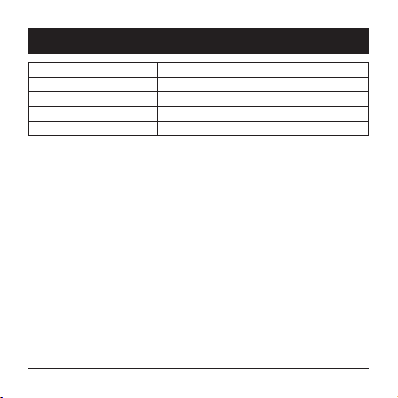
Bluetooth version 5.2 and higher (32bit processor)
Power CR2032 (not included)
Degree of cover protection IP66
Operating system iOS (iPhone, iPad), macOS
Dimensions 44 × 44 × 11 mm
IP66 indicates the degree of protection against dust, against the danger of contact with any
tool and protection against any intense jet of water (in all angles, flow 100 l/min, pressure 100
kN/m2for 3 minutes).
TECHNICAL PARAMETERS

6ENGLISH
Battery insertion/replacement
1. Loosen the back cover screw.
2. Insert a coin into the hole in the back cover and turn counter-clockwise to release the back
cover. Remove it carefully.
3. Insert a new CR2032 type battery. When inserting, pay attention to the correct polarity,
which is marked on the bottom of the battery compartment.
4. Replace the cover, insert a coin into the hole in the back cover and turn clockwise to lock
the cover.
5. Secure with a screw.
When replacing, proceed in the same way, but remove the dead battery first.
Adding to the list of devices
Before pairing and adding to the list of devices, make sure your iOS device (iPhone, iPad, etc.)
is connected to Wi-Fi and Bluetooth is turned on.
1. Open the "Find My" app.
2. Click the "+" icon and then select "Add another device".
3. A screen will appear with a search for available devices.
4. Select "AlzaGuard Hero Tag" from the list of found devices.
5. Click next step and follow the in-app instructions when the device is added to the list.
Note:
1. If the device fails to pair within 10 minutes, the device will stop transmitting the Bluetooth
signal to save battery. In this case, you need to start the pairing process again.
2. If the pairing is interrupted, such as by an incoming call, a network problem or switching to
another page, you need to start the pairing process again.
3. If you change your iOS device (iPhone, iPad, etc.), you must first remove the Bluetooth Tag
from the original device before pairing with the new device.
INSTRUCTIONS

7ENGLISH
Lost device mode
You can switch the Bluetooth Tag to lost device mode. If it is then registered by another device
that is connected to the network, it will automatically notify the user, or it is possible to set the
contact details of the owner to be displayed to Find Myer.
1. Click on AlzaGuard hero Tag in the "Find My" application.
2. Click "Mark as lost" on the details screen.
3. Click "Continue" and on the next screen you can mark a Found alert, insert your phone
contact or leave a message.
4. Click "Activate" in the upper right corner and the lost device mode will be in operation.
Navigation to Find My the item you are looking for
The application displays a map where the item you are looking for is located.
1. In the "Find My" app, click "Directions".
2. A map will appear showing the location of the item you are looking for and ways to get
there. Select a means of transport from the menu and click "Start". The arrow on the map
will navigate you directly to the item you are looking for.
Searching for an item using an audio alert
This method of searching is ideal for items that you know are somewhere around you, such as
keys, but can't Find My them at the moment. After sending a signal from the application, the
device will sound an alert.
1. Click "Play Sound" in the "Find My" app.
2. The Bluetooth Tag will emit an audio alert.
Find Mying a lost item
If you Find My a lost item that is equipped with an AlzaGuard Hero Tag, you can notify its owner
that it has been found.
INSTRUCTIONS

8ENGLISH
1. Click "Report Found" in the "Find My" app.
2. The search will start.
3. Select the found device from the found list and click "Continue".
4. Follow the instructions in the app to notify the owner of the Find My, leave a message or
contact the owner, depending on the settings the owner has made.
Audible Alert
The device is also protected against tracking. It will emit a beep sound if another user without
FindMy and Bluetooth enabled is nearby (when detecting the same signal for 3 consecutive
days and each subsequent approach).
Furthermore, upon activation and restart.
INSTRUCTIONS

9ENGLISH
• Read the safety and operating instructions. Failure to observe the safety and operating
instructions can endanger people or damage the device.
• This product is not a toy. The product contains small parts that could be swallowed by
children, so it is important to keep it out of their reach, especially of children under 3 years
of age.
• Children must not use the product.
• Use the product only for the purposes for which it is intended.
• Keep this product away from heat sources such as stoves or direct sunlight.No naked flame
sources, such as lighted candles, should be placed on the product.
• Do not place containers filled with water, such as vases, on the product.
• Do not expose the product to extreme temperatures (above 60 °C) or dirt.
• Do not immerse the product in water or other liquids or throw it into a fire.
• Do not use or store the product near materials / objects that could ignite, flammable or
explosive substances, etc.
• Do not short-circuit, disassemble or otherwise mechanically damage the product.
• Avoid overloading the product.
• Do not place any objects on the product. It is at risk of irreversible damage.
• This product does not contain parts repairable by the user . In the event of a malfunction
or defect contact the nearest authorized service center. Check the product regularly for
damage. It is prohibited to use a damaged product.
• If you are not going to use the product for a long time, remove the battery from it to avoid
damage in case of electrolyte leakage.
• Use only a clean and dry cloth for cleaning. Do not use any chemical cleaners, abrasives,
gasoline, thinners or other similar substances. Make sure the battery is removed prior to
cleaning.
• Store the product in a dry and well-ventilated place. Do not place any objects on it during
storage.
The company Alza.cz, a. s. hereby declares that the type of radio device AGD-BTH01x complies
with Directive 2014/53/EU.
SAFETY INFORMATION

10 ENGLISH
DISPOSAL OF USED BATTERIES
Batteries contain materials harmful to the environment. Therefore, do not
dispose of batteries in regular municipal waste. Dispose of used batteries
properly at collection points.
08/05
SAFETY INFORMATION
Table of contents
Languages:
Other ALZA GPS manuals





