
Alcatel-Lucent Enterprise OmniSwitch 6865 Installation manual

Alcatel-Lucent Enterprise
OmniSwitch 6865
Hardware Users Guide
Part No. 060435-10, Rev F
August 2017

This user guide documents OmniSwitch 6865 hardware, including chassis and associated components.
The specifications described in this guide are subject to change without notice.
enterprise.alcatel-lucent.com
Alcatel-Lucent and the Alcatel-Lucent Enterprise logo are trademarks of Alcatel-Lucent. To view other
trademarks used by affiliated companies of ALE Holding, visit: enterprise.alcatel-lucent.com/trademarks.
All other trademarks are the property of their respective owners. The information presented is subject to
change without notice. Neither ALE Holding nor any of its affiliates assumes any responsibility for
inaccuracies contained herein. (2017)

Contents
About This Guide 1
Related Documentation .............................................................................................1
Product Release Notes .......................................................................................1
Customer Support....................................................................................................1
Chassis and Power 2
OmniSwitch 6865-P16X ..............................................................................................3
Chassis Front Panel...........................................................................................4
Chassis Rear Panel............................................................................................5
OmniSwitch 6865-U12X..............................................................................................6
Chassis Front Panel...........................................................................................7
Chassis Rear Panel............................................................................................8
OmniSwitch 6865-U28X..............................................................................................9
Chassis Front Panel...........................................................................................10
Chassis Rear Panel............................................................................................11
Power Supplies .......................................................................................................12
OS6865-BP - 180W AC Power Supply .......................................................................12
OS6865-BP-D - 180W/140W DC Power Supply ............................................................13
DC Power Supply Connection.......................................................................................14
Connecting a DC Cable Harness to the Chassis Power Supply..........................................14
Connecting a DC Cable Harness to the DC Power Source...............................................14
Connecting a DC Power Source .............................................................................14
Getting Started and Installation 17
Getting Started.......................................................................................................18
Preparing for the Installation...............................................................................18
Providing Air Flow and Minimum Recommended Clearances...........................................20
Items Included.................................................................................................20
Preparing the Chassis and Power Supply Tray Assembly .......................................................21
Side Mount Power Supply Tray..............................................................................21
Rear Mount Power Supply Tray .............................................................................23
Attaching Rack Mount Flanges ..............................................................................24
Attaching Table Mount Feet.................................................................................25
Installing Power Supplies............................................................................................26
Installing Power Supplies for Side Mount Trays ..........................................................26
Installing Power Supplies for Rear Mount Trays..........................................................28
Mounting the OS6865-P16X / OmniSwitch 6865-U12X ..........................................................30
Rack Mounting.................................................................................................30
Table Mounting................................................................................................31

Connections and Cabling............................................................................................32
Booting the Switch...................................................................................................33
System and Port LEDs ........................................................................................33
The First Login Session.......................................................................................34
Unlocking Session Types .....................................................................................35
Changing the Login Password ...............................................................................35
Setting the System Time Zone..............................................................................36
Setting the Date and Time ..................................................................................36
Setting Optional Parameters................................................................................36
Viewing Your Changes........................................................................................36
Saving Your Changes..........................................................................................37
Power Over Ethernet (PoE) 38
Managing Power over Ethernet (PoE) .............................................................................39
Power over Ethernet Budget................................................................................40
Determining the Power Available for Powered Devices (PDs) .........................................41
PoE Class Detection ..........................................................................................41
PoE Operational Status.......................................................................................41
Setting Port Priority Levels..................................................................................43
Understanding Priority Disconnect.........................................................................44
Understanding Guard Band..................................................................................46
Regulatory Compliance and Safety Information 47
Compliance and Certifications .....................................................................................48
Commercial Safety............................................................................................48
Commercial EMI/EMC.........................................................................................48
Industrial Compliance Requirements ......................................................................49
China RoHS: Hazardous Substance Table..................................................................50
Taiwan RoHS: Hazardous Substance Table................................................................51
California Proposition 65 Warning..........................................................................51
Waste Electrical and Electronic Equipment (WEEE) Statement .......................................52
FCC Class A, Part 15..........................................................................................52
JATE.............................................................................................................53
CISPR22 Class A Warning.....................................................................................53
Korea Emissions Statement..................................................................................53
VCCI.............................................................................................................53
Class A Warning for Taiwan and Other Chinese Markets................................................53
Translated Safety Warnings .................................................................................54
Instrucciones de seguridad en español ....................................................................58

OmniSwitch 6865 Hardware Users Guide 1
About This Guide
Related Documentation
The following related documents can found at enterprise.alcatel-lucent.com/userguides:
• OmniSwitch CLI Reference Guide
• OmniSwitch AOS Switch Management Guide
• OmniSwitch AOS Network Configuration Guide
• OmniSwitch AOS Advanced Routing Configuration Guide
• OmniSwitch AOS Data Center Guide
• OmniSwitch AOS Specifications Guide
• OmniSwitch Transceivers Guide
Product Release Notes
Release Notes can be downloaded from the Customer Support website (account login required).
Customer Support
Web: support.esd.alcatel-lucent.com
Email: ebg_global_supportcent[email protected]

OmniSwitch 6865 Hardware Users Guide 2
1 Chassis and Power

OmniSwitch 6865 Hardware Users Guide 3
OmniSwitch 6865-P16X
The Alcatel-Lucent Enterprise OmniSwitch® 6865 series are Gigabit Ethernet (GigE) and 10 Gb Ethernet
(GigE) switches designed for demanding electrical and severe temperature environments.
OmniSwitch 6865-P16X (Side Mounted Power Supply Tray Shown)
OmniSwitch 6865-P16X Chassis Specifications
Fans None
Power Supplies 2 total (1 primary PSU and 1 optional backup PSU)
Rack Unit Dimensions 2 RU (Additional clearance is required for airflow,
see “Providing Air Flow and Minimum Recommended
Clearances” on page 20 for more information.)
Dimensions (WxHxD) 21.6 cm (8.5 in) x 8.81 cm (3.47 in) x 26 cm (10.24 in)
Weight 5.07 kg (11.18 lb)
Operating Temperature (TMRA) With airflow: -40°C to 74°C (-40°F to 165°F)
Without airflow: -40°C to 65°C (-40°F to 149°F)
Storage Temperature -40°C to 85°C (-40°F to 185°F)
Operating and Storage Humidity 5% to 95% non-condensing
Altitude 4000m/13,000 feet
75W HPoE Ports 4
30W PoE+ Ports 8
SFP Ports 2
1G/10G SFP+ Ports 2
OmniSwitch 6865 Hardware Users Guide 4
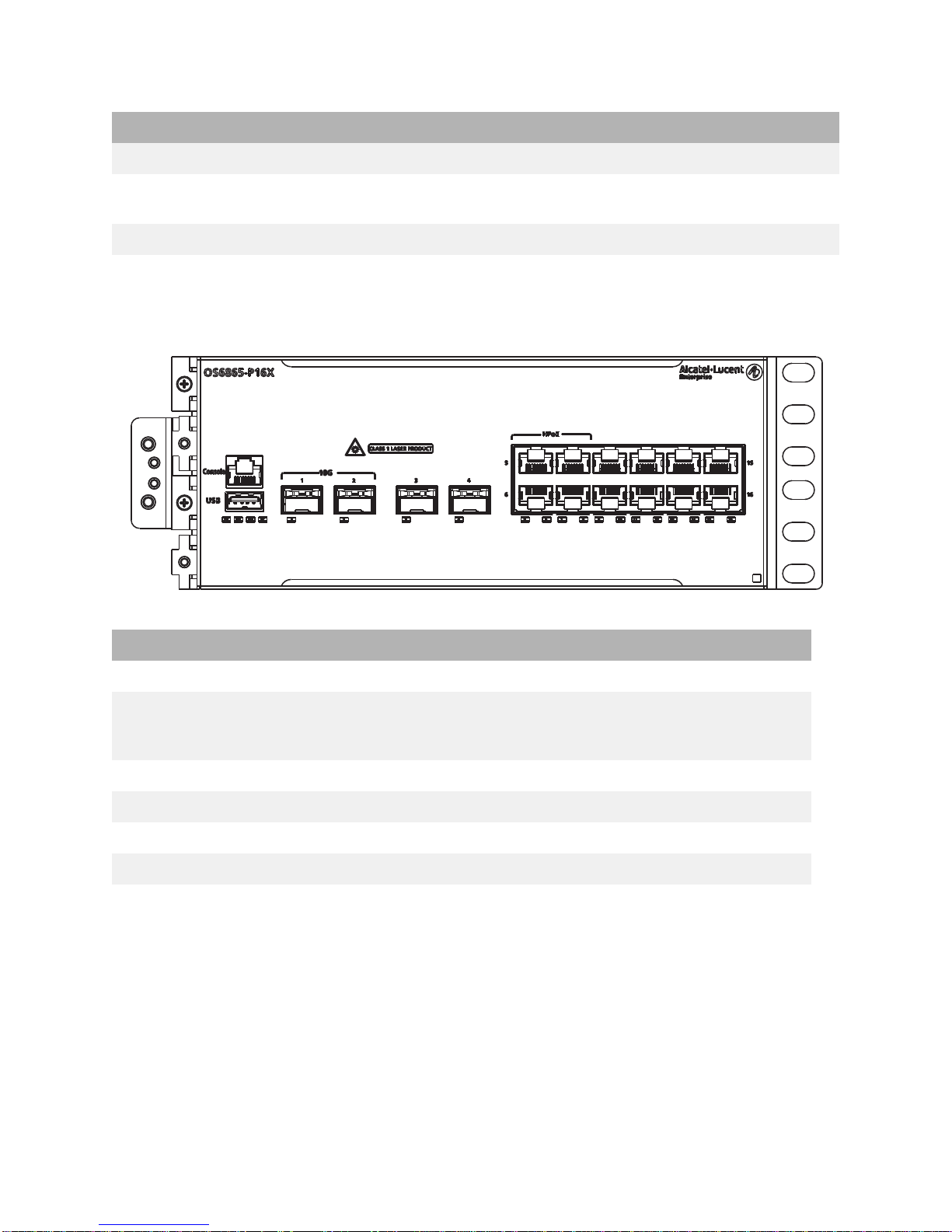
Chassis Front Panel
Note: For LED descriptions, refer to “System and Port LEDs” on page 33.
1588v2 Capability Supported
PoE Power Budget See “Power over Ethernet Budget” on page 40 for more
information.
Power Consumption (idle) 30W
Front Panel Descriptions (Left to Right)
Console (RJ45) For console or modem
USB Type A For storage devices that can download code or save configuration
information, such as flash-based pen drives or external hard
drives. For Maintenance Only.
Ports 1 and 2 Two (2) fixed SFP+ (1G/10G)
Ports 3 and 4 Two (2) 1000Base-X SFP
Ports 5 through 8 Four (4) 10/100/1000Base-T PoE+ (supporting 75W HPoE per port)
Ports 9 through 16 Eight (8) 10/100/1000Base-T PoE+ (supporting 30W PoE per port)
OmniSwitch 6865-P16X Chassis Specifications

OmniSwitch 6865 Hardware Users Guide 5
Chassis Rear Panel
Rear Panel Descriptions (Left to Right)
PS2 Power Supply Connector
PS1 Power Supply Connector
Grounding Block Chassis Ground

OmniSwitch 6865 Hardware Users Guide 6
OmniSwitch 6865-U12X
OmniSwitch 6865-U12X Chassis Specifications
Fans None
Power Supplies 2 total (1 primary PSU and 1 optional backup PSU)
Rack Unit Dimensions 2 RU (Additional clearance is required for airflow,
see “Providing Air Flow and Minimum Recommended
Clearances” on page 20 for more information.)
Dimensions (WxHxD) 21.6 cm (8.5 in) x 8.81 cm (3.47 in) x 26 cm (10.24 in)
Weight 5.17 kg (11.40 lb)
Operating Temperature (TMRA) With airflow: -40°C to 74°C (-40°F to 165°F)
Without airflow: -40°C to 65°C (-40°F to 149°F)
Storage Temperature -40°C to 85°C (-40°F to 185°F)
Operating and Storage Humidity 5% to 95% non-condensing
Altitude 4000m/13,000 feet
75W HPoE Ports 4
30W PoE+ Ports 0
SFP Ports 6
1G/10G SFP+ Ports 2
1588v2 Capability Supported
PoE Power Budget See “Power over Ethernet Budget” on page 40 for more
information.
Power Consumption (idle) 29W
Table of contents





