Aiwa XP-Z5 AEZ User manual

XP-Z5
AEZ
COMPACT DISC
PLAYER
REPRODUCTOR DE
DISCOS
COMPACTOS
LECTEUR DE DISQUE
COMPACT
8C-HP5-905-11
020401BMK-O-B
OPERATING INSTRUCTIONS
INSTRUCCIONES DE MANEJO
MODE D’EMPLOI
ENGLISH
ESPAÑOL
FRANÇAIS

2
ENGLISH
To maintain good performance
•DO NOT use the unit in places that are
extremely hot, cold, dusty, or humid. In
particular, DO NOT use or keep the unit in
the following places:
–In a high-humidity area such as a
bathroom
–Near a heater
–Inanareaexposedtodirectsunlight(e.g.
insideaparkedcar,whereitcanbecome
extremely hot)
–Nearsourcesofstrongmagnetism,such
as televisions, speakers, or magnets
–Where there is a lot of movement or
vibration, such as on a car dashboard or
an unstable shelf
•Before connecting the AC adaptor or the
headphones, etc., be sure to confirm that
the power is off.
PRECAUTIONSTABLE OF CONTENTS
PRECAUTIONS ........................................... 2
NOTES ON MP3 DISCS..............................4
POWER SOURCES..................................... 6
BEFORE PLAYBACK .................................. 8
PLAYBACK ................................................ 11
OTHER PLAYBACK FUNCTIONS ............ 13
E•A•S•S PLUS (Electronic Anti-Shock
System) function ....................................13
Sound equalizer ..................................... 13
Selecting a playback mode .................... 14
Program play.......................................... 16
CONNECTING TO AN EXTERNAL
UNIT....................................................... 20
MAINTENANCE ......................................... 21
TERMINOLOGY ........................................ 22
SPECIFICATIONS ..................................... 23
WARNING:
TO REDUCE THE RISK OF FIRE OR
ELECTRIC SHOCK, DO NOT EXPOSE
THIS APPLIANCE TO RAIN OR
MOISTURE.

ENGLISH
3
ENGLISH
For safety
•DO NOT attempt to disassemble the unit.
Laser light from the optical pickup is
dangerous to the eyes.
•Makesurethatpinsorotherforeignobjects
do not get inside the unit.
•Take care not to drop the unit or subject it
to strong shock.
•To keep dust off the pickup lens, keep the
disc compartment lid closed after use.
NEVER touch the lens.
•If you hear no sound when playing a disc,
DONOTturnthevolumeuphigh,because
musiccouldsuddenlystartathighvolume.
Turnthevolumecontroltothelowestlevel
before starting playback and slowly turn it
up to the desired level.
•Use only the supplied AC adaptor.
Notes on listening with the
headphones
•Listen at moderate volume levels to avoid
hearing damage.
•DONOTweartheheadphoneswhiledriving
or cycling. It may create a traffic hazard.
•You should use extreme caution or
temporarily discontinue use in potentially
hazardous situations, such as walking,
jogging, etc.
•Wear them properly: L is left, R is right.
•The in-ear type headphones should be
worn with the longer cord behind your
neck.
CAUTION
Listening with headphones at high volume
levels for an extended period of time can
result in hearing damage.
Note on condensation
If the unit is suddenly moved from a cold
place to a warm one, it may result in
condensation on the pickup lens and
malfunction or playback difficulties.
Should this occur, leave the unit for a few
hours, then try to playback again.

4
ENGLISH
NOTES ON MP3 DISCS
•An MP3 file stores audio data
compressedusingMPEG1/2,theaudio
layer-3 file-coding scheme.
•In this manual, CDs, CD-R discs and
CD-RW discs are all referred to as
“discs.” We refer to what are called
“folders” and “files” in PC terminology
as “albums” and “tracks.”
Notes on playing MP3 files
•An MP3 track must be recorded on a disc
in the format compliant with ISO 9660.
Note, however, that the unit may not play
tracks in the order in which they were
recorded.
•The maximum allowable number of tracks
and albums on a disc are as follows:
–Numberoftracks:199(dependingonthe
number of albums)
– Number of albums: up to 99 (depending
on the number of tracks)
•The maximum allowable depth of nested
albums is 8.
•E•A•S•S PLUS memory duration is
approximately 400 seconds at the longest
with tracks of 128-kbps bit rate.
•Itmaytake30secondsormorebeforethe
unitcanstartplayofaMP3track,depending
on the number of recorded tracks and the
complexity of the album tree.
•Ifadisccontainsaudio(CD-DA)tracksand
MP3 tracks, the unit plays only the audio
tracks.
•TheunitmaynotplayMP3tracksrecorded
using a packet writing utility.
•The unit can play MP3 tracks having the
filename extension “.mp3.”
•If you play a non-MP3 track that has the
“.mp3” filename extension, you may hear
some noise.
•This unit can play back MP3 tracks of the
following bit rates and sampling
frequencies:
MPEG1: 32–320 kbps,
32 kHz, 44.1 kHz, 48 kHz
MPEG2: 16–160 kbps,
16 kHz, 22.05 kHz, 24 kHz
•This unit is best-suited for playback of
tracks with a bit rate of 128 kbps. The
sound may be intermittent or distorted
during playback of tracks encoded with a
certain encoder or encoded with bit rate
over 128 kbps.
•The elapsed playing time may not be
displayed correctly when variable-bit-rate
(VBR) files are played.

ENGLISH
5
ENGLISH
•Sound is muted for a moment with a disc
that contains no silent portion between
songs (tracks), such as a disc with a
recording of a live performance, etc.
•When files encoded with the MP3 Pro
formatareplayedback,theirsoundquality
may not be as high as they should be.
Note on display indications during
play
Thisunitdoes notsupportID3 TAG,andthe
information such as album names and track
names cannot be displayed.
Notes on creating MP3 discs
When converting audio data to MP3
Toenjoyhighsoundquality,werecommend
storing MP3 files with a sampling frequency
of 44.1 kHz and a fixed bit rate of 128 kbps.
To play tracks in the order they were
recorded
1Use writing software capable of
recording MP3 tracks (files) in
numerical and alphabetical order.
Fordetailsonusingthesoftware,referto
the operating instructions supplied with
the software.
2Use only one album. (Do not create
a subalbum within an album.)
3Includeatwo-orthree-digitnumber
at the beginning of each album or
track name so that the albums and
tracks will be played in order.
Examples of recommended names:
01XXXXX.mp3
02XXXXX.mp3
03XXXXX.mp3
04XXXXX.mp3
05XXXXX.mp3
Examplesofnamesnotrecommended:
1XXXXX.mp3
5XXXXX.mp3
10XXXXX.mp3
15XXXXX.mp3
20XXXXX.mp3
(Numbers at the beginning have
different digit number. The tracks will
not be played in this order but played
intheorderof“1,”“10,”“15,”“20,”and
“5.”)
6
ENGLISH
POWER SOURCES
To power this unit, you can use dry-cell
batteries, or the supplied AC adaptor.
Dry-cell batteries
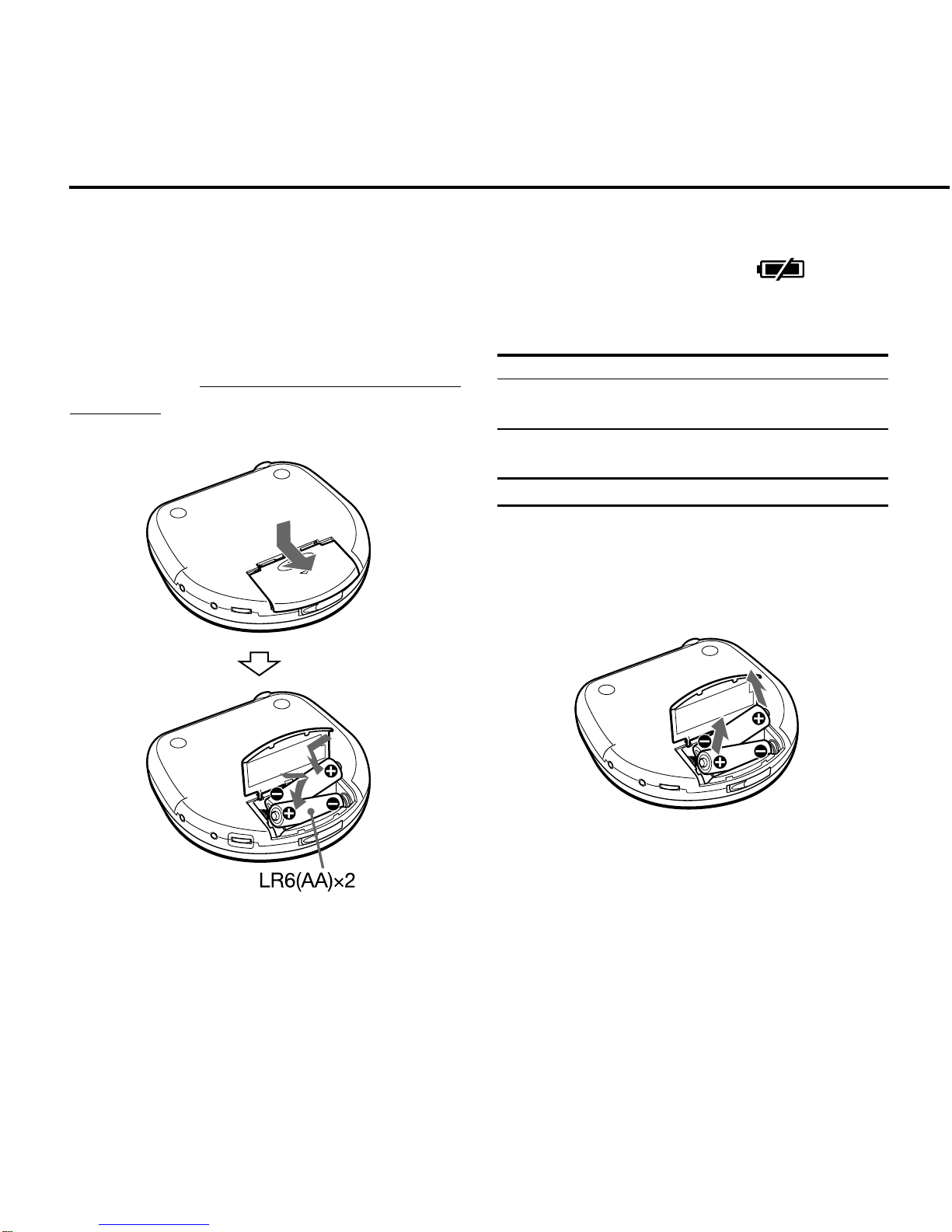
Open the battery compartment and
insert two LR6 (size AA) alkaline
batteries with the 0and 9marks
correctly aligned.
Battery replacement
Replace the batteries when appears
on the display.
Battery life (using alkaline batteries LR6)
Audio disc playback
E•A•S•S PLUS Approx. 8 hours
function on
E•A•S•S PLUS Approx. 8 hours
function off
MP3 disc playback Approx. 12 hours
Batterylifemayvarydependingonconditions
of use.
To remove the batteries

ENGLISH
7
ENGLISH
Notes on dry-cell batteries
•Make sure that the 0and 9marks are
correctly aligned.
•DONOTmixdifferenttypesofbatteries,or
only one old battery with a new one.
•Topreventtheriskofelectrolyteleakageor
explosions,NEVERrechargethebatteries,
apply heat to them, or take them apart.
•Whennotusingthebatteries,removethem
to prevent needless battery drain.
•If liquid leaks from the batteries, wipe
thoroughly to remove.
AC adaptor
Connect the supplied AC adaptor to
the DC 5~6V jack of the unit and to an
AC outlet. to a wall outlet
DC 5~6V
8
ENGLISH
Turning the power on
PLAY/PAUSE
Press ePLAY/PAUSE. Power is turned
on, and playback starts.
Notes
•IftheHoldfunctionison,“Hold”appearson
the display. Cancel the Hold function and
press ePLAY/PAUSE again.
•When you press ePLAY/PAUSE with
no disc inside the unit, “no dISC” appears
on the display.
•When a disc is placed upside-down or a
defective disc is inserted, playback does
not start even if you press ePLAY/
PAUSE.
BEFORE PLAYBACK
Hold function
The Hold function locks the buttons on the
unit to prevent them from accidentally being
activated.
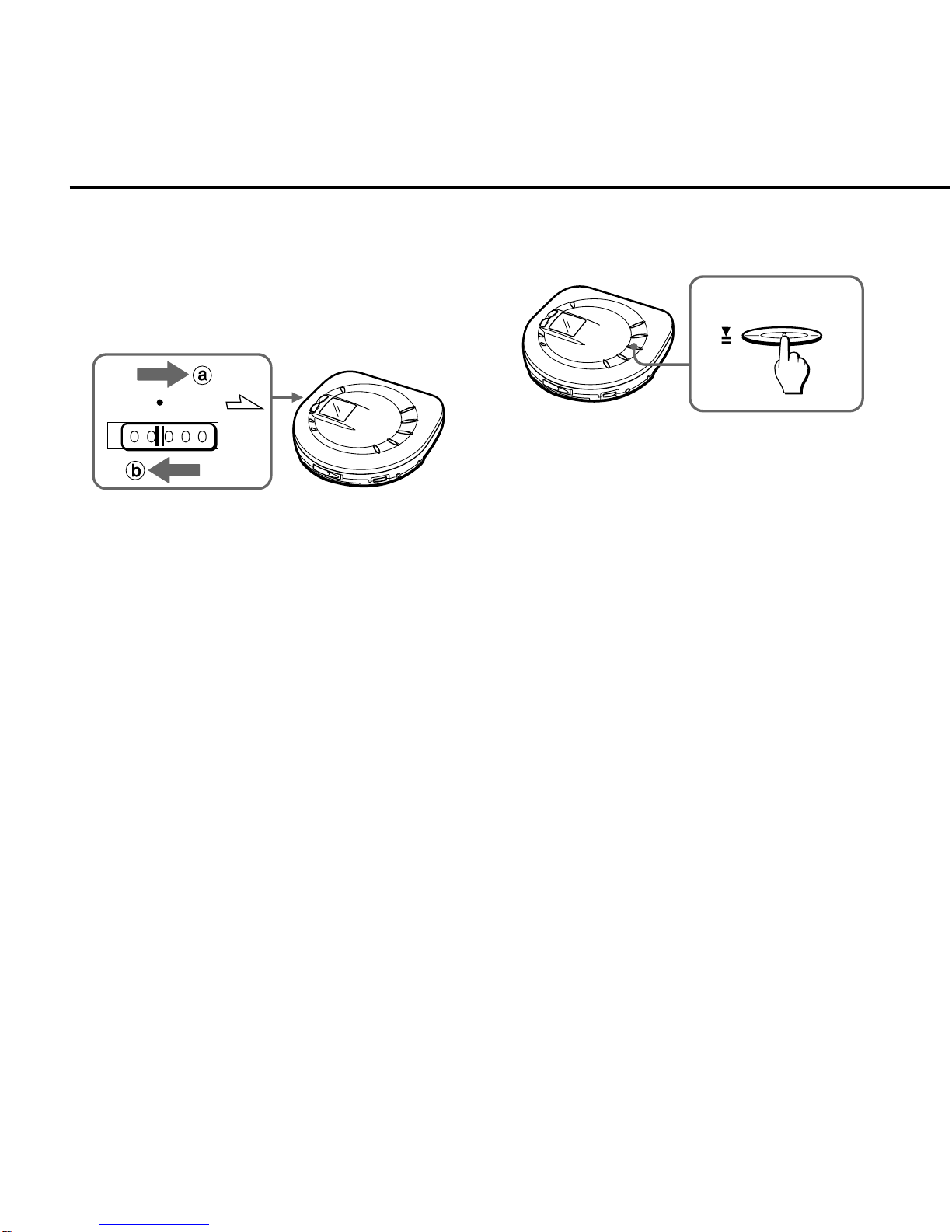
HOLD
To enable the Hold function
SlidetheHOLDswitchtotheHOLDposition
(ba).
To cancel the Hold function
Release the HOLD switch (bb).
Be sure to cancel the Hold function before
starting playback.
ENGLISH
9
ENGLISH
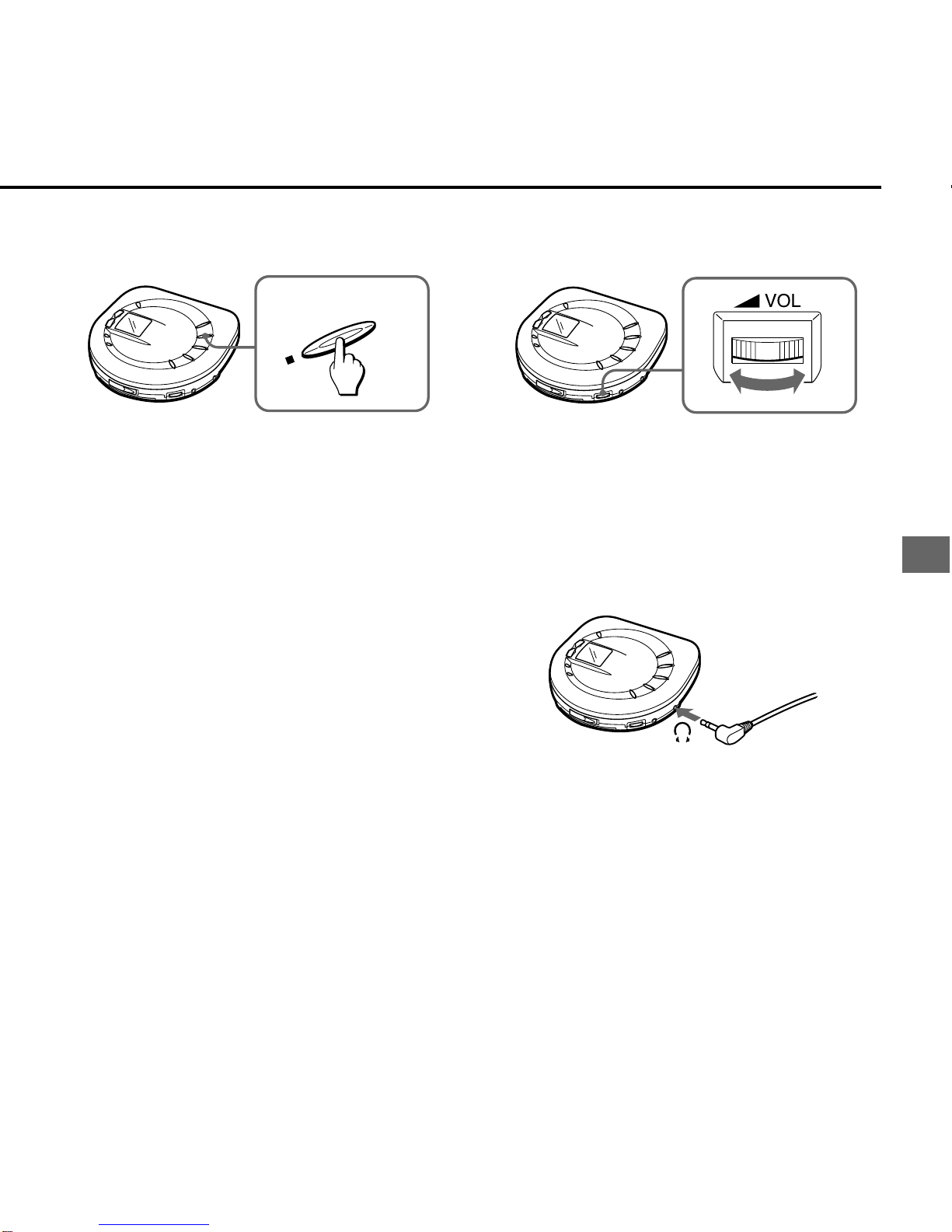
Turning the power off
STOP/OFF
Standby mode/Auto Power-Off
function
When playback finishes or sSTOP/OFF is
pressed to stop playback, the unit goes to
Standby mode.
Ifnooperationisperformedwithin60seconds
in Standby mode, the power is turned off
automatically (Auto Power-Off function).
To turn the power off manually
Press sSTOP/OFF in Standby mode.
Adjusting the volume
Turn the VOL control to adjust the volume.
The volume increases by turning it to the
right.
Connecting the headphones
Connect the supplied headphones to the \
jack of the unit.

10
ENGLISH
Inserting a disc
1Slide the OPEN switch to open the
disc compartment.
OPEN
2Place a disc in the center with the
label side facing up.
3Close the disc compartment.
To remove the disc
Pick up the disc, holding its edge, while
holding the pivot gently pressed.
Notes on discs
•The unit may not play CD-R/RW discs
recorded on some kinds of personal
computersorCD-R/RWrecordersbecause
of differences in recording platforms.
•DO NOT attach stickers or other adhesive
objects on either side of the disc.
•DO NOT leave or store the disc in an area
exposedtodirectsunlightorhighhumidity.
•To remove dust or dry particles, see
“Maintenance” on page 21.
BEFORE PLAYBACK
Other manuals for XP-Z5 AEZ
1
Table of contents
Other Aiwa CD Player manuals