AFERIY AF-P010 User manual

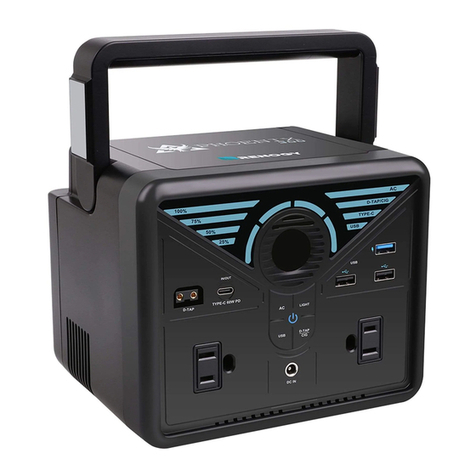
Portable Power Station
AF-P010 User Manual
800W

Hi dear, thank you very much for purchasing and experiencing the AF-P010 portable
power station. Before operating this product, please carefully read the user manual
for proper operation.
According to the transportation requirements of the international customs for baery
products, the baery level of this product is only less than 35% when it leaves the factory.
Please fully charge the product after unpacking it to start the experience tour of AF-P010.
1. Please avoid long-term storage and use of this product in environ-ments with
high temperature and humidity or direct sunlight to avoid shortened baery life
and other failures. The product should not be close to the fire source, otherwise it
may cause a major fire or accident.
2. This product must not be disassembled or modified. Improper oper-ation may
cause product malfunction or even fire.
3. Be careful not to drop or drop the product from a high place, so as not to
damage the product
4. Please store or use this product out of the reach of children, other-wise the
product may be dropped or collided and may cause bodily injury to children.
5. Please use our original accessories, and AFERIY will not guarantee the defective
products caused by the use of non-original accessories.
6. Please directly plug in the wall socket to charge the product, do not use exten-
sion cords or cable taps, otherwise there is a risk of damage to the extension
cords and cable taps or even a fire; If the extension socket is plugged in to charge
this product, please do not connect other electrical appliances to this socket,
otherwise the household meter may trip.
7. When the product is not in use or idle, please turn it o and unplug the power
cable. If it needs to be idle for a long time, please consume the product from a fully
charged state to an uncharged state, then recharge it to about 50% of the baery
level and store it. In order to prolong the life of the product, please take three
months as a cycle, operate and keep it in this way.
8. If the product reaches scrap conditions, please discard or recycle the product
in accordance with local laws.
Precautions For Use

Contents
01
02
02
05
06
07
08
09
09
10
11
12
AC Output Parameter
Packing List
Product introduction
Introduction of Display Interface
UPS Mode
Connection of Solar Panels
Warranty Card
Baery specification
Car charging
Product Parameter
Disclaimer
Troubleshooting table

1
AC Output Parameter
Type of AC port AC output
100V~120V 50Hz/60Hz
220V 50Hz
220V~240V 50Hz/60Hz
220V~240V 50Hz/60Hz
CH
UK
EU
220V 60Hz
KR
US/JP

2
Packing List
Product Introduction
Power Station AC Charger User Manual MC4 to XT60 Plug
Charging Cable
Portable Power Station
AF-P010 User Manual
800W
This product is a 512Wh large capacity 800W high power, 1.5 hours of high-speed
charging portable energy storage power supply, using high safety performance of
LiFePo4 baery.
It can be used as a backup power supply in case of emergency power cut,disaster,
camping and vehicles, and can also provide power for various electric tools.
800W high power, pure sine wave AC output,can be used for house hold appliances
such as dryers, microwave ovens, refrigera tors,high-power induction cookers and it
can also be used for other electronic devices such as personal computers.
Through the 400W ultra-fast charging,this model can be full charged within 1.5 hours,
The AC input/output voltage frequency can auto matic or manually switched between
50Hz/60Hz. This product also supports maximum 200W solar charge,allow you to
charge even when the power cut or in outdoor situations.

3
Main Power Control
1
LED light control
2
1
3
2
4
5
8
9
6
7
USB buon
Main Control for the whole system turn on/o.
Operate method:short press to turn on and change the light mode (SOS/Flash).
3
7
66
9
8XT60 input port(for solar
panel)
AC input port
Main power control
Light control
USB control
DC control
LCD display
Air intake/outlet
AC on/o control(50Hz/60Hz
switching control)
Operate method:long press the buon for 3s to turn on/o the system.
Notice: you can turn o the light by long press the buon(1-2s) in any mode.
Operate method:short press to turn on/o.
QC 3.0 PD-100W PD-20W
TYPE-C × 2USB-A × 2 TYPE-C × 1
DC buon
Operate method:short press to turn on/o.
4
6530 Output × 1 Cigar Lighter × 1
12V/10A12V/10A

4
The product can be charged directly by the wall socket, please do not use extension cords and cable taps.
When the product is charging, do not plug other products in the same socket.
Present the remaining power and using data.
LCD display
Cooling system
When the fans are working, please don’t block the channel.
AC buon(AC output, total share 800W)
Solar panel input
Use the included XT60→MC4 conversion cable to connect the solar panel.
※
AC Input
Use wall socket to get 400W fast charging, which can full charge from 0 to 100% in 1.5
hours.
5
6
7
8
9
Please do not plug several devices together in a extension socket at once, the current will be to high and
bring damage to the cable and fire risk.
※
Operate method:short press to turn on/o.
Notice: 1.Please confirm the output voltage or frequency before using.
2.Long press the buon for 3s to entry the frequency changing mode, 50Hz and 60Hz will blink in the
display, press again the buon to chose the right frequency,wait till the frequency is not blinking, then you
will get the frequency you want.
3.Quick short press for 10 times to switch the voltage.
1.Solar panels can have a maximum input of 200W and a maximum voltage of 50V.
2.If exceeding the maximum voltage leads to equipment damage, it is beyond the scope of warranty
If the extension socket is plugged in to charge this product, please do not connect other electrical appliances
to this socket, otherwise the household meter may trip.
※

5
Introduction of Display Interface
1 2 543
6789101112131415
1Charging/using time
2Total input power
3Baery Progress Bar
4Power percentage
9Type-c output
10 USB output
11 Fan state
12 Cigar lighter output
13 XT60 charging
14 AC charging
15 High/low temperature
protection
6LED light
7AC output
8DC output
5Total output power
Display Aention
When this icon light up. Please keep Air intake/outlet unobstructed.
When this icon light up. Please note the device is now with high/low
temperature and will possibly stop working till the temperature back
to normal standard.
When this icon is blinking, represent that the AC input is fault, please
recheck(Power/Hz/cable).
When the icon is blinking, represent theoutput
is fault, please recheck.

As shown in the figure below, connect the product between the socket on the wall and
the electrical appliances, and the power of the product is in the ON state. When you
turn on the power of the electrical appliances,it will directly uses the AC power of the
power grid.
UPS Mode
UPS function
This product has the bypass mode, does not need to pass through the baery, can
directly output from the AC.
In UPS mode, when the AC input power of the mains is cut o due to a power outage,
the ac input power of the mains can be used in about automatic switch to product
baery power within 10 ms to ensure AC output.
UPS Connections
In this state, when the power grid is cut o, it will automatically switch to the product’s
internal baery to supply power.
※ In UPS mode of The United States and Japan, the maximum power output of AC is below 800W, and the AC
output exceeds 800W.The AC output icon" "blinks indicating overload.
※ In UPS mode of the China, United Kingdom, Europe and South Korea , AC output of the maximum power below
800W, AC output over 800W, " " AC output icon flashes indicating overload.
TV
6

7
Connection of Solar Panels
We recommend the following two charging schemes:
Connecting Paern ①
Portable Power Station Charging Area
Connecting Paern ②
Portable Power Station Charging Area
Under the condition of light, this product can be connected to the solar panel and
geing charged. The charging power is determined according to the conditions of light
and weather.
In this charging mode, we support solar panel input within 200W, and the input voltage
cannot exceed 50V, otherwise the product abnormality caused by it will not be covered
by the warranty.
Solar panel
XT60 toMC4
Device
AC inputXT60 port
XT60 toMC4
(Not included in the accessory) (Not included in the accessory)
Solar panel ASolar panel B
Device
AC inputXT60 port
Table of contents