AEG BSE792220B User manual

USER
MANUAL
EN User Manual
Steam oven
BSE792220B
BSE792220M

CONTENTS
1. SAFETY INFORMATION.............................................................................................2
2. SAFETY INSTRUCTIONS.............................................................................................4
3. PRODUCT DESCRIPTION...........................................................................................7
4. CONTROL PANEL....................................................................................................... 8
5. BEFORE FIRST USE................................................................................................... 10
6. DAILY USE..................................................................................................................11
7. CLOCK FUNCTIONS.................................................................................................23
8. AUTOMATIC PROGRAMMES.................................................................................. 24
9. USING THE ACCESSORIES...................................................................................... 24
10. ADDITIONAL FUNCTIONS.................................................................................... 27
11. HINTS AND TIPS..................................................................................................... 28
12. CARE AND CLEANING.......................................................................................... 53
13. TROUBLESHOOTING.............................................................................................57
14. ENERGY EFFICIENCY.............................................................................................60
FOR PERFECT RESULTS
Thank you for choosing this AEG product. We have created it to give you
impeccable performance for many years, with innovative technologies that help
make life simpler features you might not find on ordinary appliances. Please
spend a few minutes reading to get the very best from it.
Visit our website for:
Get usage advice, brochures, trouble shooter, service information:
www.aeg.com/webselfservice
Register your product for better service:
www.registeraeg.com
Buy Accessories, Consumables and Original spare parts for your appliance:
www.aeg.com/shop
CUSTOMER CARE AND SERVICE
Always use original spare parts.
When contacting our Authorised Service Centre, ensure that you have the
following data available: Model, PNC, Serial Number.
The information can be found on the rating plate.
Warning / Caution-Safety information
General information and tips
Environmental information
Subject to change without notice.
1. SAFETY INFORMATION
Before the installation and use of the appliance,
carefully read the supplied instructions. The
www.aeg.com
2

manufacturer is not responsible for any injuries or
damages that are the result of incorrect installation or
usage. Always keep the instructions in a safe and
accessible location for future reference.
1.1 Children and vulnerable people safety
•This appliance can be used by children aged from 8
years and above and persons with reduced physical,
sensory or mental capabilities or lack of experience
and knowledge if they have been given supervision or
instruction concerning the use of the appliance in a
safe way and understand the hazards involved.
•Do not let children play with the appliance.
•Keep all packaging away from children and dispose of
it appropriately.
•Keep children and pets away from the appliance when
it operates or when it cools down. Accessible parts are
hot.
•If the appliance has a child safety device, this should
be activated.
•Children shall not carry out cleaning and user
maintenance of the appliance without supervision.
•Children aged 3 years and under must be kept away
from this appliance when it is in operation at all times.
1.2 General Safety
•Only a qualified person must install this appliance and
replace the cable.
•WARNING: The appliance and its accessible parts
become hot during use. Care should be taken to
avoid touching heating elements. Children less than 8
years of age shall be kept away unless continuously
supervised.
•Always use oven gloves to remove or put in
accessories or ovenware.
•Before carrying out any maintenance, disconnect the
appliance from the power supply.
ENGLISH 3

•Ensure that the appliance is switched off before
replacing the lamp to avoid the possibility of electric
shock.
•Do not use a steam cleaner to clean the appliance.
•Do not use harsh abrasive cleaners or sharp metal
scrapers to clean the glass door since they can scratch
the surface, which may result in shattering of the glass.
•If the mains power supply cable is damaged, it must
be replaced by the manufacturer, its Authorised
Service Centre or similarly qualified persons to avoid
an electrical hazard.
•To remove the shelf supports first pull the front of the
shelf support and then the rear end away from the
side walls. Install the shelf supports in the opposite
sequence.
•Use only the food sensor (core temperature sensor)
recommended for this appliance.
2. SAFETY INSTRUCTIONS
2.1 Installation
WARNING!
Only a qualified person must
install this appliance.
• Remove all the packaging.
• Do not install or use a damaged
appliance.
• Follow the installation instructions
supplied with the appliance.
• Always take care when moving the
appliance as it is heavy. Always use
safety gloves and enclosed footwear.
• Do not pull the appliance by the
handle.
• Keep the minimum distance from
other appliances and units.
• Make sure that the appliance is
installed below and adjacent safe
structures.
• The sides of the appliance must stay
adjacent to appliances or units with
the same height.
2.2 Electrical connection
WARNING!
Risk of fire and electric
shock.
• All electrical connections should be
made by a qualified electrician.
• The appliance must be earthed.
• Make sure that the parameters on the
rating plate are compatible with the
electrical ratings of the mains power
supply.
• Always use a correctly installed
shockproof socket.
• Do not use multi-plug adapters and
extension cables.
• Make sure not to cause damage to
the mains plug and to the mains
cable. Should the mains cable need
to be replaced, this must be carried
out by our Authorised Service Centre.
• Do not let mains cables touch or
come near the appliance door,
especially when the door is hot.
• The shock protection of live and
insulated parts must be fastened in
www.aeg.com
4

such a way that it cannot be removed
without tools.
• Connect the mains plug to the mains
socket only at the end of the
installation. Make sure that there is
access to the mains plug after the
installation.
• If the mains socket is loose, do not
connect the mains plug.
• Do not pull the mains cable to
disconnect the appliance. Always pull
the mains plug.
• Use only correct isolation devices: line
protecting cut-outs, fuses (screw type
fuses removed from the holder), earth
leakage trips and contactors.
• The electrical installation must have
an isolation device which lets you
disconnect the appliance from the
mains at all poles. The isolation
device must have a contact opening
width of minimum 3 mm.
• This appliance complies with the
E.E.C. Directives.
2.3 Use
WARNING!
Risk of injury, burns and
electric shock or explosion.
• This appliance is for household use
only.
• Do not change the specification of
this appliance.
• Make sure that the ventilation
openings are not blocked.
• Do not let the appliance stay
unattended during operation.
• Deactivate the appliance after each
use.
• Be careful when you open the
appliance door while the appliance is
in operation. Hot air can release.
• Do not operate the appliance with
wet hands or when it has contact with
water.
• Do not apply pressure on the open
door.
• Do not use the appliance as a work
surface or as a storage surface.
• Open the appliance door carefully.
The use of ingredients with alcohol
can cause a mixture of alcohol and air.
• Do not let sparks or open flames to
come in contact with the appliance
when you open the door.
• Do not put flammable products or
items that are wet with flammable
products in, near or on the appliance.
WARNING!
Risk of damage to the
appliance.
• To prevent damage or discoloration
to the enamel:
– do not put ovenware or other
objects in the appliance directly
on the bottom.
– do not put aluminium foil directly
on the bottom of cavity of the
appliance.
– do not put water directly into the
hot appliance.
– do not keep moist dishes and
food in the appliance after you
finish the cooking.
– be careful when you remove or
install the accessories.
• Discoloration of the enamel or
stainless steel has no effect on the
performance of the appliance.
• Use a deep pan for moist cakes. Fruit
juices cause stains that can be
permanent.
• This appliance is for cooking
purposes only. It must not be used for
other purposes, for example room
heating.
• Always cook with the oven door
closed.
• If the appliance is installed behind a
furniture panel (e.g. a door) make sure
the door is never closed when the
appliance is in operation. Heat and
moisture can build up behind a
closed furniture panel and cause
subsequent damage to the appliance,
the housing unit or the floor. Do not
close the furniture panel until the
appliance has cooled down
completely after use.
2.4 Steam Cooking
WARNING!
Risk of burns and damage to
the appliance.
• Released Steam can cause burns:
ENGLISH 5

– Be careful when you open the
appliance door when the function
is activated. Steam can release.
– Open the appliance door with
care after the steam cooking
operation.
2.5 Care and cleaning
WARNING!
Risk of injury, fire, or damage
to the appliance.
• Before maintenance, deactivate the
appliance and disconnect the mains
plug from the mains socket.
• Make sure the appliance is cold.
There is the risk that the glass panels
can break.
• Replace immediately the door glass
panels when they are damaged.
Contact the Authorised Service
Centre.
• Be careful when you remove the door
from the appliance. The door is
heavy!
• Clean regularly the appliance to
prevent the deterioration of the
surface material.
• Clean the appliance with a moist soft
cloth. Only use neutral detergents. Do
not use any abrasive products,
abrasive cleaning pads, solvents or
metal objects.
• If you use an oven spray, follow the
safety instruction on it's packaging.
• Do not clean the catalytic enamel (if
applicable) with any kind of
detergent.
2.6 Internal lighting
WARNING!
Risk of electric shock.
• The type of light bulb or halogen
lamp used for this appliance is for
household appliances only. Do not
use it for house lighting.
• Before replacing the lamp, disconnect
the appliance from the power supply.
• Only use lamps with the same
specifications.
2.7 Service
• To repair the appliance contact an
Authorised Service Centre.
• Use original spare parts only.
2.8 Disposal
WARNING!
Risk of injury or suffocation.
• Disconnect the appliance from the
mains supply.
• Cut off the mains electrical cable
close to the appliance and dispose of
it.
• Remove the door catch to prevent
children or pets from becoming
trapped in the appliance.
www.aeg.com
6

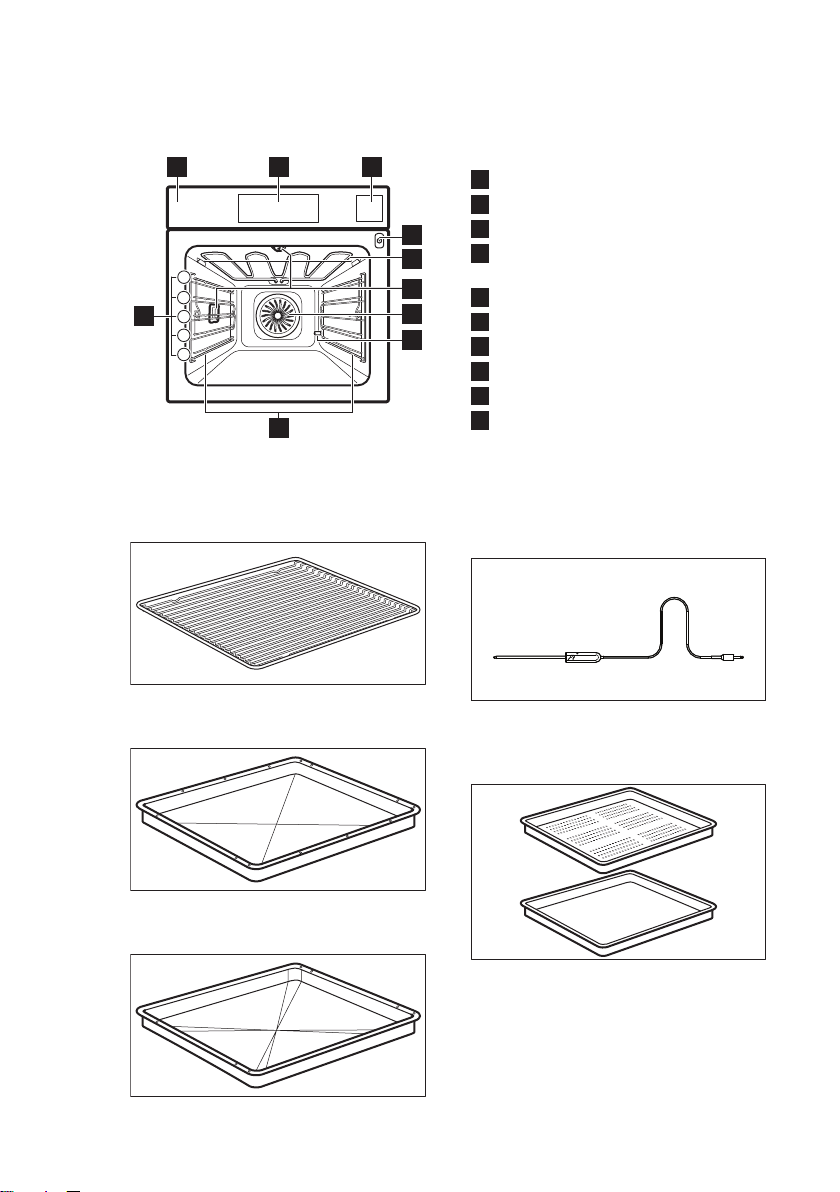
3. PRODUCT DESCRIPTION
3.1 General overview
21
10
9
3
5
4
3
2
1
5
4
6
7
8
1Control panel
2Electronic programmer
3Water drawer
4Socket for the core temperature
sensor
5Heating element
6Lamp
7Fan
8Descaling pipe outlet
9Shelf support, removable
10 Shelf positions
3.2 Accessories
Wire shelf
For cookware, cake tins, roasts.
Baking tray
For cakes and biscuits.
Grill- / Roasting pan
To bake and roast or as a pan to collect
fat.
Food Sensor
To measure the temperature inside the
food.
Steam set
One unperforated and one perforated
food container.
The steam set drains the condensing
water away from the food during steam
cooking. Use it to prepare food that
should not be in the water during the
cooking e.g. vegetables, pieces of fish,
ENGLISH 7

chicken breast. The set is not suitable for
food that needs to soak in the water e.g.
rice, polenta, pasta.
4. CONTROL PANEL
4.1 Electronic programmer
21 3 4 5 8 9 10 1176
Use the sensor fields to operate the appliance.
Sensor
field
Function Comment
1- Display Shows the current settings of the appliance.
2ON / OFF To activate and deactivate the appliance.
3
Heating Functions
or VarioGuide
Touch the sensor field once to choose a heating
function or the menu: VarioGuide. Touch the sen-
sor field again to switch between the menus:
Heating Functions, VarioGuide. To activate or de-
activate the light, touch the field for 3 seconds.
You can activate the light also when the appliance
is deactivated.
4Favourites To save and access your favourite programmes.
5
Temperature se-
lection
To set the temperature or show the current tem-
perature in the appliance. Touch the field for 3
seconds to activate or deactivate the function:
Fast Heat Up.
6Down key To move down in the menu.
7Up key To move up in the menu.
www.aeg.com8

Sensor
field
Function Comment
8OK To confirm the selection or setting.
9Back key To go back one level in the menu. To show the
main menu, touch the field for 3 seconds.
10
Time and addi-
tional functions
To set different functions. When a heating func-
tion operates, touch the sensor field to set the
timer or the functions: Function Lock, Favourites,
Heat + Hold, Set + Go. You can also change the
settings of the core temperature sensor.
11 Minute Minder To set the function: Minute Minder.
4.2 Display
A
DE
B C
A. Heating function
B. Time of day
C. Heat-up indicator
D. Temperature
E. Duration time or end time of a
function
Other indicators of the display:
Symbol Function
Minute Minder The function operates.
Time of day The display shows the current time.
Duration The display shows the necessary time
for cooking.
End Time The display shows when the cooking
time is complete.
Temperature The display shows the temperature.
Time Indication The display shows how long the heat-
ing function operates. Press and
at the same time to reset the time.
Calculation The appliance calculates the time for
cooking.
Heat-up Indicator The display shows the temperature in
the appliance.
ENGLISH 9

Symbol Function
Fast Heat Up Indicator The function is active. It decreases the
heat up time.
Weight Automatic The display shows that the automatic
weight system is active or that weight
can be changed.
Heat + Hold The function is active.
5. BEFORE FIRST USE
WARNING!
Refer to Safety chapters.
5.1 Initial Cleaning
Remove all accessories and removable
shelf supports from the oven.
Refer to "Care and
cleaning" chapter.
Clean the oven and the accessories
before first use.
Put the accessories and the removable
shelf supports back to their initial
position.
5.2 First Connection
When you connect the appliance to the
mains or after the power cut, you have to
set the language, the display contrast,
the display brightness and the time of
the day.
1. Press or to set the value.
2. Press to confirm.
5.3 Setting the water hardness
The table below shows the water
hardness range (dH) with the
corresponding Calcium deposit and the
quality of the water.
Water hardness Calcium deposit
(mmol/l)
Calcium deposit
(mg/l)
Water classi-
fication
Class dH
1 0 - 7 0 - 1.3 0 - 50 Soft
2 7 - 14 1.3 - 2.5 50 - 100 Moderately
hard
3 14 - 21 2.5 - 3.8 100 - 150 Hard
4 over 21 over 3.8 over 150 Very hard
When the water hardness exceeds the
values in the table, fill the water drawer
with bottled water.
1. Take the 4 colour change strip
supplied with the steam set in the
oven.
2. Put all the reaction zones of the strip
into the water for approximately 1
second.
www.aeg.com10
Other manuals for BSE792220B
1
This manual suits for next models
1
Table of contents
Other AEG Oven manuals

AEG
AEG COMPETENCE 824 B User manual

AEG
AEG BSK792320M User manual

AEG
AEG BSK574221M User manual

AEG
AEG BSE571221M User manual

AEG
AEG BPK74378PT User manual

AEG
AEG BHP6200B1 User manual

AEG
AEG COMPETENCE D2160-1 User manual

AEG
AEG EPB331020M User manual

AEG
AEG COMPETENCE 3200 B User manual

AEG
AEG BSK882320M User manual

AEG
AEG COMPETENCE B5701-4 User manual

AEG
AEG BOBZDB User manual

AEG
AEG BP530450K User manual

AEG
AEG Competence B 2100 User manual

AEG
AEG BPK742320B User manual

AEG
AEG DEB331010M User manual

AEG
AEG KS8404721M Reference guide

AEG
AEG B 89090-5 User manual

AEG
AEG EE3003011M User manual

AEG
AEG COMPETENCE 520B User manual