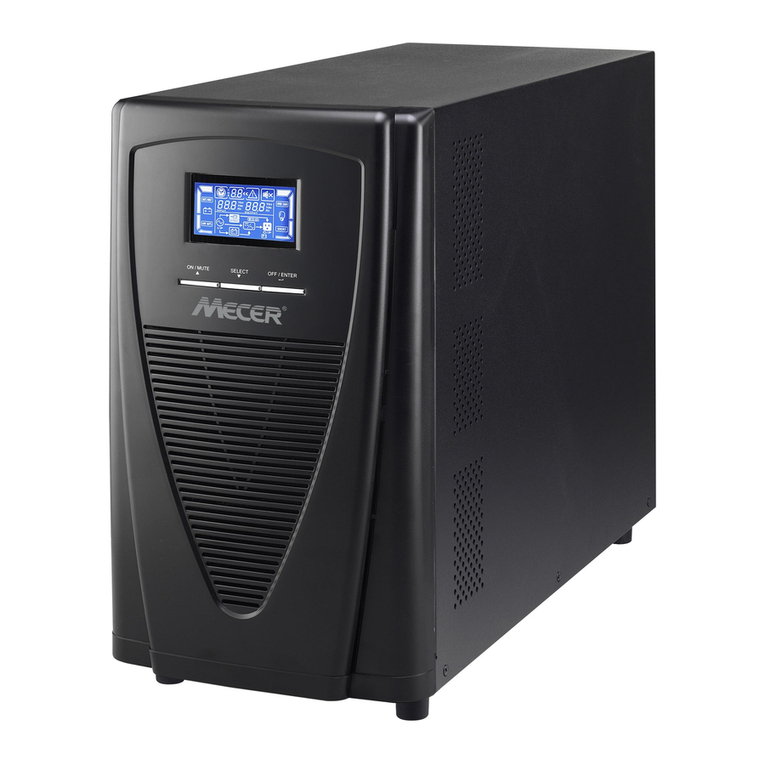
AEC IST3-J 1 kVA User manual

UPS IST3-J
(1-3kVA) Series
User Manual


UPS IST3-J (1-3kVA)
User Manual
Foreword
i
Foreword
Summaries
Thank you for choosing UPS of AEC International!
This document gives adescription of the UPS, including the features, performance, appearance,
structure, working principles, installation, operation, maintenance, transportation and storage, etc.
Please save the manual after reading, in order to consult in the future.
The figures in this manual are just for reference, for details please see the actual product.
Suitable Model
IST3-J | 1 kVA
IST3-J | 2 kVA
IST3-J | 3 kVA
Symbol Conventions
The manual quotes the safety symbols, these symbols used to prompt users to comply with safety
matters during installation, operation and maintenance. Safety symbol meaning as follows.
The manual quotes the safety symbols, these symbols used to prompt users to comply with safety
matters during installation, operation and maintenance. Safety symbol meaning as follows.
Symbol Description
Alerts you to a high risk hazard that will, if not avoided, result in
serious injury or death.
Alerts you to a medium low risk hazard that could, if not avoided,
result in moderate or minor injury.

Foreword
UPS IST3-J (1-3kVA)
User Manual
ii
Symbol Description
Alerts you to a low risk hazard that could, if not avoided, result in
minor injury.
Anti-static prompting.
Be care electric shock prompting.
Provides a tip that may help you solve a problem or save time.
Provides additional information to emphasize or supplement
important points in the main text.
Product standard: IEC 62040

UPS IST3-J (1K-3K)
User Manual
Contents
iii
Contents
1 Safety Description.........................................................................................................................1
1.1 Safety Announcements..................................................................................................................................... 1
1.1.1 UPS Announcements............................................................................................................................... 2
1.1.2 Battery Announcements .......................................................................................................................... 4
1.1.3 ESD Protection........................................................................................................................................ 4
1.1.4 Grounding Requirements ........................................................................................................................ 5
1.1.5 Measurement When Power On ............................................................................................................... 5
1.2 Operation Announcements ............................................................................................................................... 5
1.3 Operation Environment Requirements............................................................................................................. 7
2 Overview.........................................................................................................................................8
2.1 Product Intro..................................................................................................................................................... 8
2.1.1 Model Meaning....................................................................................................................................... 8
2.1.2 Features................................................................................................................................................... 8
2.2 Appearance....................................................................................................................................................... 9
2.2.1 Operation Panel..................................................................................................................................... 10
2.2.2 Rear Panel View.................................................................................................................................... 12
2.2.3 Intelligent Slot....................................................................................................................................... 15
2.2.4 EPO Connector ..................................................................................................................................... 18
2.2.5 RS232 Communication......................................................................................................................... 18
2.3 Working Principles......................................................................................................................................... 18
2.3.1 Fault Status............................................................................................................................................ 19
2.3.2 UPS Parameters Setting (LCD)............................................................................................................. 20
2.3.3 UPS Parameters Setting (PC)................................................................................................................ 23
2.4 Optional Component ...................................................................................................................................... 23

Contents
UPS IST3-J (1-3kVA)
User Manual
iv
2.4.1 Battery Box ........................................................................................................................................... 24
2.4.2 Programmable Outlets........................................................................................................................... 24
2.4.3 Charging Module (7A).......................................................................................................................... 24
3 Installation....................................................................................................................................25
3.1 Installation Announcements ........................................................................................................................... 25
3.2 Installation Preparation .................................................................................................................................. 26
3.2.1 Installation Place and Environment Requirements ............................................................................... 26
3.2.2 Input Breaker Selection......................................................................................................................... 27
3.2.3 Selection of the Cross-sectional Area of Wire....................................................................................... 28
3.3 Transporting, Unpacking and Checking......................................................................................................... 28
3.3.1 Transporting .......................................................................................................................................... 28
3.3.2 Unpacking and Checking ...................................................................................................................... 28
3.4 Installation Procedures ................................................................................................................................... 29
3.4.1 Rack-mounting...................................................................................................................................... 29
3.4.2 Tower-mounting.................................................................................................................................... 32
3.4.3 Intelligent Slot Replacement ................................................................................................................. 34
3.5 Electrical Connection ..................................................................................................................................... 36
3.6 Check the Installation..................................................................................................................................... 36
4 Operation Guide .........................................................................................................................38
4.1 Checking Before Startup ................................................................................................................................ 38
4.2 Startup Operation ........................................................................................................................................... 38
4.3 Shutdown Operation....................................................................................................................................... 39
5 Maintenance and Troubleshooting .........................................................................................40
5.1 Maintenance Guide ........................................................................................................................................ 40
5.1.1 Safety Precautions................................................................................................................................. 40
5.1.2 Preventive Maintenance........................................................................................................................ 40
5.2 Daily Battery Maintenance............................................................................................................................. 41
5.3 Battery Replacement ...................................................................................................................................... 41
5.3.1 Battery Replacement Announcements .................................................................................................. 41

UPS IST3-J (1-3kVA)
User Manual
Contents
v
5.3.2 Battery Pack of UPS Replacement........................................................................................................ 42
5.3.3 Battery Pack of Battery Box Replacement............................................................................................ 44
5.4 Troubleshooting.............................................................................................................................................. 48
6 Package, Transportation, Storage.............................................................................................52
6.1 Package .......................................................................................................................................................... 52
6.2 Transportation ................................................................................................................................................ 52
6.3 Storage ........................................................................................................................................................... 52
A Technical Specifications...........................................................................................................53
B Acronyms and Abbreviations ..................................................................................................56

UPS IST3-J (1-3kVA)
User Manual
1 Safety Description
1
1 Safety Description
This chapter mainly describes safety announcements. Prior to performing any work on device, please
read user manual carefully, follow operation and installation instructions and observe all danger,
warning and safety information, which is to avoid human injury and device damage by irregular
operations.
1.1 Safety Announcements
This section mainly describes safety announcements during operation and maintenance. For details,
please refer to safety instructions in the relevant chapters.
Before attempting to operate device, please read safety announcements and operation instructions in
this section carefully to avoid accident.
The promptings in the user manual, such as "Danger", "Warning", "Caution", etc. don't include all
safety announcements. They are just only the supplement of safety announcements during operation.
Any device damage caused by violating the general safety operation requirements or safety standards
of design, production, and usage will be out of warranty range.

1 Safety Description
UPS IST3-J (1-3kVA)
User Manual
2
1.1.1 UPS Announcements
The input voltage and output voltage of device are dangerous high voltage. Touching high voltage
will endanger human life. Before attempting to install or operate device, carefully read this manual
and pay attention to all warning signs in the device. Only authorized professionals are allowed to
dismantle power device.
Device damage or device failure may cause electric shock or fire!
Before attempting to operate device, check that there is no damage or other potential danger in
the device visually.
Check that other external devices or circuit connection is safe.
During a thunderstorm, don't perform high voltage operation, AC power operation or operations in
the tower or mast. Besides, in order to avoid device struck by lightning, for the atmosphere will
generate a strong electromagnetic field during a thunderstorm, it should prepare lightning protection
and grounding system in time.
Don't connect with unbalance load, half-wave rectification load or inductive load in the output of
UPS, such as air-condition, blower, starter, electric drill, motor, daylight lamp, etc.

UPS IST3-J (1-3kVA)
User Manual
1 Safety Description
3
Don't connect ground wire and neutral wire, live wire and neutral wire reversely to avoid short
circuit.
Device should be grounded well and the voltage between ground wire and neutral wire should be less
than 5V.
Don't put finger or tool into rotating fans to avoid human injury or device damage.
In case of fire, please use dry power fire extinguisher. If using liquid fire extinguisher, it may cause
electric shock.
Make sure that there is no object in the air inlet, air outlet, as well as in the front of fans to keep
device with good ventilation.
No liquid or other objects are allowed to enter device.
The device is level A UPS! When it applies to residential building, additional measures should be
took to inhibit the harassment.
This manual suits for next models
2
Table of contents
Other AEC UPS manuals