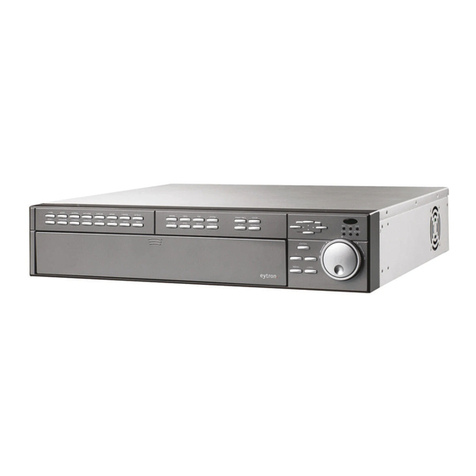
Abus NVR10020P User manual

ABUS NVR
User manual local user interface
Original user manual in English. Keep for future use.
Version 02/2020

2
CONTENTS
1) Declaration of conformity..................................................................................... 5
2) Setup wizard........................................................................................................ 6
3) Live view.............................................................................................................. 6
Main menu.............................................................................................................. 8
Camera menu ......................................................................................................... 9
Camera command .................................................................................................. 9
Display menu.......................................................................................................... 9
4) Playback view.................................................................................................... 10
Camera selection.................................................................................................. 10
Calendar ............................................................................................................... 11
Camera command ................................................................................................ 11
Playback control.................................................................................................... 12
Preview.............................................................................................................. 12
Time display on time bar ................................................................................... 12
Time bar filters................................................................................................... 13
Controlling the time bar ..................................................................................... 13
5) File search......................................................................................................... 14
Saved search .................................................................................................... 15
All files............................................................................................................... 15
Search for people.............................................................................................. 15
Save search ...................................................................................................... 15
Export search results......................................................................................... 16
6) Intelligent analysis............................................................................................. 16
People counting:....................................................................................................... 16
Heat map:................................................................................................................. 16
7) Camera settings ................................................................................................ 17
Camera................................................................................................................. 17
Network overview.............................................................................................. 18
Connecting camera via PoE.............................................................................. 20
Layout................................................................................................................... 23
Private Zone.......................................................................................................... 24
Video parameters.................................................................................................. 24
Event..................................................................................................................... 25
Normal event..................................................................................................... 26
Intelligent event ................................................................................................. 27
8) Storage settings ................................................................................................ 28

3
Schedule............................................................................................................... 28
Video recording (recording plan) ....................................................................... 28
Advanced Configuration.................................................................................... 29
Image recording (detection)............................................................................... 29
Storage medium.................................................................................................... 30
Add NetHDD...................................................................................................... 32
Storage mode ....................................................................................................... 32
Mode: Quota...................................................................................................... 33
Mode: Group ..................................................................................................... 33
Auto backup.......................................................................................................... 34
Advanced settings................................................................................................. 35
9) System settings................................................................................................. 37
General................................................................................................................. 37
Users..................................................................................................................... 39
Add user............................................................................................................ 40
Editing a user .................................................................................................... 40
Delete Users...................................................................................................... 41
Live view parameters......................................................................................... 41
Individual user authorisation.............................................................................. 41
Network................................................................................................................. 42
TCP/IP............................................................................................................... 42
DDNS................................................................................................................ 43
PPPoE............................................................................................................... 44
NTP................................................................................................................... 44
NAT................................................................................................................... 44
Advanced settings –SNMP............................................................................... 45
Advanced settings –Email................................................................................ 46
Advanced settings –ABUS Link Station............................................................ 47
Advanced settings –additional settings............................................................. 48
Live view............................................................................................................... 49
General.............................................................................................................. 49
Layout / display ................................................................................................. 50
All-in-one stream (Channel-Zero)...................................................................... 50
Holiday.................................................................................................................. 51
10) Maintenance settings...................................................................................... 52
System info........................................................................................................... 52
Log book............................................................................................................... 53

4
Import/Export ........................................................................................................ 53
Update .................................................................................................................. 54
Restore defaults.................................................................................................... 54
Network................................................................................................................. 55
Hard disk drive function......................................................................................... 55
System maintenance............................................................................................. 56
Advanced settings................................................................................................. 56

5
1) Declaration of conformity
ABUS Security Center hereby declares that the enclosed product complies with the
requirements of the following directives:
EMC Directive 2014/30/EU
Low-Voltage Directive 2014/35/EU
RoHS Directive 2011/65/EU
The full EU declaration of conformity can be obtained from the following address:
ABUS Security Center GmbH & Co. KG
Linker Kreuthweg 5
86444 Affing
GERMANY
www.abus.com/product/itemnumber
(“Item number” in the link to be replaced with the item number
of the enclosed product)

6
2) Setup wizard
The setup wizard guides you through the required basic settings for the system. The
recorder should then be ready for recording and monitoring.
3) Live view
Live view starts automatically when the device is switched on.
The live view function provides the option of displaying live images and executing
camera commands for all cameras connected to the recorder.

7
•Double-clicking an image displays the selected camera image in full screen or
switches back to the original view.
•Click the right-hand button to show or hide the menu in order to display only
the relevant camera layout in full screen.
The live view is divided into the following function areas:
Main menu
For selecting the configuration and operating menus
Camera menu
For selecting and searching for cameras and/or displaying of
various analysis functions
Camera
command
For selecting camera commands and actions for the selected
camera
Display menu
For controlling the view on the local monitor
Recording
status
In live image, the current recording status will always be shown
(top right) in the form of a coloured R (“Record”). Every video
channel can have one of the following three statuses:
No symbol
No recording programmed, no HDD available,
no event
Event alarm
(for motion, alarm input or VCA)
Recording started

8
Main menu
Switches to live view
Switches to playback view
Switches to file search
Switches to intelligent analysis
Switches to menu for camera settings
Switches to menu for memory settings
Switches to menu for system settings
Switches to menu for maintenance settings
Opens the log book
All interactions and events are recorded in the log book. Entries can
be filtered according to specific criteria and displayed.
Backup. All active export downloads are displayed.
Use this to log off from the NVR or restart and/or shut down the
system.

9
Camera menu
Camera command
Display menu
Generates an instant image
Starts playback of the last 5 minutes
Opens the PTZ control
Opens digital zoom
Switches audio on/off
Opens the display priority
Shows information on the video stream
Starts/ends the recording, ATTENTION: This function overwrites the
existing recording schedules.
Opens a menu for changing views when using fisheye cameras
Switches between stream 1 and stream 2
Switches 3D positioning on/off
1/1
Switches between view pages
Changes to second monitor
Open the camera layout selection
Starts/ends sequential display
Starts/ends the recording for all cameras
Starts/ends full-screen display

10
4) Playback view
Playback allows recorded video data from cameras on the recorder to be played.
The playback view is divided into the following function areas:
Camera selection
The camera list makes it possible to select the recorded camera archive on the
recorder. By clicking on the selection fields in the list, several cameras can be
played back simultaneously.
You can search for a specific camera name in the search filed above the camera list
(case-sensitive). You also have the option to “Select all cameras” or “Select cameras
individually” with a single click.
Camera
selection
For selecting the cameras for the playback.
Calendar
For selecting the date of the recorded data.
Camera
command
For selecting camera commands and actions for the selected
camera.
Playback
control
For controlling and interacting with the playback.
Other manuals for NVR10020P
1
This manual suits for next models
1
Table of contents
Other Abus DVR manuals

Abus
Abus TVHD80120 User manual

Abus
Abus TVVR33004 User manual

Abus
Abus TVVR20001 User manual

Abus
Abus TVVR30004 User manual

Abus
Abus TVVR60011 User manual

Abus
Abus Eytron TV8931 User manual

Abus
Abus HDCC90001 User manual

Abus
Abus HDCC90002 User manual

Abus
Abus TVVR25000 User manual

Abus
Abus HDCC90020 User manual