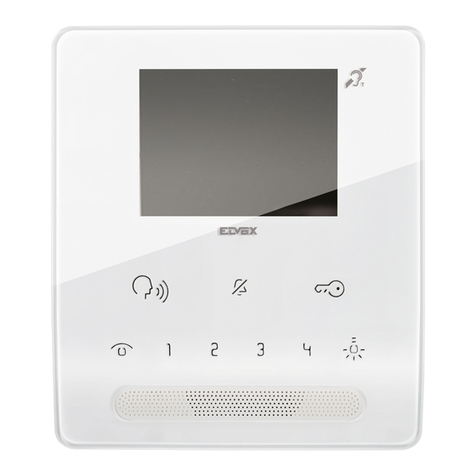
ABB M2231 SERIES User manual

2TMD041600D0107 │09.04.2018
Product manual
ABB-Welcome
M2231.-. 4.3" video hands-free indoor
station

Table of contents
Product manual 2TMD041600D0107 │
2
Tableo fcontents
1 Notes on the instruction manual....................................................................................................................4
2 Safety.............................................................................................................................................................4
3 Intended use..................................................................................................................................................4
4 Environment...................................................................................................................................................5
4.1 ABB devices.......................................................................................................................................5
5 Product description........................................................................................................................................6
5.1 Control elements................................................................................................................................6
6 Technical data ...............................................................................................................................................8
7 Mounting/Installation......................................................................................................................................9
7.1 Requirement for the electrician..........................................................................................................9
7.2 General installation instructions.......................................................................................................10
7.3 Mounting...........................................................................................................................................11
7.3.1 Recommended installation height..................................................................................................11
7.3.2 Dismantling.....................................................................................................................................11
7.3.3 Installation dimension.....................................................................................................................12
7.3.4 Wiring..............................................................................................................................................12
7.3.5 Address setting...............................................................................................................................12
7.3.6 Surface-mounted installation..........................................................................................................13
7.3.7 Desktop-mounted installation.........................................................................................................14
7.3.8 Flush-mounted installation .............................................................................................................14
7.3.9 Cavity wall installation ....................................................................................................................16
7.3.10 Replace the front cover..................................................................................................................16
8 Commissioning............................................................................................................................................17
8.1 Device settings.................................................................................................................................17
8.2 Intercom call settings .......................................................................................................................19
8.3 Switch actuator settings...................................................................................................................21
8.4 Program button settings...................................................................................................................22
8.5 Call forward settings.........................................................................................................................23
8.6 Auto unlock settings.........................................................................................................................24
8.7 Outdoor station password settings ..................................................................................................25
8.8 Ringtone settings .............................................................................................................................26
8.9 Volume settings................................................................................................................................27
8.10 Date and time settings .....................................................................................................................28
8.11 Other settings...................................................................................................................................29
8.12 Blacklist settings...............................................................................................................................30
8.13 History review...................................................................................................................................31
8.14 Camera list.......................................................................................................................................32
8.15 Language settings............................................................................................................................34
8.16 Information .......................................................................................................................................34
8.17 Reset factory default........................................................................................................................35

Table of contents
Product manual 2TMD041600D0107 │
3
9 Operation.....................................................................................................................................................36
9.1 Incoming a call .................................................................................................................................36
9.2 Display and volume settings............................................................................................................37
9.3 Communication menu......................................................................................................................38
9.3.1 Overview.........................................................................................................................................38
9.3.2 Intercom call ...................................................................................................................................38
9.3.3 Call guard unit ................................................................................................................................39
9.3.4 Broadcast .......................................................................................................................................39
9.3.5 Switch actuator...............................................................................................................................40
9.4 Cleaning...........................................................................................................................................41

Notes on the instruction manual
Product manual 2TMD041600D0107 │
4
1 Notes on the instruction manual
Please read through this manual carefully and observe the information it contains. This will
assist you in preventing injuries and damage to property, and ensure both reliable operation and
a long service life for the device.
Please keep this manual in a safe place. If you pass the device on, also pass on this manual
along with it. ABB accepts no liability for any failure to observe the instructions in this manual.
2 Safety
Warning
Electric voltage!
Dangerous currents flow through the body when coming into direct or indirect
contact with live components.
This can result in electric shock, burns or even death.
– Disconnect the mains power supply prior to installation and/or disassembly!
– Permit work on the 100-240 V supply system to be performed only by
specialist staff!
3 Intended use
This device is an integral part of the ABB-Welcome door communication system and operates
exclusively with components from this system. The device must only be installed in dry indoor
rooms.

Environment
Product manual 2TMD041600D0107 │
5
4 Environment
Consider the protection of the environment!
Used electric and electronic devices must not be disposed of with household
waste.
– The device contains valuable raw materials that can be recycled. Therefore,
dispose of the device at the appropriate collecting facility.
4.1 ABB devices
All packaging materials and devices from ABB bear the markings and test seals for proper
disposal. Always dispose of the packing materials and electric devices and their components via
an authorized collection facility or disposal company.
ABB products meet the legal requirements, in particular the laws governing electronic and
electrical devices and the REACH ordinance.
(EU-Directive 2012/19/EU WEEE and 2011/65/EU RoHS)
(EU-REACH ordinance and law for the implementation of the ordinance (EG) No.1907/2006)

Product description
Product manual 2TMD041600D0107 │
6
5 Product description
5.1 Control elements
Fig. 1: Control elements
No. Function
14.3" Color display
2
Communication button
■While a call is coming, press this button to activate the communication within 30 s
and press again to end the call.
■In standby mode, press this button to enter the communication menu.
– If the LED flashes slowly, this indicates an incoming call.
– If the LED illuminates, this indicates that a conversation is in progress.
– If the LED flashes rapidly, it indicates system is busy.
3
Unlock button
■Open the door by pressing this button at any time.
■Auto-unlock: the door is automatically opened after incoming call (for this function,
long press this button for more than 10 s until the backlit LED is on, the same
operation will switch off the function and LED will be off)
– The LED illuminates to indicate auto-unlock.
– The LED flashes fast, it means door is open exceeding the set time (sensor must
be connected first)
4
Surveillance button
■In standby mode, press this button to surveil the default outdoor station.
■While the display is on, press this button to switch to surveil next outdoor station.
(Function is available depending on the installation's type)
■**While the display is on, long press this button to snapshot manually.
■In standby mode, if the LED flashes, long press this button to display the "History"
menu.
– The LED flashes slowly to show the notification of missing call.

Product description
Product manual 2TMD041600D0107 │
7
5
Mute button
■In standby mode, press this button to mute ringtone of this indoor station.
■In standby mode, long press this button to mute ringtone of all indoor stations in
the same apartment.
■While a call is coming, press this button to reject the call.
■During the conversation, press this button to mute microphone.
– *The LED illuminates to indicate mute status
6
Programmable button 1
■Default function of button 1 releases the 2nd lock connected with outdoor station.
■In standby mode, long press this button for 3 s to send SOS alarm to guard unit.
And LED flashes slowly to indicate success and flashes fast to indicate fail.
■*Programmable for addition function, e.g. call guard unit, intercom.
7System setting button
Enter into the system setting for various functions of the device.
The LED flashes fast, it means setting is busy
8**Induction loop function
Tab.1: Description
* For use of those buttons, please contact your electrical installer.
** The function is only available in M22343-.
Induction loop function
This function is available for hearing-impaired persons wearing a hearing aid to hear the person
speaking from the outdoor station or from other indoor stations during an intercom call.
The device is able to interface hearing aids with "T" function at a distance of around 35 cm.
Fig. 2: Distance

Technical data
Product manual 2TMD041600D0107 │
8
6 Technical data
Designation Value
Display resolution 480 x 272
Display size 4.3”
Operating temperature -10 °C…+55 °C
Storage temperature -40 °C…+70 °C
Protection IP 30
Single-wire clamps 2 x 0.28 mm² - 2 x 0.75 mm²
Fine-wire clamps 2 x 0.28 mm² - 2 x 0.75 mm²
Bus voltage 20-30 VDC
Size 137 mm x 155 mm x 24 mm
Tab.2: Technical data

Mounting/Installation
Product manual 2TMD041600D0107 │
9
7 Mounting/Installation
Warning
Electric voltage!
Dangerous currents flow through the body when coming into direct or indirect
contact with live components.
This can result in electric shock, burns or even death.
– Disconnect the mains power supply prior to installation and/or disassembly!
– Permit work on the 100-240 V supply system to be performed only by
specialist staff!
7.1 Requirement for the electrician
Warning
Electric voltage!
Install the device only if you have the necessary electrical engineering
knowledge and experience.
– Incorrect installation endangers your life and that of the user of the electrical
system.
– Incorrect installation can cause serious damage to property, e.g. due to fire.
The minimum necessary expert knowledge and requirements for the installation
are as follows:
– Apply the "five safety rules" (DIN VDE 0105, EN 50110):
1. Disconnect
2. Secure against being re-connected
3. Ensure there is no voltage
4. Connect to earth and short-circuit
5. Cover or barricade adjacent live parts.
– Use suitable personal protective clothing.
– Use only suitable tools and measuring devices.
– Check the type of supply network (TN system, IT system, TT system) to
secure the following power supply conditions (classic connection to ground,
protective grounding, necessary additional measures, etc.).

Mounting/Installation
Product manual 2TMD041600D0107 │
10
7.2 General installation instructions
■Terminate all branches of the wiring system via a connected bus device (e.g., indoor station,
outdoor station, system device).
■Do not install the system controller directly next to the bell transformer and other power
supplies (to avoid interference).
■Do not install the wires of the system bus together with 100-240 V wires.
■Do not use common cables for the connecting wires of the door openers and wires of the
system bus.
■Avoid bridges between different cable types.
■Use only two wires for the system bus in a four-core or multi-core cable.
■When looping, never install the incoming and outgoing bus inside the same cable.
■Never install the internal and external bus inside the same cable.
Other manuals for M2231 SERIES
2
Table of contents
Other ABB Intercom System manuals

ABB
ABB H8137xPx-S User manual

ABB
ABB H82351 Series User manual

ABB
ABB Welcome M2233 Series User manual

ABB
ABB M22311 Series User manual

ABB
ABB M22341 Series User manual

ABB
ABB 83210-AP-xxx-500 User manual

ABB
ABB M2304 User manual

ABB
ABB M2231 SERIES User manual

ABB
ABB H8131xPx-A User manual

ABB
ABB H81402FR Series User manual

ABB
ABB Welcome M2248 W Series User manual

ABB
ABB H8303 User manual

ABB
ABB M22381-W User manual

ABB
ABB i-HD H81365P A Series User manual

ABB
ABB M22301 series User manual

ABB
ABB 83220-SM-xxx-500 User manual

ABB
ABB Welcome M2303 User manual

ABB
ABB Welcome M2233 Series User manual

ABB
ABB 83210-AP 500 Series User manual

ABB
ABB H81381P Series User manual