
Zebronics Zeb-Juke Bar 9530WS User manual
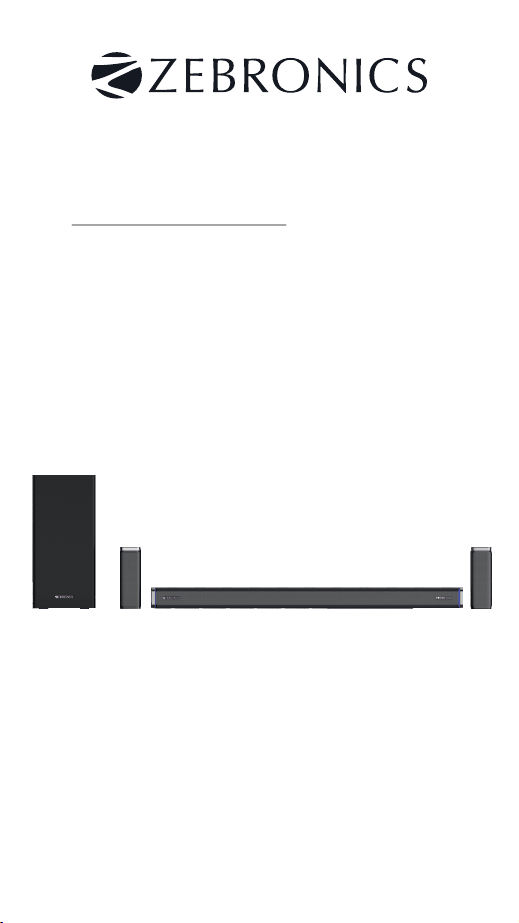
Juke Bar
ZEB
Pro Dolby 5.1
9530WS
sound bar
www.zebronics.com
User Manual
Important Safety Instruction
Thank you for purchasing the ZEB-JUKE
BAR 9350WS DOLBY 5.1 Soundbar. Please
read this user manual carefully and keep for
future reference.
Warning
Caution:
Ÿ To reduce the risk of electric shock, do not
dismantle the product and do not expose the
device to rain or moisture. No user-serviceable
parts inside.
Ÿ Refer servicing to qualified personnel only.
The lightning flash within an
e q u i l a t e r a l t r i a n g l e i s
intended to alert you to the
presence of uninsulated
dangerous voltage within the
product’s enclosure that may
be of sufficient magnitude to
constitute an electric shock to
a person or persons.
Important! This symbol alerts
you to read and observe
im portant war n ings and
instructions on the unit or in
this manual.
Notice:
This device is not intended for use by
persons (including children) with reduced
physical sensory or mental capabilities, or lack
of experience and knowledge, unless they
have been given supervision or instruction
concerning use of the device by a person
responsible for their safety.
Children should be supervised to ensure
that they do not play with the device.
1. To prevent possible hearing
damage, do not listen at high

volume levels for long time
periods or a sudden high volume level.
2. Never use the device unsupervised! Switch
off the device whenever you are not using it,
even if not using it only for a short while.
3. The device is not intended to be operated by
means of an external timer or separate remote
control system.
4. If the supply cord is damaged, it must be
replaced by the manufacturer, its service agent
or similarly qualified persons in order to avoid
a hazard.
5. Before operating this system, check the
voltage of this system to see if it is identical to
the voltage of your local power supply.
6. The unit should not be impeded by covering
the ventilation opening with items such as
newspaper, table-cloths, curtains etc. Make
sure that there are at least 20 cm of space
above and at least 5 cm of space on each side of
the unit.
7. The device must not be exposed to dripping
or splashing liquid, no objects filled with liquids
such as vases, should be placed on the device.
8. To prevent fire or shock hazard, do not
expose this equipment to direct heat, rain,
moisture or dust.
9. Do not position this unit near any water
sources e.g. taps, bathtubs, washing machines

or swimming pools. Ensure that you place the
unit on a dry, stable surface.
10. Do not place this unit close to a strong
magnetic field.
11. Do not place the unit on a amplifier or
receiver.
12. Do not place this unit in a damp area as the
moisture will affect the life of electric
components.
13. Do not attempt to clean the unit with
chemical solvents as this might damage the
finish. Wipe with a clean, dry or slightly damp
cloth.
14. When removing the power plug from the
power socket, always pull directly on the plug,
never pull on the cord.
15. Depending on the electromagnetic waves
used by a television broadcast, if a TV is turned
on near this unit while it is also on, lines might
appear on the LED TV. Neither this unit nor the
TV is malfunctioning. If you see such lines, keep
this unit well away from the TV set.
16. The mains plug is used to disconnect the
device, the disconnected device should remain
readily operable.

Important Safety Instructions
1. Read these instructions. Keep these
instructions. Follow all instructions. Heed all
warnings.
2. Do not use this device near water.
3. Clean only with dry cloth.
4. Do not block any ventilation openings. Install
in accordance with the manufacturer's
instructions.
5. Do not install near any heat sources such as
radiators, heaters, stoves, or other device
(including amplifiers) that produce heat.
6. Protect the power cord from being walked
on o r p in ch ed p ar ti cu la r l y at p lu gs ,
convenience receptacles or at the point where
they exit from the device.
7. Only use attachments/accessories specified
by the manufacturer.
8. Unplug this device during lightning storms or
when unused for long periods of time.
9. Refer all servicing to qualified service
personal. Servicing is required when the device
has been damage in any way, for example,
when the power-supply cord or plug is
damaged, liquid has been spilled or objects
have fallen into the device, the device has been
exposed to rain or moisture, does not operate
normally, or has been dropped.

10. The AC plug is used to disconnect the
device, the disconnected device should remain
readily operable. In order to disconnect the
device from the AC power completely, the AC
plug must be removed from the AC power
socket completely.
Preparation for Use
Unpacking and Set Up
Ÿ Remove the Sound bar from the carton
and remove all packing material from the
Sound bar. Save the packing material, if
possible, in case the Sound bar ever needs to
be serviced or transported.
Ÿ The original carton and packing material is
the only safe way to pack your Sound bar to
protect it from damage in transit.
Ÿ Remove any descriptive labels or stickers
on the front or top of the cabinet. Do not
remove any labels or stickers from the back or
bottom of the cabinet.
Ÿ Place your Sound bar on a level surface
such as a table, desk or shelf, convenient to an
AC power socket, out of direct sunlight, and
away from sources of excess heat, dirt, dust,
moisture, humidity, or vibration.
Ÿ Unwind the Line cord connecting the AC
adapter and extend it to its full length.

Protect Your Furniture
This model is equipped with non-skid
rubber 'feet' to prevent the product from
moving when you operate the controls. These
'feet' are made from non-migrating rubber
material specially formulated to avoid leaving
any marks or stains on your furniture. However
c e r ta in ty p e s o f o il b a se d f ur n i t ur e
polishes, wood preservatives, or cleaning
sprays may cause the rubber 'feet' to soften,
and leave marks or a rubber residue on the
furniture. To prevent any damage to your
furniture we strongly recommend that you
purchase small self-adhesive felt pads,
available at hardware stores and home
improvement center everywhere, and apply
these pads to the bottom of the rubber 'feet'
before you place the unit.
Important Notes
Ÿ Safety and operating instruction manual
should be retained for future reference.
Ÿ The device should not be exposed to
dripping, splashing or placed in a humid
atmosphere such as a bathroom.
Ÿ Do not install the product in the following
areas:
Ÿ Places exposed to direct sunlight or
close to radiators.

Ÿ On top of other stereo equipment that
radiate too much heat -Blocking
ventilation or in a dusty area.
Ÿ Areas where there is constant vibration.
Ÿ Humid or moist places.
Ÿ Do not place near candles or other
flames.
Ÿ Operate the product only as instructed in
this manual.
Ÿ Before turning on the power for the first
time, make sure the sound bar is plugged to
power socket.
Ÿ For safety reasons, do not remove any
covers or attempt to gain access to the inside of
the product. Refer any servicing to qualified
personnel.
Ÿ Do not attempt to remove any screws, or
open the casing of the unit; there are no user
serviceable parts inside. Refer all servicing to
qualified service personnel.
Power Source:
This soundbar is designed to operate in AC
220-240V 50/60Hz.
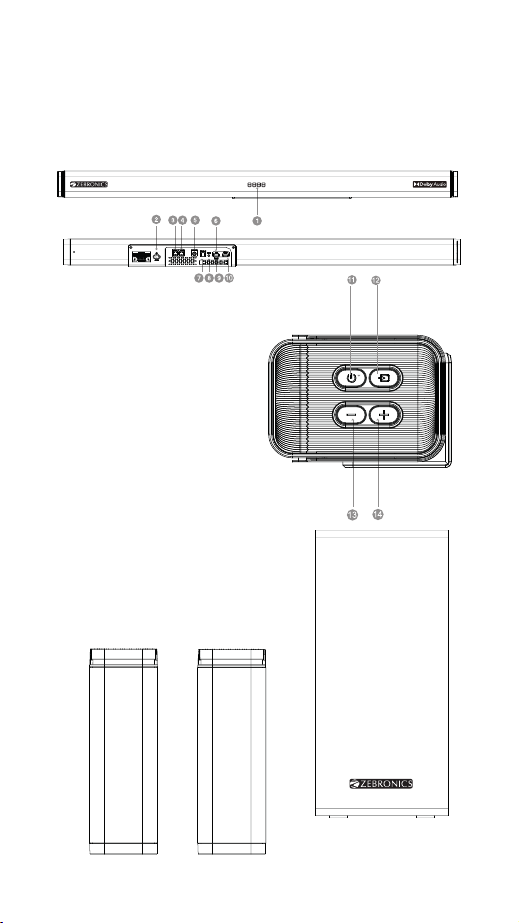
Product Representation
Sound Bar
1. LED DISPLAY
2. AC IN
3. SR OUT
4. SL OUT
5. SW OUT
6. USB
7. OPTICAL
8. LINE IN(AUX)
9. FOR UPDATE
10. HDMI(ARC)
11. POWER/STAND BY
12. INPUT
13. VOL -
14. VOL +
Table of contents
Other Zebronics Speakers System manuals


Popular Speakers System manuals by other brands




Sondpex
Sondpex Active Speaker System and Digital Music... User manual and installation instructions

JVC
JVC NX-PN7 instructions

Marshall Amplification
Marshall Amplification AR-DM61-BT user manual
Yamaha
Yamaha NX-A01 - Speaker Sys Product bulletin
SE Audiotechnik
SE Audiotechnik I-LINE manual

Gemini
Gemini WRX-843 Series user manual