
Viper 4108V User manual

OWNER’S GUIDE MODEL
Since its inception, Directed has had one pur-
pose, to provide consumers with the finest
vehicle security products and accessories
available. The recipient of nearly 100 pat-
ents and Innovations Awards in the field of
advanced electronic technology.
Quality Directed products are sold and ser-
viced throughout North America and around
the world.
Call (800) 876-0800 for more information
about our products and services.
Vista, Ca 92081
www.directed.com
Directed is committed to delivering
world class quality products and
services that excite and delight our
customers.
®
No oNe Dares
Come Close ®
4208V
4108V
©2012 Directed. All rights reserved. G4208V ML 2012-12

1
© 2012 Directed. All rights reserved.
Contents
Responder LE 2-Way & 1-Way............................................................................. 2
Advanced Remote Control Commands ................................................... 3
Fault Condition Alerts........................................................................... 3
Basic Commands................................................................................................. 3
Lock ................................................................................................... 3
Unlock................................................................................................ 3
Remote Start........................................................................................ 4
Remote Features ................................................................................. 4
Keypad Lock ....................................................................................... 5
Remote Beeps...................................................................................... 5
Additional Remotes ............................................................................................. 6
Remote Start Features .......................................................................................... 6
Disabling Remote Start ......................................................................... 6
Remote and System Operations............................................................................ 6
Out of Range ...................................................................................... 6
No Remote Output............................................................................... 7
Battery Information.............................................................................................. 7
Low Battery......................................................................................... 7
Low Battery Alerts................................................................................ 7
Battery Life.......................................................................................... 8
Battery Replacement Responder LE 2-Way .............................................. 8
Battery Disposal .................................................................................. 9
Government Regulations .................................................................................... 10
Warning! Safety First......................................................................................... 10
Limited Lifetime Consumer Warranty................................................................... 12

2© 2012 Directed. All rights reserved.
Responder LE 2-Way & 1-Way
AUX
1
2
3
4
5
8
7
6
* Ghost LEDs and 2-way communications are only applicable to the
Responder LE 2-way remote control.
Feature Description
1 Internal Antenna:Used for transmitting and receiving* infor-
mation
2 Transmit LED flashes once when transmitting and receiving*
information.
3 Each button has an associated LED next to it that are active
during related operations. These LEDs are labeled respec-
tively as: Lock LED, Unlock LED, Remote Start LED, Aux LED,
and LED. Ghost LEDs (Term denotes that these LEDs are
only visible when On.)*
4 Press for one second to lock.
5 Press for one second to unlock.
6 Press for one second to activate remote start.
7Press and hold for 5 seconds to activate optional trunk
release or other optional accessory.
8 Allows access to programming and modifies operation of
the other buttons.

3
© 2012 Directed. All rights reserved.
Advanced Remote Control Commands
Refer to the Quick Reference Guide for more information
on advanced remote start commands that are specific to
each vehicle.
Fault Condition Alerts
If, when performing a command, a condition exists that does not al-
low activation of a Remote Start feature*, the LED and a fault tone
plays to alert of the fault condition**.
* Remote Start feature not available when the Remote Start status is
incorrect upon receiving the command. (Example: Runtime reset
command received when remote start is off).
Refer to the notes included in the command descriptions that ad-
dress these faults or go to Remote Start Faults under the Remote
Start Features section for more details.
** Confirmation LED and tone are only applicable to the Re-
sponder LE 2-way remote control.
Basic Commands
Lock
Press and release
The doors lock (if connected) and parking lights flash once. The Lock
LED and beeps play to confirm1.
Unlock
Press and release
The doors unlock (if connected) and parking lights flash twice. The
Unlock LED and beeps play to confirm1.

4© 2012 Directed. All rights reserved.
Remote Start
Press and release
Activates (or if On, deactivates) the remote starter. The engine and
parking lights turn On and the Remote start LED and On tones play1,
or the engine and parking lights turn Off and the Remote start LED
and Off tones play to confirm1. The runtime on the remote starter is
predetermined based on vehicle application. The remote starter will
shut down when the preset runtime times out or when any shutdown
zone becomes active.
Note Refer to the Quick Reference Guide for more information.
AUX/Trunk
Press and hold AUX
The Trunk opens (if connected) when this button is pressed for 5 sec-
onds. The Aux LED and tones play to confirm1.
Remote Features
1. Press and hold the button for 8 seconds, the remote emits one
long beep and the transmit LED turns on.
2. Press the button to access the remote operation features, 2
transmit LED flashes and 2 beeps indicate the remote features
menu is accessed. Press the buttons indicated in the tables
below to set the feature option.
Responder LE 2-way remote control
The Ghost LEDs next to the button indicate the feature settings.
1-way remote control: The 1-way remote will flash the transmit
LED to indicate the setting.
1 Confirmation LEDs, beeps and tones are only applicable to the Responder LE 2-way
remote control.

5
© 2012 Directed. All rights reserved.
Feature Button
Press
LED on LED off LED Flash
Keypad Lock Auto Off
Remote Beeps* Beeps On Beeps Off Triggers only
* This feature is not available on 1-way remote control.
3. Remote programming will exit by itself after 30 seconds and the
transmit LED will turn off.
Keypad Lock
Options: Off, Auto
When Off, the buttons do not lock and always perform a command
when pressed. When set to Auto, the remote buttons lock after a 20
second lapse between buttons presses to prevent unintentional opera-
tions. If a button is pressed when locked the LED and a fault tone
play as an alert*. To unlock the buttons, press the button followed
by the button. The Ghost LEDs flash and tones play to confirm
unlocking.*
* LED will flash on triggers on the Responder LE 2-way remote con-
trol only.
Remote Beeps*
Options: On, Off, Triggers Only (not available)
The Responder LE will emit a beep as confirmation of button presses
and command responses. When set to Off, beeps are not emitted for
any operations except programming.
* This feature is not available on 1-way remote control.

6© 2012 Directed. All rights reserved.
Additional Remotes
This device does not support end user programming. To add a new
remote, please consult your local 12-volt retailer to have one pro-
grammed for you.
Remote Start Features
Refer to the Quick Reference Guide for more information on
remote start features that are specific to each vehicle.
Disabling Remote Start
Remote start can be disabled by moving the Toggle Switch to the Off
position. If remote start is attempted while Off, the engine will not start.
Move the switch back to the On position to resume normal operation.
Note Consult your local 12-volt retailer for the location of Toggle
switch.
Remote and System Operations
These Remote and System Operations are only applicable to Re-
sponder LE 2-way remote control.
Out of Range
Each time a command is performed the Responder LE will expect a
command confirmation from the system. If a command confirmation
is not received the and transmit LEDs flash and a long fault tone
plays as an alert.

7
© 2012 Directed. All rights reserved.
No Remote Output
Occasionally when a command is performed the remote may not
generate a command confirmation output or Out of Range output.
This indicates that the system received the command but it was an
incomplete command (e.g. Aux button pressed too short to activate
the trunk release) or it was an illegal message (e.g. the command
was corrupted due to local RF interference). These are temporary nor-
mal functions of the system and remote, perform the command again
within 10 seconds to return to normal operation.
Battery Information
The Responder LE remote is powered by 2 batteries (PN CR-2016)
and the 1-way companion remote by 1 battery (PN CR-2032) that
can be purchased at most retailers. When the battery begins to weak-
en, the operating range will be reduced. The information and precau-
tions in this section can help maximize your battery’s life and usage in
providing your Responder LE 2-way and 1-way remote controls with
many years of trouble free operation.
Low Battery
After a command is performed the Responder LE 2-way and 1-way
remote control check their battery level and, when the level requires
attention, will begin generating alerts. Once the alerts begin, the re-
mote controls will remain operational for several days but the battery/
batteries should be replaced at the earliest opportunity or failure to
control the system may occur.
Low Battery Alerts
After performing a command, several beeps play on the Responder LE
2-way remote control to indicate the battery/batteries need replacing.

8© 2012 Directed. All rights reserved.
Battery Life
The Responder LE remote control has many features that make it one of
the most unique remote controls on the market today. The default fea-
ture settings provide for excellent battery life. However, to maximize
this battery life, the following suggestion will help:
Turn Beeps off: The Button beeps can be turned off in the Setup Re-
mote menu. The command beeps still play normally.
Battery Replacement Responder LE 2-Way
1. Slide the battery cover up by apply-
ing equal pressure at its top and bot-
tom (the arrow on the cover indicates
the direction), remove the cover from the
remote control housing.
2. Gently pry up on the battery to re-
move it from the holder. Insert a new bat-
tery into the holder and under the clip
with the positive (+) side up. Replace the battery cover. The remote
control is now ready for use.
Battery
Cover
Battery
Clip
Rear View
+
12
9
© 2012 Directed. All rights reserved.
Battery Replacement Responder LE 1-Way
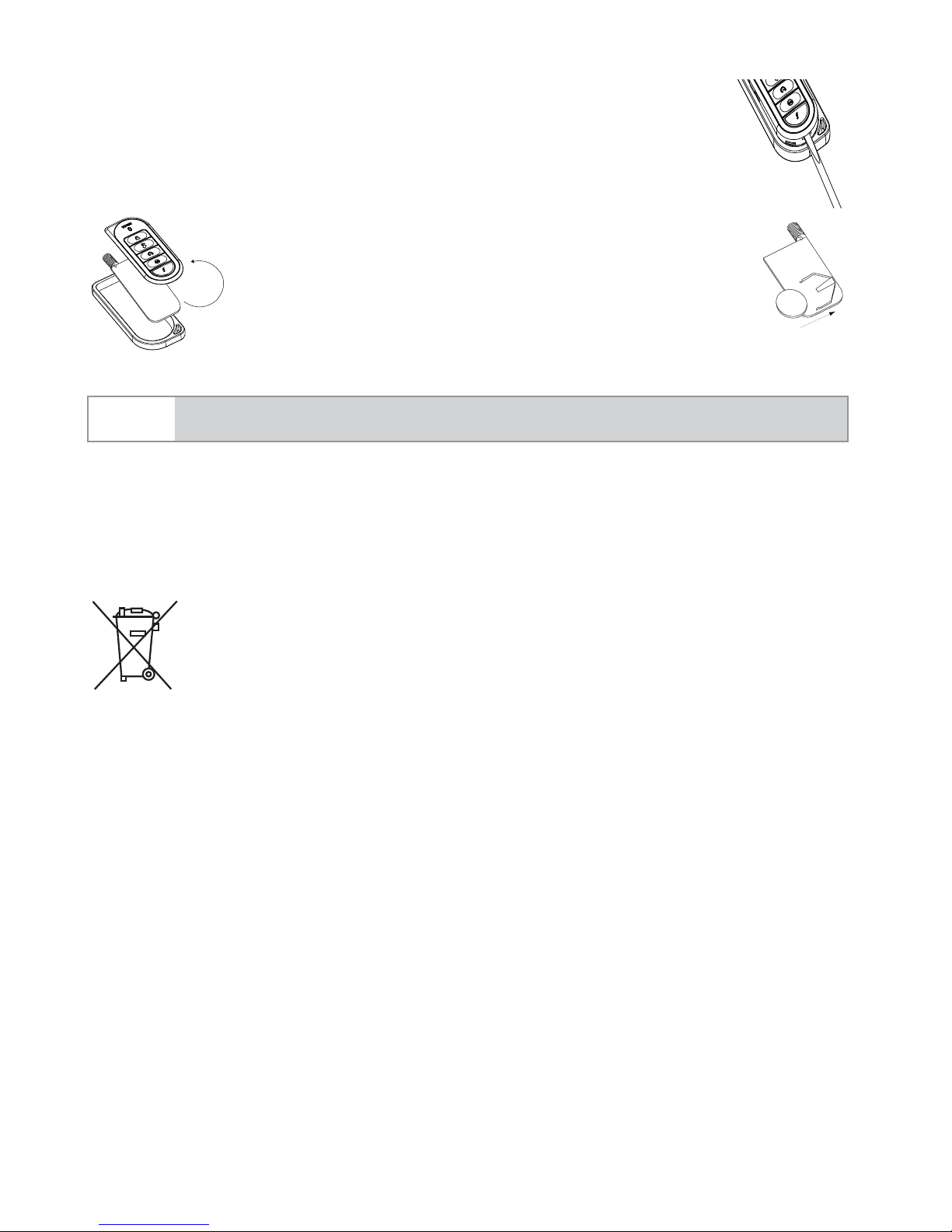
1. Using a small slotted screwdriver, insert into slot lo-
cated as shown and carefully pry the front of the unit
open until front is completely separated from housing.
2. Turn both the unit front and circuit
board over, remove battery from clip and
replace.
Note Verify that the battery polarity is correct when replacing.
3. Reposition all parts and snap together.
Battery Disposal
Directed cares about the environment. If you need to dis-
pose of the battery, please do so in accordance with your
municipal requirements for battery disposal.
+
+
This manual suits for next models
1
Table of contents
Languages:
Other Viper Car Alarm manuals


Viper
Viper 771XV User manual

Viper
Viper 5706V User manual

Viper
Viper 4218V User manual

Viper
Viper 330V User manual

Viper
Viper SmartStart 5000 Series User manual

Viper
Viper 5704 Responder LC3 User manual

Viper
Viper 5901 User manual

Viper
Viper 5906V User manual

Viper
Viper 280HF User manual

Viper
Viper 5002 User manual


Popular Car Alarm manuals by other brands

Clifford
Clifford 3606X owner's guide

Ultra Start
Ultra Start 2500M SERIES install guide

Ultra Start
Ultra Start 650 Series owner's manual

Audiovox
Audiovox Prestige Platinum+ APS-511C owner's manual

Sparkrite
Sparkrite SRA8 Guide
Federal Signal Corporation
Federal Signal Corporation Pathfinder Siren Series Installation and maintenance manual


